
CoPilot EA V1.30 MT4: A Comprehensive Guide to Automated Forex Trading
Introduction
In the fast-paced world of forex trading, automation has become a game-changer for traders seeking efficiency and precision. Among the many Expert Advisors (EAs) available for the MetaTrader 4 (MT4) platform, CoPilot EA V1.30 stands out as a specialized tool designed to enhance risk management and complement other trading strategies. This blog provides an in-depth exploration of CoPilot EA V1.30, covering its features, installation process, performance, user feedback, and considerations for traders looking to integrate it into their trading systems.
What is CoPilot EA V1.30?
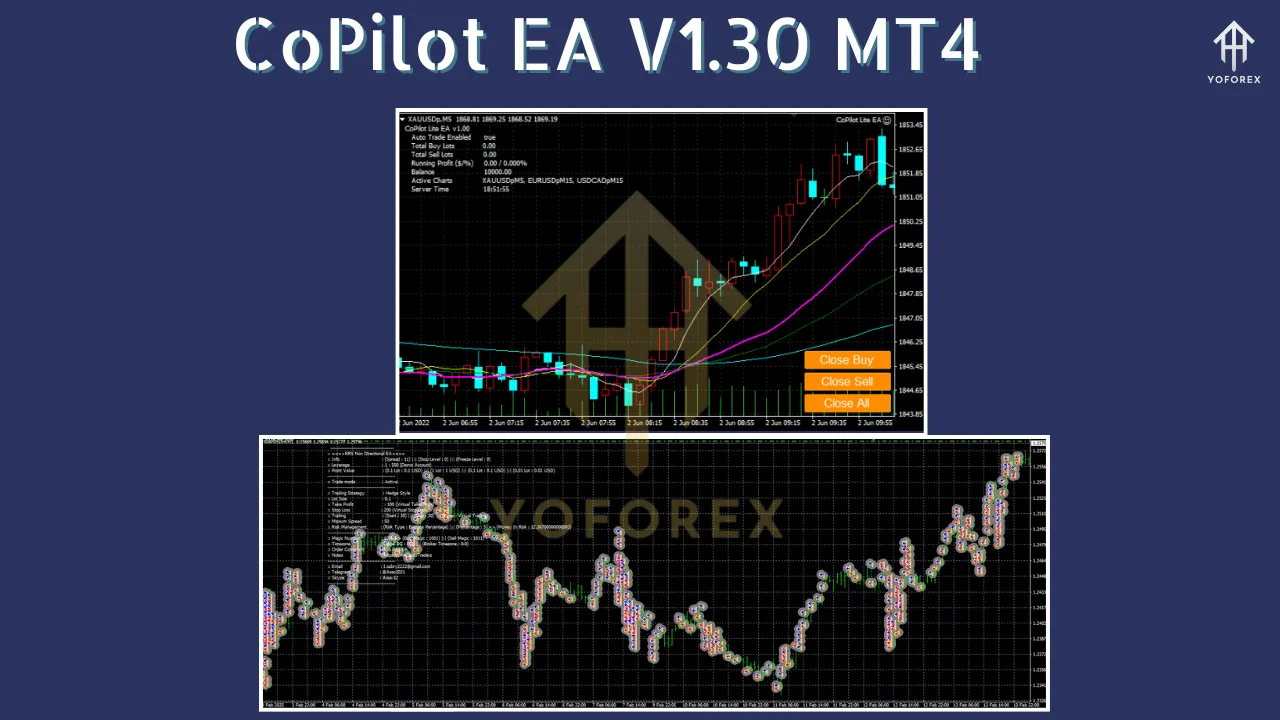
CoPilot EA V1.30 is an add-on Expert Advisor for the MetaTrader 4 platform, primarily designed to provide advanced order and risk management capabilities. Unlike standalone EAs that execute trades based on built-in algorithms, CoPilot EA focuses on supporting other EAs by automating critical aspects of trade management, such as setting stop-loss, take-profit, trailing stops, and partial close lot sizes. It is marketed as a utility tool that enhances the performance of existing trading systems by adding a layer of precision and control.
Published on June 2, 2022, CoPilot EA was initially offered as a free tool for a limited time through the MQL5 marketplace, a popular platform for MT4 and MT5 trading tools. Its primary function is to work alongside other EAs, making it a valuable asset for traders who use multiple automated systems or wish to refine their risk management strategies. The EA also integrates with Telegram for notifications, providing real-time updates on trade activities, which is particularly useful for traders managing multiple accounts or those who prefer remote monitoring.
Key Features
CoPilot EA V1.30 offers a range of features that make it a versatile tool for forex traders. Below are its core functionalities:
1. Advanced Risk Management
CoPilot EA automates critical risk management tasks, including:
-
Automatic Stop-Loss and Take-Profit Settings: The EA calculates stop-loss and take-profit levels based on the Average True Range (ATR) indicator, which adjusts to market volatility.
-
Trailing Stops: CoPilot EA dynamically adjusts stop-loss levels to lock in profits as the market moves in the trader’s favor.
-
Partial Close Lot Sizes: The EA can close portions of a trade at predefined profit levels, allowing traders to secure gains while keeping part of the position open for further potential profits.
-
Customizable Risk Parameters: Traders can adjust lot sizes and risk levels to align with their trading strategies and risk tolerance.
2. Compatibility with Other EAs
Unlike traditional EAs that operate independently, CoPilot EA is designed to complement other trading systems. It can be integrated with any MT4-based EA, enhancing the primary system’s performance by automating risk management tasks. This makes it particularly appealing for traders who already use scalping, trend-following, or grid-based EAs.
3. Real-Time Notifications
CoPilot EA supports instant notifications through email and Telegram, allowing traders to stay informed about trade executions, stop-loss triggers, and other critical events. This feature is especially useful for those running EAs on a Virtual Private Server (VPS) or managing trades remotely.
4. Support for Multiple Chart Types
The EA is compatible with both candlestick and Renko charts, offering flexibility for traders who use different charting methods to analyze the market.
5. User-Friendly Interface
CoPilot EA is designed with ease of use in mind. It includes straightforward setup instructions and a graphical interface that simplifies configuration, making it accessible to both novice and experienced traders.
Installation and Setup
Installing CoPilot EA V1.30 on the MT4 platform is a straightforward process, similar to other EAs. Below is a step-by-step guide based on standard MT4 EA installation practices:
-
Download the EA: Obtain the CoPilot EA V1.30 file (typically in .ex4 or .ex5 format) from a trusted source, such as the MQL5 marketplace.
-
Locate the MT4 Directory: Open your MT4 terminal, click File > Open Data Folder, and navigate to the MQL4 > Experts folder.
-
Copy the EA File: Paste the CoPilot EA file into the Experts folder. If the EA includes additional .dll files, place them in the MQL4 > Libraries folder.
-
Restart MT4: Close and reopen the MT4 platform to ensure the EA appears in the Navigator panel under Expert Advisors.
-
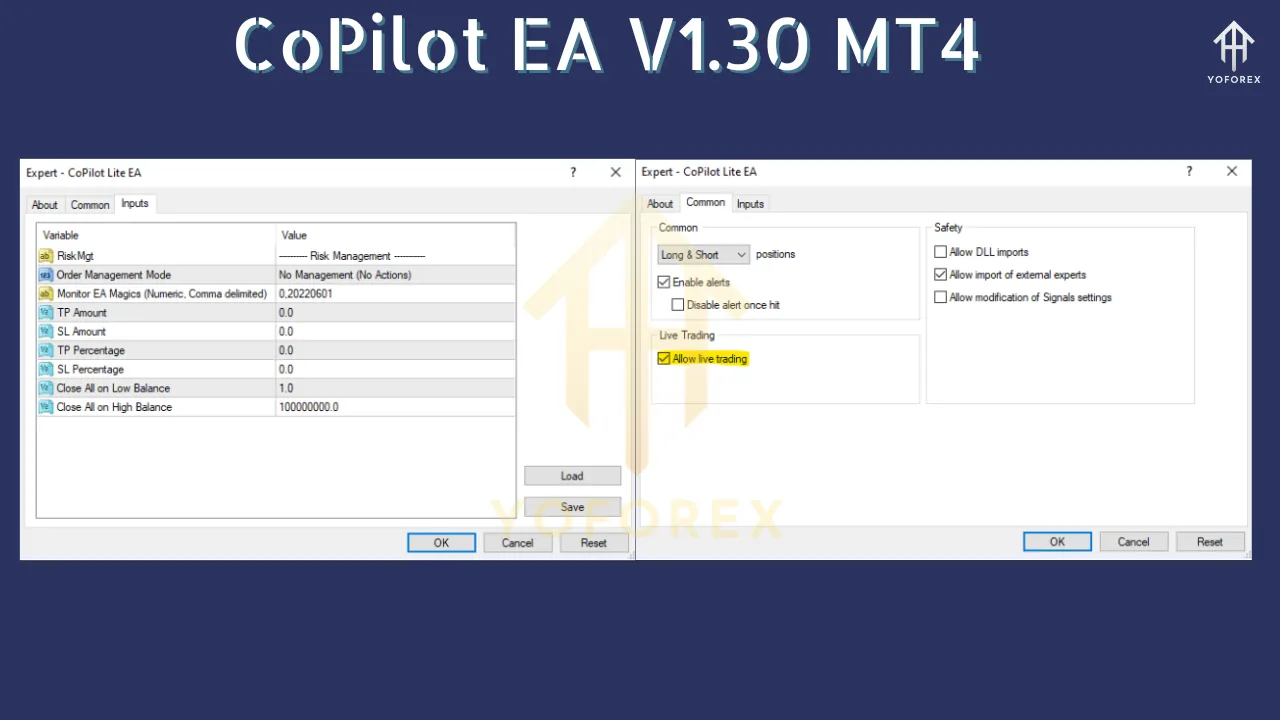
Attach the EA to a Chart: Drag CoPilot EA onto the desired chart (e.g., EUR/GBP H4, as recommended). A settings window will appear, allowing you to configure parameters such as risk levels, stop-loss, take-profit, and notification preferences.
-
Enable Auto-Trading: Ensure the AutoTrading button in MT4 is activated (it should be green). Adjust settings as needed and click OK to activate the EA.
For optimal performance, it’s recommended to run CoPilot EA on a reliable Forex VPS to ensure uninterrupted operation, as interruptions in connectivity can affect automated trading systems. Additionally, traders should test the EA on a demo account before deploying it on a live account to verify compatibility with their existing EAs and trading strategies.
Performance and Strategy
CoPilot EA V1.30 does not execute trades independently but enhances the performance of other EAs by managing orders. Its strategy revolves around:
-
ATR-Based Risk Management: The EA uses the ATR indicator to set dynamic stop-loss and take-profit levels, ensuring they adapt to current market conditions.
-
Scalping and Trend Support: It is particularly effective when paired with scalping or trend-following EAs, as it optimizes trade exits and minimizes risk exposure.
-
Flexible Timeframes: While the recommended timeframe is H4 for EUR/GBP, the EA is adaptable to various timeframes and currency pairs, depending on the primary EA it supports.
Since CoPilot EA is an add-on, its performance depends heavily on the primary EA it is paired with. There are no publicly available backtesting results specific to CoPilot EA V1.30, as its effectiveness is tied to the trading system it supports. However, user feedback suggests that it can significantly improve trade outcomes by reducing drawdowns and locking in profits through its trailing stop and partial close features.
User Feedback and Community Insights
User feedback on CoPilot EA V1.30 is limited, likely due to its niche role as a risk management tool rather than a standalone trading system. However, reviews from platforms like MQL5 and forex forums provide some insights:
-
Positive Feedback: Users appreciate the EA’s ability to automate risk management tasks, particularly the trailing stop and partial close features. Traders using scalping EAs have noted that CoPilot EA helps secure profits during volatile market conditions. The Telegram integration is also praised for its convenience.
-
Criticisms: Some users have reported challenges with compatibility when pairing CoPilot EA with certain EAs, particularly those with complex algorithms. Others have mentioned the need for frequent configuration tweaks to align with their primary trading systems.
-
Scam Concerns: While CoPilot EA itself does not appear to be a scam, traders are advised to download it from reputable sources like MQL5 to avoid fraudulent versions. General caution is warranted, as the forex EA market is known for scams, with some providers exaggerating performance claims.
The lack of extensive reviews may be attributed to the EA’s specialized nature and its free availability for a limited period. Traders interested in CoPilot EA should engage with forex communities on platforms like Forex Peace Army or EarnForex to gather more user experiences and ensure they are using a legitimate version.
Advantages of CoPilot EA V1.30
-
Enhanced Risk Management: Automates critical tasks like stop-loss and take-profit adjustments, reducing the risk of emotional trading decisions.
-
Complementary Functionality: Works seamlessly with other EAs, making it a versatile tool for traders with diverse strategies.
-
Real-Time Notifications: Keeps traders informed via email and Telegram, ideal for remote trading.
-
User-Friendly: Easy to install and configure, even for beginners.
-
Free Availability (Limited Time): Initially offered for free, making it accessible to traders with limited budgets.
Potential Drawbacks
-
Dependency on Primary EA: CoPilot EA’s performance is tied to the effectiveness of the primary trading system, limiting its standalone value.
-
Limited Performance Data: Lack of verified backtesting results makes it challenging to assess its impact independently.
-
Compatibility Issues: May require careful configuration to work effectively with certain EAs, particularly those with unique trading logic.
-
Learning Curve: Traders new to EAs may need time to understand how to optimize CoPilot EA’s settings for their specific needs.
Considerations for Traders
Before integrating CoPilot EA V1.30 into your trading setup, consider the following:
-
Test on a Demo Account: Always test the EA on a demo account to ensure compatibility with your primary EA and to fine-tune settings without risking real capital.
-
Choose a Reliable VPS: A Forex VPS is essential for uninterrupted operation, as EAs require constant connectivity to function effectively.
-
Verify Source: Download CoPilot EA from trusted platforms like MQL5 to avoid scams or malicious software.
-
Understand Your Primary EA: Since CoPilot EA enhances other systems, ensure your primary EA has a proven track record and aligns with your trading goals.
-
Risk Management: While CoPilot EA automates risk management, traders should still monitor their accounts and set appropriate risk parameters to avoid overexposure.
Comparison with Other EAs
CoPilot EA V1.30 differs from popular EAs like Forex Fury, Waka Waka, or Forex Flex EA, which are designed for independent trade execution. For example:
-
Forex Fury is a fully automated EA with a 93% win rate, focusing on scalping and trend-following strategies. It operates independently and doesn’t require an add-on like CoPilot EA.
-
Waka Waka EA uses a martingale strategy and boasts a 6600% growth rate over five years, but its high cost ($2000 lifetime license) and riskier approach contrast with CoPilot’s risk management focus.
-
Forex Flex EA employs virtual trades for precise entry points and is highly customizable, but it lacks the specific risk management enhancements provided by CoPilot EA.
CoPilot EA’s niche role makes it a complementary tool rather than a direct competitor to these EAs, appealing to traders who already have a robust trading system in place.
Best Practices for Using CoPilot EA V1.30
To maximize the benefits of CoPilot EA V1.30, consider these best practices:
-
Pair with a Compatible EA: Choose a primary EA with a clear strategy (e.g., scalping or trend-following) to leverage CoPilot’s risk management features effectively.
-
Regularly Monitor Settings: Adjust risk parameters and notification settings based on market conditions and your trading goals.
-
Use a Low-Latency VPS: A reliable VPS minimizes latency and ensures the EA operates without interruptions.
-
Backtest and Optimize: While CoPilot EA itself may not require extensive backtesting, test the combined performance of your primary EA and CoPilot EA on historical data.
-
Stay Informed: Join forex trading communities to stay updated on user experiences and potential updates to CoPilot EA.
Conclusion
CoPilot EA V1.30 for MT4 is a specialized tool that enhances automated forex trading by providing advanced risk management features. Its ability to automate stop-loss, take-profit, and trailing stop settings, along with its compatibility with other EAs, makes it a valuable addition for traders looking to optimize their existing systems. While it lacks standalone trading capabilities and extensive performance data, its user-friendly design and free availability (during its initial release) make it an attractive option for both novice and experienced traders.
By carefully integrating CoPilot EA with a reliable primary EA, testing it on a demo account, and running it on a robust VPS, traders can harness its potential to improve trade outcomes and reduce risk. As with any forex tool, thorough research, cautious implementation, and ongoing monitoring are essential to ensure it aligns with your trading objectives. Whether you’re a scalper, trend trader, or long-term investor, CoPilot EA V1.30 offers a unique way to enhance your automated trading journey.