
Magneto EA V1.0 MT4: A Comprehensive Guide to Automated Forex Trading
Introduction
In the fast-paced world of forex trading, automation has become a game-changer for traders seeking efficiency, consistency, and profitability. Among the numerous Expert Advisors (EAs) available for the MetaTrader 4 (MT4) platform, Magneto EA V1.0 MT4 stands out as a user-friendly and effective tool designed to simplify trading while maximizing returns. Specifically tailored for the EUR/USD currency pair on the M5 timeframe, Magneto EA offers a “set and forget” approach, making it an attractive option for both novice and experienced traders. This blog post delves into the features, benefits, installation process, performance, and considerations of using Magneto EA V1.0 MT4, providing a comprehensive guide for those interested in automated forex trading.
What is Magneto EA V1.0 MT4?
Magneto EA V1.0 MT4 is an automated trading robot designed exclusively for the MetaTrader 4 platform, one of the most widely used trading platforms in the forex market. This Expert Advisor is engineered to facilitate day trading, focusing on the EUR/USD currency pair, which is renowned for its liquidity and tight spreads. Operating on the M5 (5-minute) timeframe, Magneto EA leverages predefined algorithms to analyze market conditions, identify trading opportunities, and execute trades without requiring constant manual intervention. With a minimum deposit requirement of $1,000, it is accessible to traders with moderate capital, and its user-friendly interface ensures that even those with limited trading experience can utilize it effectively.
The EA is marketed as a “set and forget” solution, meaning once it is configured, it handles all trading activities autonomously. This hands-off approach appeals to traders who want to reduce emotional bias, save time, and maintain a disciplined trading strategy. Magneto EA comes with pre-optimized setfiles for EUR/USD, which are designed to enhance profitability while managing risk, making it a versatile tool for various trading styles, including prop firm accounts and personal trading accounts.
Key Features
Magneto EA V1.0 MT4 is packed with features that make it a compelling choice for automated trading. Below are some of its standout attributes:
1. User-Friendly Interface
One of the primary advantages of Magneto EA is its simplicity. The installation and configuration process is straightforward, requiring minimal technical expertise. This makes it ideal for beginners who may not be familiar with complex trading algorithms or MT4 programming. The EA’s intuitive design allows users to set it up quickly and start trading with ease.
2. Optimized for EUR/USD on M5 Timeframe
Magneto EA is specifically designed for the EUR/USD currency pair, which is one of the most traded pairs in the forex market due to its high liquidity and low volatility. By focusing on the M5 timeframe, the EA capitalizes on short-term price movements, making it suitable for day trading strategies. The included setfiles are pre-optimized to ensure consistent performance in various market conditions.
3. Set and Forget Functionality
The “set and forget” feature is a hallmark of Magneto EA. Once the EA is installed and configured with the provided setfiles, it operates autonomously, analyzing market data, placing trades, and managing positions. This eliminates the need for constant monitoring, allowing traders to focus on other tasks or even trade multiple accounts simultaneously.
4. Real-Time Market Adaptability
Magneto EA is equipped to adapt to changing market dynamics. Its algorithms are designed to respond to sudden price shifts and capitalize on trading opportunities in real time. This adaptability is crucial in the volatile forex market, where conditions can change rapidly.
5. Risk Management Features
Effective risk management is essential for long-term success in forex trading. Magneto EA incorporates built-in risk management tools, such as stop-loss and take-profit settings, to protect capital and lock in profits. Traders can customize these parameters to align with their risk tolerance and trading goals.
6. Compatibility with Prop Firms and Personal Accounts
Magneto EA is versatile enough to be used with proprietary trading firm accounts as well as personal trading accounts. This flexibility makes it suitable for traders looking to pass prop firm challenges or grow their personal portfolios.
7. No DLL Requirement
The EA is provided in an .ex4 format with no DLL (Dynamic Link Library) requirement, ensuring compatibility with the latest MT4 builds (e.g., Build 1421). This reduces potential technical issues and enhances security by avoiding external dependencies.
Installation and Setup
Installing Magneto EA V1.0 MT4 is a simple process that can be completed in a few steps. Below is a step-by-step guide to get started:
-
Purchase and Download: After purchasing Magneto EA, you will receive a download link via email, typically within 5 minutes to 12 hours. The download includes the .ex4 file and pre-optimized setfiles for EUR/USD.
-
Locate the MT4 Data Folder:
-
Open MetaTrader 4.
-
Navigate to “File” > “Open Data Folder.”
-
In the data folder, go to the “MQL4” folder, then open the “Experts” folder.
-
-
Add the EA File:
-
Copy and paste the Magneto EA .ex4 file into the “Experts” folder.
-
If provided, place the setfiles in the “Presets” folder within the MQL4 directory.
-
-
Refresh MetaTrader:
-
Return to MT4, open the “Navigator” tab, and right-click on “Expert Advisors” to refresh.
-
Magneto EA should now appear in the list.
-
-
Enable Auto-Trading:
-
Drag the Magneto EA onto the EUR/USD M5 chart.
-
Ensure the “Auto-Trading” button on the MT4 toolbar is enabled (it should be green).
-
Load the provided setfile or configure the EA settings manually, including lot size, stop-loss, and take-profit levels.
-
-
Configure Settings:
-
Adjust risk parameters to suit your trading strategy. For example, set the lot size based on your account balance (e.g., 0.01 lot per $1,000 for conservative trading).
-
Verify that the EA is set to trade on the M5 timeframe and EUR/USD pair.
-
-
Test on a Demo Account:
-
Before using Magneto EA on a live account, test it on a demo account to familiarize yourself with its performance and ensure compatibility with your broker.
-
Performance and Profitability
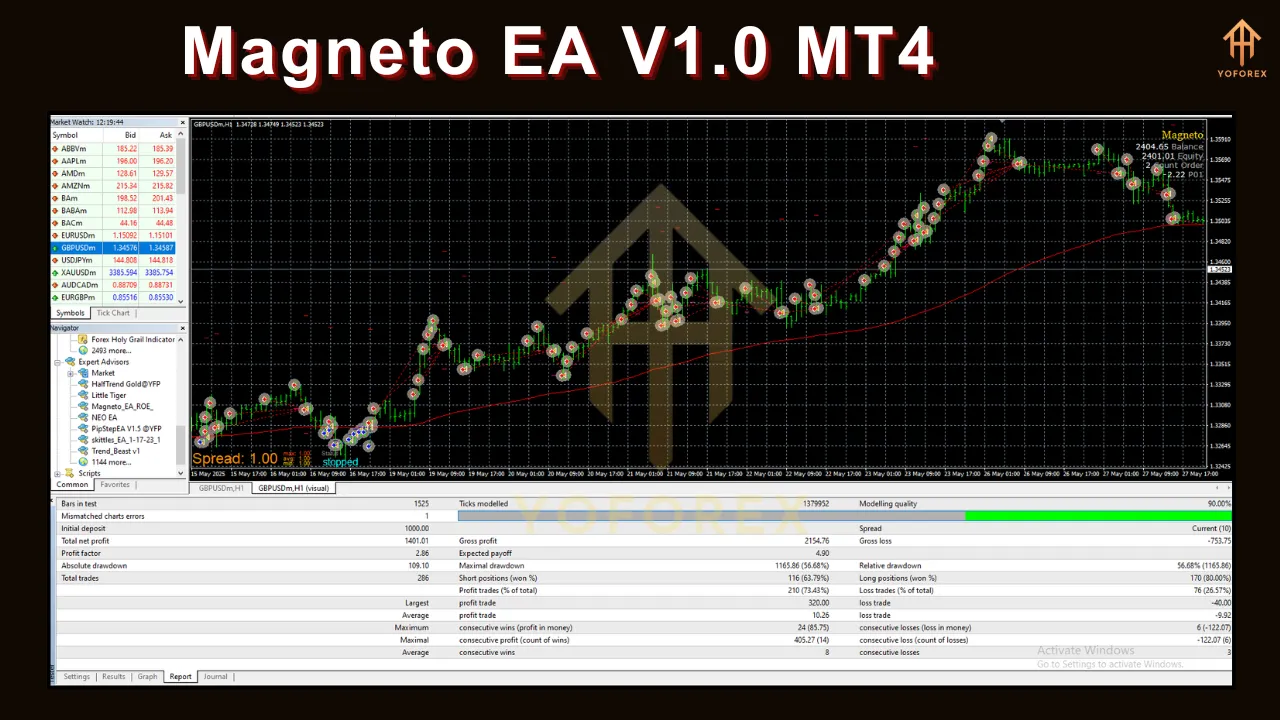
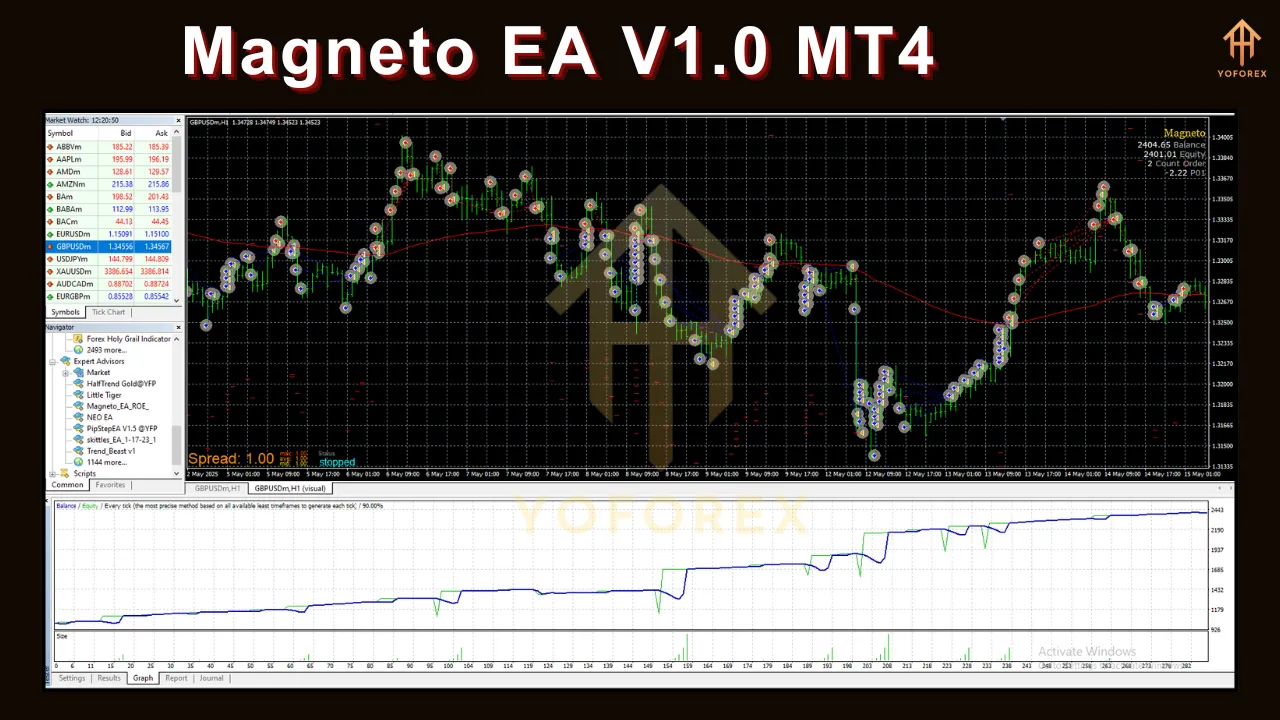
Magneto EA V1.0 MT4 is marketed for its consistent profitability across various market conditions. While specific performance metrics, such as win rates or monthly gains, are not publicly disclosed in all sources, the EA is praised for its ability to generate steady returns with proper risk management. The focus on the EUR/USD pair and M5 timeframe allows it to exploit short-term price fluctuations, which can lead to frequent small wins. However, as with any trading system, past performance is not a guarantee of future results, and traders should approach the EA with realistic expectations.
Backtesting is a critical step to evaluate Magneto EA’s performance. Using MT4’s Strategy Tester, traders can run the EA on historical data to assess its profitability, drawdown, and risk-reward ratio. It is recommended to use real tick data and account for variable spreads and commissions to ensure accurate results. Additionally, forward testing on a demo account can help validate the EA’s performance in live market conditions.
Advantages of Magneto EA V1.0 MT4
-
Ease of Use: The EA’s simple installation and intuitive interface make it accessible to traders of all experience levels.
-
Time Efficiency: The “set and forget” feature frees up time for traders, eliminating the need for constant market monitoring.
-
Optimized Setfiles: Pre-configured setfiles for EUR/USD reduce the need for extensive manual optimization.
-
Adaptability: The EA’s ability to adapt to real-time market changes enhances its effectiveness in dynamic conditions.
-
Versatility: Suitable for both prop firm challenges and personal trading accounts, offering flexibility for different trading goals.
Considerations and Risks
While Magneto EA V1.0 MT4 offers numerous benefits, there are important considerations and risks to keep in mind:
-
Market Risk: Forex trading inherently carries risks, and no EA can guarantee profits. Market conditions, such as high volatility or unexpected news events, can impact performance.
-
Minimum Deposit: The $1,000 minimum deposit requirement may be a barrier for traders with limited capital.
-
Broker Compatibility: Ensure your broker supports MT4 and allows EA trading. Some brokers may have restrictions or high spreads that affect performance.
-
Testing Required: Always test the EA on a demo account before using it on a live account to understand its behavior and optimize settings.
-
No Guaranteed Profits: While Magneto EA is designed for profitability, losses are possible, especially without proper risk management.
Best Practices for Using Magneto EA
To maximize the benefits of Magneto EA V1.0 MT4, consider the following best practices:
-
Use a Forex VPS: A Virtual Private Server ensures the EA runs continuously without interruptions due to internet or power issues.
-
Implement Risk Management: Set appropriate stop-loss and take-profit levels, and avoid over-leveraging your account.
-
Monitor Performance: Periodically review the EA’s performance and adjust settings if market conditions change.
-
Stay Informed: Keep an eye on economic calendars to avoid trading during high-impact news events that could disrupt the EA’s strategy.
-
Backtest and Optimize: Regularly backtest the EA with updated market data to ensure it remains effective.
Conclusion
Magneto EA V1.0 MT4 is a powerful and user-friendly tool for traders looking to automate their forex trading strategies. Its focus on the EUR/USD pair, M5 timeframe, and “set and forget” functionality make it an attractive option for those seeking efficiency and consistency. With features like real-time adaptability, pre-optimized setfiles, and robust risk management, Magneto EA caters to both novice and experienced traders. However, like any trading tool, it requires careful setup, testing, and monitoring to achieve optimal results. By following best practices and maintaining realistic expectations, traders can leverage Magneto EA to enhance their trading performance and potentially achieve steady profits in the dynamic forex market.
For those interested in exploring Magneto EA V1.0 MT4, visit trusted platforms like forexeashop.com or outletforexshop.com for more information and to purchase the EA. Always test on a demo account first and ensure you understand the risks involved in forex trading.