In the fast-paced world of forex trading, automation has become a game-changer for traders seeking efficiency and consistency. One such tool is Stellar EA V3 MT4, a fully automated Expert Advisor (EA) designed for the MetaTrader 4 (MT4) platform. Promising steady profits with low drawdown, this trading robot has garnered attention for its performance over multiple years. In this blog, we’ll dive into the features, setup, performance, and considerations of using Stellar EA V3 MT4, helping you decide if it’s the right fit for your trading strategy.
What is Stellar EA V3 MT4?
Stellar EA V3 is an advanced forex trading robot tailored for the MT4 platform, one of the most popular trading platforms globally. This EA is engineered to execute trades automatically, leveraging algorithmic strategies to capitalize on market opportunities. According to its developers, Stellar EA V3 has been tested for over three years, demonstrating consistent profitability with minimal capital withdrawal, making it appealing for both novice and experienced traders. It’s particularly optimized for currency pairs like AUDCAD, AUDNZD, and NZDCAD on the M15 timeframe, though it can handle additional pairs like EURUSD, GBPUSD, and USDJPY with adjusted settings.
The EA is designed to operate seamlessly with minimal user intervention, offering a hands-off approach to trading. Its compatibility with proprietary trading firms (prop firms) and low-risk profile further enhance its appeal for traders looking to grow their accounts steadily.
Key Features of Stellar EA V3 MT4
1. Fully Automated Trading
Stellar EA V3 eliminates the need for constant market monitoring. Once installed, it analyzes market conditions, identifies trading opportunities, and executes trades based on predefined algorithms. This automation is ideal for traders with busy schedules or those who prefer a passive income stream.
2. Low Drawdown
One of the standout features is its low drawdown, which minimizes the risk of significant capital loss. By maintaining disciplined risk management, Stellar EA V3 ensures that your account remains secure even during volatile market conditions.
3. Optimized Currency Pairs
The EA performs best on AUDCAD, AUDNZD, and NZDCAD, focusing on the M15 timeframe. These pairs are known for their stability, allowing the EA to execute precise trades with reduced exposure to erratic market movements. While it can trade other pairs, the developers recommend sticking to the optimized ones for best results.
4. Compounding Profits
Stellar EA V3 leverages the power of compounding to grow earnings over time. By reinvesting profits, the EA aims to deliver exponential account growth, making it suitable for traders aiming for long-term gains.
5. User-Friendly Setup
Installing Stellar EA V3 is straightforward. After purchasing, users receive a download link via email, typically within minutes. The EA can be uploaded to MT4, and with default settings, it’s ready to trade almost immediately. For brokers using suffixes (e.g., AUDCAD.a), users can update the symbol parameter to ensure compatibility.
6. VPS Compatibility
For optimal performance, the developers recommend running Stellar EA V3 on a Virtual Private Server (VPS). This ensures 24/7 operation without interruptions, crucial for a bot that trades round-the-clock in the forex market.
How to Install and Set Up Stellar EA V3 MT4
Setting up Stellar EA V3 is a simple process, even for beginners. Follow these steps to get started:
- Purchase and Download: After purchasing from a reputable source, you’ll receive a download link for the EA and set files.
- Install on MT4: Open MT4, navigate to “Tools” > “Options” > “Expert Advisors,” and enable “Allow automated trading” and “Allow DLL imports.”
- Attach to Chart: Drag the EA onto an M15 chart of one of the recommended currency pairs (AUDCAD, AUDNZD, or NZDCAD). Update symbol parameters if your broker uses suffixes.
- Test on Demo Account: Before going live, test the EA on a demo account to ensure it aligns with your expectations and performs correctly.
- Use a VPS: For uninterrupted trading, deploy the EA on a reliable VPS, such as those offered by providers like Cloudzy.
Always verify that your broker is regulated (e.g., by FCA, CySEC, or ASIC) to ensure fund safety. Testing on a demo account is critical to understanding the EA’s behavior without risking real capital.
Performance and Track Record
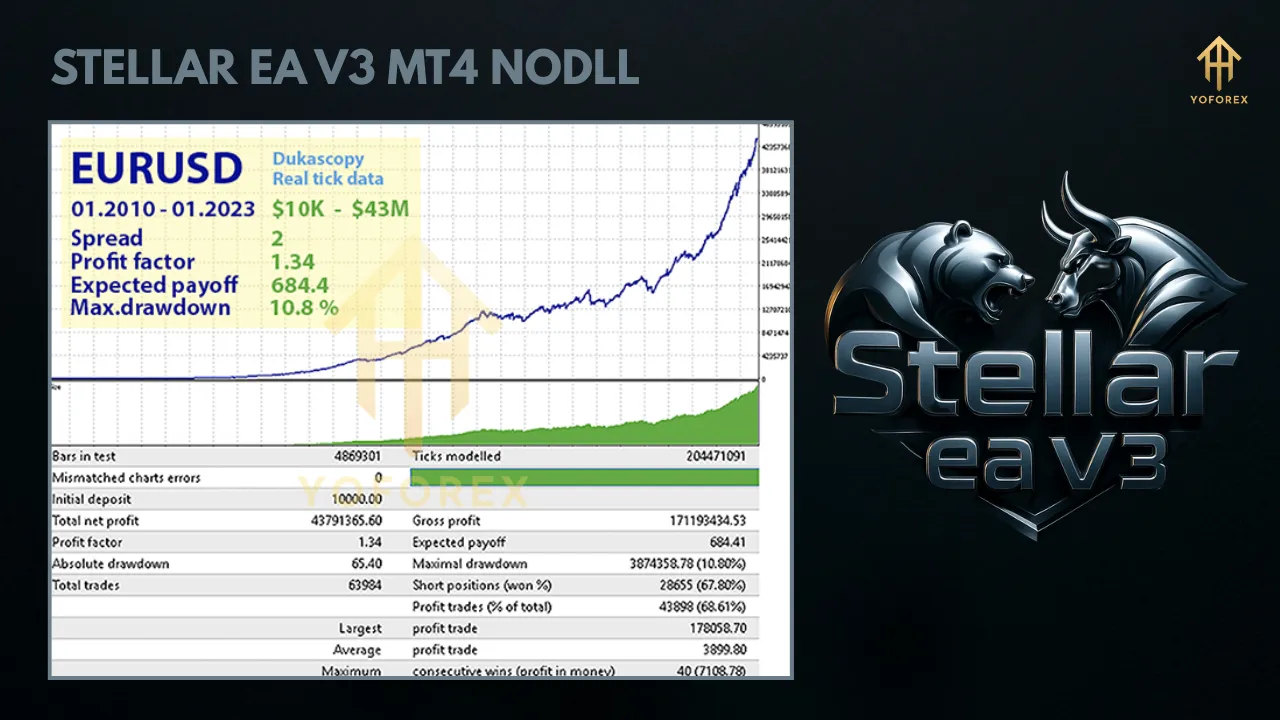
Stellar EA V3 claims a strong track record, with over three years of consistent profits and low drawdown. While specific performance metrics vary, its focus on stable currency pairs and conservative strategies contributes to its reliability. The EA’s design avoids risky techniques like martingale, which can lead to account blowouts, making it a safer choice for risk-averse traders.
However, past performance is not a guarantee of future results. Forex trading carries inherent risks, and market conditions can change. Traders should backtest the EA using MT4’s Strategy Tester to evaluate its performance across different market scenarios. Additionally, live performance data, such as Myfxbook records, can provide transparency into its real-world results.
Pros and Cons of Stellar EA V3 MT4
Pros
- Automation: Saves time by automating trade execution and analysis.
- Low Drawdown: Reduces risk, making it suitable for conservative traders.
- Ease of Use: Simple installation and setup, even for beginners.
- Compounding: Supports exponential growth through reinvested profits.
- Prop Firm Compatibility: Works with FTMO and other prop firms, broadening its appeal.
Cons
- Limited Currency Pairs: Optimal performance is restricted to specific pairs, limiting diversification.
- Broker Dependency: Performance may vary depending on broker spreads and execution speeds.
- Initial Cost: While some EAs are free, Stellar EA V3 requires a one-time purchase, which may deter budget-conscious traders.
- Learning Curve: Beginners must understand basic MT4 settings and risk management to use it effectively.
Tips for Using Stellar EA V3 MT4
- Start with a Demo Account: Test the EA thoroughly to understand its behavior and tweak settings if needed.
- Choose a Regulated Broker: Ensure your broker is reputable to protect your funds and ensure smooth EA operation.
- Monitor Performance: Regularly check the EA’s performance and adjust risk settings to align with your goals.
- Use a VPS: A stable VPS minimizes downtime and ensures the EA operates 24/7.
- Stay Informed: Keep up with market conditions and EA updates to maintain optimal performance.
Is Stellar EA V3 MT4 Right for You?
Stellar EA V3 MT4 is an excellent choice for traders seeking a reliable, automated trading solution with a focus on low risk and steady returns. Its compatibility with MT4, ease of use, and proven track record make it appealing for both beginners and seasoned traders. However, it’s not a “set-and-forget” solution. Success requires proper setup, testing, and occasional monitoring to adapt to changing market conditions.
Before investing, consider your risk tolerance, trading goals, and familiarity with automated trading. If you’re looking for a passive income stream with minimal drawdown and are willing to invest in a VPS and a regulated broker, Stellar EA V3 could be a valuable addition to your trading arsenal.
Conclusion
Stellar EA V3 MT4 stands out as a robust and user-friendly forex trading robot, offering automation, low drawdown, and compatibility with prop firms. While it excels on specific currency pairs and requires careful setup, its potential for consistent profits makes it worth exploring. By testing on a demo account and pairing it with a reliable broker and VPS, traders can harness the power of Stellar EA V3 to streamline their forex trading journey. As with any EA, thorough research and risk management are key to maximizing its benefits.