Mastering the Stochastic CCI Indicator V8.17 for MT4: A Comprehensive Guide for Forex Traders
The world of forex trading is filled with tools designed to help traders navigate the complexities of the market. Among these, technical indicators play a pivotal role in identifying trends, reversals, and trading opportunities. One such powerful tool is the Stochastic CCI Indicator V8.17 for MetaTrader 4 (MT4), a unique combination of the Stochastic Oscillator and the Commodity Channel Index (CCI). This blog post delves into the intricacies of the Stochastic CCI Indicator V8.17, exploring its features, setup, trading strategies, and practical applications. By the end, you’ll have a thorough understanding of how to leverage this indicator to enhance your trading performance.
Understanding the Stochastic CCI Indicator
What is the Stochastic CCI Indicator?
The Stochastic CCI Indicator V8.17 is a custom technical analysis tool designed for the MT4 platform, blending the strengths of two well-known indicators: the Stochastic Oscillator and the Commodity Channel Index (CCI). The Stochastic Oscillator measures momentum by comparing a currency pair’s closing price to its price range over a specific period, helping traders identify overbought and oversold conditions. The CCI, on the other hand, measures the deviation of an asset’s price from its statistical average, providing insights into potential trend reversals or continuations.
By combining these two, the Stochastic CCI Indicator creates a hybrid tool that refines the signals generated by each, offering a more robust framework for assessing market conditions. The “V8.17” designation suggests this is an advanced iteration, likely incorporating optimized algorithms, enhanced visuals, or additional features compared to earlier versions.
Why Use the Stochastic CCI Indicator?
The primary advantage of the Stochastic CCI Indicator is its ability to filter out noise and provide clearer signals. While the CCI is excellent for spotting overbought and oversold levels, it can be unbound, leading to erratic readings in volatile markets. The Stochastic Oscillator, with its fixed 0–100 range, adds a layer of normalization, making it easier to interpret trends and reversals. The V8.17 version is tailored for MT4, a platform widely used by forex traders for its flexibility and extensive indicator library.
Key benefits include:
-
Enhanced Signal Accuracy: Combining Stochastic and CCI reduces false signals, especially in choppy markets.
-
Versatility: Suitable for various trading styles, including scalping, day trading, and swing trading.
-
Customizability: Adjustable parameters allow traders to tailor the indicator to their strategies.
-
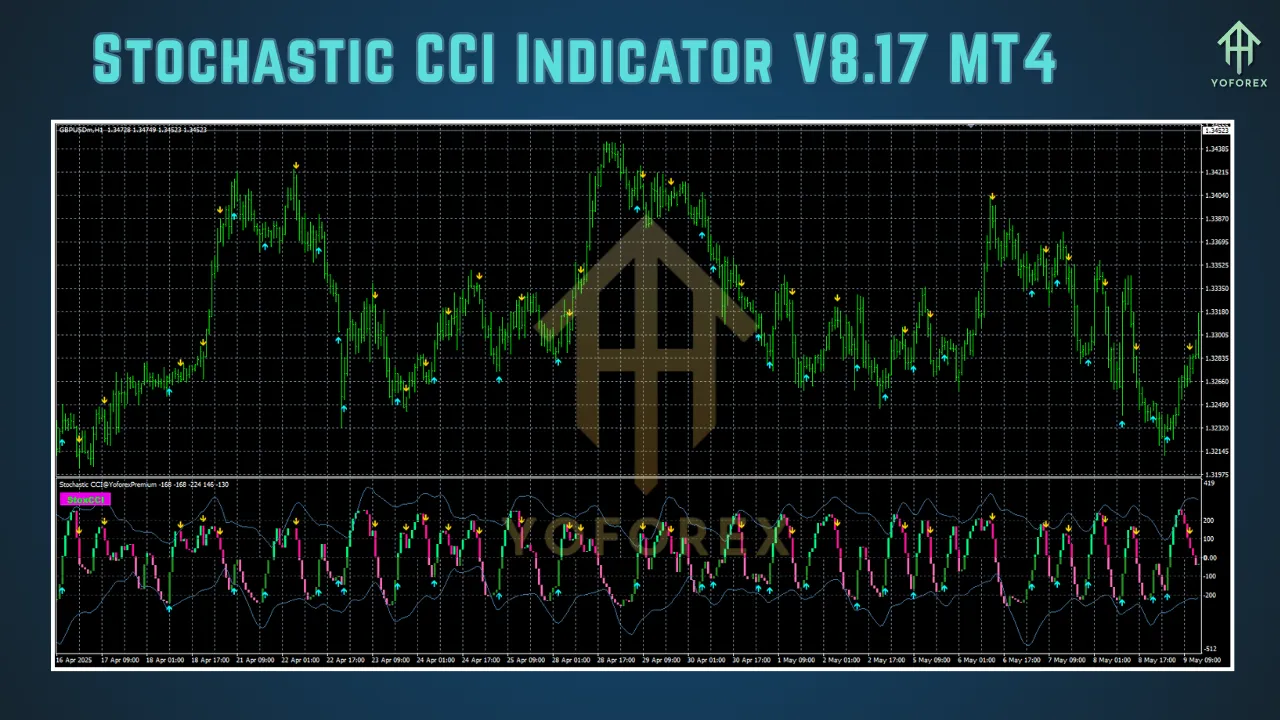
Visual Clarity: The indicator often displays signals via arrows or color-coded lines, simplifying decision-making.
Setting Up the Stochastic CCI Indicator V8.17 on MT4
Installation Process
To use the Stochastic CCI Indicator V8.17, you’ll first need to install it on your MT4 platform. Follow these steps:
-
Download the Indicator: Obtain the indicator file (typically in .ex4 or .mq4 format) from a trusted source, such as a reputable forex forum, MT4 indicator repository, or developer website.
-
Open MT4 Data Folder: In MT4, click File > Open Data Folder.
-
Navigate to Indicators: Go to MQL4 > Indicators folder.
-
Add the Indicator: Copy and paste the downloaded .ex4 or .mq4 file into the Indicators folder.
-
Restart MT4: Close and reopen the MT4 terminal to load the indicator.
-
Apply to Chart: In the Navigator window, locate the Stochastic CCI Indicator V8.17, drag it onto your desired chart, or double-click to apply.
-
Configure Settings: A settings window will appear, allowing you to adjust parameters like period lengths and signal thresholds.
Note: Ensure the source is trustworthy to avoid malware. If the indicator requires DLLs, only enable them if you trust the provider, as DLLs can pose security risks.
Key Parameters
The Stochastic CCI Indicator V8.17 typically allows customization of:
-
CCI Period: The number of bars used to calculate the CCI (default often 14 or 20).
-
Stochastic Period: The lookback period for the Stochastic Oscillator (e.g., 14).
-
K and D Periods: For the Stochastic’s %K and %D lines, controlling smoothness and sensitivity.
-
Overbought/Oversold Levels: Typically set at 80/20 or 75/25 for Stochastic, and +100/-100 for CCI.
-
Signal Display: Options for arrows, alerts, or color changes to indicate buy/sell signals.
Experiment with these settings based on your trading style and the timeframes you trade (e.g., M5 for scalping, H1 for day trading).
How the Stochastic CCI Indicator Works
The Stochastic CCI Indicator V8.17 operates by applying the Stochastic formula to CCI values, creating a bounded oscillator (0–100) that reflects the momentum of CCI movements. This hybrid approach addresses the CCI’s lack of fixed boundaries, making it easier to identify overbought (above 80) and oversold (below 20) conditions. The indicator typically displays:
-
A main line (similar to Stochastic’s %K) representing the Stochastic of CCI.
-
A signal line (like %D) for smoother trend confirmation.
-
Visual cues like arrows or color changes for buy/sell signals.
Signal Generation
-
Buy Signal: Generated when the indicator crosses above the oversold level (e.g., 20) or when a bullish crossover occurs (main line crosses above signal line).
-
Sell Signal: Triggered when the indicator crosses below the overbought level (e.g., 80) or a bearish crossover happens.
-
Trend Confirmation: Values above 50 suggest bullish momentum, while values below 50 indicate bearish momentum.
Practical Example
Imagine you’re trading EUR/USD on the H1 timeframe. The Stochastic CCI Indicator V8.17 shows the main line crossing above the signal line at 25, with a green arrow appearing. This suggests a potential buy opportunity, especially if the price is near a support level. Conversely, a red arrow at 75 with a bearish crossover could signal a sell, particularly if confirmed by resistance or other indicators.
Trading Strategies Using Stochastic CCI Indicator V8.17
1. Overbought/Oversold Reversal Strategy
This strategy focuses on entering trades when the market reverses from extreme conditions.
-
Setup:
-
Timeframe: M15–H1
-
CCI Period: 20
-
Stochastic Settings: %K = 14, %D = 3, Smoothing = 3
-
Levels: Overbought at 80, Oversold at 20
-
-
Entry:
-
Buy when the indicator crosses above 20 with a bullish crossover, confirmed by a support level or candlestick pattern (e.g., bullish engulfing).
-
Sell when the indicator crosses below 80 with a bearish crossover, confirmed by resistance or a bearish pattern.
-
-
Exit:
-
Close buy trades when the indicator approaches 80 or shows a bearish crossover.
-
Close sell trades when the indicator nears 20 or shows a bullish crossover.
-
-
Risk Management: Use a stop-loss below recent swing lows (for buys) or above swing highs (for sells). Aim for a risk-reward ratio of at least 1:2.
2. Trend-Following Strategy
For trend traders, the Stochastic CCI can confirm trend direction and pullback entries.
-
Setup:
-
Timeframe: H4 or D1
-
CCI Period: 50–80 (longer for trend detection)
-
Stochastic Settings: %K = 14, %D = 5
-
-
Entry:
-
Buy when the indicator is above 50 and shows a bullish crossover during a pullback to a moving average (e.g., 50 EMA).
-
Sell when the indicator is below 50 and shows a bearish crossover during a pullback.
-
-
Exit: Exit when the indicator reverses or price breaks a key trendline.
-
Confirmation: Use additional indicators like the 200 EMA or ADX to confirm trend strength.
3. Scalping Strategy
Scalpers can use the indicator on lower timeframes for quick trades.
-
Setup:
-
Timeframe: M1–M5
-
CCI Period: 14
-
Stochastic Settings: %K = 5, %D = 3
-
-
Entry:
-
Buy on a green arrow with the indicator rising from below 30.
-
Sell on a red arrow with the indicator falling from above 70.
-
-
Exit: Take profits after 5–10 pips or when the indicator reverses.
-
Risk Management: Tight stop-losses (e.g., 5 pips) and trade during high-liquidity sessions (London/New York overlap).
Advantages and Limitations
Advantages
-
Reduced False Signals: The Stochastic normalization of CCI minimizes noise, improving signal reliability.
-
Flexibility: Works across timeframes and currency pairs.
-
User-Friendly: Visual signals (arrows, colors) make it accessible for beginners.
Limitations
-
Lagging Nature: Like most oscillators, it may lag in fast-moving markets.
-
False Signals in Trends: Strong trends can keep Hawkins signals, leading to premature entries.
-
Parameter Sensitivity: Incorrect settings can reduce effectiveness, requiring optimization.
Tips for Effective Use
-
Combine with Other Tools: Use support/resistance levels, trendlines, or other indicators (e.g., RSI, MACD) to confirm signals.
-
Test on Demo: Backtest the indicator on a demo account to optimize settings for your trading style.
-
Avoid Overtrading: Focus on high-probability setups to avoid losses from market noise.
-
Monitor Multiple Timeframes: Use higher timeframes (e.g., H4) to confirm the trend direction before entering on lower timeframes.
Real-World Application
In a real-world scenario, suppose you’re analyzing GBP/JPY on the H4 timeframe. The Stochastic CCI Indicator V8.17 shows a bullish crossover at 30, with the price testing the 50 EMA and forming a bullish pin bar. This confluence suggests a strong buy signal. You enter a long position, set a stop-loss below the recent low, and target a 1:3 risk-reward ratio. The trade succeeds as the price rallies, and the indicator approaches 80, prompting an exit.
Conclusion
The Stochastic CCI Indicator V8.17 for MT4 is a powerful tool that combines the momentum-tracking capabilities of the Stochastic Oscillator with the trend-reversal insights of the CCI. Its ability to provide clear, normalized signals makes it a valuable asset for forex traders of all levels. By understanding its mechanics, optimizing its settings, and integrating it into a disciplined trading plan, you can enhance your ability to spot high-probability trade setups. Whether you’re scalping, day trading, or swing trading, this indicator offers versatility and precision when used correctly.
Start by testing the Stochastic CCI Indicator V8.17 on a demo account, experimenting with different settings and strategies. Combine it with sound risk management and complementary tools to maximize its potential. With practice and patience, this indicator can become a cornerstone of your trading arsenal, helping you navigate the dynamic forex market with confidence.