Understanding the Alpha Trend Indicator for MT4: A Comprehensive Guide
The Alpha Trend Indicator is a powerful tool used by traders on the MetaTrader 4 (MT4) platform to identify market trends, gauge momentum, and make informed trading decisions. Designed to simplify technical analysis, this indicator combines elements of trend-following and momentum-based strategies, making it suitable for both novice and experienced traders. In this 1500-word blog, we’ll explore what the Alpha Trend Indicator is, how it works, its key features, setup process, trading strategies, advantages, limitations, and tips for maximizing its potential on MT4.
What is the Alpha Trend Indicator?
The Alpha Trend Indicator is a custom technical analysis tool developed for the MetaTrader 4 platform, one of the most widely used trading platforms in the world. Unlike traditional indicators like Moving Averages or the Relative Strength Index (RSI), the Alpha Trend Indicator is designed to provide clear, actionable signals by filtering market noise and highlighting reliable trend directions. It is particularly popular in forex trading but can also be applied to other asset classes like stocks, commodities, and cryptocurrencies.
The indicator works by analyzing price action and momentum to generate buy or sell signals. It typically plots lines or arrows on the chart to indicate trend direction, potential entry points, and exit points. Its primary goal is to help traders avoid false signals during choppy or sideways markets, a common challenge in trend-following strategies.
How Does the Alpha Trend Indicator Work?
The Alpha Trend Indicator combines multiple technical concepts, such as moving averages, volatility filters, and momentum oscillators, to identify trends with high accuracy. While the exact formula may vary depending on the version of the indicator (as it’s often customized by developers), the core mechanism typically involves:
-
Trend Detection: The indicator uses a combination of moving averages or similar smoothing techniques to determine the overall direction of the market (uptrend, downtrend, or ranging).
-
Momentum Confirmation: It incorporates momentum-based calculations to confirm whether the trend has sufficient strength to act upon.
-
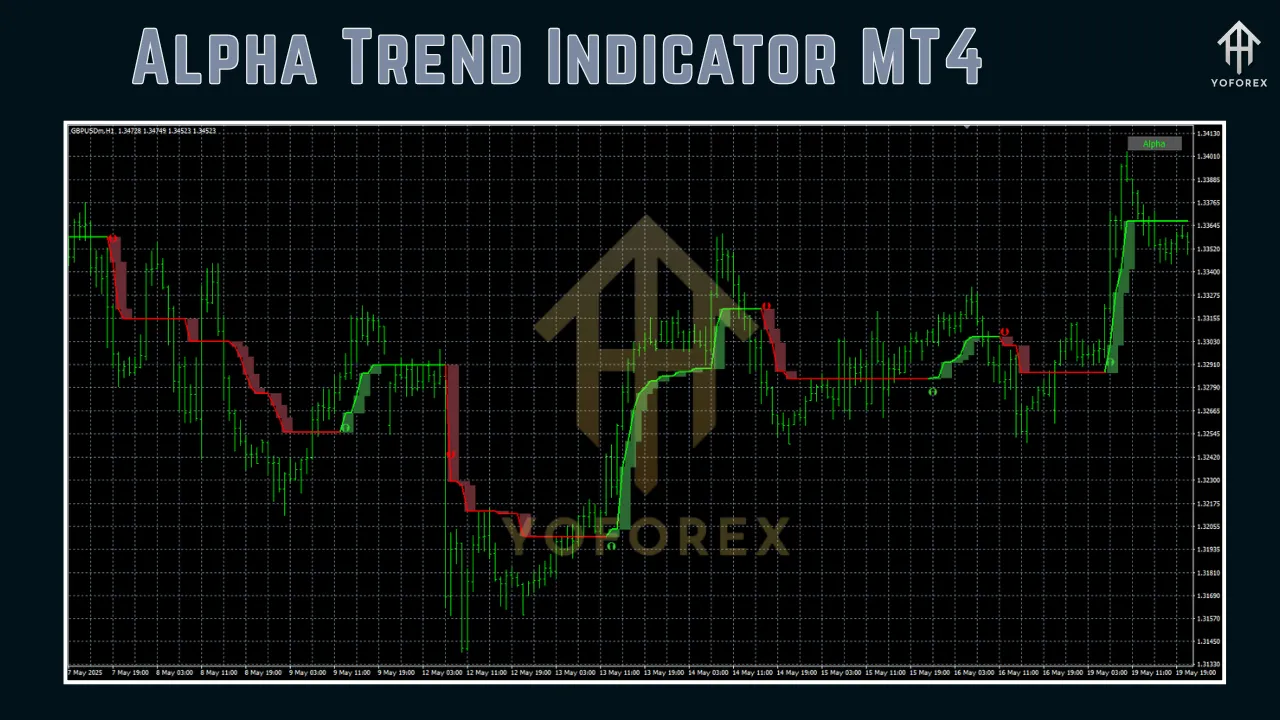
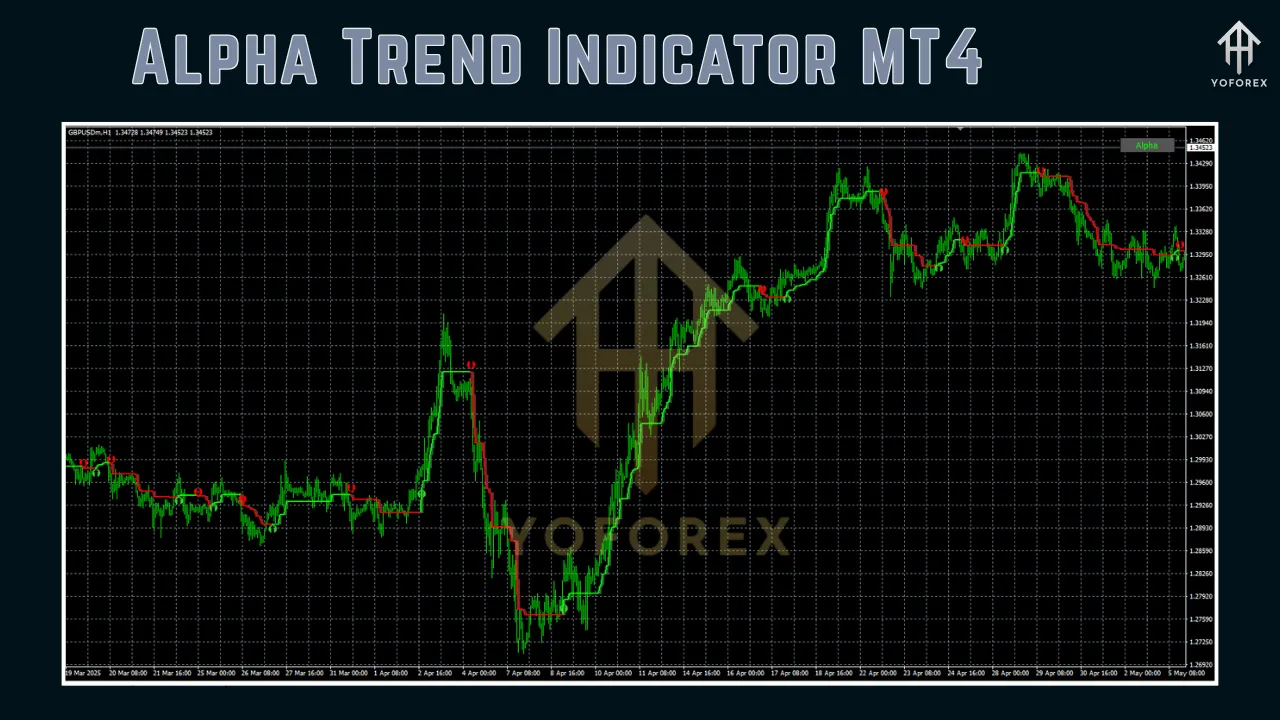
Signal Generation: The indicator generates visual signals, such as arrows or color changes, to indicate potential buy or sell opportunities. For example, a green arrow might signal a buy, while a red arrow indicates a sell.
-
Noise Filtering: By using volatility filters, the Alpha Trend Indicator reduces false signals during periods of low market activity or consolidation.
The indicator is displayed directly on the MT4 chart, making it easy to interpret even for beginners. It often includes customizable settings, allowing traders to adjust parameters like sensitivity, period lengths, and signal thresholds to suit their trading style.
Key Features
The Alpha Trend Indicator stands out due to its versatility and user-friendly design. Some of its key features include:
-
Clear Visual Signals: The indicator provides straightforward buy and sell signals, often in the form of arrows or colored lines, making it easy to interpret.
-
Customizable Parameters: Traders can tweak settings like moving average periods, volatility thresholds, and signal strength to align with their trading preferences.
-
Multi-Timeframe Compatibility: It can be used on various timeframes, from 1-minute charts for scalping to daily charts for swing trading.
-
Noise Reduction: The indicator filters out market noise, helping traders focus on high-probability setups.
-
Versatility: It works across multiple markets, including forex pairs, indices, and commodities.
-
MT4 Integration: As a custom indicator, it seamlessly integrates with MT4’s charting tools and can be combined with other indicators like RSI, MACD, or Bollinger Bands.
Setting Up the Alpha Trend Indicator on MT4
Installing and configuring the Alpha Trend Indicator on MT4 is straightforward. Follow these steps to get started:
Step 1: Download the Indicator
-
Obtain the Alpha Trend Indicator file (usually in .mq4 or .ex4 format) from a trusted source, such as a reputable trading forum, marketplace, or developer website.
-
Ensure the file is compatible with your version of MT4.
Step 2: Install the Indicator
-
Open your MT4 platform.
-
Go to File > Open Data Folder.
-
Navigate to the MQL4 folder, then open the Indicators subfolder.
-
Copy and paste the downloaded indicator file into the Indicators folder.
-
Restart MT4 to load the indicator.
Step 3: Add the Indicator to a Chart
-
Open a chart for your desired asset (e.g., EUR/USD).
-
Right-click on the chart, select Indicators List, and choose Custom > Alpha Trend Indicator.
-
Adjust the indicator’s settings (e.g., period, sensitivity) in the pop-up window, or use the default settings.
-
Click OK to apply the indicator to the chart.
Step 4: Customize Settings
-
Period: Adjust the lookback period for trend calculations (e.g., 14 for short-term or 50 for long-term trends).
-
Signal Sensitivity: Increase or decrease sensitivity to control the frequency of signals.
-
Visual Options: Modify colors, arrow sizes, or line styles for better visibility.
Once installed, the indicator will appear on your chart, ready to generate signals based on market conditions.
Trading Strategies Using the Alpha Trend Indicator
The Alpha Trend Indicator can be used in various trading strategies, depending on your goals and risk tolerance. Here are three popular approaches:
1. Trend-Following Strategy
-
Objective: Capitalize on sustained market trends.
-
Setup:
-
Apply the Alpha Trend Indicator to a higher timeframe (e.g., H1 or H4) to identify the primary trend.
-
Wait for a buy signal (e.g., green arrow) in an uptrend or a sell signal (e.g., red arrow) in a downtrend.
-
Confirm the signal with additional indicators, such as a 50-period moving average or RSI above 50 for buy signals.
-
-
Entry: Enter a trade when the indicator generates a signal in the direction of the trend.
-
Exit: Set a take-profit at a key resistance/support level or exit when the indicator signals a trend reversal.
-
Risk Management: Use a stop-loss below the recent swing low (for buys) or above the swing high (for sells).
2. Scalping Strategy
-
Objective: Capture small price movements in fast-moving markets.
-
Setup:
-
Apply the indicator to a lower timeframe (e.g., M5 or M15).
-
Combine with a volatility indicator like Bollinger Bands to identify high-probability setups.
-
-
Entry: Enter a trade when the indicator generates a signal and the price is near a key support/resistance level.
-
Exit: Aim for a small profit target (e.g., 5-10 pips) and use a tight stop-loss to minimize risk.
-
Risk Management: Scalping is high-risk, so maintain a strict risk-reward ratio (e.g., 1:2).
3. Reversal Strategy
-
Objective: Identify potential trend reversals for early entries.
-
Setup:
-
Use the indicator on a daily or weekly chart to spot major reversals.
-
Look for divergence between the indicator’s signals and price action (e.g., price makes a higher high, but the indicator shows weakening momentum).
-
-
Entry: Enter a trade when the indicator generates a reversal signal (e.g., a sell signal after a prolonged uptrend).
-
Exit: Set a take-profit at a significant support/resistance level or when the indicator confirms a new trend.
-
Risk Management: Use a wider stop-loss to account for potential pullbacks in reversal setups.
Advantages of the Alpha Trend Indicator
-
Ease of Use: The indicator’s clear signals make it accessible to beginners.
-
Reduced Noise: Its noise-filtering capabilities improve signal reliability.
-
Flexibility: It can be adapted to various trading styles, from scalping to long-term investing.
-
Customizability: Adjustable settings allow traders to tailor the indicator to their needs.
-
Compatibility: Works well with other MT4 tools, enhancing its utility in multi-indicator strategies.
Limitations of the Alpha Trend Indicator
-
Lagging Nature: Like most trend-following indicators, it may lag behind rapid price movements, leading to delayed signals.
-
False Signals in Choppy Markets: While it reduces noise, it’s not immune to false signals during consolidation periods.
-
Dependency on Settings: Incorrect settings can lead to poor performance, requiring optimization.
-
Not a Standalone Tool: Best used in conjunction with other indicators or price action analysis for confirmation.
Tips for Maximizing the Alpha Trend Indicator
-
Combine with Other Tools: Pair the indicator with complementary tools like RSI, MACD, or Fibonacci retracement levels to confirm signals.
-
Test on a Demo Account: Before using the indicator in live trading, test it on a demo account to understand its behavior in different market conditions.
-
Optimize Settings: Experiment with different settings to find the best configuration for your trading style and asset.
-
Use Multi-Timeframe Analysis: Analyze higher timeframes to confirm the overall trend before taking signals on lower timeframes.
-
Practice Risk Management: Always use stop-losses and maintain a favorable risk-reward ratio to protect your capital.
-
Stay Updated: Check for updates or newer versions of the indicator, as developers often release improved versions with enhanced features.
Common Mistakes to Avoid
-
Overtrading: Don’t take every signal generated by the indicator. Filter signals based on market context and confirmation from other tools.
-
Ignoring Market Conditions: The indicator performs best in trending markets. Avoid using it in choppy or low-volatility conditions.
-
Neglecting Risk Management: Failing to set stop-losses or risking too much per trade can lead to significant losses.
-
Using Default Settings Blindly: Customize the indicator to suit your trading style and the specific asset you’re trading.
Conclusion
The Alpha Trend Indicator for MT4 is a versatile and powerful tool that can enhance your trading by providing clear, reliable signals for identifying trends and momentum. Its ease of use, customizable settings, and compatibility with various trading strategies make it a valuable addition to any trader’s toolkit. However, like any technical indicator, it’s not a magic bullet. Success with the Alpha Trend Indicator requires a solid understanding of its mechanics, careful optimization, and disciplined risk management.
By combining the indicator with other technical tools, practicing on a demo account, and adapting it to your trading style, you can unlock its full potential. Whether you’re a scalper looking for quick profits or a swing trader aiming for larger moves, the Alpha Trend Indicator can help you navigate the markets with greater confidence. Start exploring this indicator today, and take your MT4 trading to the next level!
Support & Disclaimer
Got questions or need help? Reach out anytime:
- WhatsApp: https://wa.me/+443300272265
- Telegram: https://t.me/yoforexrobot
Disclaimer: Past performance is no guarantee of future results. All trading carries risk. Always demo-test the System Haos Indicator MT4 in a risk-free environment before deploying on a live account.