
Exploring the Money Printer EA V7.0 MT4: A Comprehensive Guide to Automated Forex Trading
Introduction
In the fast-paced world of forex trading, automation has become a game-changer for traders seeking efficiency and precision. The Money Printer EA V7.0 MT4, an Expert Advisor (EA) designed for the MetaTrader 4 (MT4) platform, promises to deliver just that. Marketed as a tool to optimize trading strategies for gold and forex markets, this EA has garnered attention for its potential to generate consistent profits through sophisticated algorithms. In this blog, we’ll dive deep into the features, performance, setup, and user feedback surrounding the Money Printer EA V7.0 MT4, while critically examining its claims and practical applications.
What is Money Printer EA V7.0 MT4?
The Money Printer EA V7.0 MT4 is an automated trading robot tailored for the MetaTrader 4 platform, one of the most popular trading platforms globally. Developed to trade forex and gold (XAU/USD), it combines technical indicators and market analysis to execute trades with high precision. Unlike manual trading, which requires constant monitoring, this EA operates semi-automatically or fully automatically, depending on user settings, to follow buy/sell signals and capitalize on market trends. The name “Money Printer” suggests a bold claim of profitability, but as with any trading tool, it’s essential to approach it with a balanced perspective.
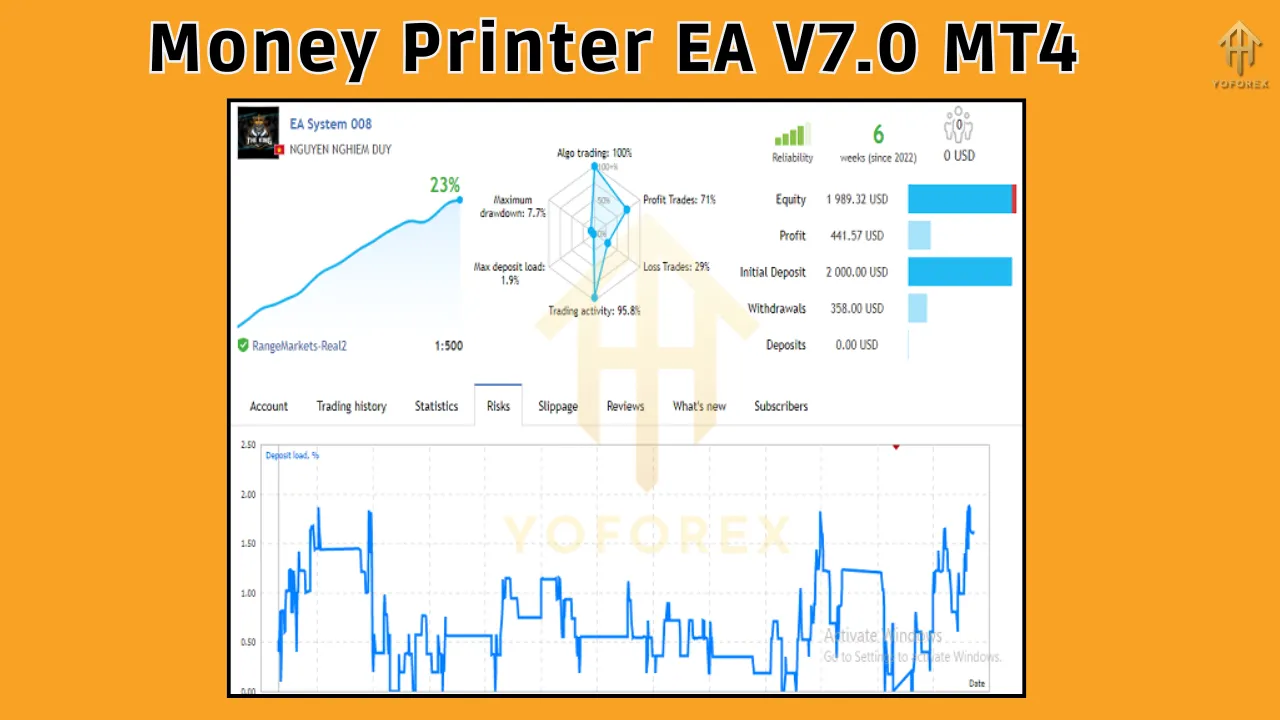
The EA, reportedly designed by Nguyen Nghiem Duy, leverages a trend-following strategy, making it suitable for traders who prefer to ride market momentum. It includes customizable settings such as lot size management, take profit (TP), stop loss (SL), and risk parameters, allowing users to align the EA with their trading style and risk tolerance. While marketed as a user-friendly tool, its performance and reliability depend heavily on proper configuration and market conditions.
Key Features
The Money Printer EA V7.0 MT4 boasts several features that make it appealing to both novice and experienced traders. Here’s a breakdown of its core functionalities:
1. Trend-Following Strategy
The EA employs a trend-following approach, combining technical indicators to identify and act on market trends. This strategy is particularly effective in volatile markets like gold, where strong price movements can offer significant profit opportunities. By following buy/sell signals, the EA aims to enter trades at optimal points, reducing the risk of trading against the market.
2. Customizable Settings
Flexibility is a hallmark of the Money Printer EA. Traders can adjust parameters such as:
-
Maximum Orders: Control the number of simultaneous trades.
-
Lot Size Management: Set fixed or dynamic lot sizes based on account balance.
-
TP/SL Parameters: Define take profit and stop loss levels to manage risk.
-
Trading Strategies: Incorporate money management and hedging techniques for diversified trading.
These settings allow traders to fine-tune the EA to match their risk appetite and market conditions.
3. Gold and Forex Compatibility
Designed specifically for gold (XAU/USD) and forex pairs, the EA is optimized for high-volatility markets. Gold trading, in particular, is known for its rapid price movements, and the EA’s algorithms are tailored to exploit these fluctuations.
4. Semi-Automatic and Automatic Modes
The EA can operate in semi-automatic mode, where it follows user-defined buy/sell signals, or fully automatic mode, where it independently analyzes the market and executes trades. This dual functionality caters to traders who want varying levels of control.
5. Risk Management
The EA includes built-in risk management tools, such as stop-loss settings and dynamic position sizing, to protect accounts from significant drawdowns. However, proper configuration is crucial to avoid over-optimization or excessive risk.
Installation and Setup
Setting up the Money Printer EA V7.0 MT4 is straightforward, making it accessible even for traders new to automated systems. Here’s a step-by-step guide:
-
Download the EA: Obtain the Money Printer EA file (.ex4 or .mq4) from a reputable source, such as the MQL5 marketplace or the developer’s official site.
-
Locate the Experts Folder: Open MetaTrader 4, navigate to “File” > “Open Data Folder,” then go to the “MQL4” > “Experts” folder.
-
Install the EA: Copy and paste the EA file into the “Experts” folder.
-
Refresh Navigator: In MT4, open the Navigator tab, right-click on “Expert Advisors,” and select “Refresh.” The Money Printer EA should appear.
-
Attach to Chart: Drag the EA onto a chart (e.g., XAU/USD on M5 timeframe) and configure the settings in the pop-up window. Ensure “Auto-Trading” is enabled on the MT4 toolbar.
-
Configure Settings: Adjust lot size, TP/SL, and other parameters to align with your trading strategy and risk tolerance.
Tip: Always test the EA on a demo account before deploying it on a live account to ensure compatibility with your broker and market conditions.
Performance and Backtesting
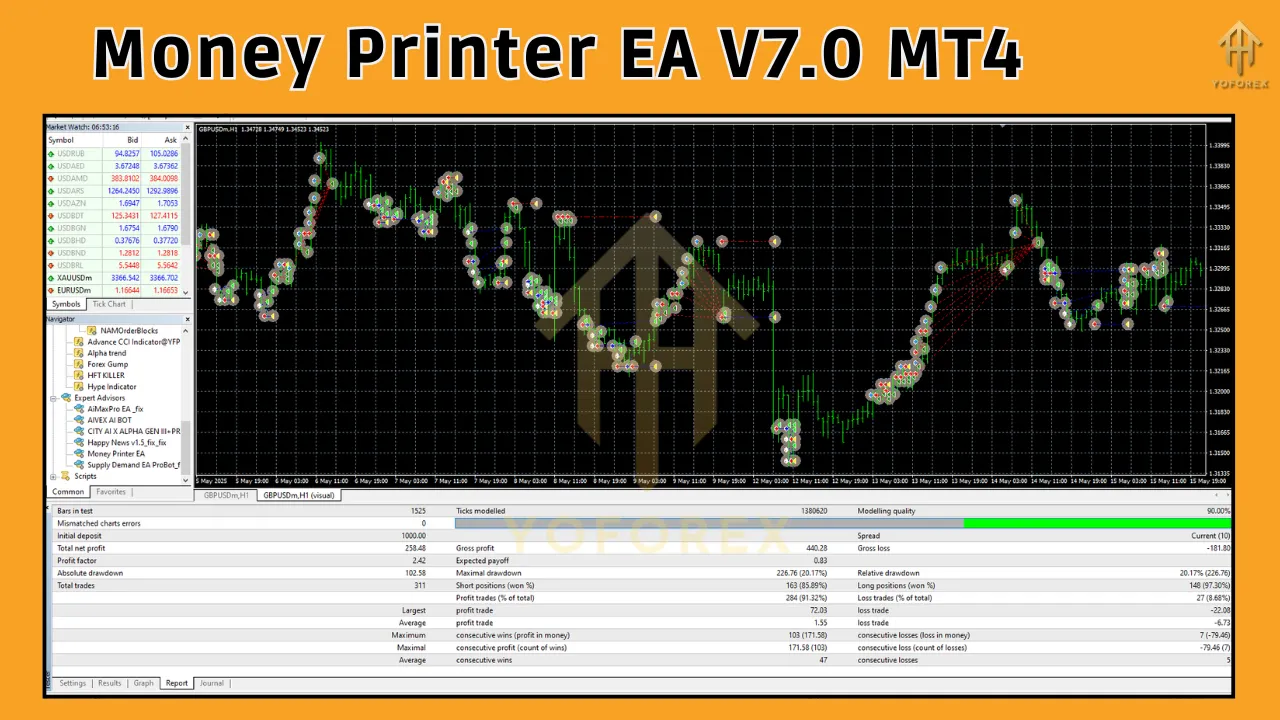
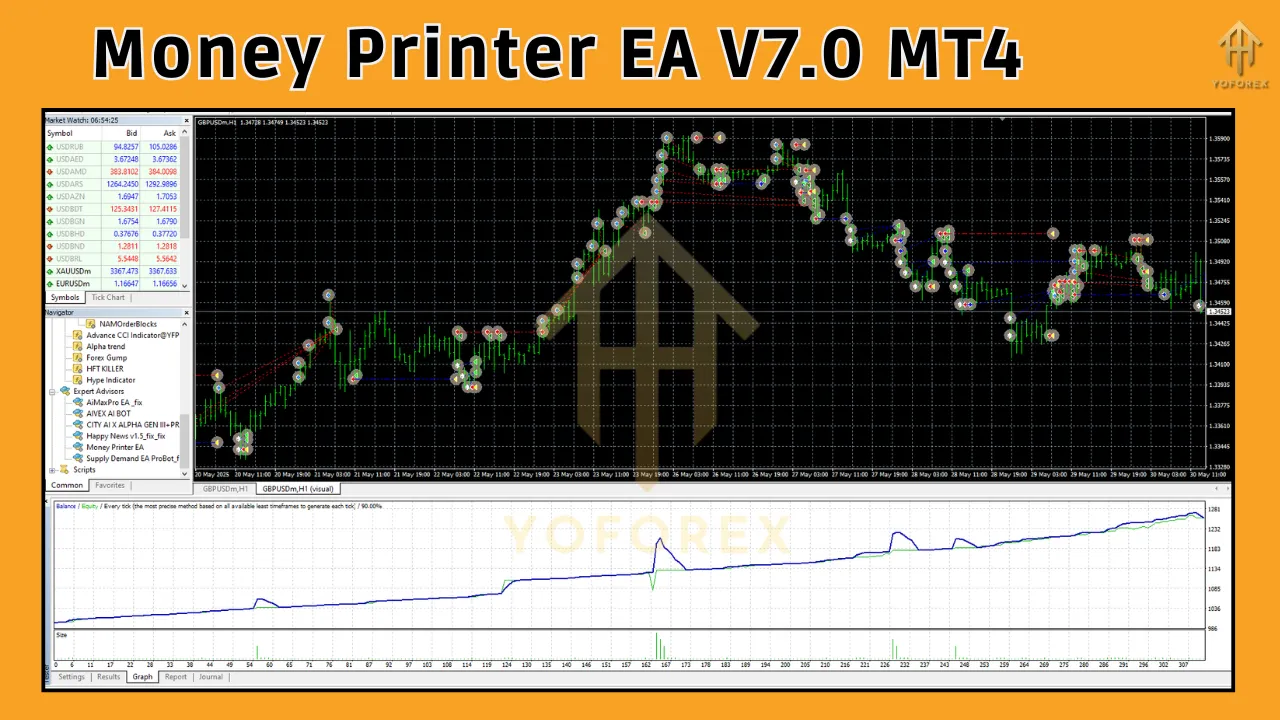
The performance of the Money Printer EA V7.0 MT4 is a mixed bag, based on available user feedback and reviews. While the developer claims a high success rate, real-world results vary significantly. According to sources like forexroboteasy.com, the EA has shown promise in demo testing, with some users reporting consistent small profits, particularly in prop trading challenges. However, live account performance has been less reliable, with some users experiencing severe losses due to algorithmic flaws or improper settings.
Backtesting is a critical step for evaluating the EA’s effectiveness. Using MT4’s Strategy Tester, traders can simulate the EA’s performance on historical data. The Money Printer EA reportedly performs best on volatile pairs like XAU/USD, with optimized settings for the M5 timeframe. However, backtesting results can be misleading if over-optimized, leading to curve-fitting that doesn’t translate to live trading. To mitigate this, traders should:
-
Use high-quality tick data for accurate backtesting.
-
Test across diverse market conditions to assess robustness.
-
Avoid overly aggressive settings that inflate backtest results but fail in live markets.
User reviews highlight a dichotomy: some praise the EA’s simplicity and developer support, while others criticize its reliability, with a reported 0-star rating in certain forums due to losses in live trading. This underscores the importance of thorough testing and realistic expectations.
Pros and Cons
Pros
-
User-Friendly: Easy to install and configure, suitable for beginners.
-
Flexible Settings: Allows customization to suit various trading styles.
-
Trend-Following Strategy: Effective in trending markets like gold.
-
Risk Management: Includes TP/SL and position sizing options to limit losses.
-
Community Support: Some users report good developer support for troubleshooting.
Cons
-
Mixed Performance: Inconsistent results in live trading, with some users reporting significant losses.
-
Over-Optimization Risk: Adjustable parameters can lead to curve-fitting if not carefully managed.
-
Limited Transparency: Lack of detailed user reviews and long-term performance data.
-
Market Dependency: Performance heavily relies on trending market conditions, which may not always be present.
-
Developer Reputation: Nguyen Nghiem Duy’s mid-level reputation raises questions about the EA’s reliability.
User Feedback and Community Insights
The Money Printer EA V7.0 MT4 has sparked varied reactions within the trading community. On platforms like forexroboteasy.com, users have noted its potential for small, consistent gains in demo environments, particularly for gold trading. Some traders appreciate its ability to simplify trading through automation, especially for those with limited time to monitor charts. However, negative feedback is prevalent, with complaints about the EA deleting losing trades or failing to adapt to changing market conditions. A 0-star rating in some discussions reflects skepticism about its reliability in live trading.
Community forums, such as Reddit and Forex Factory, emphasize the importance of due diligence when using EAs like Money Printer. Traders recommend combining the EA with manual oversight and testing it extensively on demo accounts. Joining communities like EASY Traders, as suggested by forexroboteasy.com, can provide access to exclusive stats and strategies to enhance the EA’s performance.
Critical Considerations for Traders
Before integrating the Money Printer EA V7.0 MT4 into your trading arsenal, consider the following:
-
Risk Management: Automated trading does not eliminate risk. Ensure proper lot sizing and SL settings to protect your capital. High-risk strategies like martingale or grid trading, which some EAs employ, are not used here, but over-leveraging remains a concern.
-
Market Conditions: The EA performs best in trending markets. Sideways or choppy markets may lead to losses, so monitor market volatility.
-
Broker Compatibility: Ensure your broker supports MT4 and has low spreads, especially for gold trading, to maximize the EA’s effectiveness.
-
Demo Testing: Run the EA on a demo account for at least 1–2 months to evaluate its performance under real-time conditions.
-
Avoid Over-Optimization: Tweak settings cautiously to avoid curve-fitting, which can inflate backtest results but fail in live trading.
Comparison with Other Forex EAs
The Money Printer EA V7.0 MT4 competes with other popular EAs like Forex Robotron, Forex Flex EA, and WallStreet Forex Robot 2.0 Evolution. Unlike Forex Robotron, which boasts extensive backtesting with real tick data and a verified Myfxbook track record, Money Printer lacks comprehensive long-term performance data. Forex Flex EA combines multiple trading styles (scalping, counter-trend, and trend-following), offering more versatility than Money Printer’s trend-focused approach. WallStreet Forex Robot 2.0 Evolution includes news filters to avoid high-impact events, a feature not explicitly mentioned in Money Printer’s documentation.
While Money Printer’s simplicity is a strength, its lack of transparency and mixed user reviews put it at a disadvantage compared to more established EAs. Traders seeking a more robust solution may prefer EAs with verified track records or open-source options like EA31337, which allow full customization.
Tips for Maximizing Success with Money Printer EA
To get the most out of the Money Printer EA V7.0 MT4, follow these best practices:
-
Start Small: Begin with a low lot size and a demo account to assess performance.
-
Monitor Performance: Regularly review trade logs and adjust settings based on market conditions.
-
Use a VPS: A Virtual Private Server ensures the EA runs continuously without interruptions.
-
Stay Informed: Join trading communities to share insights and stay updated on EA performance.
-
Combine with Manual Analysis: Use the EA’s signals as a complement to your own market analysis for better decision-making.
Conclusion
The Money Printer EA V7.0 MT4 offers an intriguing option for traders looking to automate their forex and gold trading strategies. Its trend-following approach, customizable settings, and user-friendly interface make it accessible to a wide range of traders. However, its mixed performance in live trading, limited transparency, and dependency on proper configuration highlight the need for caution. By thoroughly testing the EA on a demo account, optimizing settings conservatively, and maintaining realistic expectations, traders can potentially leverage its strengths while mitigating risks.
Automated trading tools like Money Printer EA V7.0 MT4 are not a guaranteed path to riches, despite the suggestive name. Success in forex trading requires a combination of robust tools, sound risk management, and market knowledge. Whether you’re a novice or a seasoned trader, approach this EA with due diligence, and it could become a valuable addition to your trading toolkit.
Support & Disclaimer
Got questions or need help? Reach out anytime:
- WhatsApp: https://wa.me/+443300272265
- Telegram: https://t.me/yoforexrobot
Disclaimer: Past performance is no guarantee of future results. All trading carries risk. Always demo-test the System Haos Indicator MT4 in a risk-free environment before deploying on a live account.