In the fast-paced world of forex trading, precision, speed, and risk management are critical to success. MetaTrader 4 (MT4) remains one of the most popular trading platforms due to its robust tools and flexibility, but manual trade management can be time-consuming and prone to errors. Enter Trade Manager EA V1.0 for MT4, a powerful Expert Advisor (EA) designed to streamline trade execution, enhance risk management, and optimize trading performance. In this blog post, we’ll explore the features, benefits, and practical applications of this innovative tool, making it a must-have for both novice and seasoned traders.
What is Trade Manager EA V1.0 for MT4?
Trade Manager EA V1.0 is a semi-automated trading tool built specifically for the MetaTrader 4 platform. Unlike fully automated EAs that execute trades independently, this tool focuses on assisting manual traders by simplifying trade management tasks. It offers an intuitive interface, one-click trade execution, and advanced risk management features, allowing traders to focus on strategy rather than repetitive calculations or manual adjustments. Whether you’re scalping, swing trading, or managing long-term positions, Trade Manager EA V1.0 enhances efficiency and precision.
Key Features of Trade Manager EA V1.0
1. One-Click Trade Execution
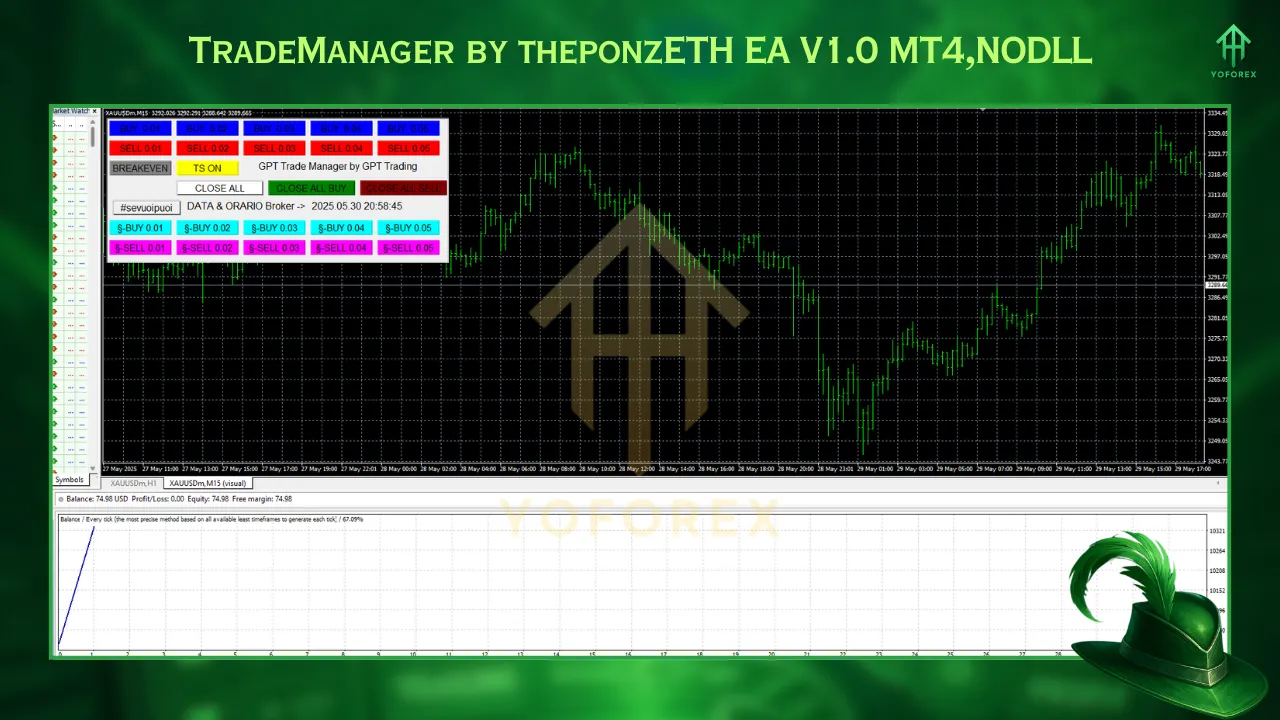
Trade Manager EA V1.0 simplifies the process of entering and exiting trades. With a single click, traders can open buy or sell orders, set stop-loss (SL) and take-profit (TP) levels, and manage pending orders like Buy Stop, Sell Stop, Buy Limit, or Sell Limit. This feature is a game-changer for intraday traders and scalpers who need to act quickly in volatile markets.
2. Risk-Based Lot Size Calculation
One of the standout features is the built-in lot size calculator, which automatically computes the appropriate position size based on the trader’s predefined risk parameters. For example, if you want to risk 1% of a $10,000 account on a trade with a 50-pip stop-loss, the EA calculates the lot size to ensure you stay within your risk tolerance. This eliminates the need for external calculators or manual computations, reducing errors and saving time.
3. Automatic Break-Even and Trailing Stop
Protecting profits is crucial in forex trading, and Trade Manager EA V1.0 excels in this area. The EA can automatically move your stop-loss to the break-even point once a trade reaches a specified profit level, ensuring you lock in gains without risking your initial capital. Additionally, it supports trailing stops, which adjust dynamically as the price moves in your favor, securing profits while allowing room for further gains. Traders can customize trailing stop settings based on pips, ATR, or other indicators.
4. Partial Close and Multi-Level Take-Profit
The EA allows traders to split their positions into multiple take-profit levels, enabling partial profit-taking while letting the remaining position run. For instance, you can close 50% of your position at TP1, 25% at TP2, and let the remaining 25% target a higher profit level. This flexibility is ideal for managing trades in volatile markets where price reversals are common.
5. Stealth and Decoy SL/TP
To counter potential broker manipulations, Trade Manager EA V1.0 offers stealth and decoy stop-loss/take-profit features. Stealth mode hides your SL and TP levels from the broker, while decoy mode adds a specified number of pips to your SL/TP to mislead the broker. These features are particularly useful for traders who suspect their brokers engage in practices like stop hunting. However, using stealth mode requires your MT4 terminal to remain active, as the EA manages these levels internally.
6. News Filter and Spread Control
High-impact news events can cause significant market volatility, often leading to unexpected losses. Trade Manager EA V1.0 includes a news filter that can automatically cancel pending orders or close open positions before major news releases, such as Non-Farm Payrolls (NFP). Additionally, the spread filter ensures trades are only executed when the spread is favorable, preventing entries during high-spread periods.
Benefits of Using Trade Manager EA V1.0
Enhanced Risk Management
Effective risk management is the cornerstone of successful trading. Trade Manager EA V1.0 automates risk calculations, ensuring you never over-leverage your account. By setting risk parameters in percentage or fixed currency amounts, traders can maintain consistency across their trades, which is especially valuable for those participating in prop firm challenges.
Time Efficiency
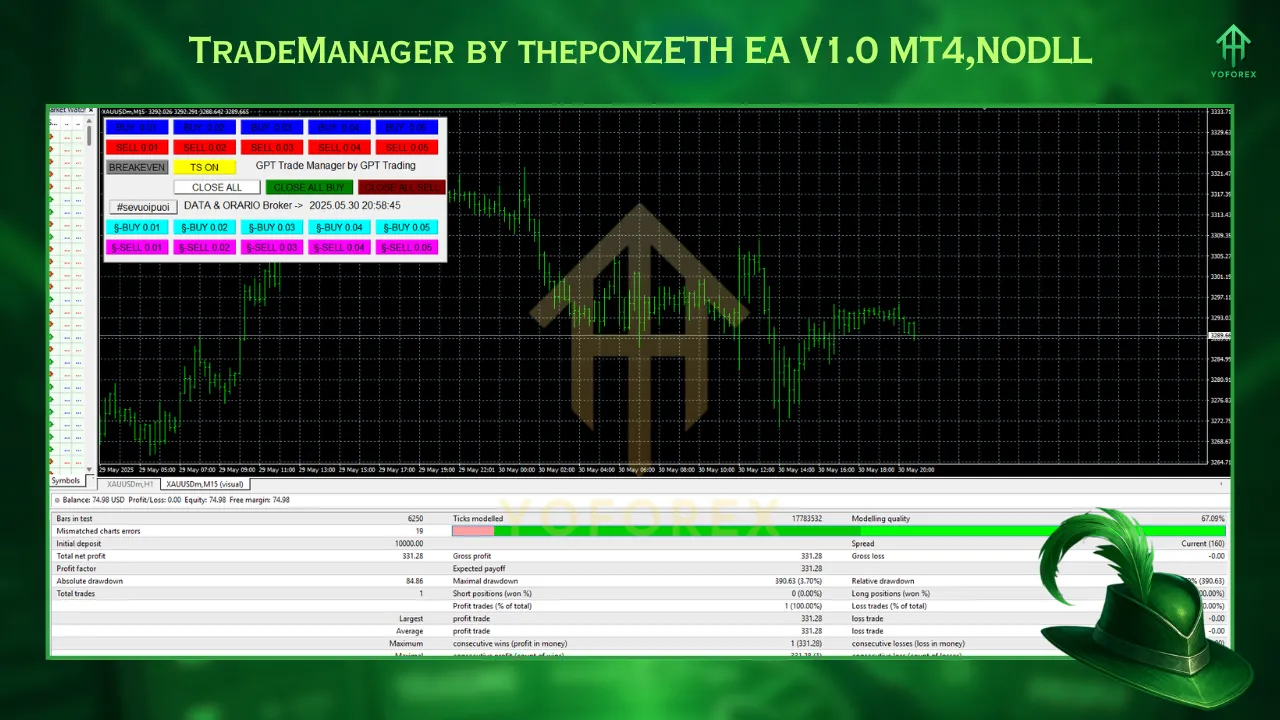
Manually calculating lot sizes, setting SL/TP levels, and adjusting positions can be tedious. Trade Manager EA V1.0 eliminates these time-consuming tasks, allowing traders to focus on market analysis and strategy development. The draggable horizontal lines for setting entry, SL, and TP levels directly on the chart further enhance usability.
Versatility Across Trading Styles
Whether you’re a scalper needing quick execution or a position trader managing long-term trades, Trade Manager EA V1.0 adapts to your style. It supports trading across various asset classes, including forex, indices, metals, and cryptocurrencies, making it a versatile tool for diversified portfolios.
Improved Discipline
Emotional trading and overtrading are common pitfalls for traders. The EA includes features like maximum daily loss limits and restrictions on the number of trades per day, week, or month, helping traders stick to their plans and avoid impulsive decisions.
Installation and Setup
- Download the EA file (.ex4) and place it in the MQL4 > Experts folder of your MT4 platform (File > Open Data Folder > MQL4 > Experts).
- Enable “AutoTrading” in MT4 and ensure “Allow DLL imports” and “Allow live trading” are checked under Tools > Options > Expert Advisors.
- Drag the EA onto your chart and configure settings like risk percentage, SL/TP levels, and news filter preferences.
- Restart MT4 to ensure the EA loads correctly.
Who Should Use Trade Manager EA V1.0?
- Beginners who need assistance with lot size calculations and risk management.
- Experienced traders looking to streamline their workflow and reduce manual errors.
- Prop firm traders aiming to pass challenges by maintaining strict risk discipline.
- Scalpers and intraday traders who require fast execution and precise trade management.
Conclusion
Trade Manager EA V1.0 for MT4 is a powerful tool that bridges the gap between manual trading and automation. Its intuitive interface, robust risk management features, and time-saving capabilities make it an essential companion for traders seeking efficiency and consistency. By automating complex calculations, protecting profits, and offering advanced features like stealth SL/TP and news filters, this EA empowers traders to focus on what matters most: making informed trading decisions.
Whether you’re new to forex or a seasoned professional, Trade Manager EA V1.0 can enhance your trading experience. Download a demo version today, test it on your MT4 platform, and discover how it can transform your trading strategy. For more details on installation and advanced features, check out resources like The Forex Army or Forex Factory.