Exploring the FTLM Hist Arrow Indicator for MT4: A Comprehensive Guide
Introduction
In the fast-paced world of forex trading, having reliable tools to interpret market dynamics is crucial for success. One such tool is the FTLM Hist Arrow Indicator for MetaTrader 4 (MT4), a powerful and user-friendly indicator designed to simplify momentum trading. Standing for Fast Trend Line Momentum Histogram, this indicator provides traders with clear visual cues through a histogram format and arrow signals, helping them identify potential trend changes and make informed trading decisions. This blog dives deep into the features, benefits, setup, and trading strategies of the FTLM Hist Arrow Indicator, offering insights for both novice and experienced traders.
What is the FTLM Hist Arrow Indicator?
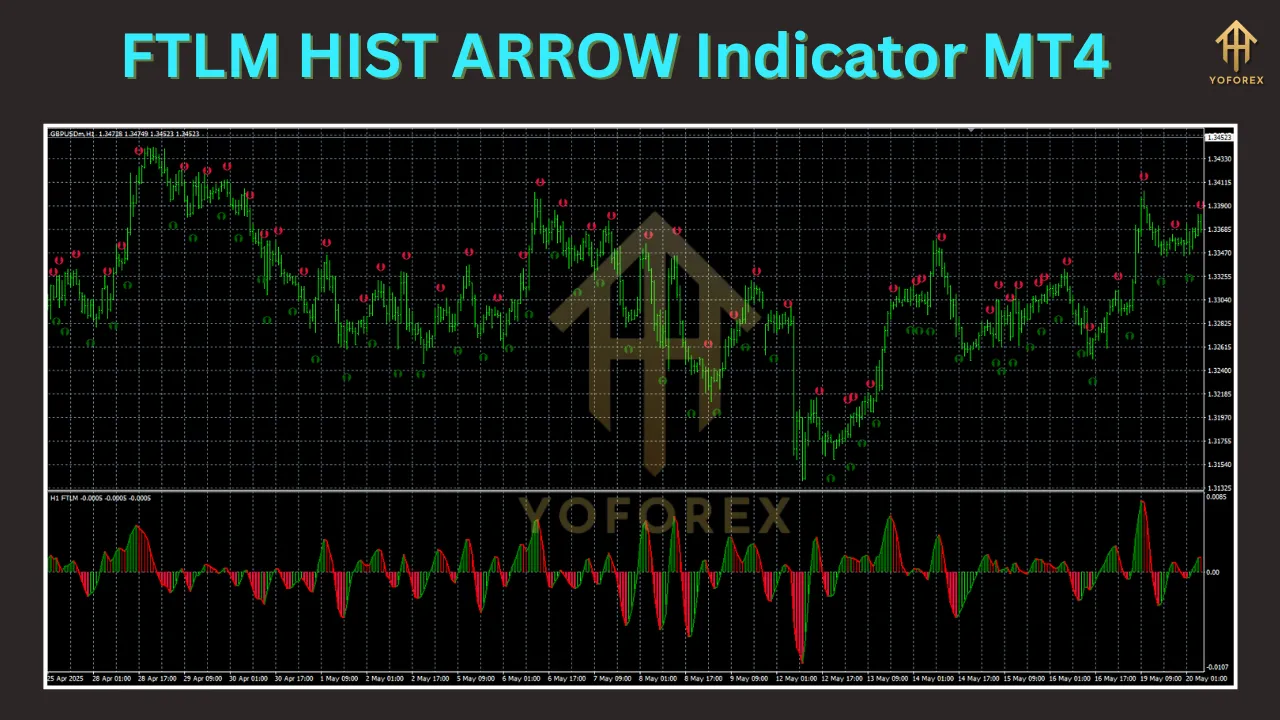
The FTLM Hist Arrow Indicator is a momentum-based technical analysis tool tailored for the MT4 platform. It combines the simplicity of a histogram with arrow signals to display market momentum and trend direction. Unlike traditional momentum indicators that rely on complex line graphs, the FTLM Hist Arrow Indicator uses a straightforward bar format displayed below the price chart. Green bars typically indicate bullish momentum, while red bars signal bearish pressure, making it easy to gauge market strength at a glance.
The “Arrow” component of the indicator adds another layer of clarity by placing buy and sell arrows directly on the chart, pinpointing potential entry and exit points. This feature is particularly useful for traders who prefer clear, actionable signals over interpreting raw data. The indicator’s low lag ensures it responds quickly to price changes, offering a significant advantage in fast-moving markets like forex.
Key Features
-
Histogram Display: The indicator presents momentum shifts through a histogram, with bars fluctuating above and below a zero line. Green bars above the zero line suggest bullish momentum, while red bars below indicate bearish momentum.
-
Arrow Signals: Upward (buy) and downward (sell) arrows appear on the chart to highlight potential trade setups, reducing the need for manual analysis.
-
Multi-Timeframe (MTF) Capability: Some versions, like the T3 FTLM Hist Arrows Alerts MTF, allow traders to analyze momentum across multiple timeframes simultaneously, providing a broader market perspective.
-
Alerts Functionality: The indicator often includes customizable alerts (visual, sound, or email) to notify traders of signal generation, ensuring timely responses to market changes.
-
Non-Repainting Signals: Many versions of the FTLM Hist Arrow Indicator are designed to provide stable, non-repainting signals, enhancing reliability for real-time trading and backtesting.
-
Customizability: Traders can adjust settings such as timeframe, signal sensitivity, and arrow display preferences to align with their trading style.
Benefits
Simplicity for Beginners
The FTLM Hist Arrow Indicator is particularly appealing to new traders due to its intuitive design. The color-coded histogram and clear arrow signals eliminate the complexity of interpreting intricate chart patterns, allowing beginners to focus on executing trades with confidence.
Enhanced Decision-Making for Pros
Experienced traders can integrate the FTLM Hist Arrow Indicator into their existing strategies, using it as a confirmation tool alongside other indicators like Moving Averages, RSI, or Bollinger Bands. Its low-lag nature makes it ideal for fine-tuning entries and exits in volatile markets.
Versatility Across Trading Styles
Whether you’re a scalper, day trader, or swing trader, the indicator’s multi-timeframe functionality and customizable settings cater to various trading approaches. Scalpers can use lower timeframes (e.g., M1 or M5) for quick trades, while swing traders can analyze higher timeframes (e.g., H1 or H4) for longer-term trends.
Reduced Noise
By focusing on momentum shifts, the indicator filters out minor price fluctuations, helping traders avoid false signals and focus on high-probability setups.
How to Install the FTLM Hist Arrow Indicator on MT4
Installing the FTLM Hist Arrow Indicator on MT4 is straightforward. Follow these steps:
-
Download the Indicator File: Obtain the indicator file (.mq4 or .ex4) from a reputable source, such as ForexMT4Indicators.com or Top-Trading-Indicators.com. Ensure the source is trustworthy to avoid corrupted files.
-
Open MT4 Data Folder: Launch your MT4 terminal, click File > Open Data Folder in the top left corner.
-
Navigate to Indicators Folder: In the data folder, open the MQL4 folder, then the Indicators folder.
-
Copy the Indicator File: Paste the downloaded .mq4 or .ex4 file into the Indicators folder.
-
Restart MT4: Close and reopen the MT4 terminal to refresh the indicator list.
-
Add to Chart: In the MT4 Navigator window (left-hand side), locate the FTLM Hist Arrow Indicator under Indicators. Double-click or drag it onto your chart.
-
Customize Settings: Adjust the indicator settings (e.g., timeframe, alert preferences, or arrow display) to suit your trading strategy.
-
Enable DLLs (if required): Some versions may require DLL access. If prompted, click Yes to allow DLLs, but only if you trust the source.
Trading Strategies with the FTLM Hist Arrow Indicator
1. Trend-Following Strategy
The FTLM Hist Arrow Indicator excels at identifying momentum shifts, making it ideal for trend-following strategies.
-
Buy Signal:
-
Wait for the histogram bars to transition from red to green.
-
Ensure the green bars rise above the zero line, indicating growing bullish momentum.
-
Look for an upward arrow on the chart.
-
Confirm with price action, such as a bullish candlestick pattern (e.g., engulfing or pin bar).
-
Enter on a minor pullback after the first green bar for better risk-reward.
-
-
Sell Signal:
-
Wait for the histogram bars to shift from green to red.
-
Confirm the red bars fall below the zero line, signaling bearish momentum.
-
Look for a downward arrow on the chart.
-
Verify with a bearish candlestick pattern.
-
Consider entering on a small upward pullback after the first red bar.
-
Example: On a 15-minute EUR/USD chart, a trader notices the histogram flipping from red to green with an upward arrow appearing after a bullish engulfing candle. They enter a buy trade on a pullback, setting a stop-loss below the recent swing low and a take-profit at the next resistance level.
2. Reversal Trading Strategy
For reversal traders, the FTLM Hist Arrow Indicator can help spot potential trend reversals when combined with support and resistance levels.
-
Buy Setup:
-
Identify a key support level using price action or tools like Fibonacci retracement.
-
Wait for the histogram to show green bars above the zero line near the support zone.
-
Look for two consecutive upward arrows, with the second arrow higher than the first, indicating a potential bullish reversal.
-
Confirm with additional indicators (e.g., RSI showing oversold conditions).
-
-
Sell Setup:
-
Identify a resistance level.
-
Wait for red bars below the zero line near the resistance zone.
-
Look for two downward arrows, with the second lower than the first.
-
Confirm with bearish divergence on momentum indicators like MACD.
-
Example: On a 1-hour GBP/JPY chart, a trader spots a double bottom at a support level with green bars and two upward arrows. The second arrow is higher, and the RSI shows oversold conditions. They enter a buy trade, targeting the next resistance level.
3. Multi-Timeframe Analysis
Using the MTF feature, traders can align signals across different timeframes for higher-probability trades.
-
Setup:
-
Apply the indicator to a higher timeframe (e.g., H4) to determine the overall trend.
-
Switch to a lower timeframe (e.g., M15) for precise entry points.
-
Enter trades only when the lower timeframe signals align with the higher timeframe trend.
-
Example: On an H4 chart, the FTLM Hist Arrow Indicator shows green bars and an upward arrow, confirming a bullish trend. On the M15 chart, a trader waits for a green bar and upward arrow on a pullback, entering a buy trade aligned with the higher timeframe trend.
Best Practices for Using the FTLM Hist Arrow Indicator
-
Combine with Other Tools: Use the indicator alongside price action, support/resistance levels, or other technical indicators to confirm signals and reduce false positives.
-
Backtest Thoroughly: Test the indicator on a demo account to understand its performance across different market conditions and timeframes.
-
Avoid Overtrading: Focus on high-probability setups and avoid trading during low-volume periods or major news events, which can cause erratic signals.
-
Risk Management: Set stop-loss and take-profit levels based on market structure or ATR to manage risk effectively.
-
Adjust Settings: Experiment with the indicator’s settings to optimize it for your preferred trading style and asset class.
Limitations of the FTLM Hist Arrow Indicator
While powerful, the FTLM Hist Arrow Indicator is not foolproof. It may generate false signals in choppy or ranging markets, so traders should avoid relying on it alone. Additionally, some versions may repaint under certain conditions, so always verify if the indicator is non-repainting before live trading. Lastly, like all technical tools, it performs best when combined with a robust trading plan and proper risk management.
Where to Download the FTLM Hist Arrow Indicator
The FTLM Hist Arrow Indicator is available for free on several reputable platforms, including:
-
ForexMT4Indicators.com: Offers the FTLM Hist Indicator with detailed instructions.
-
Top-Trading-Indicators.com: Provides versions like the T3 FTLM Hist Arrows Alerts MTF.
-
MT4Collection.com: Features the 4 TF FTLM Alerts Indicator for multi-timeframe analysis.
Always download from trusted sources to avoid malware or corrupted files.
Conclusion
The FTLM Hist Arrow Indicator for MT4 is a versatile and user-friendly tool that simplifies momentum trading with its clear histogram and arrow signals. Its low-lag design, customizable settings, and multi-timeframe capabilities make it suitable for traders of all levels. By integrating it with sound trading strategies and risk management, traders can leverage its strengths to navigate the forex market with greater confidence. Whether you’re a beginner seeking simplicity or a seasoned trader aiming to enhance your strategy, the FTLM Hist Arrow Indicator is a valuable addition to your trading arsenal. Download it, test it on a demo account, and explore its potential to elevate your trading performance.
Support & Disclaimer
Got questions or need help? Reach out anytime:
- WhatsApp: https://wa.me/+443300272265
- Telegram: https://t.me/yoforexrobot
Disclaimer: Past performance is no guarantee of future results. All trading carries risk. Always demo-test the FTLM HIST ARROW Indicator MT4 in a risk-free environment before deploying on a live account.