The FX Volcano System Indicator MT4 is a dynamic and versatile trading system designed to simplify forex trading for both novice and experienced traders. Built for the MetaTrader 4 platform, this indicator leverages advanced algorithms to deliver precise buy and sell signals, aiming to capitalize on market trends across various trading styles, including scalping, day trading, and swing trading. In this 800-word blog, we’ll explore the features, functionality, performance, and practical applications of the FX Volcano System Indicator, helping traders understand its potential and how to use it effectively.
Overview of the FX Volcano System Indicator
The FX Volcano System is a non-repainting indicator that combines three key components: an entry/exit indicator, a currency strength/weakness dashboard, and a trading assistant. These elements work together to provide clear, actionable signals while reducing the need for manual market analysis. Developed to cater to different trading preferences, the system offers three operational modes—FXVOLCANO1, FXVOLCANO2, and FXVOLCANO3—each tailored to varying risk appetites and time commitments. Its user-friendly design and adaptability make it a popular choice among traders seeking consistent profitability.
Core Components and Features
1. Entry/Exit Indicator
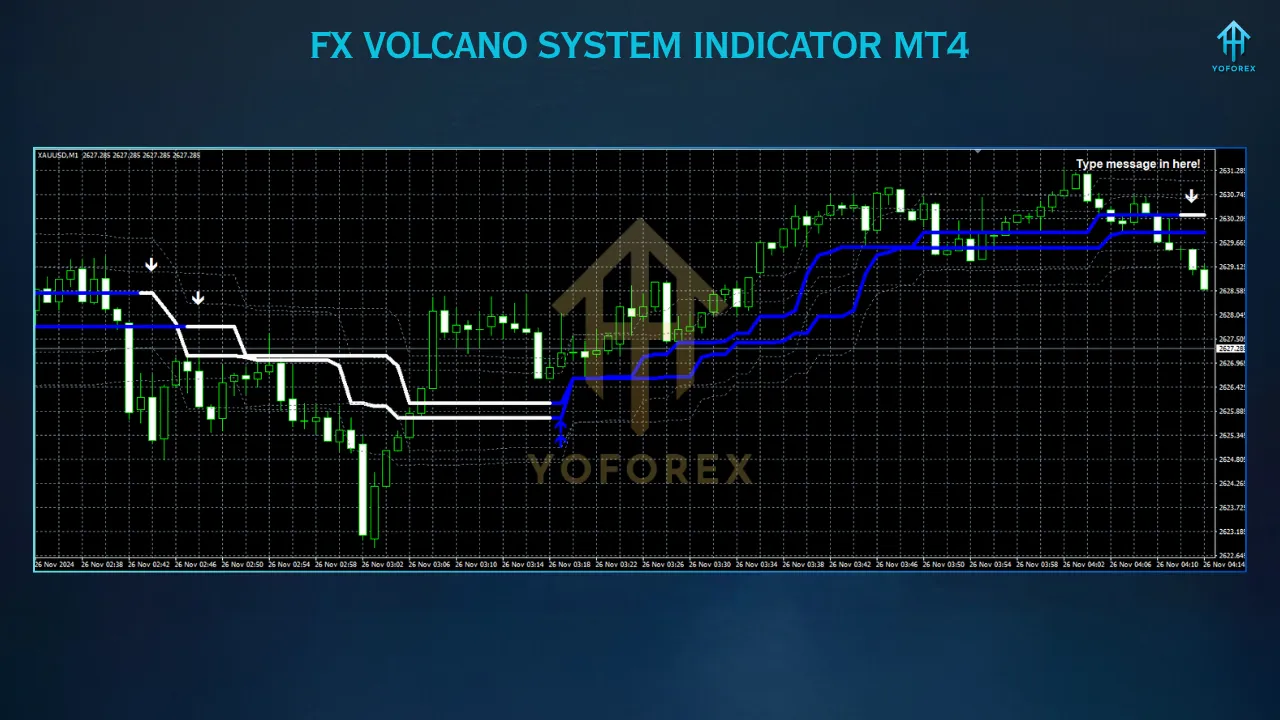
The primary component of the FX Volcano System is its entry/exit indicator, which generates color-coded buy and sell signals based on price action and technical patterns. For instance, a blue arrow with a blue line signals a buy opportunity, while a white arrow with a white line indicates a sell. These signals are non-repainting, ensuring reliability and eliminating the risk of misleading hindsight adjustments. Traders can use these signals across all currency pairs and timeframes, from M1 for scalping to D1 for swing trading.
2. Currency Strength/Weakness Dashboard
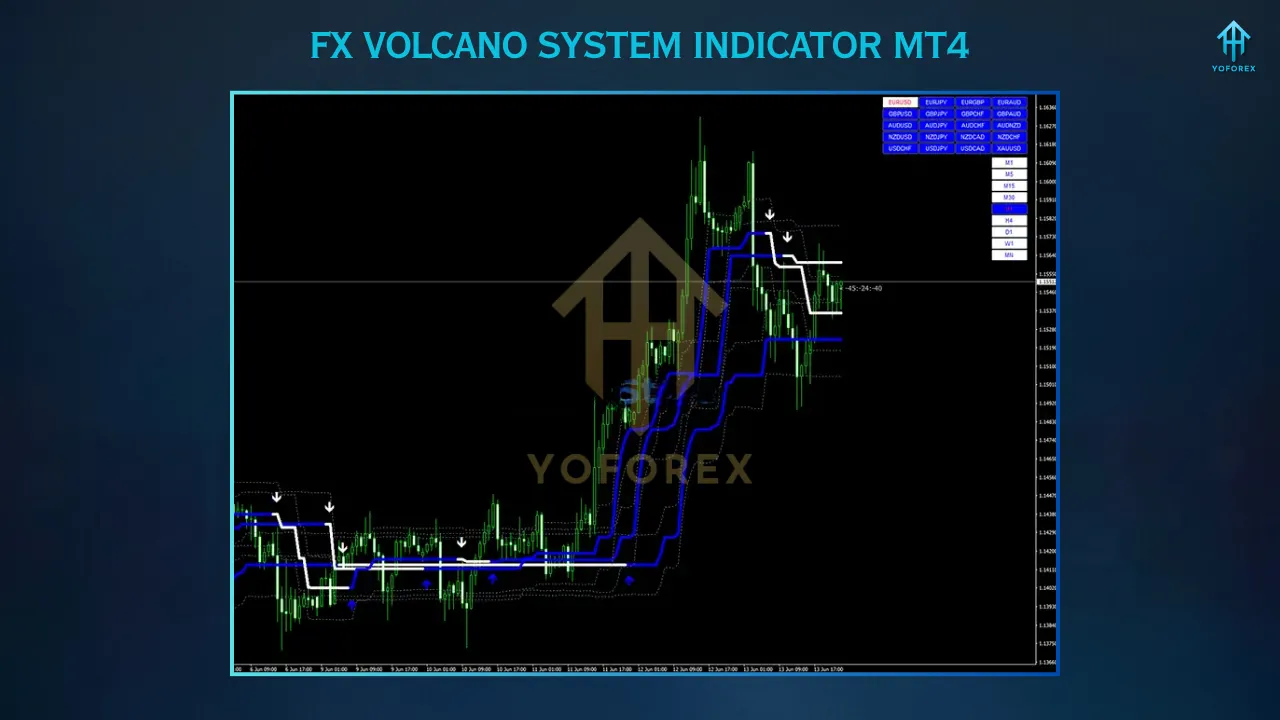
The currency strength dashboard is a critical tool for signal validation. It displays the relative strength or weakness of individual currencies in real-time, helping traders confirm whether a signal aligns with market momentum. For example, a sell signal on EURUSD is valid only if EUR appears weak (white) on the dashboard. This feature simplifies currency strength analysis, making it easier to identify high-probability trades by matching signal colors with dashboard indicators.
3. Trading Assistant
The trading assistant enhances automation by managing trade execution, including setting stop-loss, take-profit, and trailing stop levels based on the selected mode. It also allows quick switching between currency pairs and timeframes, reducing manual effort and enabling traders to focus on strategy. This feature is particularly useful for those who prefer a hands-off approach or need to monitor multiple charts simultaneously.
4. Three Operational Modes
- FXVOLCANO1: Designed for low-risk, secure trades with minimal screen time. Ideal for swing traders or those with limited availability, using higher timeframes like H1, H4, or D1.
- FXVOLCANO2: A balanced mode for day traders, offering moderate risk and profit potential. Best for M5, M15, or M30 timeframes.
- FXVOLCANO3: A high-risk, fast-paced mode for scalpers, optimized for M1 or M5 timeframes. Suited for experienced traders comfortable with rapid market movements.
5. Additional Tools
The system includes a free RSI Dashboard, which identifies overbought (blue) and oversold (red) conditions across multiple timeframes, enhancing trade confirmation. Alerts (visual, sound, email, or push notifications) ensure traders never miss a signal, even during busy trading sessions.
How to Use the FX Volcano System
- Select Trading Pairs and Timeframe: Choose 4–8 currency pairs (e.g., EURUSD, GBPUSD) and a timeframe suited to your trading style (M1/M5 for scalping, M5/M15/M30 for day trading, H1/H4/D1 for swing trading).
- Wait for a Signal: Monitor the entry/exit indicator for a buy (blue arrow) or sell (white arrow) signal.
- Confirm with Dashboard: Verify the signal’s validity by checking the currency strength dashboard. For a buy signal, the base currency should be strong (blue); for a sell signal, it should be weak (white).
- Execute and Manage Trade: Use the trading assistant to place the trade, setting stop-loss and take-profit levels (e.g., 10 pips for scalping). Allow the assistant to manage the trade or adjust manually as needed.
Installation and Setup
- Download: Obtain the indicator files (.ex4, .mq4, and .tpl) from a trusted source like fxprosystems.com or forexstrategiesresources.com.
- Install: Open MT4, go to File > Open Data Folder > MQL4 > Indicators, and paste the .ex4 and .mq4 files. Place the .tpl file in the Templates folder.
- Restart MT4: Refresh the Navigator or restart the platform.
- Apply to Chart: Attach the indicator to a chart, select the desired template (FXVOLCANO1, FXVOLCANO2, or FXVOLCANO3), and adjust settings like alerts or colors.
- Use a VPS: For uninterrupted trading, especially during major market sessions, run the system on a Virtual Private Server.
Performance and Backtesting
While specific performance data for 2025 is limited, user reviews and backtests from sources like fxprosystems.com suggest the FX Volcano System achieves a win rate of approximately 60–70% in trending markets, with drawdowns of 20–30% in volatile conditions. The system excels during high-volatility sessions (e.g., London or New York) but may produce false signals in range-bound markets. Backtesting on MT4’s Strategy Tester is crucial to optimize settings for specific pairs and timeframes.
Strengths and Weaknesses
Strengths
- Non-Repainting Signals: Reliable, consistent signals enhance trust in trade decisions.
- Versatile Modes: Caters to scalping, day trading, and swing trading, accommodating various trader profiles.
- User-Friendly: The trading assistant and dashboard simplify analysis and execution.
- Currency Strength Integration: Improves signal accuracy by aligning trades with market momentum.
Weaknesses
- Market Dependency: Performance falters in choppy markets, requiring careful market condition monitoring.
- Technical Issues: Some users report dashboard or currency switch panel malfunctions, necessitating troubleshooting or developer support.
- Learning Curve: Optimizing settings for specific pairs and timeframes may require experience.
Who Should Use It?
The FX Volcano System is ideal for traders seeking a semi-automated, trend-following approach. Beginners can benefit from the low-risk FXVOLCANO1 mode, while experienced traders may prefer the fast-paced FXVOLCANO3 for scalping. Prop firm traders will appreciate its structured risk management, though extensive demo testing is recommended for all users.
Tips for Success
- Backtest Thoroughly: Use MT4’s Strategy Tester to fine-tune settings for your preferred pairs and timeframes.
- Avoid News Events: Pause trading during high-impact news to minimize volatility risks.
- Use Major Sessions: Trade during London or New York sessions for optimal volatility and liquidity.
- Confirm Signals: Always verify signals with the currency strength dashboard to avoid false entries.
- Choose a Reliable Broker: Opt for brokers with low spreads and fast execution, such as Alpari or XM.
Conclusion
The FX Volcano System Indicator MT4 is a robust tool that simplifies forex trading through clear, non-repainting signals and a user-friendly interface. Its three operational modes, currency strength dashboard, and trading assistant make it adaptable to various trading styles, from conservative swing trading to aggressive scalping. While it excels in trending markets, traders must exercise caution during range-bound conditions and ensure proper setup to avoid technical issues.
By backtesting diligently, aligning trades with market momentum, and adhering to risk management principles, traders can leverage the FX Volcano System to enhance their profitability. As with any trading tool, success requires discipline and practice—test it on a demo account before going live.