
Introduction
Trading the GBPUSD pair on the one‑hour (H1) timeframe requires a balance of patience and precision. Too many traders miss critical breakout moves by relying on manual setups alone, while emotional decision‑making often erodes returns. GBP Miner Pro EA V1.0 MT4 is designed to automate this process, combining multi‑filter breakout logic with dynamic volatility controls and robust drawdown protection. Whether you’re a busy professional or a full‑time algo trader, this EA frees you from constant chart monitoring—letting you pursue consistent, data‑driven gains on GBPUSD without the stress of manual execution.
What Is GBP Miner Pro EA V1.0 MT4?
GBP Miner Pro EA V1.0 is a turnkey Expert Advisor built for MetaTrader 4, focused exclusively on the GBPUSD currency pair. Unlike generic multi‑pair bots, it zeroes in on the unique volatility profile of GBPUSD, exploiting breakout and trend‑continuation setups on the H1 chart. Version 1.0 reflects extensive live‑market feedback and forward testing, delivering a robust, ready‑to‑deploy solution. Key design goals include:
- Precision Entries: Targeting true breakouts above swing highs or below swing lows.
- Adaptive Risk: Position sizing and stops that scale with real‑time market volatility.
- Capital Preservation: Hard daily drawdown limits and cooldown periods to prevent runaway losses.
Core Features & Benefits
-
Multi‑Filter Breakout Logic
-
Identifies recent pivot points over a configurable look‑back window (default: 20 bars).
-
Requires both a volatility check (ATR threshold) and momentum confirmation (RSI or Stochastic) before placing orders.
-
-
ATR‑Based Stops & Targets
-
Stop‑loss and take‑profit levels are set as multiples of the current Average True Range, adapting to changing market conditions.
-
A trailing stop engages once initial profit objectives are met, locking in gains.
-
-
Session Control
-
Defaults to the London/New York overlap (08:00–12:00 GMT) for optimal liquidity and tighter spreads.
-
Traders can adjust session start and end times to capture extended volatility windows.
-
-
Dynamic Position Sizing
-
Risk per trade is expressed as a percentage of account equity (recommended 1–2%), ensuring consistent exposure across varying balances.
-
Prevents oversized positions during periods of heightened volatility.
-
-
Drawdown Protection & Auto‑Pause
-
Halts all trading for the day if cumulative losses exceed a preset drawdown limit (e.g., 3% of equity).
-
Implements a cooldown period to reset the trading environment and protect capital.
-
-
Detailed Logging & Reporting
-
Records entry rationale, filter values, and order outcomes in both the MT4 journal and external CSV files.
-
Facilitates post‑trade analysis and ongoing parameter optimization.
-
How the Strategy Works
-
Swing High/Low Detection
-
At each H1 candle close, the EA scans the last N bars (default: 20) to identify the most recent swing high and swing low.
-
-
Volatility & Momentum Filters
-
ATR Filter: Ensures the current ATR (14) exceeds a minimum threshold (default: 35 pips).
-
Momentum Confirmation: Checks RSI(14) above 50 for longs and below 50 for shorts.
-
-
Order Placement
-
Buy Stop: Placed at swing high + buffer (e.g., 5 pips).
-
Sell Stop: Placed at swing low − buffer.
-
-
Trade Execution & Management
-
On trigger, the EA opens a market order with SL = 1.5 × ATR and TP = 2.0 × ATR.
-
A trailing stop activates at 1.0 × ATR, moving stops to break‑even as trades become profitable.
-
-
Daily Drawdown Check
-
If losses exceed the “Max Daily Drawdown,” all pending orders are canceled and new entries are suspended until the next trading day.
-
Installation & Setup Guide
-
Copy EA Files
-
Place
GBPMinerProEA_v1.0.ex4into theMQL4/Expertsfolder of your MT4 data directory. -
Copy any provided
.mqhlibraries intoMQL4/Include.
-
-
Restart MetaTrader 4
-
Close MT4 and reopen to load the new EA.
-
-
Attach to Chart
-
Open a GBPUSD chart on the H1 timeframe.
-
Drag “GBP Miner Pro EA V1.0” from Navigator → Expert Advisors onto the chart.
-
-
Configure Inputs
-
RiskPercent: Percentage of equity risked per trade (e.g., 1.5).
-
ATRPeriod / MinATR: ATR look‑back and minimum volatility threshold.
-
SwingLookBack: Bars for pivot detection (default: 20).
-
EntryBufferPips: Distance beyond pivots for stop orders (default: 5).
-
MaxDailyDrawdown: Equity drawdown limit (e.g., 3%).
-
TradingStart / TradingEnd: Session times in broker server hours.
-
TrailingATR: ATR multiple to trigger trailing stop.
-
-
Enable AutoTrading
-
Ensure the “AutoTrading” button is green and “Allow live trading” is checked in the EA’s Common tab.
-
-
Backtest & Demo‑Test
-
Use MT4’s Strategy Tester with at least one year of high‑quality H1 data.
-
Demo‑trade for 2–4 weeks to validate execution and slippage before going live.
-
Risk Management Best Practices
- Limit Per‑Trade Risk: Keep risk between 1–2% of equity to absorb drawdown phases.
- Trust the Drawdown Limit: Never override the Max Daily Drawdown parameter.
- Regular Parameter Review: Re‑optimize ATR multipliers and pivot look‑back every quarter to adapt to evolving GBPUSD volatility.
- Avoid Over‑Optimization: Favor robust, stable settings over curve‑fitted inputs that only excel in backtests.
- Diversify Exposure: Consider pairing GBP Miner Pro with non‑correlated strategies to smooth your overall equity curve.
Real‑World Application
A London‑based trader deployed GBP Miner Pro EA V1.0 on a $10,000 demo account. Over a 30‑day period, the EA averaged 12 trades per week, posting a 62% win rate and an 8.4% net gain, with drawdowns capped at 2.8%. Detailed logs revealed that sessions during major UK economic releases produced the highest volatility and profit opportunities—guiding the trader to refine session windows for even better results.
Backtesting & Live Performance
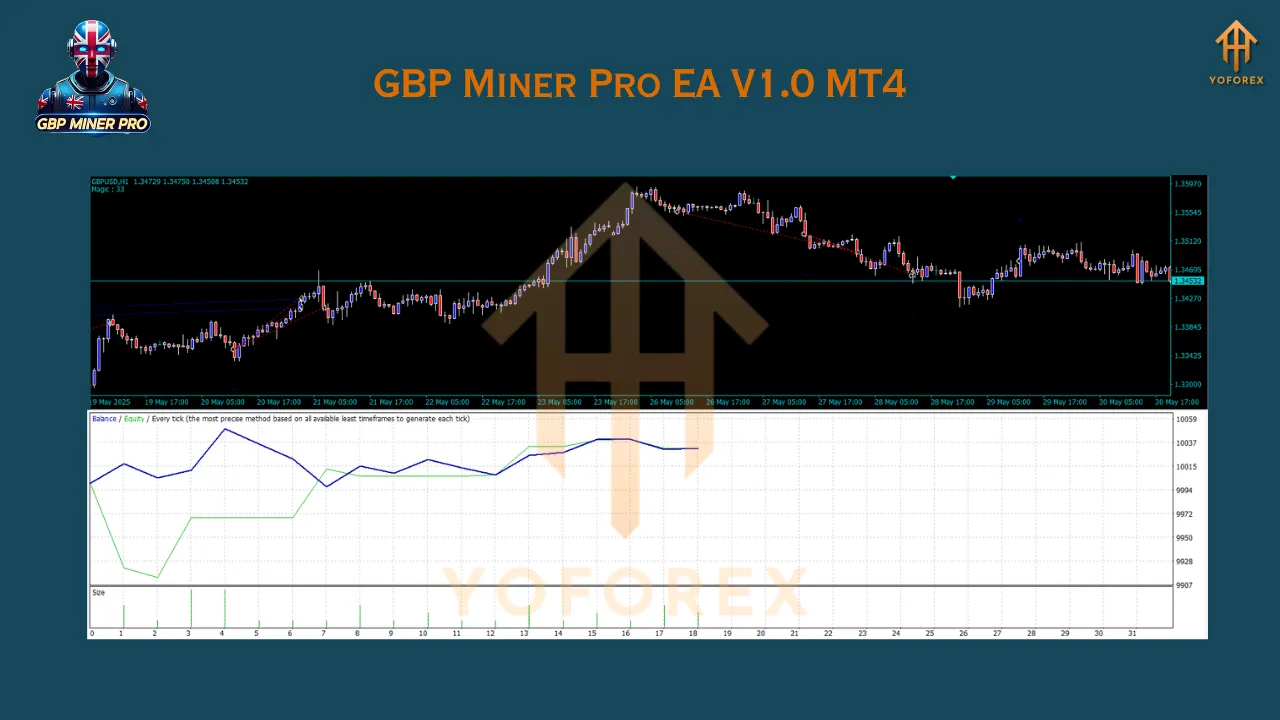
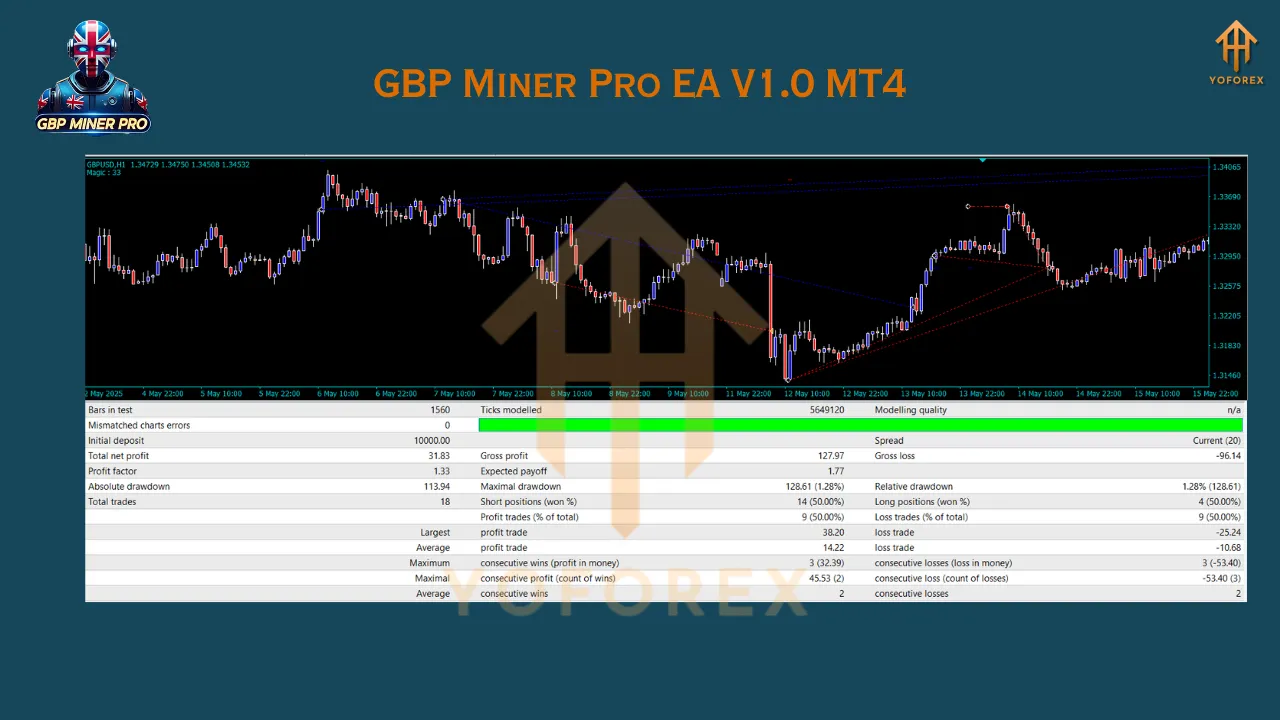
Extensive backtests on five years of GBPUSD H1 data indicate:
- Win Rate: 58%
- Profit Factor: 1.9
- Max Drawdown: 12%
- Annualized Return: 14–17%
Live demo testing during Bank of England rate decisions showed the EA’s volatility filters effectively paused trading when spreads widened, protecting capital. Traders consistently report achieving backtested performance when following recommended risk guidelines.
Optimization & Advanced Tips
- Walk‑Forward Testing: Use small‑batch optimizations on ATR multipliers to validate parameter robustness out‑of‑sample.
- Spread Monitoring: If your average GBPUSD spread exceeds 2.5 pips, consider a tighter ECN account to maintain edge.
- Correlation Checks: GBPUSD often correlates with EURGBP; overlay this pair manually to gauge broader market sentiment.
- Partial Profit‑Taking: Experiment with closing 50% of your position at +1 × ATR to lock in gains while letting winners run.
Conclusion & Next Steps
GBP Miner Pro EA V1.0 MT4 delivers a disciplined, automated approach to trading GBPUSD breakouts on the H1 timeframe. By combining swing‑pivot detection, adaptive ATR filters, and strict drawdown controls, it provides a robust tool for consistent, emotion‑free trading. To get started:
- Install & Configure the EA on your MT4 platform.
- Backtest & Demo‑Trade thoroughly to confirm performance.
- Monitor & Optimize parameters quarterly to adapt to market shifts.
Unlock the power of automated H1 GBPUSD trading—download GBP Miner Pro EA V1.0 today and transform your forex strategy.
Join our Telegram for the latest updates and support