
Exploring PhonzieGrid EA V1.0 MT4: A Comprehensive Guide to Grid-Based Forex Automation
Introduction: Why Choose Automated Trading?
In the fast-moving world of forex trading, automation has become a crucial advantage. Traders today seek tools that offer efficiency, consistency, and the ability to capture market opportunities without constant manual monitoring. PhonzieGrid EA V1.0 MT4 is one such expert advisor (EA) that promises to streamline your trading through a structured and intelligent grid-based strategy.
Built specifically for the MetaTrader 4 platform, PhonzieGrid EA V1.0 is designed to capitalize on market fluctuations while providing users with control over risk parameters and trading behavior. This guide explores how PhonzieGrid EA works, its core features, benefits, limitations, and how to set it up for optimal results.
What is PhonzieGrid EA V1.0?
PhonzieGrid EA V1.0 is a fully automated trading robot for MetaTrader 4 that uses a grid trading strategy. This means it places multiple buy and sell orders above and below the current price level at pre-set intervals, forming a “grid” of trades. The EA seeks to profit from the natural retracements and swings that occur in the forex market.
The system is suitable for a wide range of currency pairs, particularly those with high volatility like GBP/JPY and XAU/USD (Gold). Its customizable parameters make it accessible for both beginner and advanced traders.
Key Features
1. Grid Trading Strategy
-
Places multiple buy and sell orders at defined price intervals.
-
Profits from both up and down price movements.
-
Takes advantage of market volatility and retracement behavior.
-
Particularly effective in ranging markets.
2. Customizable Inputs
-
Adjustable grid spacing (distance between trades).
-
Selectable lot sizes and risk settings.
-
Configurable take-profit and stop-loss levels.
-
Tailorable to different trading styles: scalping, swing, or long-term.
3. Built-in Risk Management
-
Automated lot size calculation based on account balance.
-
Maximum drawdown limit to protect account capital.
-
Optional stop-loss settings for additional risk protection.
-
Capital preservation tools to avoid over-leveraging.
4. Compatibility with Multiple Pairs
-
Works well with forex pairs and commodities like gold.
-
Optimized for high-volatility assets.
-
Provides portfolio diversification by running on different symbols.
5. Clean and Simple Interface
-
User-friendly setup and control panel within MT4.
-
Real-time updates of trades and profit/loss.
-
One-click options for trade closure.
-
Easy to operate even for non-technical users.
6. No Martingale or Hedging
-
Does not use dangerous strategies like doubling after losses.
-
Focuses on consistent, calculated execution.
-
Ideal for traders looking to avoid excessive risk exposure.
How PhonzieGrid EA Works
The EA operates by establishing a grid of pending orders around the current market price. Here’s a simplified example:
-
Suppose GBP/JPY is trading at 180.00.
-
The EA may place buy limit orders at 179.60, 179.20, and 178.80.
-
At the same time, it places sell limit orders at 180.40, 180.80, and 181.20.
-
When price moves and triggers these orders, the EA manages each trade to close them in profit using take-profit or overall grid profit targets.
The strategy relies on the principle that markets often retrace after a move, creating opportunities to exit with profit even if the initial trade was against the direction of movement.
Installation and Setup Guide
Setting up PhonzieGrid EA V1.0 is straightforward. Follow these steps:
Step 1: Download the EA
-
Obtain the EA file in
.ex4or.mq4format from a reliable source.
Step 2: Add EA to MT4
-
Open MT4.
-
Go to
File > Open Data Folder > MQL4 > Experts. -
Copy the EA file into the “Experts” folder.
-
Restart MetaTrader 4 to load the EA.
Step 3: Attach EA to Chart
-
Open the chart of your chosen currency pair (e.g., GBP/JPY).
-
Drag the EA from the “Navigator” panel onto the chart.
-
Configure the settings: lot size, grid spacing, take-profit, etc.
Step 4: Enable Auto Trading
-
Click the “AutoTrading” button on the MT4 toolbar to activate live trading.
-
Monitor the chart and trade execution to ensure proper functioning.
Benefits of Using PhonzieGrid EA V1.0
1. Fully Automated Execution
-
Executes trades 24/5 without the need for manual involvement.
-
Enables traders to focus on strategy development or other tasks.
2. Emotion-Free Trading
-
Eliminates impulsive decisions driven by fear or greed.
-
Maintains consistency and discipline through programmed logic.
3. High Customizability
-
Suitable for a variety of trading styles.
-
Can be adjusted to suit conservative or aggressive risk profiles.
4. Scalability
-
Can be used on micro, mini, or standard accounts.
-
Works well on multiple charts simultaneously for diversification.
5. Continuous Market Monitoring
-
Always watches for new opportunities without missing trades.
-
Responds instantly to changes in price and volatility.
Risks and Considerations
While the EA offers a strong set of benefits, there are also important risks to note:
1. Exposure to Drawdown
-
In trending markets without retracements, multiple open positions may lead to large drawdowns.
-
It is essential to set maximum loss limits and monitor exposure.
2. Capital Requirements
-
Grid trading often requires higher capital reserves.
-
Small accounts may quickly run out of margin during strong market moves.
3. Market Suitability
-
Most effective in ranging or mildly trending markets.
-
In strong one-directional trends, the EA may underperform unless properly managed.
4. Broker Selection
-
Low-spread, fast-execution brokers are ideal for grid strategies.
-
Slippage or high commissions may reduce profitability.
5. No Guarantee of Profit
-
As with any EA, success depends on market conditions and proper configuration.
-
Testing and optimization are essential before going live.
Performance Testing and Optimization
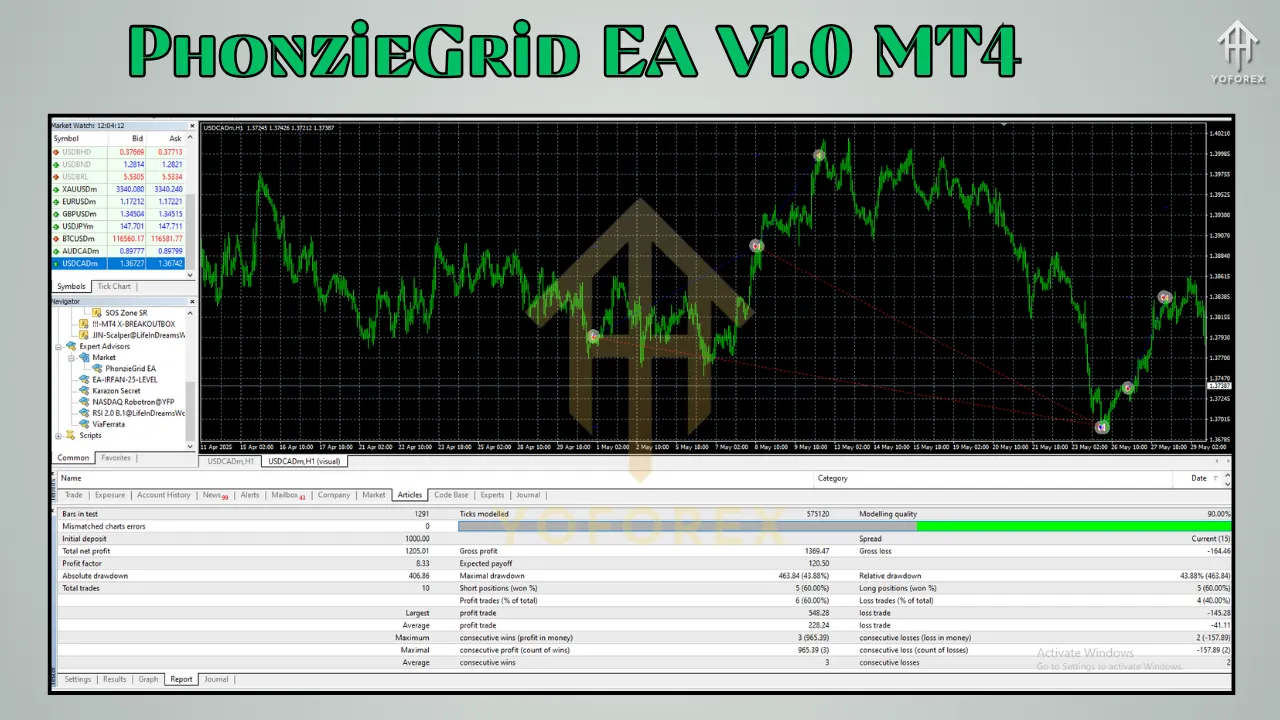
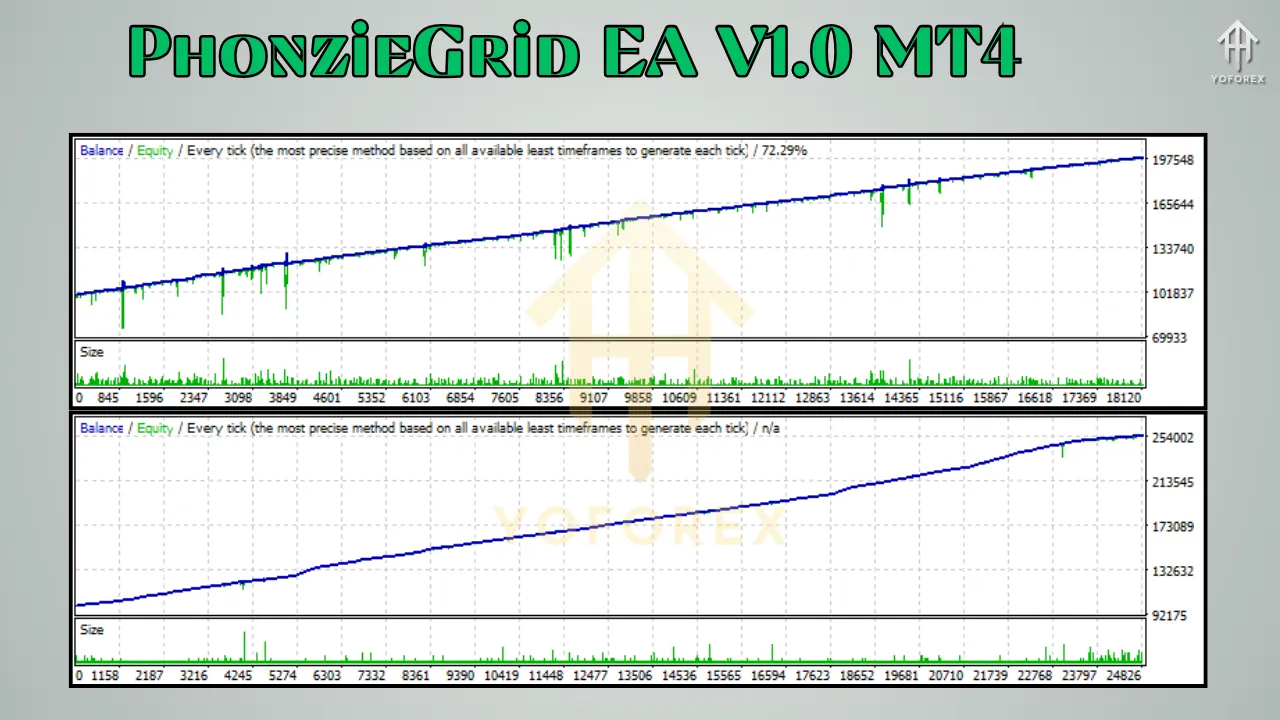
To determine how PhonzieGrid EA V1.0 performs under different market conditions, users are advised to:
1. Use Strategy Tester in MT4
-
Run historical backtests using real tick data.
-
Test different symbols and timeframes.
-
Evaluate key performance metrics like:
-
Profit factor
-
Drawdown percentage
-
Win/loss ratio
-
Average trade duration
-
2. Demo Account Testing
-
Deploy the EA on a demo account for at least 1-3 months.
-
Observe behavior in real-time market conditions.
-
Adjust settings to improve performance based on outcomes.
3. Risk-to-Reward Optimization
-
Try multiple grid spacing and lot sizing configurations.
-
Avoid overfitting to historical data.
-
Set a profit target and daily stop-loss to preserve equity.
Comparing PhonzieGrid EA with Other EAs
PhonzieGrid EA V1.0 holds its own against various other EAs in the market. Let’s look at how it compares:
vs. Waka Waka EA
-
Waka Waka uses grid plus technical indicators like RSI.
-
PhonzieGrid keeps it cleaner with a pure grid strategy and no martingale.
vs. Forex Robotron (Trend EA)
-
Forex Robotron follows trend-based logic.
-
PhonzieGrid performs better in sideways or oscillating markets.
vs. Golden Scalper PRO
-
Scalping EAs target quick in-and-out trades.
-
PhonzieGrid holds trades longer depending on the grid distance and volatility.
Each EA has strengths and weaknesses depending on the market environment. Traders should choose based on their risk appetite and preferred strategy.
Best Practices for Using PhonzieGrid EA V1.0
To make the most out of this EA, follow these expert tips:
-
Start on Demo First: Always test with virtual funds to understand behavior.
-
Use Conservative Settings: Begin with small lot sizes and larger grid distances.
-
Avoid Trading During Major News: High-impact events can trigger volatility spikes.
-
Monitor Margin Usage: Don’t let open trades consume all your free margin.
-
Regularly Update Settings: Market conditions change, so adjust parameters accordingly.
-
Use VPS for 24/7 Uptime: Prevent disruptions caused by internet or power outages.
Final Thoughts
PhonzieGrid EA V1.0 MT4 is a solid entry into the world of automated grid trading. With its risk-controlled strategy, broad asset compatibility, and user-friendly setup, it offers a practical solution for traders aiming to leverage market swings without constant manual effort.
However, as with any forex robot, its success ultimately depends on smart configuration, proper risk management, and ongoing optimization. Used wisely, PhonzieGrid EA can serve as a reliable tool in your trading arsenal.
DOWNLOAD NOW