Unlock Your Trading Potential: A Deep Dive into the Supply Demand EA ProBot V1.3 for MT4
In the fast-paced world of Forex trading, every trader seeks an edge—a method to navigate the market’s volatility with precision, consistency, and minimal emotional interference. The markets are a constant battle between buyers and sellers, a fundamental principle known as supply and demand. What if you could harness this core market dynamic and automate it?
Enter the Supply Demand EA ProBot V1.3 for MT4. This isn’t just another trading robot; it’s a sophisticated, fully automated Expert Advisor (EA) designed to identify and trade based on the foundational principles that move every financial market. Whether you’re a beginner struggling to find consistency or a seasoned professional looking to automate a proven strategy, this tool promises to revolutionize your approach.
This comprehensive review will explore every facet of the Supply Demand EA ProBot, from its underlying trading philosophy to its powerful features, setup process, and best practices for maximizing its potential.
The Timeless Philosophy: Why Trade Supply and Demand?
Before we delve into the EA itself, it’s crucial to understand the power of its core strategy. Unlike complex indicators that can lag or provide conflicting signals, the concept of supply and demand is the bedrock of price action.
- Supply Zone: This is a price area where an overwhelming amount of selling interest is concentrated. Think of it as a ceiling where sellers have previously stepped in forcefully, pushing prices down. When the price returns to this zone, there’s a high probability that leftover sell orders will be triggered, causing another price decline. The ProBot is engineered to identify these institutional-level selling zones.
- Demand Zone: Conversely, a demand zone is a price floor where significant buying interest has previously emerged. Buyers overwhelmed sellers in this area, causing a sharp rally. When the price revisits this zone, it’s likely that unfilled buy orders will activate, providing strong support and pushing the price up. The EA’s algorithm is fine-tuned to pinpoint these high-probability buying opportunities.
By trading based on these zones, you are aligning your trades with the “smart money”—the institutional players whose large orders create these imbalances in the first place. The Supply Demand EA ProBot V1.3 automates this entire process, removing guesswork and emotional decision-making.
Introducing the Supply Demand EA ProBot V1.3: Your Automated Trading Partner
The Supply Demand EA ProBot is a specialized software designed exclusively for the MetaTrader 4 (MT4) platform. Its primary function is to scan the market 24/5, identify high-probability supply and demand zones, and execute trades automatically based on its built-in logic and your predefined risk parameters.
It’s built for universal application, meaning it can be deployed on any currency pair and across any timeframe, offering unparalleled flexibility to fit your unique trading style and preferences.
Key Features That Set the ProBot Apart
What makes this EA a standout choice in a crowded market? It boils down to a combination of intelligent design, user-centric features, and robust performance.
1. Fully Automated Trading Engine
The core appeal of the ProBot is its “set and forget” capability. Once configured, it operates entirely on its own.
- 24/5 Market Analysis: It never sleeps, ensuring you never miss a potential setup, even when you’re away from your charts.
- Emotion-Free Execution: It eliminates the two biggest enemies of a trader: fear and greed. Trades are executed based on pure, unbiased algorithmic logic, leading to more consistent decision-making.
- Passive Potential: For those with busy schedules, it offers a pathway to participating in the markets without dedicating hours to manual charting and analysis.
2. Advanced Supply and Demand Detection Algorithm
This EA doesn’t just draw boxes on a chart. Its proprietary algorithm is designed to qualify zones based on their strength and probability of holding. It analyzes the structure of the zone’s formation—how price left the area—to distinguish powerful, fresh zones from weak, tested ones. This intelligent filtering is key to its high-probability trade selection.
3. Intuitive Graphical Trading Dashboard
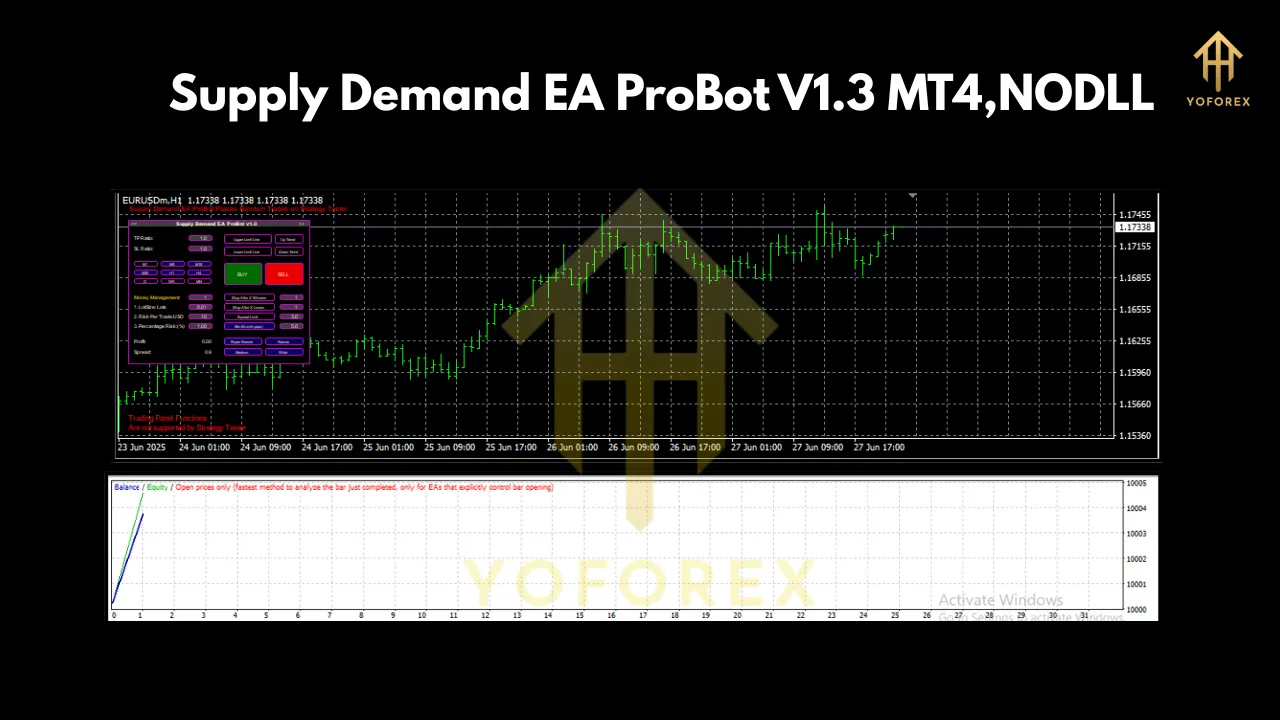
This is perhaps the most user-friendly feature, especially for beginners. Instead of digging through complex input menus, the ProBot features an on-chart graphical dashboard. From this central hub, you can:
- Control EA Operations: Easily switch the EA on or off.
- Adjust Risk Settings: Visually set your lot size, Stop Loss (), and Take Profit () levels.
- Monitor Performance: Get a quick overview of open trades, profit/loss, and key account metrics.
- Customize Strategy: Fine-tune settings like risk-to-reward ratios and trade management options without touching a single line of code.
This dashboard demystifies EA configuration and puts you in complete control, making advanced automation accessible to everyone.
4. Comprehensive and Customizable Risk Management
Profitability is intrinsically linked to smart risk management. The Supply Demand EA ProBot excels here.
- Fixed and Dynamic Lot Sizing: Choose a fixed lot size for every trade or use a dynamic model that calculates lot size based on a percentage of your account balance.
- Strict Stop Loss and Take Profit: Every trade is protected with a pre-calculated and . The is logically placed to invalidate the trade idea, while the targets the next opposing zone or a fixed reward multiple.
- Trailing Stop Functionality: Secure profits as a trade moves in your favor with a customizable trailing stop.
5. Universal Compatibility and Low Entry Barrier
The EA’s flexibility is a massive advantage. You are not locked into a single “best” pair or timeframe. You can backtest and optimize it on major pairs like EUR/USD, volatile pairs like GBP/JPY, or even exotic pairs.
Furthermore, with a minimum recommended deposit of just $100, it’s incredibly accessible. You don’t need a large capital outlay to begin leveraging the power of automated supply and demand trading.
Getting Started: A Simple 4-Step Guide to Your First Automated Trade
Deploying the Supply Demand EA ProBot is straightforward.
- Purchase and Download: Secure your copy of the EA from a verified source and download the
.ex4file. - Installation on MT4: Open your MT4 terminal. Go to
File > Open Data Folder. Navigate to theMQL4 > Expertsfolder and paste the downloaded.ex4file there. Refresh your ‘Navigator’ panel or restart MT4, and the EA will appear under ‘Expert Advisors’. - Configuration: Drag the “Supply Demand EA ProBot V1.3” onto your desired chart. The settings window will pop up. Ensure “Allow live trading” is checked. You can make initial adjustments here, but most of the control is handled via the on-chart dashboard that will appear.
- Activation: Click the “AutoTrading” button in your MT4 terminal to turn it green. The EA is now live and will begin analyzing the market for its next trade.
Best Practices for Maximizing Success
To get the most out of this powerful tool, follow these professional guidelines:
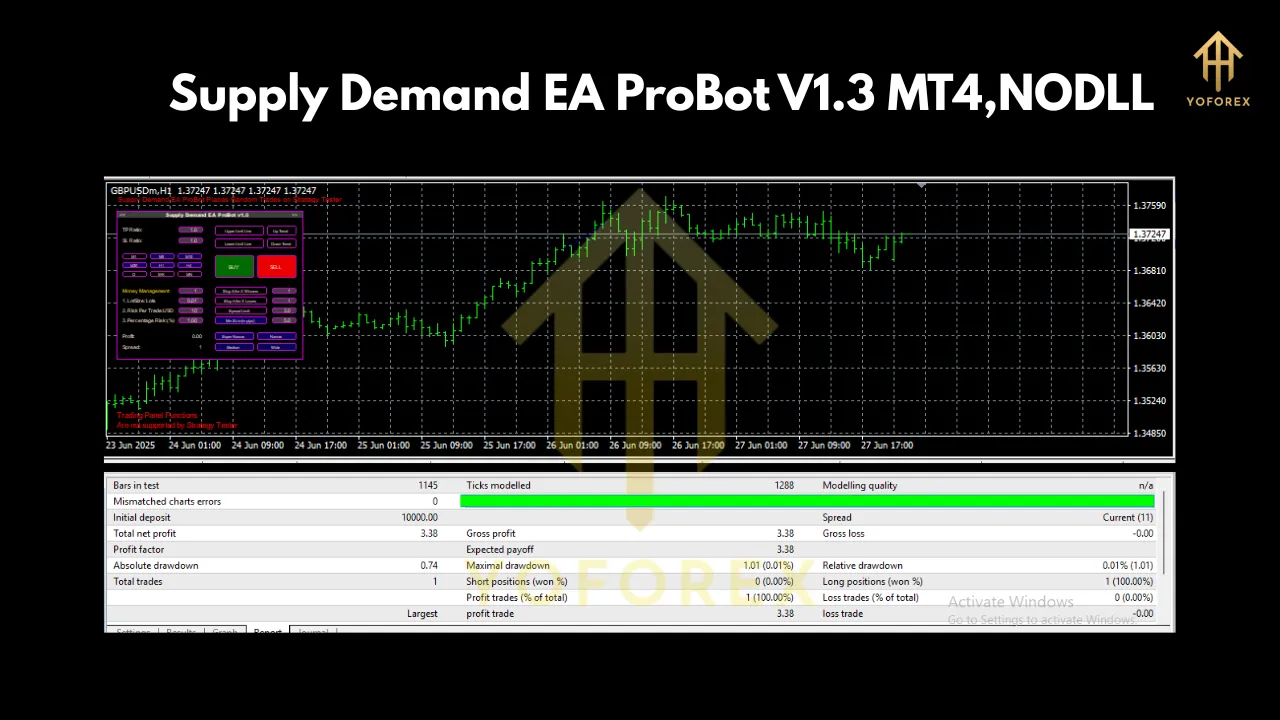
- Backtest Thoroughly: Before going live, use MT4’s Strategy Tester to backtest the EA on different pairs and timeframes. This helps you understand its performance characteristics and find the optimal settings for your risk appetite.
- Start on a Demo Account: Always run the EA on a demo account for at least a week or two. This allows you to observe its behavior in a live market environment without risking real capital.
- Use a VPS (Virtual Private Server): An EA needs to run 24/7 without interruption. A VPS is a remote computer that is always online. It protects your EA from power outages, internet disconnections, or your PC shutting down, ensuring it never misses a trade.
- Understand Your Settings: While the dashboard is simple, take the time to understand what each setting does. Know your risk-per-trade percentage and your target profit levels. Never trade with settings you don’t comprehend.
- Diversify: Don’t limit the EA to a single currency pair. Once you are comfortable, consider running it on 2-3 uncorrelated pairs to diversify your risk and smooth out your equity curve.
Who Is This EA For?
The Supply Demand EA ProBot V1.3 is designed for a wide spectrum of traders:
- The Beginner Trader: Provides a structured, rule-based trading system that teaches the principles of price action while automating the difficult parts.
- The Part-Time Trader: Perfect for those with full-time jobs who cannot dedicate hours to active screen time but still want to participate in the markets.
- The Strategy-Driven Trader: Ideal for those who already believe in the power of supply and demand but want to automate the execution for better discipline and efficiency.
- The Diversifier: An excellent tool for experienced traders looking to add an automated, non-correlated strategy to their existing portfolio.
The Verdict
The Supply Demand EA ProBot V1.3 MT4 is more than just an automated system; it’s a comprehensive trading solution built on a timeless market principle. By combining a powerful analytical algorithm with an exceptionally user-friendly interface and robust risk management controls, it empowers traders of all levels to trade with discipline, precision, and confidence.
Its ability to operate on any pair, any timeframe, and with a low starting deposit of $100 makes it one of the most accessible and versatile EAs available today. If you are ready to remove emotion from your trading and systematically exploit the fundamental forces of supply and demand, the ProBot EA is a tool that deserves your serious consideration.