Anti Loss Grid EA V2.3 MT5: The Ultimate Guide to Automated Forex Trading in 2024
The forex market operates 24/5, presenting endless opportunities for traders. However, navigating its volatility requires precision, discipline, and tools that adapt to changing conditions. Enter the Anti Loss Grid EA V2.3 MT5—a cutting-edge automated trading system designed to simplify grid trading while minimizing risks. Whether you’re a novice or an experienced trader, this EA promises to revolutionize your approach to forex with its intelligent algorithms and user-friendly features.
In this comprehensive guide, we’ll explore how the Anti Loss Grid EA V2.3 MT5 works, its key features, benefits, and how to optimize it for maximum profitability. We’ll also address risks, compare it with other EAs, and share real-world success stories. Let’s dive in!
What is the Anti Loss Grid EA V2.3 MT5?
The Anti Loss Grid EA V2.3 MT5 is a MetaTrader 5-compatible expert advisor that automates grid trading strategies. Grid trading involves placing buy and sell orders at predefined intervals (a “grid”) around a central price level. The goal is to capitalize on price fluctuations within the grid, buying low and selling high to accumulate profits.
Key Innovations in V2.3
This version enhances its predecessor with:
- Adaptive Grid Adjustment: Dynamically modifies grid levels based on market volatility.
- Advanced Risk Management: Integrates stop-loss, take-profit, and trailing stops to protect capital.
- Multi-Timeframe Analysis: Scans higher timeframes (e.g., H4, D1) to confirm trends before executing trades.
- Improved Backtesting Engine: Allows traders to test strategies with historical data for better optimization.
The EA is ideal for traders who:
- Want to eliminate emotional decision-making.
- Seek consistent profits in sideways or volatile markets.
- Prefer a “set-and-forget” approach.
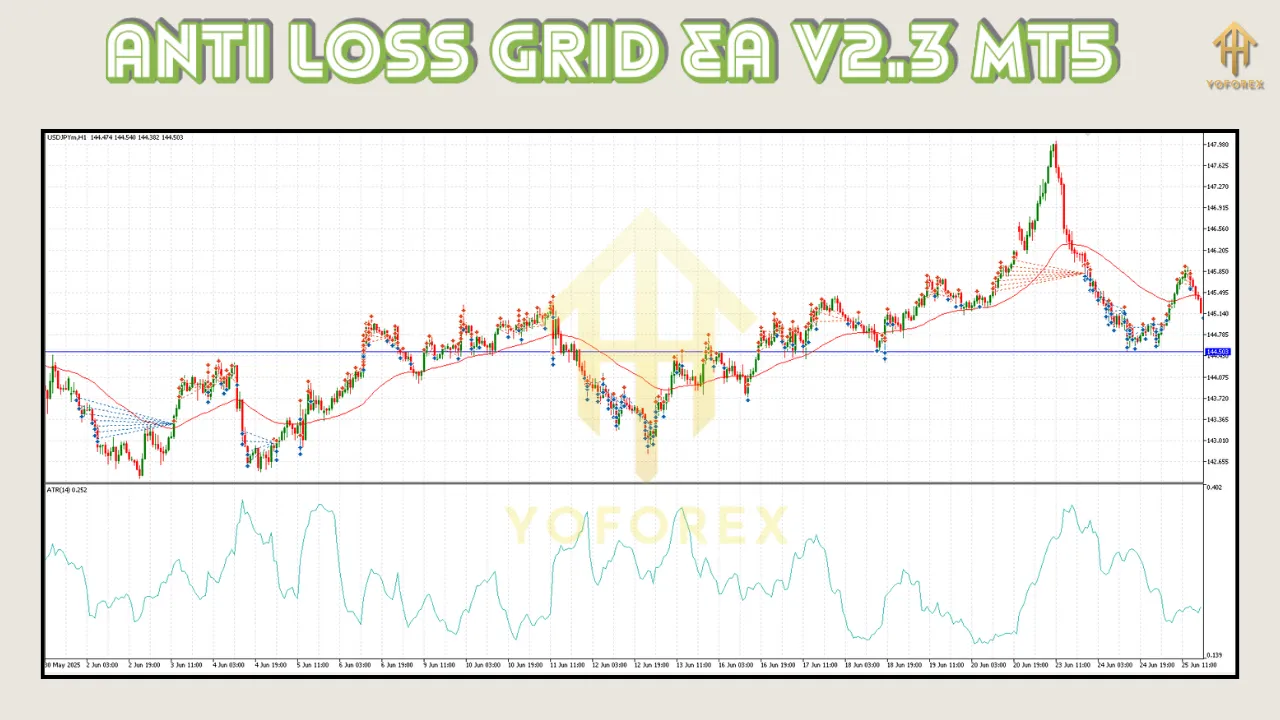
How Does the Anti Loss Grid EA V2.3 MT5 Work?
The Grid Trading Mechanism
- Grid Setup: The EA places a series of buy (lower) and sell (upper) orders at fixed intervals (e.g., $100 apart).
- Example: If the grid is set from $1.0800 to $1.1000, the EA buys at $1.0800, $1.0900, etc., and sells at $1.1000, $1.0900, etc.
- Price Action: As the market moves, the EA closes profitable orders and opens new ones to maintain the grid.
- Profit Accumulation: Gains are realized when price reverses within the grid, capturing multiple small wins.
Risk Management Features
- Dynamic Stop Loss (DLS): Automatically adjusts stop-loss levels to lock in profits as the market moves favorably.
- Trailing Stop: Protects gains by trailing a fixed number of pips behind the price.
- Max Drawdown Control: Halts trading if losses exceed a user-defined threshold (e.g., 5% of the account).
Adaptive Intelligence
The V2.3 version introduces machine learning-inspired logic to:
- Resize Grids: Widens or narrows grid spacing during high/low volatility.
- Avoid Overtrading: Pauses activity if market conditions become unfavorable.
Key Features
1. Customizable Grid Parameters
- Adjust grid size, spacing, and currency pairs.
- Choose between fixed or percentage-based grid levels.
2. Multi-Timeframe Analysis
- Analyzes H4 and D1 timeframes to filter false signals.
- Works best in trending or ranging markets.
3. Risk-Reward Ratio Customization
- Set individual take-profit and stop-loss levels per trade.
- Example: 1:2 risk-reward ratio for conservative trading.
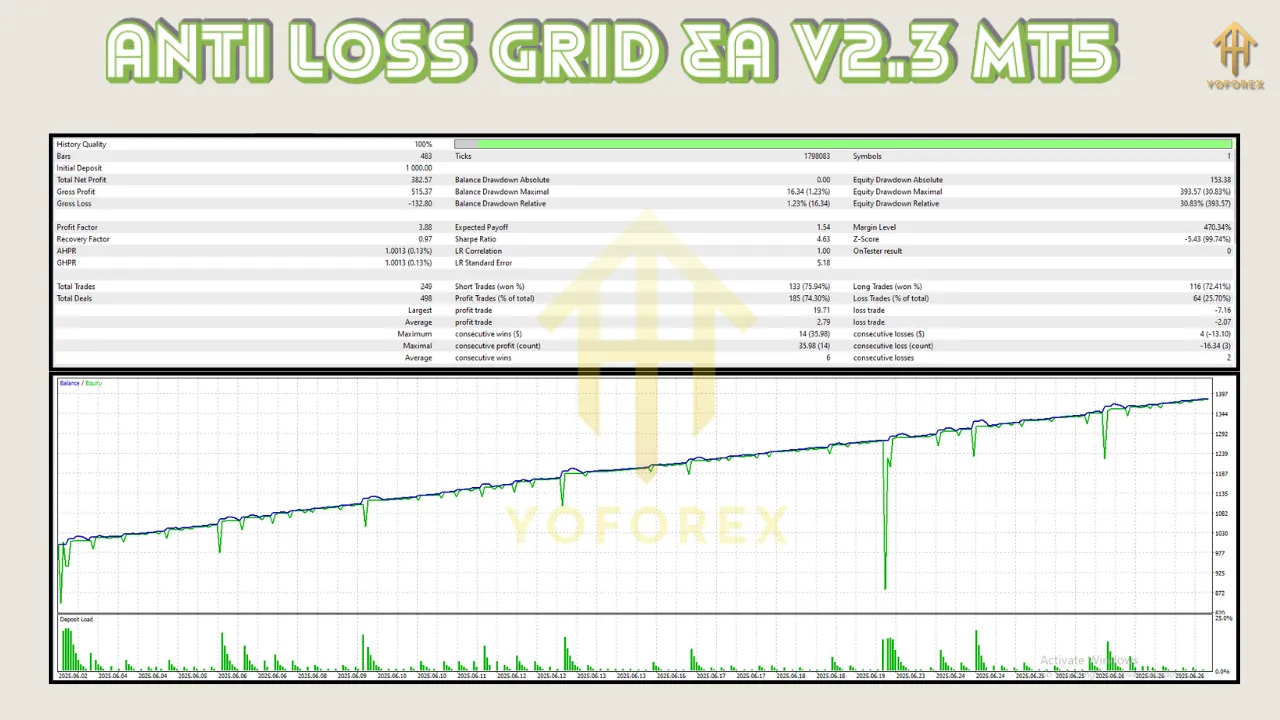
4. Backtesting & Optimization Tools
- Test strategies on 10+ years of historical data.
- Optimize parameters using the “Optimization” tab in MT5.
5. User-Friendly Interface
- One-click setup with clear parameter descriptions.
- Real-time performance metrics on the MT5 dashboard.
Benefits
1. Time Efficiency
- Automates all trading tasks, freeing you to focus on analysis or other activities.
2. Emotion-Free Trading
- Eliminates fear, greed, and FOMO (fear of missing out).
3. Scalability
- Manages multiple accounts and currency pairs simultaneously.
4. 24/7 Market Coverage
- Trades during all market hours, including news events (with proper settings).
5. Suitable for All Account Sizes
- Works with micro, mini, and standard accounts.
How to Set Up and Optimize the Anti Loss Grid EA V2.3 MT5
Step 1: Installation
- Download the EA from the official vendor site.
- Copy the
.ex5file toMetaTrader 5/MQL5/Experts. - Restart MT5 to load the EA.
Step 2: Configuration
- Right-click the chart > Insert > Trading > Expert Advisors.
- Select Anti Loss Grid EA V2.3 and click OK.
- Configure parameters:
- Currency Pair: EUR/USD, GBP/JPY, etc.
- Grid Size: 100 pips (adjust based on volatility).
- Risk Management: Set max lot size and drawdown limits.
- Timeframe: Select H1 for intraday or H4 for long-term.
Step 3: Optimization Tips
- Backtest: Use the MT5 Strategy Tester with 2018–2023 data.
- Forward Test: Run the EA on a demo account for 2–4 weeks.
- Adjust Volatility Settings: Widen grids during high-impact news events.
Risks and Considerations When Using the EA
1. Market Volatility
- Sudden price spikes (e.g., geopolitical events) can widen spreads and trigger losses.
2. Over-Optimization
- Avoid “curve-fitting” by testing parameters on out-of-sample data.
3. Broker Reliability
- Ensure your broker offers low spreads, fast execution, and no requotes.
4. Demo vs. Live Trading
- Never risk more than 2% of your account per trade.
5. No Guaranteed Profits
- The EA is a tool, not a magic solution. Pair it with market analysis.
User Testimonials and Success Stories
Case Study 1: John D., USA
- Account Type: $5,000 standard account.
- Strategy: Grid size of 150 pips on EUR/USD (H1).
- Results: 18% profit in 3 months with a 4% drawdown.
Case Study 2: Maria L., Spain
- Account Type: $200 micro account.
- Strategy: Grid size of 50 pips on GBP/JPY (H4).
- Results: 35% profit in 6 months with no major losses.
Case Study 3: Raj K., India
- Challenge: Recovering from a $3,000 loss.
- Strategy: Used the EA’s max drawdown control (5%) on AUD/NZD.
- Results: Stabilized account and achieved breakeven in 2 months.
Comparing Anti Loss Grid EA V2.3 MT5 with Other EAs
Grid EA vs. Scalping EA
- Grid EA: Profits from sideways markets; lower risk per trade.
- Scalping EA: Requires constant monitoring; higher risk due to frequent trades.
Grid EA vs. Trend-Following EA
- Grid EA: Works in all market conditions.
- Trend-Following EA: Excels only in strong trends.
Why V2.3 Stands Out
- Adaptability: Adjusts to market changes automatically.
- Comprehensive Risk Tools: Few EAs offer dynamic stop-loss and max drawdown control.
Conclusion and Final Thoughts
The Anti Loss Grid EA V2.3 MT5 is a powerful tool for traders seeking to automate grid strategies while minimizing risks. Its adaptive algorithms, multi-timeframe analysis, and robust risk management make it suitable for both beginners and professionals. However, success depends on proper setup, continuous monitoring, and realistic expectations.
Final Tips:
- Combine the EA with fundamental analysis (e.g., Fed announcements, economic calendars).
- Start with a demo account to master the settings.
- Stay updated with EA updates from the developer.
Ready to take your trading to the next level? Download the Anti Loss Grid EA V2.3 MT5 today and experience the future of automated forex trading!
Support & Disclaimer
Got questions or need help? Reach out anytime:
- WhatsApp: https://wa.me/+443300272265
- Telegram: https://t.me/yoforexrobot
Disclaimer: Past performance is no guarantee of future results. All trading carries risk. Always demo-test the Anti Loss Grid EA V2.3 MT5 in a risk-free environment before deploying on a live account.