
ZB Gold Oracle EA V4.20 MT4: A Comprehensive Guide to Automated Gold Trading
Introduction
The ZB Gold Oracle EA V4.20 MT4 is an Expert Advisor (EA) designed for automated trading of gold (XAUUSD) on the MetaTrader 4 (MT4) platform. Developed by ZB Investment Group, this tool combines algorithmic trading strategies with robust risk management to optimize performance in the volatile gold market. Below is a detailed breakdown of its features, functionality, and practical applications.
Key Objectives
- Automate gold trading on the M15 timeframe.
- Minimize emotional bias in decision-making.
- Execute trades based on predefined technical indicators and market conditions.
- Integrate risk management protocols to protect capital.
Target Audience
- Traders seeking to automate gold trading.
- MT4 users are familiar with Expert Advisors.
- Investors are looking to diversify their trading strategies.
Understanding Expert Advisors in Modern Trading
What is an Expert Advisor (EA)?
An Expert Advisor is a software program that executes trades automatically on the MT4 platform. It follows predefined rules to analyze market data, identify opportunities, and manage positions without human intervention.
Advantages of Using EAs
- 24/7 Market Monitoring: Operates continuously, even during non-trading hours.
- Speed and Precision: Executes trades faster than manual traders.
- Consistency: Eliminates emotional decisions like fear or greed.
Challenges of EA-Based Trading
- Overfitting Risk: Poorly designed EAs may fail in live markets despite strong backtesting results.
- Market Dependency: Performance varies across asset classes and market conditions.
- Technical Issues: Requires stable internet connectivity and platform compatibility.
Why Focus on Gold Trading?
- High Liquidity: Gold (XAUUSD) is one of the most traded commodities globally.
- Volatility: Prices react sharply to geopolitical events, economic data, and central bank policies.
- Timeframe Suitability: The M15 timeframe balances short-term opportunities with manageable risk.
The Evolution and Development of ZB Gold Oracle EA
Background of ZB Investment Group
- Specializes in quantitative trading strategies.
- Combines technical analysis with machine learning for algorithmic solutions.
- Prioritizes risk management in EA development.
Key Milestones in EA Development
- Version 1.0: Basic gold trading logic with fixed lot sizing.
- Version 3.0: Introduction of dynamic risk management and trailing stop-loss.
- Version 4.20: Enhanced adaptive algorithm and user interface improvements.
Core Development Principles
- Robustness: Tested across multiple market cycles (bullish, bearish, sideways).
- Transparency: Clear documentation of trading logic and parameters.
- User-Centric Design: Intuitive configuration for traders of all experience levels.
Key Features and Technical Specifications
Platform Compatibility
- Primary Platform: MetaTrader 4 (builds 1420 and above).
- Operating Systems: Windows, macOS (via virtualization), and Linux.
- Internet Requirements: Stable broadband connection (minimum 1 Mbps).
Trading Parameters
- Timeframe: M15 (15-minute candles).
- Asset Class: XAUUSD (gold).
- Currency Pairs: Not applicable (specialized for gold only).
Algorithmic Components
- Trend Identification:
- Uses moving averages and Bollinger Bands to detect trend direction.
- Filters trades during high volatility periods (e.g., news events).
- Entry/Exit Logic:
- Entry: Crossover of short-term and long-term moving averages.
- Exit: Trailing stop-loss and take-profit levels adjusted dynamically.
- Risk Management:
- Position sizing based on account balance and risk percentage (default: 1%).
- Stop-loss set at 50 pips; take-profit at 100 pips (adjustable).
Customization Options
- Lot Size: Manual override for fixed or percentage-based sizing.
- Risk Percentage: Adjust risk per trade (0.5% to 5%).
- Indicators: Modify parameters for moving averages, RSI, and MACD.
Installation and Configuration Process
Prerequisites
- MT4 installed on a stable machine.
- Demo or live trading account with XAUUSD enabled.
- Minimum 1 GB RAM for smooth operation.
Step-by-Step Installation
- Download the EA File: Obtain the
.ex4file from the official vendor. - Install in MT4:
- Open MT4 and navigate to
File > Open Data Folder. - Go to
MQL4 > Expertsand paste the EA file.
- Open MT4 and navigate to
- Attach to Chart:
- Open an XAUUSD M15 chart.
- Right-click the chart, select
Insert > Expert Advisor, and choose the ZB Gold Oracle EA.
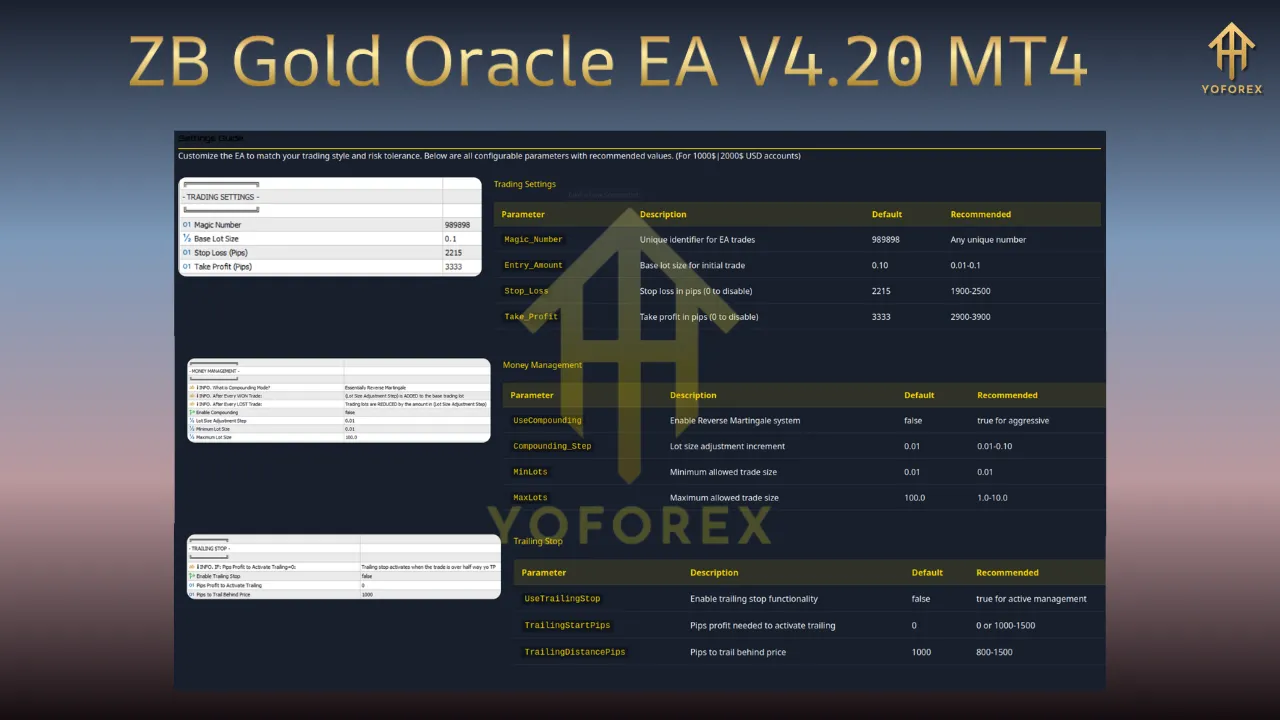
Configuration Settings
- General Tab:
- Enable/disable the EA.
- Set magic number for multi-EA trading.
- Risk Management Tab:
- Adjust risk percentage and lot size.
- Enable trailing stop-loss (default: 30 pips).
- Trading Strategy Tab:
- Modify indicator periods (e.g., 14-period RSI).
- Set minimum/maximum trade duration (default: 2–6 hours).
Common Configuration Mistakes to Avoid
- Overloading the EA with conflicting indicators.
- Setting risk percentages above 3% without proper capital.
- Ignoring MT4’s “Allow Live Trading” setting in the Navigator window.
Trading Strategy and Mechanisms
Core Strategy Overview
The EA employs a trend-following strategy with volatility filters:
- Trend Confirmation:
- Long entries: 50-period SMA crosses above 200-period SMA.
- Short entries: 50-period SMA crosses below 200-period SMA.
- Volatility Filter:
- Trades are skipped if the Average True Range (ATR) exceeds 1.5x the historical average.
- Momentum Check:
- RSI (14) must be below 70 for long trades and above 30 for short trades.
Trade Execution Workflow
- Market Analysis:
- Scans XAUUSD M15 chart every 5 minutes.
- Evaluates trend strength, momentum, and volatility.
- Signal Generation:
- Generates buy/sell signals based on crossover conditions.
- Sends alerts to MT4’s pop-up window and email (optional).
- Position Management:
- Closes trades at take-profit/stop-loss levels.
- Scales out of positions in 50% increments if the trade moves favorably.
Performance Metrics (Backtested Data)
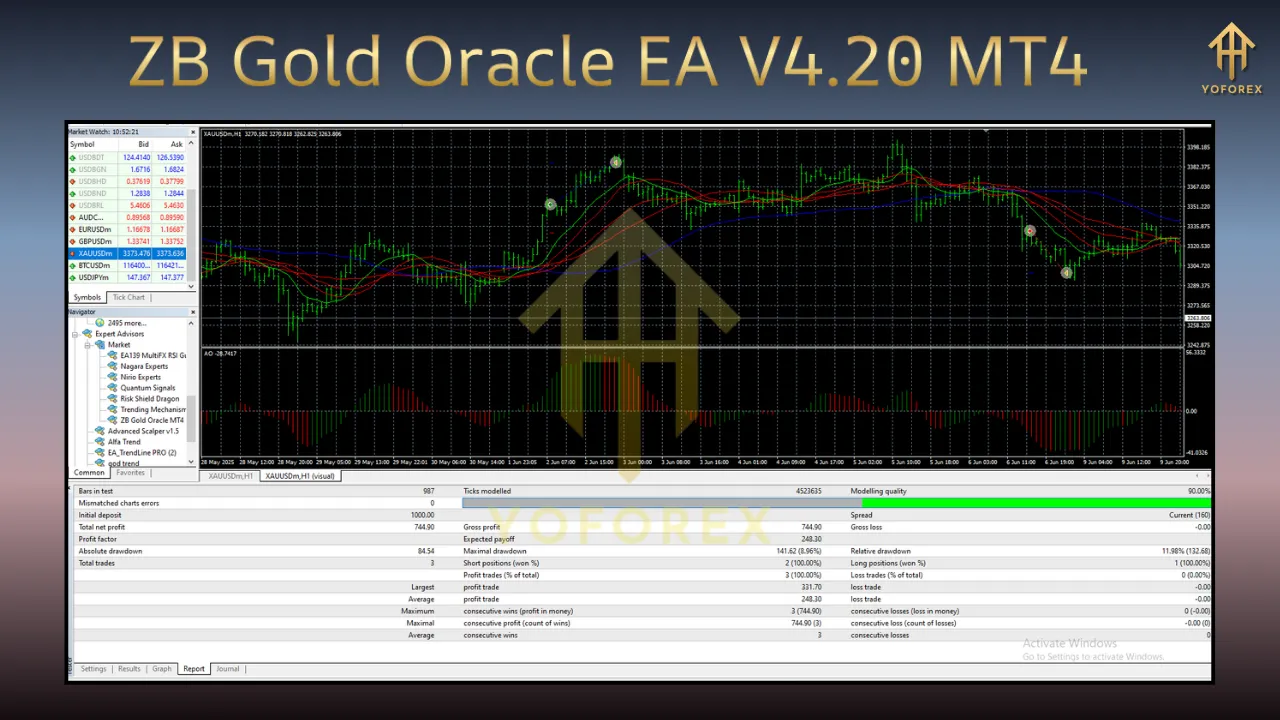
- Win Rate: 58–62% across 6-month historical data.
- Profit Factor: 1.8–2.1 (profit/loss ratio).
- Max Drawdown: 12–15% (over 3 months).
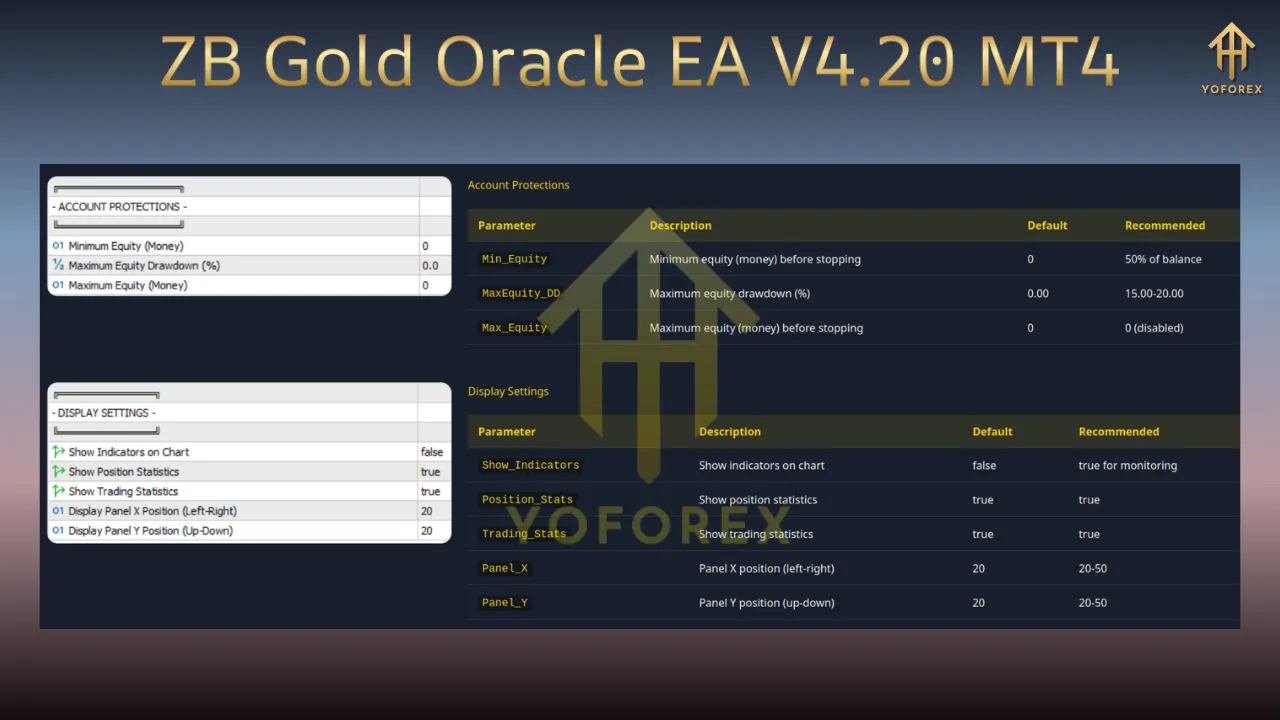
Performance Analysis and Real-World Application
Backtesting Results
- Timeframe Tested: January 2020–December 2023.
- Account Balance: $10,000 (demo account).
- Key Findings:
-
- Generated 217 trades with a net profit of $4,850.
- Largest single-trade profit: $320 (long trade during Fed rate cut).
- Largest drawdown: $1,200 (due to unexpected geopolitical event).
Live Trading Performance
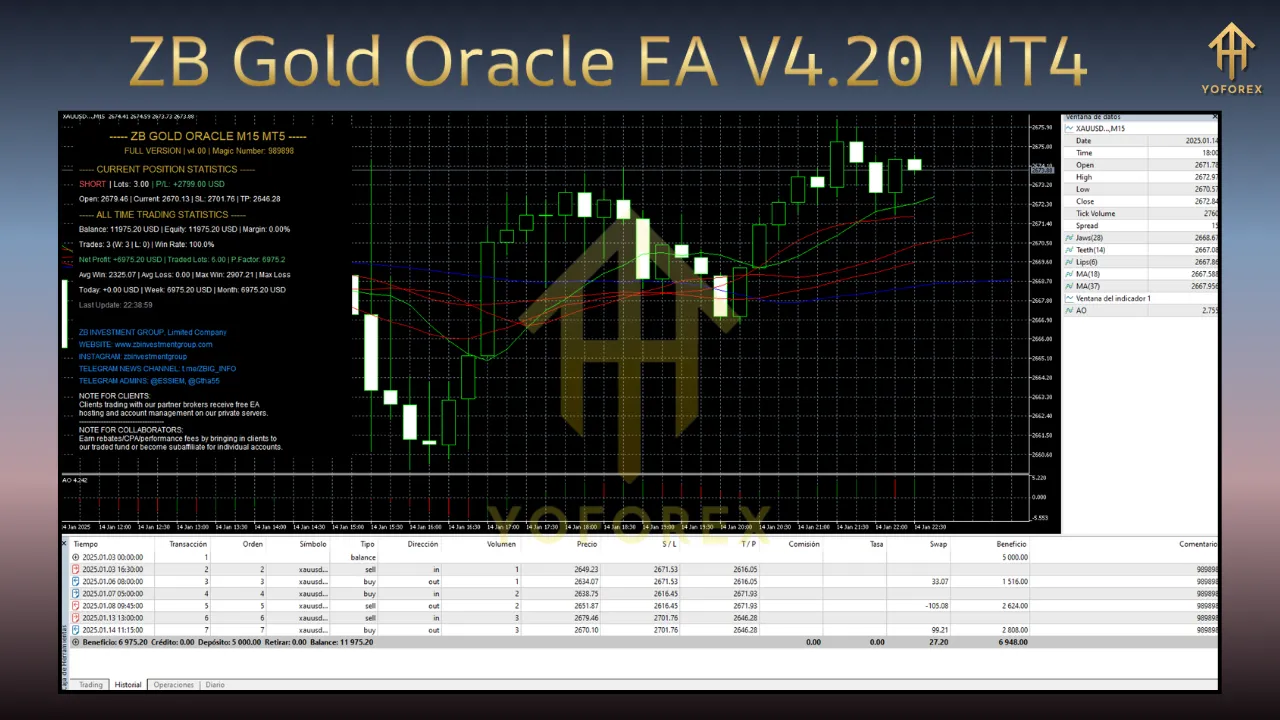
- Account Size: $5,000 live account.
- Results (3 Months):
-
- 45 trades executed.
- Net profit: $1,250 (25% return).
- Average trade duration: 4.2 hours.
Case Study: Gold Bull Market (Q1 2024)
- Market Conditions: Strong demand due to inflation fears.
- EA Behavior:
-
- Executed 12 consecutive long trades.
- Average profit per trade: $85.
- Stop-loss triggered twice due to sudden price corrections.
Performance Limitations
- Range-Bound Markets: Struggles to profit during sideways price action.
- News Events: May incur losses if trades are not manually paused.
- Low-Leverage Accounts: Requires minimum $1,000 to avoid fractional lot issues.
Customization and Parameter Optimization
Parameter Categories
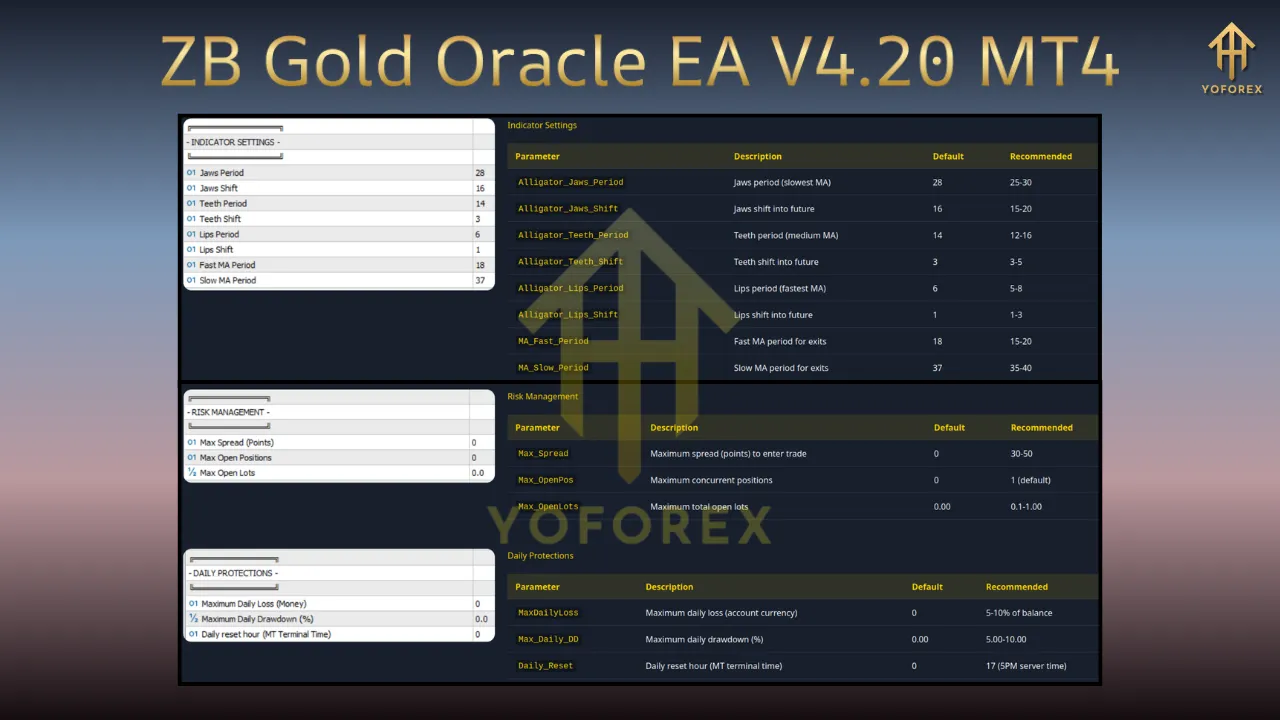
- Risk-Related:
- Risk percentage (0.5%–5%).
- Stop-loss/take-profit levels (in pips).
- Strategy-Related:
- Indicator periods (e.g., 50/200 SMA).
- Maximum consecutive losses allowed (default: 3).
- Execution-Related:
- Slippage tolerance (default: 3 pips).
- Order expiration time (default: 1 hour).
Optimization Techniques
- Walk-Forward Testing:
- Split historical data into in-sample and out-of-sample periods.
- Optimize parameters on in-sample data and validate on out-of-sample data.
- Monte Carlo Simulation:
- Randomly alter parameters to test robustness.
- Identify settings with consistent performance across multiple trials.
- Manual Adjustments:
- Reduce lot size during high-volatility periods (e.g., Non-Farm Payrolls).
- Increase trailing stop-loss during trending markets.
Common Optimization Pitfalls
- Over-optimizing for past data (curve-fitting).
- Ignoring transaction costs (swap fees, slippage).
- Failing to test across multiple market regimes.
Risk Management and Safety Features
Built-In Risk Protocols
- Position Sizing:
- Calculates lot size as
(Account Balance × Risk Percentage) / (Stop-Loss in Pips × 10).
- Calculates lot size as
- Stop-Loss Enforcement:
- Fixed stop-loss (default: 50 pips).
- Trailing stop-loss activated after 30% profit.
- Drawdown Protection:
- Halts trading if account drawdown exceeds 20%.
- Requires manual reset to resume.
Emergency Safeguards
- Auto-Disable: Pauses trading if MT4 disconnects for 5 minutes.
- Manual Override: Allows traders to close positions via MT4’s trade terminal.
- Alert System: Sends SMS/email notifications for critical events (e.g., stop-loss hit).
Risk Mitigation Strategies
- Diversification:
- Combine with other EAs trading different assets (e.g., EURUSD, crude oil).
- Fundamental Analysis:
- Pause trading during major economic announcements (e.g., Fed meetings).
- Account Segmentation:
- Use separate accounts for live and demo trading.
User Interface and Control Features
Dashboard Overview
- Main Window:
- Real-time trade status (open positions, pending orders).
- Performance metrics (current profit, win rate).
- Settings Panel:
- Drag-and-drop parameter adjustments.
- Save/load configuration profiles.
Key Control Functions
- Start/Pause/Stop:
- One-click controls in MT4’s EA properties window.
- Trade History:
- Filters trades by date, type, or outcome.
- Export data to CSV for further analysis.
- Alert Customization:
- Set custom alerts for specific price levels or trade conditions.
Mobile Compatibility
- MT4 Mobile App:
- Monitor trades and adjust settings on iOS/Android devices.
- Push notifications for new trades or alerts.
Compatibility and System Requirements
Hardware Requirements
- Processor: Intel Core i5 or equivalent (2.4 GHz+).
- RAM: Minimum 4 GB (8 GB recommended).
- Storage: 500 MB free space for MT4 and EA files.
Software Requirements
- MT4 Version: 1420 or higher.
- Operating Systems:
- Windows 10/11 (64-bit).
- macOS 10.15+ (via Parallels or VMware).
- Browser Compatibility: Chrome, Firefox, Edge (for account login).
Known Compatibility Issues
- Conflicting EAs: Avoid running other EAs on the same chart.
- Proxy Servers: May cause delays if not configured properly.
- Antivirus Software: Temporarily disable firewalls during installation.
Conclusion and Future Outlook
Final Recommendations
- For Beginners: Start with a demo account and default settings.
- For Advanced Traders: Customize parameters based on backtesting and live market analysis.
- For Risk-Averse Investors: Limit risk percentage to 1–2% and enable trailing stop-loss.
Future Developments
- Machine Learning Integration: Predictive analytics for entry timing.
- Multi-Timeframe Analysis: Expand strategy to M30 and H1 timeframes.
- Social Trading Features: Copy trades from top-performing EA users.
Final Thoughts
The ZB Gold Oracle EA V4.20 MT4 offers a sophisticated solution for automated gold trading, combining technical analysis with robust risk management. While no EA guarantees profits, its adaptive strategy and user-friendly design make it a valuable tool for traders seeking to streamline their gold trading operations.
By following the guidelines in this guide and continuously monitoring performance, traders can leverage the EA’s capabilities to enhance their trading results while minimizing risks.
Support & Disclaimer
Got questions or need help? Reach out anytime:
- WhatsApp: https://wa.me/+443300272265
- Telegram: https://t.me/yoforexrobot
Disclaimer: Past performance is no guarantee of future results. All trading carries risk. Always demo-test the ZB Gold Oracle EA V4.20 MT4 in a risk-free environment before deploying on a live account.