In the fast-paced world of forex trading, automation is no longer a luxury—it’s a necessity. The ALFA ADVISOR EA V1.0 MT4 stands out as a reliable, strategic, and adaptable Expert Advisor (EA) for MetaTrader 4 users seeking consistent performance in dynamic markets. Built with precision, tested in various conditions, and optimized for modern trading environments, ALFA ADVISOR EA aims to provide traders with smart entries, strategic exits, and robust risk management.
Let’s explore what makes ALFA ADVISOR EA V1.0 a powerful tool in the hands of beginner and experienced traders alike.
What is ALFA ADVISOR EA V1.0 MT4?
ALFA ADVISOR EA V1.0 is a fully automated trading system developed for MetaTrader 4. It is designed to analyze price action, volatility, and momentum to identify profitable trading opportunities across major forex pairs. Unlike conventional EAs that rely heavily on lagging indicators, ALFA ADVISOR integrates dynamic algorithms, pattern recognition, and risk optimization to make real-time trading decisions.
Its primary goal is to reduce emotional trading, eliminate manual guesswork, and ensure consistent returns through strategic trade management.
Key Features of ALFA ADVISOR EA V1.0
✅ Smart Trade Entry & Exit
The EA uses a custom-built logic to detect high-probability trade setups. It doesn’t just open trades on random signals—it waits for market confirmation before taking a position, which minimizes false entries.
✅ Multi-Mode Trading Style
ALFA ADVISOR comes with adjustable trading modes:
-
Conservative: Focused on capital preservation with low drawdown.
-
Moderate: Balanced risk and reward setup.
-
Aggressive: Higher risk for potentially higher returns.
✅ Grid System Optionality
For traders who want to harness volatility, ALFA offers an optional grid trading component—smartly implemented to prevent runaway losses, thanks to integrated equity protection systems.
✅ News Filter Integration
The EA avoids trading during high-impact news events to prevent unnecessary drawdown, maintaining capital safety.
✅ Risk Management & Drawdown Control
It includes:
-
Dynamic lot sizing
-
Max drawdown limit
-
Equity-based stop-out options
✅ Trailing Stop & Break-Even Logic
Trades are not left unattended. ALFA manages open positions with auto break-even, trailing SL, and take-profit targets—ensuring that winning trades remain profitable.
Recommended Settings & Configuration
To achieve optimal performance, follow the below guidelines:
-
Broker Type: ECN/Low Spread
-
Account Type: Hedge (not FIFO)
-
Minimum Deposit: $500 (for moderate mode)
-
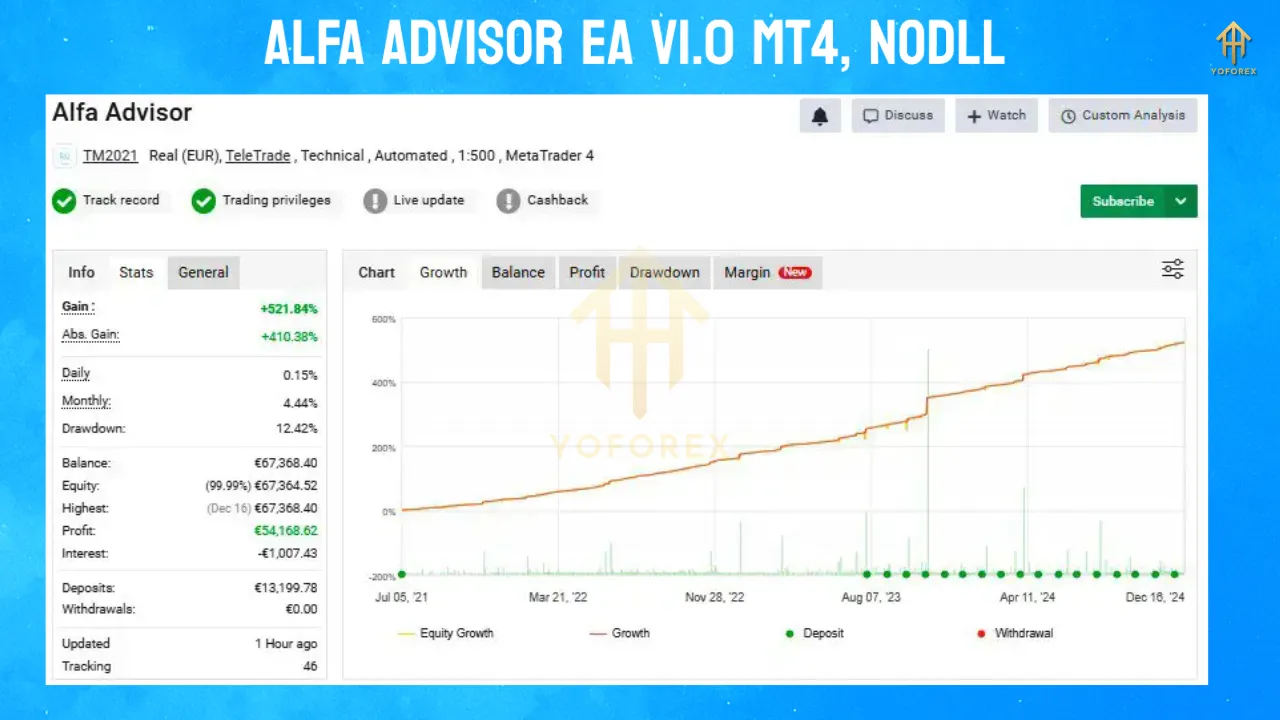
Leverage: 1:500 recommended
-
Timeframe: M15
-
Pairs Supported: EURUSD (primary), GBPUSD, XAUUSD (secondary depending on strategy)
-
Execution: VPS hosting advised for 24/5 uptime
Who Should Use ALFA ADVISOR EA V1.0?
-
🔹 Beginners who want to avoid emotional and impulsive decisions
-
🔹 Part-time traders seeking passive income from forex
-
🔹 Experienced traders looking for diversification and automation
-
🔹 Prop firm challengers who want stable risk-to-reward configurations
The flexibility of the EA ensures it can fit most trading profiles with simple tweaks to its parameters.
Performance Overview
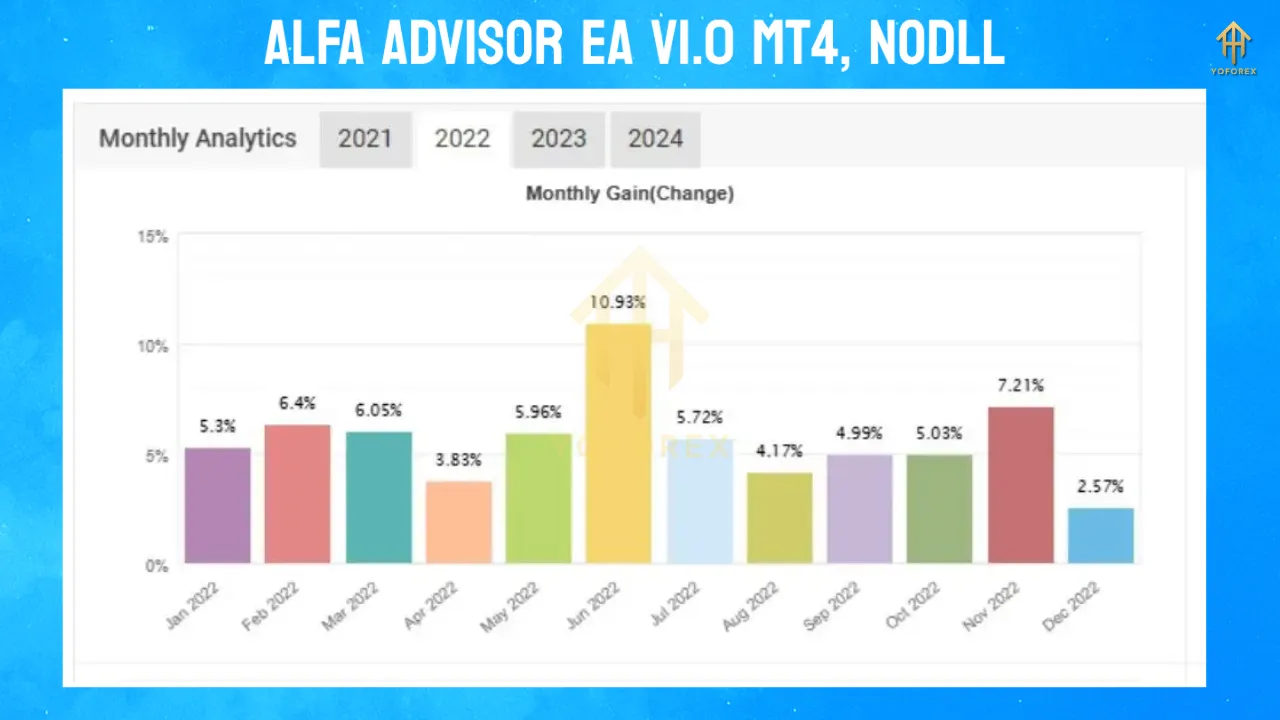
While past performance isn’t a guarantee of future success, backtests and live demo runs of ALFA ADVISOR EA V1.0 show:
-
Monthly Return: 8%–15% (depending on risk settings)
-
Maximum Drawdown: Under 10% on conservative mode
-
Win Rate: 70%+ with optimized filters
-
Strategy Style: Swing & scalp hybrid
The balance between drawdown and return ensures stability, particularly useful for traders focused on long-term growth.
Installation Guide for ALFA ADVISOR EA V1.0
Installing and configuring ALFA ADVISOR EA is straightforward:
-
Open MetaTrader 4 → Go to
File > Open Data Folder. -
Navigate to
MQL4 > Expertsand paste the.ex4file. -
Restart MT4, then drag ALFA ADVISOR EA onto the chart.
-
Enable:
-
“Allow live trading”
-
“Allow DLL imports”
-
-
Input your license key (if applicable) and configure risk parameters.
Why Choose ALFA ADVISOR EA Over Others?
Here’s how it outshines many traditional EAs:
-
✅ No over-optimization or curve fitting
-
✅ Real market logic, not just mathematical guesswork
-
✅ Flexible risk control, unlike martingale-only systems
-
✅ User-friendly dashboard for easy monitoring
-
✅ Backtest integrity using real spread and tick data
While some bots aim for quick profits with high risk, ALFA ADVISOR focuses on consistent equity growth with minimal risk exposure.
Important Trading Notes
-
Use a VPS with low latency to your broker for best execution speed.
-
Avoid changing parameters during open trades.
-
Test the EA in demo accounts before going live.
-
Adjust lot sizes according to your capital and risk appetite.
Support and Updates
Yoforex.org offers complete documentation, installation assistance, and update notifications for all users of ALFA ADVISOR EA. Regular performance patches and optimization files will be released as market dynamics evolve.
Final Verdict
ALFA ADVISOR EA V1.0 MT4 is more than just another robot—it’s a well-rounded trading system that blends intelligent market analysis with reliable risk control. It’s ideal for both novice and advanced traders looking to automate their strategy without falling into the trap of over-risking.
With multi-mode operation, strict capital protection, and adaptable logic, ALFA ADVISOR EA could be a game-changer in your trading arsenal.
Whether you’re trading part-time or running a professional account, this EA brings automation, discipline, and smart trading under one roof—ready to help you master the markets with confidence.
🔽 Download ALFA ADVISOR EA V1.0 MT4
Visit YoForex.org to download the ALFA ADVISOR EA, explore our tutorials, and join the automated trading revolution.