In the fast-paced world of forex trading, having the right tools can make all the difference between consistent profits and frustrating losses. One such tool that has gained attention among traders is the Digital 30 Mashek Podval Indicator for MT4. This versatile trend indicator combines the power of multiple moving averages with digital filtering to help identify market trends, potential reversals, and entry/exit points. Whether you’re a beginner dipping your toes into MetaTrader 4 (MT4) or a seasoned trader looking to refine your strategy, this indicator offers a robust solution for enhancing your trading decisions.
In this comprehensive guide, we’ll dive deep into what the Digital 30 Mashek Podval Indicator MT4 is, its key features, installation process, practical usage tips, and effective trading strategies. By the end, you’ll have a clear understanding of how to integrate this indicator into your MT4 platform and leverage it for better results. Let’s get started!
What is the Digital 30 Mashek Podval Indicator MT4?
The Digital 30 Mashek Podval Indicator is a custom technical analysis tool designed specifically for the MetaTrader 4 platform. It’s essentially an advanced moving average (MA) indicator that stands out due to its extensive customization options. Unlike standard MAs that rely on simple or exponential calculations, this indicator incorporates digital filtering techniques to smooth out price data and reduce noise, making it ideal for trend-following strategies.
The “30” in its name refers to the 30 different types of moving averages it supports, ranging from simple moving averages (SMA) to more complex ones like hull moving averages (HMA) or adaptive moving averages (AMA). The “Mashek” likely nods to its creator or a specific methodology, while “Podval” might indicate a basement or foundational variant, possibly emphasizing its role in building solid trading foundations. This indicator is particularly popular in forex markets but can be applied to other assets like stocks, commodities, or indices available on MT4.
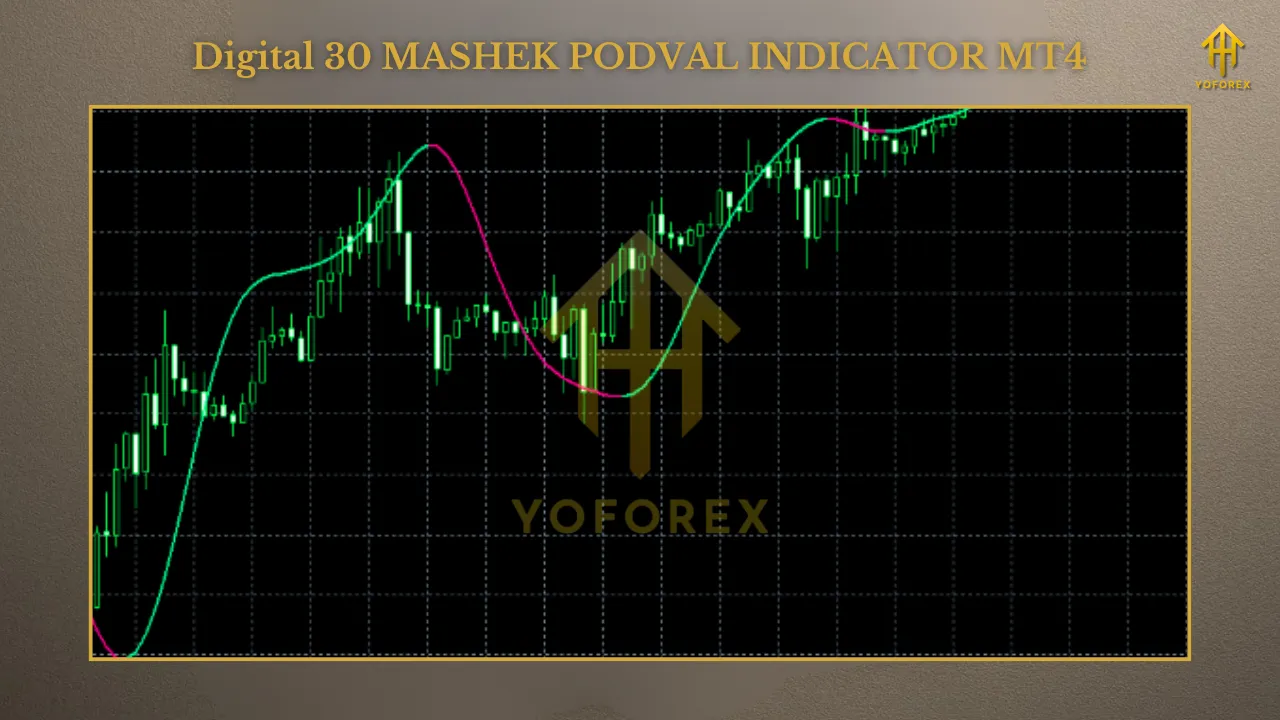
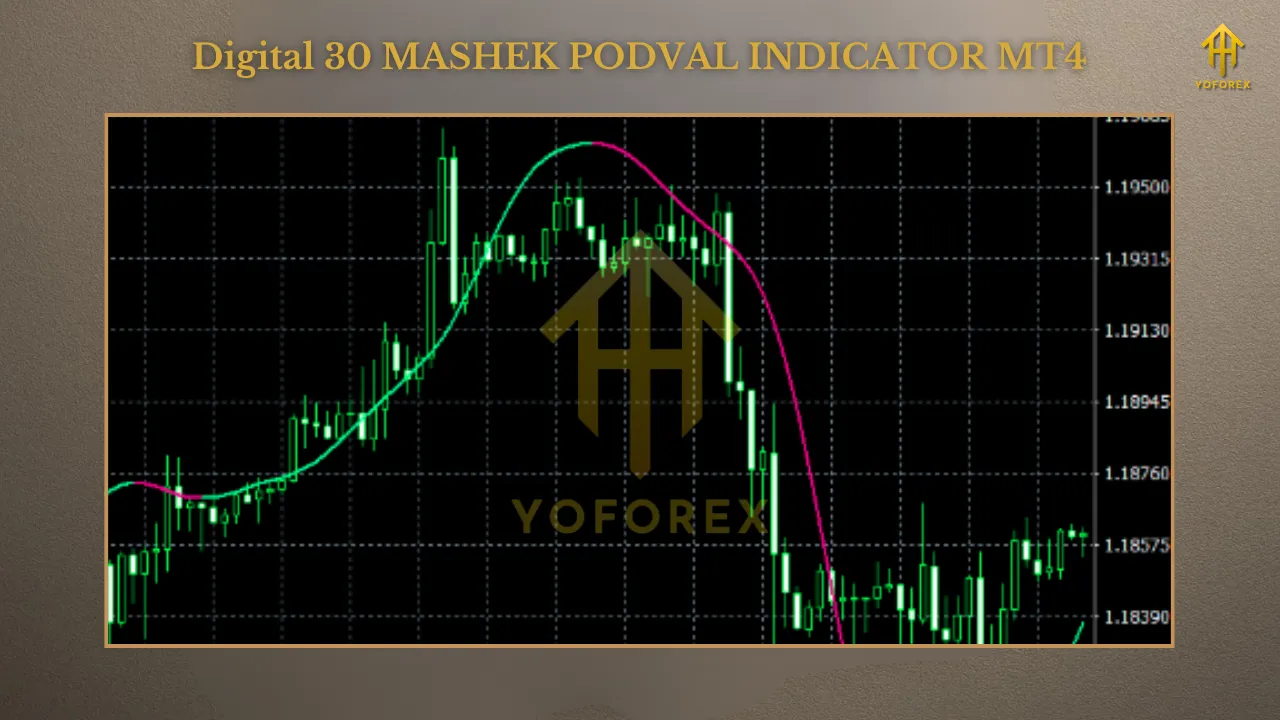
What sets the Digital 30 Mashek Podval apart is its ability to change colors dynamically based on trend shifts. For instance, the line might turn green during uptrends and red during downtrends, providing visual cues for traders. It also supports multi-timeframe (MTF) analysis, allowing you to view higher timeframe trends on a lower timeframe chart. This feature is invaluable for avoiding false signals in volatile markets.
Traders often download this indicator from forex forums, indicator repositories, or sites like Forex Station and Dove Forex Markets, where it’s shared freely or for a small fee. Always ensure you’re getting it from a reputable source to avoid malware or corrupted files.
Key Features of the Digital 30 Mashek Podval Indicator
1. 30 Moving Average Types: Choose from a wide array, including SMA, EMA (Exponential Moving Average), SMMA (Smoothed Moving Average), LWMA (Linear Weighted Moving Average), and even non-lag versions like Jurik or Kaufman Adaptive MAs. This flexibility lets you tailor the indicator to fast-moving scalping or long-term swing trading.
2. Color-Changing Mechanism: The indicator’s line changes color at inflection points—where the trend might reverse. This visual alert helps traders spot momentum shifts without constantly recalculating.
3. Multi-Timeframe Support: Analyze trends across different timeframes (e.g., H1 on an M15 chart) to confirm signals and reduce whipsaws.
4. Customizable Periods and Prices: Adjust the MA period (default often 14) and base it on close, open, high, low, or median prices for precision.
5. Alerts and Notifications: Some versions include pop-up alerts, email notifications, or sound signals when the trend changes, keeping you informed even when away from the screen.
6. Low Lag Design: Thanks to digital filtering, it minimizes lag compared to traditional MAs, making it suitable for real-time trading.
These features make the Digital 30 Mashek Podval Indicator MT4 a go-to for traders seeking accuracy in trend identification without overwhelming complexity.
How to Install the Digital 30 Mashek Podval Indicator on MT4
1. Download the Indicator: Search for “Digital 30 Mashek Podval Indicator MT4” on trusted sites like Forex Factory, MQL5, or Dove Forex Markets. Download the .mq4 or .ex4 file.
2. Open MT4 Platform: Launch your MetaTrader 4 terminal. If you don’t have it, download it from your broker’s website.
3. Locate the Indicators Folder: Go to File > Open Data Folder in MT4. Navigate to MQL4 > Indicators. Paste the downloaded file here.
4. Restart MT4: Close and reopen the platform to load the new indicator.
5. Add to Chart: Right-click on your chart, select Indicators > Custom, and choose “Digital 30 Mashek Podval.” Customize settings like MA type, period, and colors in the inputs tab.
6. Verify: The indicator should appear as a line on your chart. Test it on a demo account first to familiarize yourself.
Pro Tip: If the indicator doesn’t load, check for compatibility issues or compile the .mq4 file in the MetaEditor (accessible via Tools > MetaQuotes Language Editor in MT4).
How to Use the Digital 30 Mashek Podval Indicator in Trading
– Trend Identification: A green line typically signals an uptrend—consider buying. A red line indicates a downtrend—look for selling opportunities.
– Crossover Signals: Pair it with another MA for crossovers. For example, when the Digital 30 Mashek crosses above a 50-period SMA, it could signal a buy.
– Inflection Points: Watch for color changes as potential reversal points. Confirm with volume indicators or candlestick patterns like doji or engulfing.
– Multi-Timeframe Strategy: On an M5 chart, use the H1 timeframe setting to filter out noise and align with the broader trend.
– Risk Management: Always use stop-losses below recent lows in uptrends or above highs in downtrends. Aim for a risk-reward ratio of at least 1:2.
Effective Trading Strategies with the Digital 30 Mashek Podval Indicator
1. Trend-Following Strategy: Select a low-lag MA type like HMA with a 20-period setting. Enter trades in the direction of the color (green for long, red for short). Exit when the color flips or at predefined profit targets.
2. Scalping on Lower Timeframes: Use on M1 or M5 charts with a short period (e.g., 5-10). Combine with RSI (overbought/oversold levels at 70/30) to avoid ranging markets.
3. Swing Trading with MTF: On H4 charts, set the indicator to D1 timeframe. This helps capture larger moves while filtering intraday volatility.
4. Divergence Trading: Look for divergences between the indicator and price action. If price makes higher highs but the MA flattens, it could signal weakening momentum.
5. Combined with Other Indicators: Pair it with oscillators like MACD or Stochastic for confirmation. For instance, buy when the Digital 30 Mashek turns green and MACD crosses above its signal line.
Advantages and Disadvantages
– Highly customizable with 30 MA options.
– Reduces lag for timely signals.
– User-friendly for all skill levels.
– Free or low-cost availability.
Disadvantages:
– Can produce false signals in sideways markets.
– Requires optimization for different assets.
– Over-reliance without confirmation tools may lead to losses.
To mitigate drawbacks, always use it as part of a broader trading plan, including fundamental analysis and proper money management.
Conclusion: Elevate Your Trading with the Digital 30 Mashek Podval Indicator MT4
The Digital 30 Mashek Podval Indicator for MT4 is a powerful ally for any trader aiming to navigate the complexities of forex markets. Its blend of multiple moving averages, color-coded signals, and multi-timeframe analysis provides a clear edge in identifying trends and reversals. By installing it correctly, understanding its signals, and incorporating it into solid strategies, you can potentially boost your win rate and profitability.
Remember, successful trading isn’t just about tools—it’s about discipline, continuous learning, and risk control. Test this indicator on a demo account, refine your approach, and watch your trading evolve. If you’re ready to take your MT4 setup to the next level, download the Digital 30 Mashek Podval today and start unlocking new opportunities.
FAQs
1. Is the Digital 30 Mashek Podval Indicator free?
Yes, it’s often available for free on forex forums, though premium versions might exist.
2. Does it work on MT5?
It’s primarily for MT4, but conversions to MT5 are possible with coding adjustments.
3. What pairs work best?
Major pairs like EUR/USD and GBP/USD, but test on others.
4. Can it be used for binary options?
Yes, its signals can inform binary trades, especially with short expiries.
5. How do I avoid false signals?
Combine with filters like ADX for trend strength or avoid trading during low-volume sessions.