
Beat The Market EA V5.7 MT4 Review – Can This High-Frequency Forex Robot Really “Beat” The Market?
Automated trading has moved from being a novelty to a core part of many forex traders’ toolkits. Instead of staring at charts all day, traders now rely on Expert Advisors (EAs) to scan the market, trigger entries, manage risk, and close trades automatically.
Beat The Market EA V5.7 MT4 is one of those robots that promises to turn high-frequency trading into consistent, rule-based profit – especially on major currency pairs. In this in-depth review for YoForex.org, we’ll break down how it works, what kind of account you need, its strengths and weaknesses, and whether it deserves a spot in your trading arsenal.
What Is Beat The Market EA V5.7 MT4?
Beat The Market EA V5.7 MT4 is a fully automated forex robot designed for the MetaTrader 4 platform. It’s built as a high-frequency scalping system that:
-
Runs from a EURUSD M1 (1-minute) chart
-
Manages trades across multiple major forex pairs
-
Focuses on many small, quick trades rather than a few long-term positions
-
Targets steady, compounding account growth while trying to keep drawdown controlled
The main idea behind Beat The Market EA V5.7 MT4 is to let the algorithm “listen” to the market tick-by-tick, spot tiny inefficiencies or repeating micro-patterns, and exploit them before they disappear.
How Does Beat The Market EA V5.7 MT4 Trade?
While the developer does not reveal the full proprietary formula, the behavior and documentation point to a multi-layered technical approach:
1. Core engine on EURUSD M1
You attach Beat The Market EA V5.7 MT4 to one EURUSD M1 chart, and that chart becomes the control center. From there, the EA:
-
Analyzes price tick-by-tick
-
Reads volatility and short-term direction
-
Uses those signals to manage trades across several major pairs
This is efficient because you don’t have to attach the EA to 10 different charts – the engine handles multi-pair logic internally.
2. High-frequency scalping logic
Beat The Market EA V5.7 MT4 behaves like a scalper/HFT style system, meaning:
-
It looks for small price movements to capture a few pips at a time
-
It opens many trades per day (depending on volatility and spread)
-
It prefers short holding times, often minutes to a few hours
This style can work well on low-spread, fast-execution brokers, but it’s also more sensitive to:
-
Spread widening
-
Slippage
-
Latency between your VPS and broker
3. Volatility and market filters
The EA is designed to slow down or become more conservative when volatility explodes or when conditions become erratic. This is important to avoid over-trading during news spikes or abnormal price action.
Instead of blindly firing trades in every candle, Beat The Market EA V5.7 MT4 attempts to:
-
Trade more actively in normal, liquid sessions (London, New York overlap)
-
Reduce exposure during extreme spikes or very thin markets
Recommended Account Setup for Beat The Market EA V5.7 MT4
To give this type of EA a fair chance, you need the right environment. Based on the typical requirements described for Beat The Market EA V5.7 MT4, here’s what is generally recommended:
1. Trading platform
-
Platform: MetaTrader 4 (MT4)
-
Chart: EURUSD, M1 timeframe
-
Terminal: Latest stable MT4 build from a reputable broker
2. Capital & leverage
-
Minimum deposit:
-
Conservative traders: $1,000 – $2,000+
-
-
Leverage:
-
1:100 or higher is usually suggested for high-frequency multi-pair trading
-
The reason for this is simple: the EA sometimes manages multiple open positions across pairs. Too little capital or very low leverage can cause margin stress.
3. Broker type
Beat The Market EA V5.7 MT4 works best with:
-
ECN or Raw-spread accounts
-
Tight spreads, especially on EURUSD and other majors
-
Fast execution (low latency)
Look for brokers that are known for low spreads, low commissions, and stable execution — this is crucial for any scalping EA.
4. VPS hosting
Because the robot may place many trades throughout the day, and because every millisecond matters for scalping:
-
A 24/7 Forex VPS close to your broker’s servers is strongly recommended
-
Aim for ping below 10–20 ms if possible
At YoForex.org, we always suggest a VPS for serious EA users, especially when running high-frequency systems like this.
Key Features of Beat The Market EA V5.7 MT4
Here are the most important elements that make this EA stand out:
1. Multi-pair trading from a single chart
You only need to:
-
Open one EURUSD M1 chart
-
Attach Beat The Market EA V5.7 MT4
-
Allow it to handle supported major forex pairs automatically
This removes the typical “EA on every chart” hassle and keeps the setup clean.
2. Fully automated trade management
Beat The Market EA V5.7 MT4 handles:
-
Entry signals
-
Stop loss and take profit
-
Trailing stop (if enabled)
-
Partial or full closing of trades
-
Exposure balancing across pairs
Once configured correctly, it requires very little manual intervention beyond monitoring and adjusting lot size when your balance changes.
3. Built-in risk control
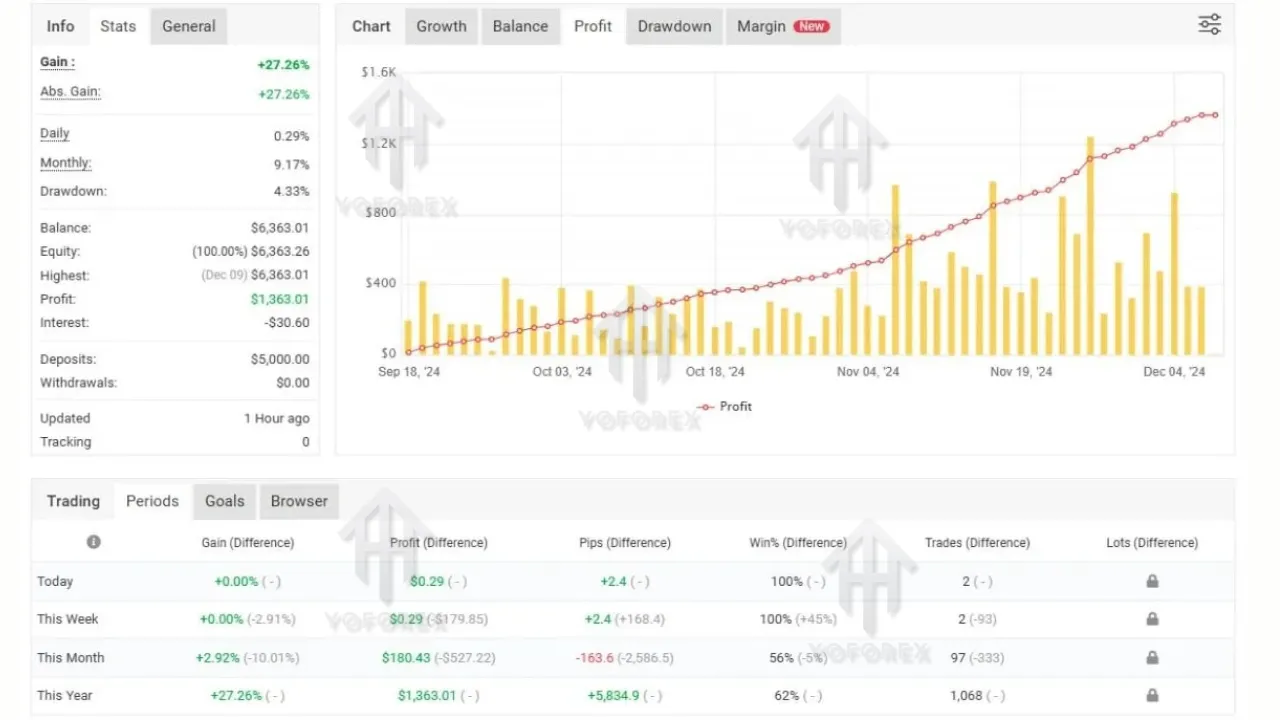
The robot is marketed as a system that aims to keep drawdown relatively low while still targeting double-digit monthly returns in favorable market conditions.
Risk features may include:
-
Maximum active trades or total lot limit
-
Automatic reduction in trade frequency during dangerous volatility
-
Stop loss placement designed to keep single-trade losses bounded
Even with these features, no EA is risk-free. You still need to choose sensible lot sizes and risk parameters.
4. Simple configuration
For many traders, complex settings can kill the experience. Beat The Market EA V5.7 MT4 is usually shipped with:
-
A ready-to-use default preset
-
Only a few key inputs to adjust (mainly lot size or risk %)
-
Documentation explaining recommended settings and account conditions
This makes it suitable even for semi-beginners who understand how MT4 works but are not programmers.
Strengths of Beat The Market EA V5.7 MT4
From a practical trading and user-experience perspective, Beat The Market EA V5.7 MT4 has several attractive points:
-
High trade frequency – Ideal if you dislike robots that open 1–2 trades per week. You can see activity and data quickly.
-
Multi-pair diversification – Instead of relying on just one pair, the EA spreads trades across several majors, which can smooth equity curves when conditions are mixed.
-
Hands-off operation – Once installed with correct broker and VPS conditions, it can run with minimal manual intervention.
-
Scalping edge in good conditions – In tight-spread, liquid sessions, high-frequency scalping can exploit micro-moves that are hard to trade manually.
Limitations and Risks You Should Understand
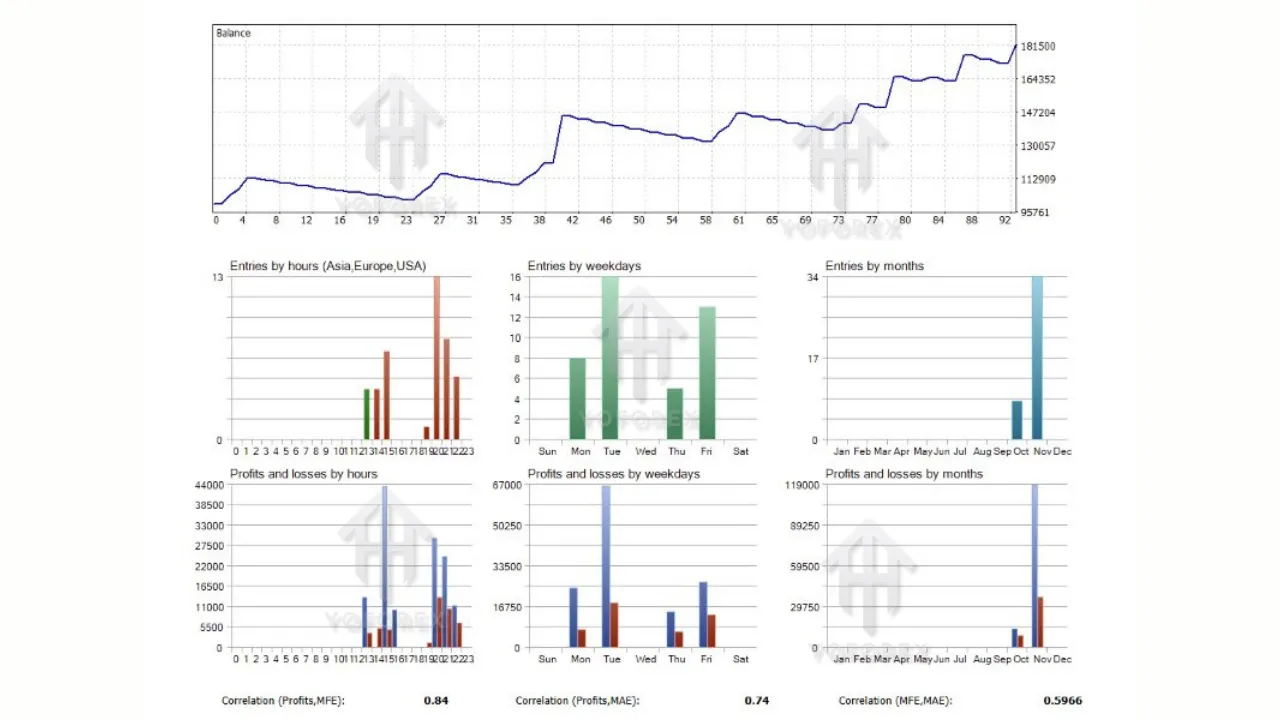
It’s important to be realistic. No EA, including Beat The Market EA V5.7 MT4, is a magic money machine. Here are some of the main limitations:
-
Broker dependency
The EA’s performance can change drastically depending on your broker’s spread, commission, slippage, and execution speed. A “perfect” backtest on one broker may not repeat on another. -
Market-condition sensitivity
High-frequency scalpers can suffer during:-
Very choppy, low-liquidity periods
-
Sudden news spikes
-
Spread widening (for example around rollover or major events)
-
-
No guarantee of monthly target
Marketing phrases like “10–20% per month” are targets, not promises. Real-world results can be much lower, flat, or even negative during bad market phases. -
Psychological challenge
Many traders struggle emotionally when:-
The EA opens many trades
-
There is floating drawdown
-
A cluster of losing trades appears
You still need discipline not to interfere emotionally with the robot’s logic.
-
Who Is Beat The Market EA V5.7 MT4 Suitable For?
Beat The Market EA V5.7 MT4 may be a good fit if:
-
You prefer scalping / high-frequency trading, but you can’t manually sit at the screen all day.
-
You have access to a good ECN broker and a reliable VPS.
-
You understand that EAs require testing, tuning, and realistic expectations.
-
You are comfortable monitoring performance and occasionally adjusting lot size or stopping the EA during extreme news events.
It may not be ideal if:
-
You only have a very small account (for example, $100–$200).
-
You use a broker with wide spreads or slow execution.
-
You want a low-frequency, long-term swing trading robot with very few trades.
How to Get Started With Beat The Market EA V5.7 MT4 (General Steps)
If you decide to test this EA, follow a structured approach:
-
Open a demo account with a fast, low-spread broker.
-
Install MT4 and place Beat The Market EA V5.7 MT4 into the
Expertsfolder. -
Restart MT4 and attach the EA to a EURUSD M1 chart.
-
Enable AutoTrading in MT4 and “Allow live trading” in the EA settings.
-
Start with small lot size and let it run at least 4–8 weeks on demo while you monitor:
-
Equity curve
-
Drawdown
-
Average trade length and frequency
-
-
If the results align with your risk tolerance, only then consider moving to a small live account, maintaining conservative risk at first.
On YoForex.org, you can combine this with our other tools, guides, and VPS recommendations to build a more robust automated trading setup.
Final Thoughts – Is Beat The Market EA V5.7 MT4 Worth Testing?
Beat The Market EA V5.7 MT4 is an interesting option for traders who:
-
Want a high-frequency, multi-pair scalping system on MT4
-
Prefer almost fully automated trading
-
Are willing to provide the right conditions (ECN broker, VPS, sensible risk)
It offers a clean, plug-and-play structure with a scalping engine built for EURUSD M1 and other major pairs, plus built-in risk controls aimed at balancing growth and drawdown.