
Maximize Your Forex Trading with Benefit EA V5.1 MT4: Strategy, Settings, and Performance
Forex trading thrives on precision, strategy, and automation, and the Benefit EA V5.1 MT4 stands out as a powerful tool for traders seeking consistent profits. This non-indicative, flexible grid advisor is designed for the MetaTrader 4 platform, leveraging mathematically derived entry points to give traders a statistical edge. Whether you’re a seasoned trader or just stepping into the world of automated trading, understanding how Benefit EA V5.1 operates, its optimal settings, and its strategic approach can unlock significant potential. In this article, we’ll explore the EA’s trading strategy, recommended currency pairs, timeframes, minimum deposit, and how it executes trades to maximize profitability. Join our vibrant trading community on Telegram at [https://t.me/yoforexrobot](https://t Tables://t.me/yoforexrobot) and download the EA from our website at https://www.yoforex.org/ to start your journey.
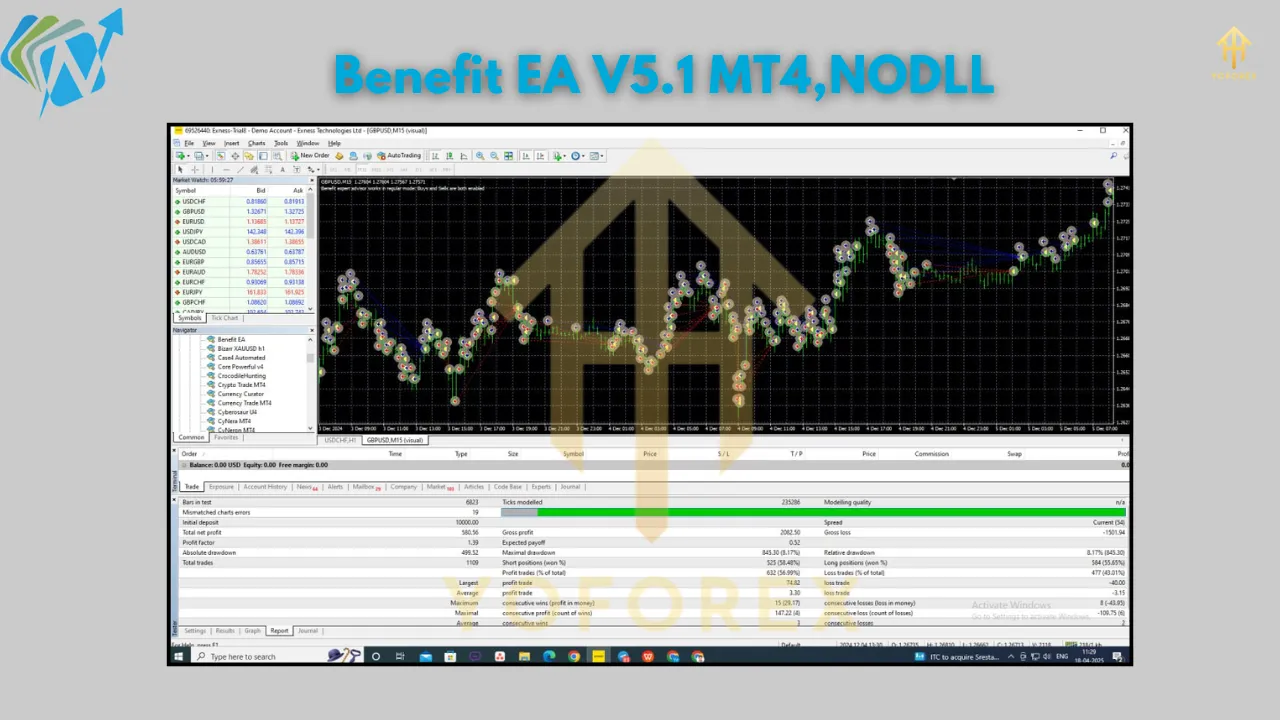
Understanding the Benefit EA V5.1 MT4 Strategy
The core of Benefit EA V5.1 lies in its sophisticated grid-based trading strategy, which sets it apart from traditional Expert Advisors. Unlike EAs that rely on stop-loss mechanisms, Benefit EA uses a unique approach, closing trades through take-profit levels or trailing stops. This design minimizes manual intervention, allowing the EA to operate seamlessly across various market conditions. The strategy is built on identifying special entry points derived from mathematical modeling of market patterns, offering a statistical advantage that enhances trade accuracy.
The EA’s grid system operates by opening a series of orders at calculated intervals, creating a network of trades that capitalize on market movements. When the market moves in the desired direction, trades are closed at predefined take-profit levels, locking in gains. If the market moves against the initial trade, the EA opens additional positions at strategic price levels, increasing the lot size incrementally to recover losses when the market reverses. This dynamic approach allows Benefit EA to adapt to volatility, making it suitable for both trending and ranging markets.
The absence of a stop-loss mechanism might sound risky, but Benefit EA compensates with its Risk Reduction System (RRS). The RRS monitors drawdowns and adjusts trade parameters to exit prolonged drawdowns, typically targeting a 70-90% profit recovery. This feature ensures that the EA remains resilient even during challenging market conditions, protecting your capital while pursuing profits. Traders can customize settings like lot sizes, maximum trades, and trailing stops to align with their risk tolerance and trading style, whether they prefer scalping, short-term trading, or flat market strategies.
Recommended Currency Pairs for Optimal Performance
Benefit EA V5.1 is versatile, supporting a range of major currency pairs to diversify trading opportunities. The recommended pairs include:
-
GBPUSD: Known for its volatility, GBPUSD allows the EA to capitalize on sharp price movements, ideal for grid-based strategies.
-
USDJPY: This pair’s stability and frequent trends make it a reliable choice for consistent trade execution.
-
EURUSD: As the most traded pair, EURUSD offers liquidity and tight spreads, enhancing the EA’s efficiency.
-
EURJPY: Combining volatility and momentum, EURJPY suits the EA’s ability to scalp and follow trends.
-
USDCAD: With moderate volatility, USDCAD provides steady opportunities for grid trading.
-
USDCHF: This pair’s low volatility aligns with the EA’s precision in flat market conditions.
-
AUDUSD: Trending movements in AUDUSD enable the EA to execute breakout and recovery trades effectively.
By focusing on these pairs, traders can leverage the EA’s adaptability across different market dynamics, from high-volatility pairs like GBPUSD to stable ones like USDCHF. This diversity ensures that the EA can perform consistently, regardless of market sentiment.
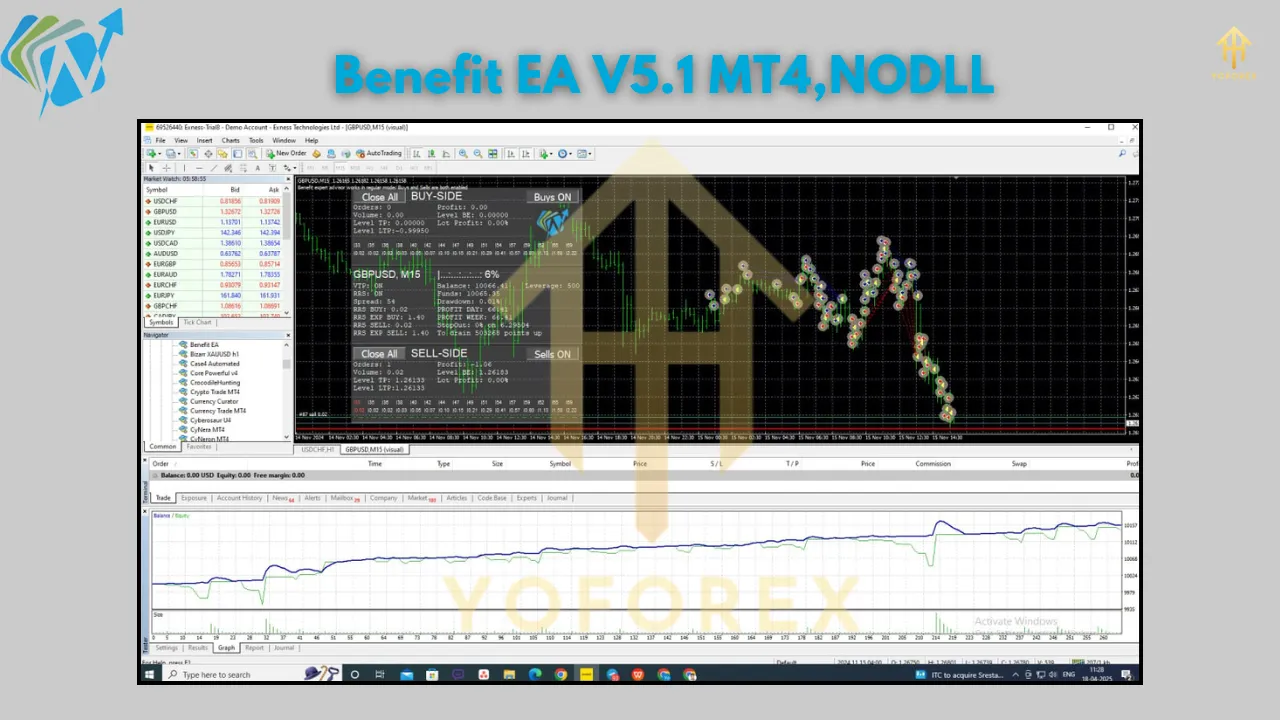
Optimal Timeframes for Running Benefit EA V5.1
The flexibility of Benefit EA V5.1 extends to its supported timeframes, allowing traders to tailor their approach based on their trading goals. The recommended timeframes are:
-
M1 (1-Minute): Ideal for scalping, the M1 timeframe enables the EA to capture rapid price fluctuations, opening and closing trades quickly for small, frequent profits.
-
M5 (5-Minute): Balancing speed and stability, M5 is suitable for traders seeking short-term trades with slightly larger price movements.
-
M15 (15-Minute): This timeframe offers a mix of scalping and trend-following opportunities, making it the most popular choice for Benefit EA users.
-
H1 (1-Hour): Best for traders preferring longer-term trades, H1 allows the EA to analyze broader market trends while maintaining precision.
The M15 timeframe is particularly recommended for GBPUSD, as it aligns with the pair’s volatility and the EA’s grid strategy. However, testing different timeframes on a demo account is advised to find the best fit for your trading style. The EA’s ability to operate across these timeframes makes it adaptable to various strategies, from high-frequency scalping to more measured trend trading.
Minimum Deposit and Account Requirements
To achieve optimal performance with Benefit EA V5.1, a minimum deposit of $5,000 is recommended. This capital base supports the EA’s grid strategy, which may open multiple trades to recover losses during adverse market conditions. A higher deposit reduces the risk of significant drawdowns, especially for smaller accounts, and allows the EA to operate with greater flexibility. For traders with limited capital, using a cent account or a broker with low spreads can mitigate risks, but the $5,000 deposit ensures stability.
To maximize the EA’s effectiveness, consider the following account setup:
-
Leverage: A leverage range of 1:20 to 1:500 is ideal, depending on the currency pair and broker regulations.
-
Broker Type: Opt for an ECN broker with low spreads and fast execution to minimize slippage, which can impact grid trading.
-
VPS: Running the EA on a Virtual Private Server (VPS) with latency below 100ms ensures uninterrupted 24/5 operation, critical for automated trading.
-
Platform: The EA is designed for MetaTrader 4 (Build 1420+), so ensure your platform is updated and configured to allow automated trading and DLL imports.
These settings create a robust environment for the EA to execute its strategy efficiently, minimizing technical disruptions and optimizing trade outcomes.
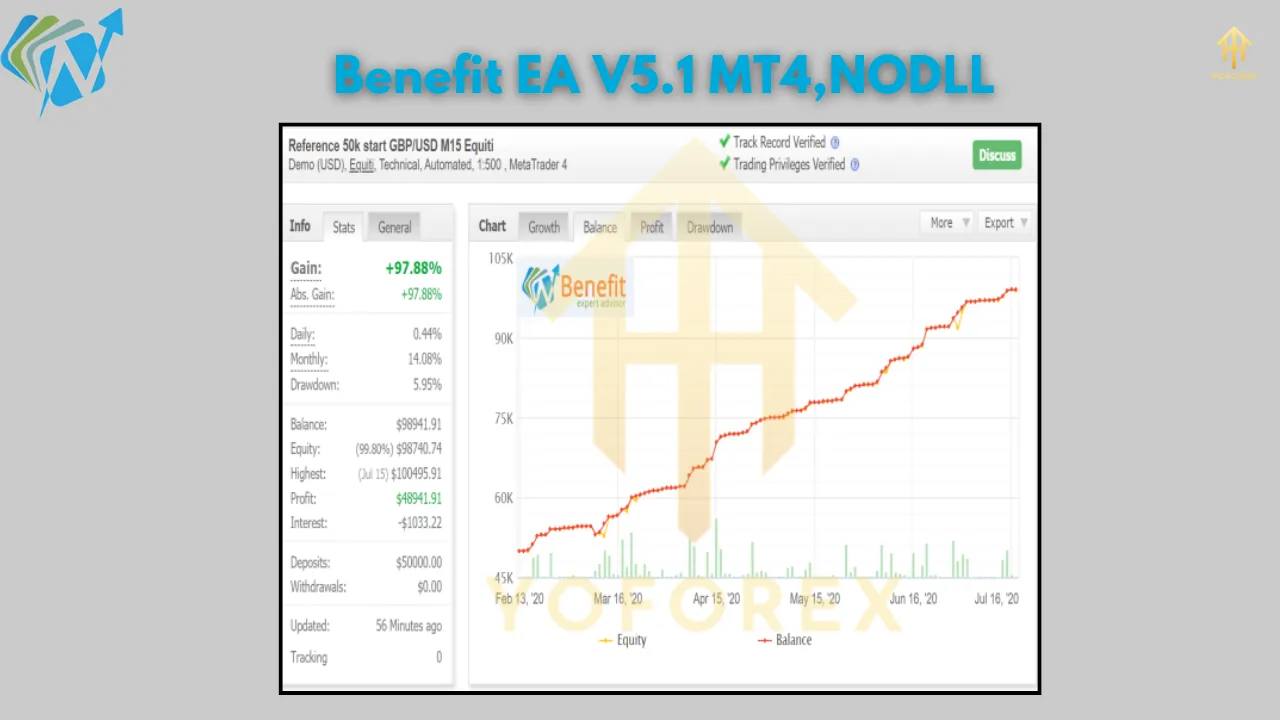
How Benefit EA V5.1 Executes Trades
The trading process of Benefit EA V5.1 is both systematic and adaptive, designed to navigate the complexities of the forex market. Here’s a step-by-step breakdown of how the EA takes trades:
-
Market Analysis: The EA uses mathematical modeling to identify high-probability entry points based on market patterns. It analyzes price movements in real-time, ensuring trades align with current trends or reversals.
-
Trade Initiation: Once an entry point is confirmed, the EA opens a trade with a predefined lot size. The initial trade is part of a grid, with subsequent trades opened at calculated intervals if the market moves against the position.
-
Grid Management: The EA dynamically adjusts the grid by increasing lot sizes for additional trades, following a coefficient-based system. This allows the EA to recover losses when the market reverses, locking in profits via take-profit levels.
-
Risk Reduction: The RRS monitors drawdowns and adjusts trade parameters to exit unprofitable series, targeting 70-90% profit recovery. Trailing stops are also employed to secure gains as the market moves favorably.
-
Trade Closure: Trades are closed when take-profit levels are reached or when the trailing stop is triggered, ensuring profits are secured without relying on stop-loss orders.
This strategy excels in volatile markets, where the EA can capitalize on price swings, and in flat markets, where the grid system captures small, consistent gains. The EA’s ability to adapt lot sizes, trailing stops, and trade frequency based on market conditions makes it a versatile tool for traders.
Why Choose Benefit EA V5.1 MT4?
Benefit EA V5.1 offers a blend of automation, flexibility, and statistical precision that appeals to traders of all levels. Its grid-based strategy, free of stop-loss reliance, provides a unique approach to risk management, while the RRS ensures capital protection during drawdowns. The EA’s compatibility with major currency pairs like GBPUSD, USDJPY, EURUSD, EURJPY, USDCAD, USDCHF, and AUDUSD, along with flexible timeframes (M1, M5, M15, H1), allows traders to diversify their portfolios and adapt to changing market conditions.
For optimal results, test the EA on a demo account for at least a week to familiarize yourself with its mechanics. Join our Telegram community at https://t.me/yoforexrobot for real-time support, expert insights, and trading discussions. Download Benefit EA V5.1 from https://www.yoforex.org/ and start automating your forex trading today.
Conclusion
Benefit EA V5.1 MT4 is a game-changer for forex traders seeking automation without sacrificing control. Its grid-based strategy, mathematical entry points, and Risk Reduction System create a robust framework for consistent profitability. With a minimum deposit of $5,000, support for major currency pairs, and flexible timeframes, the EA caters to diverse trading styles. Whether you’re scalping on M1 or trend trading on H1, Benefit EA V5.1 adapts to your needs.
Join our Telegram for the latest updates and support