Unlocking the Power of the Forex Darvas Pointer Indicator for MT4
In the dynamic world of forex trading, having the right tools can make all the difference between consistent profits and costly mistakes. One such tool that has garnered attention among traders is the Forex Darvas Pointer Indicator for MetaTrader 4 (MT4). Rooted in the legendary trading principles of Nicolas Darvas, this indicator offers a unique blend of momentum and trend-following strategies, making it a valuable asset for traders of all experience levels. In this comprehensive guide, we’ll explore the origins, functionality, setup, trading strategies, and practical applications of the Forex Darvas Pointer Indicator, empowering you to leverage its potential in the forex market.
The Origins of the Darvas Approach
The Darvas Pointer Indicator is inspired by the work of Nicolas Darvas, a professional dancer turned stock trader who, in the 1950s, transformed a modest investment into a fortune of over $2 million. His trading philosophy, detailed in his book How I Made $2,000,000 in the Stock Market, centered on identifying stocks trading at new highs and capitalizing on their momentum. Darvas developed the Darvas Box strategy, which involves drawing “boxes” around price ranges to identify breakout points where significant price movements are likely to occur.
While Darvas originally applied his method to stocks, the principles of his strategy have been adapted for forex trading, resulting in tools like the Darvas Pointer Indicator. This MT4 indicator builds on the Darvas Box concept, incorporating modern algorithms to provide traders with precise buy and sell signals, making it suitable for the fast-paced forex market.
What is the Forex Darvas Pointer Indicator?
The Forex Darvas Pointer Indicator is a trend-following and momentum-based tool designed for the MetaTrader 4 platform. It aims to simplify trading by identifying potential entry and exit points based on price breakouts and trend direction. Unlike traditional Darvas Boxes, which require manual drawing of price ranges, the Darvas Pointer Indicator automates the process, using advanced algorithms to detect significant price movements and generate non-repainting signals.
Key features of the Darvas Pointer Indicator include:
-
Non-Repainting Signals: Once a signal is generated, it remains fixed, providing traders with reliable data for decision-making.
-
Buy/Sell Arrows: The indicator plots clear arrows on the chart to indicate potential entry points for long (buy) or short (sell) positions.
-
Customizable Parameters: Traders can adjust settings to suit their trading style and preferred timeframes.
-
Versatility: It works across all currency pairs and timeframes, making it suitable for scalping, day trading, and swing trading.
-
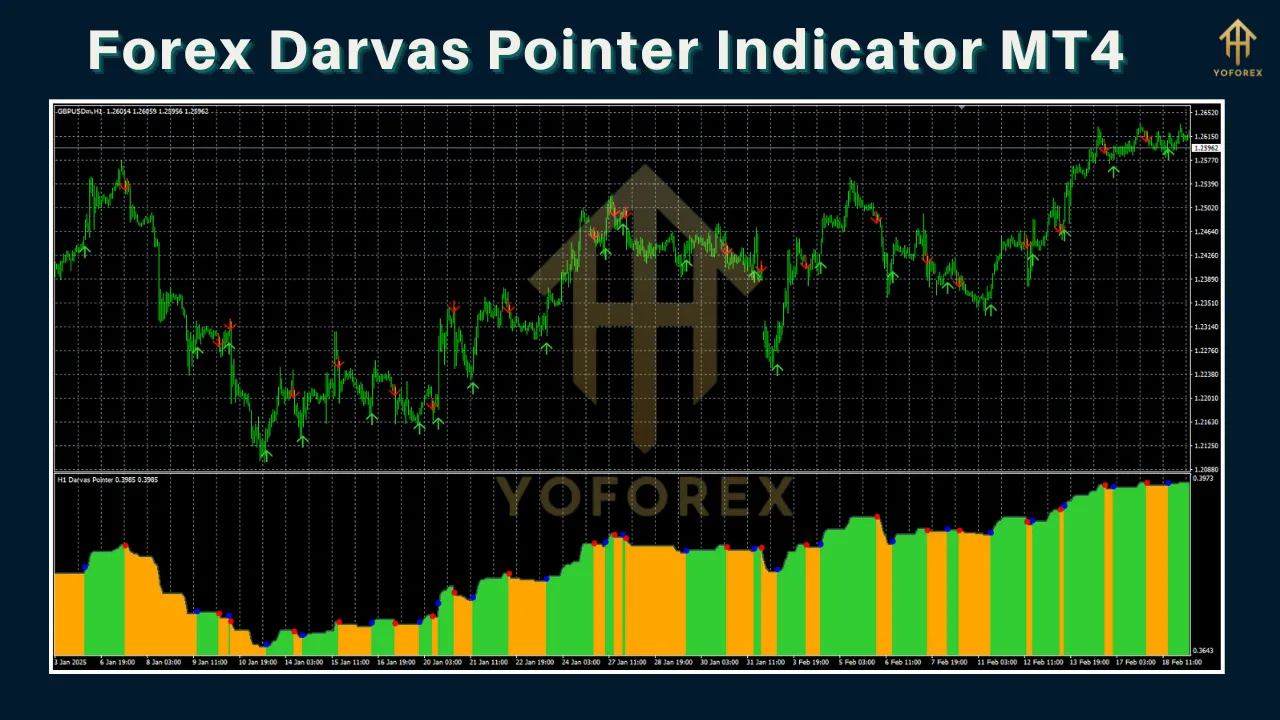
Trend Confirmation: The indicator uses histogram-based signals (e.g., green for bullish trends, yellow for bearish trends) to confirm trend direction.
The indicator’s ability to predict trends before they start and its user-friendly interface make it a popular choice among traders seeking to reduce the stress of manual analysis.
How Does the Darvas Pointer Indicator Work?
The Darvas Pointer Indicator operates by combining the Darvas Box theory with modern technical analysis. Here’s a breakdown of its mechanics:
-
Box Formation: The indicator identifies price ranges (boxes) where the price consolidates after a significant high or low. The upper boundary of the box represents the recent high, while the lower boundary represents the recent low.
-
Breakout Detection: When the price breaks above the box’s ceiling, it signals a potential bullish trend, triggering a buy signal. Conversely, a break below the box’s floor indicates a bearish trend, triggering a sell signal.
-
Histogram Signals: The indicator displays a histogram in a separate window, with colors indicating trend direction. For example, green bars suggest an uptrend, while yellow bars indicate a downtrend. The transition between colors often serves as a signal for potential entry points.
-
Volume Analysis: Some versions of the indicator incorporate volume analysis to confirm breakouts, ensuring that significant price movements are supported by increased trading activity.
These features make the Darvas Pointer Indicator a powerful tool for capturing momentum-driven trades while filtering out market noise.
Setting Up the Darvas Pointer Indicator on MT4
Installing and configuring the Darvas Pointer Indicator on MT4 is straightforward. Follow these steps:
-
Download the Indicator: Obtain the Darvas Pointer Indicator file (typically in .ex4 or .mq4 format) from a reputable source. Ensure the file is compatible with MT4.
-
Install the Indicator:
-
Open your MT4 platform and go to File > Open Data Folder.
-
Navigate to MQL4 > Indicators.
-
Copy and paste the downloaded indicator file into the Indicators folder.
-
Restart MT4 to load the indicator.
-
-
Attach to a Chart:
-
Open a chart for your desired currency pair.
-
Go to Insert > Indicators > Custom and select the Darvas Pointer Indicator.
-
Adjust the settings (e.g., box size, signal sensitivity) based on your trading preferences.
-
-
Customize Settings:
-
Box Period: Determines the lookback period for box formation (e.g., 5 bars for shorter-term boxes).
-
Signal Strength: Adjusts the sensitivity of buy/sell signals.
-
Alerts: Enable pop-up or sound alerts for breakout signals.
-
-
Apply to Chart: Click OK to display the indicator on your chart.
Once installed, the indicator will plot boxes, arrows, and a histogram, providing a visual representation of potential trading opportunities.
Trading Strategies Using the Darvas Pointer Indicator
The Darvas Pointer Indicator can be used in various trading strategies, depending on your goals and risk tolerance. Below are three effective approaches:
1. Breakout Trading Strategy
This strategy capitalizes on the indicator’s ability to detect price breakouts from Darvas Boxes.
-
Entry: Enter a buy trade when the price breaks above the box’s ceiling and a green arrow appears. Enter a sell trade when the price breaks below the box’s floor and a yellow arrow appears.
-
Stop Loss: Place a stop loss below the box’s lower boundary for buy trades or above the upper boundary for sell trades.
-
Take Profit: Set a take-profit level at a multiple of the box height (e.g., 1:2 risk-reward ratio) or use a trailing stop to capture extended trends.
-
Best Timeframe: H1 or H4 for day trading, D1 for swing trading.
Example: On a EUR/USD H1 chart, the indicator forms a box between 1.2000 and 1.2050. When the price breaks above 1.2050 with a green arrow, enter a buy trade with a stop loss at 1.1990 and a take-profit at 1.2150.
2. Scalping Strategy
For traders who prefer short-term trades, the Darvas Pointer Indicator can be used for scalping on lower timeframes (e.g., M5 or M15).
-
Entry: Wait for a histogram color change (e.g., from yellow to green) and a corresponding arrow signal. Enter a trade in the direction of the trend.
-
Stop Loss: Place a tight stop loss (5-10 pips) below the recent swing low for buy trades or above the swing high for sell trades.
-
Take Profit: Target 10-20 pips per trade or exit when the histogram reverses color.
-
Tip: Combine with a momentum indicator like the Relative Strength Index (RSI) to filter false signals.
Example: On a GBP/USD M15 chart, a green histogram and buy arrow appear at 1.3800. Enter a buy trade with a stop loss at 1.3790 and a take-profit at 1.3820.
3. Trend Confirmation Strategy
This strategy uses the Darvas Pointer Indicator to confirm trends in conjunction with other indicators, such as moving averages or the MACD.
-
Entry: Confirm a bullish trend with a green histogram and a buy arrow, ensuring the price is above a 50-period EMA. For a bearish trend, confirm a yellow histogram and sell arrow with the price below the EMA.
-
Stop Loss: Place a stop loss beyond a key support/resistance level or the box boundary.
-
Take Profit: Use a Fibonacci extension or pivot points to identify potential profit targets.
-
Best Timeframe: H4 or D1 for reliable trend signals.
Example: On a USD/JPY D1 chart, the price is above the 50 EMA, and a green histogram with a buy arrow appears. Enter a buy trade with a stop loss below the nearest support level and a take-profit at the next resistance.
Advantages of the Darvas Pointer Indicator
-
Ease of Use: The indicator’s automated box formation and clear signals make it accessible to beginners.
-
Reliability: Non-repainting signals reduce the risk of false entries.
-
Flexibility: Suitable for all currency pairs, timeframes, and trading styles.
-
Stress Reduction: Automates technical analysis, allowing traders to focus on strategy execution.
-
Momentum Focus: Excels at capturing high-probability breakout trades.
Limitations and Risks
While powerful, the Darvas Pointer Indicator is not foolproof. Consider these limitations:
-
False Breakouts: In choppy markets, breakouts may fail, leading to losses. Use additional filters like volume or RSI to confirm signals.
-
Lagging Signals: Signals may appear one candle late, as they are confirmed after the candle closes.
-
Market Dependency: The indicator performs best in trending markets and may struggle in ranging conditions.
-
Over-Optimization Risk: Over-tweaking settings can lead to curve-fitting, reducing effectiveness in live trading.
To mitigate these risks, always test the indicator on a demo account and combine it with proper risk management (e.g., risking no more than 1-2% per trade).
Practical Tips for Success
-
Test on a Demo Account: Practice using the indicator on a demo account to understand its behavior across different market conditions.
-
Combine with Other Tools: Use complementary indicators like Bollinger Bands, MACD, or support/resistance levels to enhance signal accuracy.
-
Focus on Major Pairs: The indicator often performs best on liquid pairs like EUR/USD, GBP/USD, and USD/JPY.
-
Use Proper Risk Management: Set stop losses and position sizes based on your risk tolerance to protect your capital.
-
Stay Disciplined: Avoid chasing signals without confirmation, and stick to your trading plan.
Real-World Applications
The Darvas Pointer Indicator has been praised for its ability to simplify complex market analysis. For example, a day trader using the indicator on a GBP/USD H1 chart might identify a breakout above a Darvas Box at 1.4000, entering a buy trade that yields 50 pips in a few hours. Similarly, a swing trader on a USD/CAD D1 chart could use the indicator’s histogram to confirm a bearish trend, holding a short position for several days to capture a 200-pip move.
Online communities, such as Reddit’s r/Forex_Robots, have discussed the indicator’s versatility, noting its compatibility with any currency pair and timeframe. Traders have reported success using it for both manual and automated strategies, particularly when paired with expert advisors (EAs).
Where to Find the Darvas Pointer Indicator
The Darvas Pointer Indicator is available from various sources, including:
-
Forex Forums: Websites like forex-station.com offer free downloads of the indicator.
-
Indicator Marketplaces: Platforms like mql5.com provide premium versions with additional features.
-
Trading Blogs: Sites like forexmt4indicators.com and forexcracked.com share free or cracked versions, though caution is advised when downloading from unofficial sources.
Always verify the authenticity of the file and scan for malware before installing. Additionally, check for updates or multi-timeframe (MTF) versions that enhance the indicator’s functionality.
Conclusion
The Forex Darvas Pointer Indicator for MT4 is a powerful tool that brings the time-tested principles of Nicolas Darvas into the modern forex market. Its ability to automate box formation, generate non-repainting signals, and confirm trends makes it a valuable addition to any trader’s toolkit. Whether you’re a beginner looking to simplify technical analysis or an experienced trader seeking to refine your breakout strategy, this indicator offers a versatile and reliable solution.
By understanding its mechanics, setting it up correctly, and integrating it into a well-rounded trading plan, you can unlock the full potential of the Darvas Pointer Indicator. However, success in forex trading requires more than just a great tool—it demands discipline, risk management, and continuous learning. Start by testing the indicator on a demo account, experiment with different strategies, and combine it with other tools to enhance its effectiveness. With patience and practice, the Darvas Pointer Indicator could become a cornerstone of your trading success.
Disclaimer: Forex trading involves significant risk, and past performance is not indicative of future results. Always conduct thorough research and consult with a financial advisor before trading.