Unlocking the Power of the NLGMA ATR Indicator V5.85 for MT4: A Comprehensive Guide
Introduction
In the fast-paced world of forex trading, having the right tools can make all the difference. The NLGMA ATR Indicator V5.85 for MetaTrader 4 (MT4) is one such tool, designed to enhance trading strategies by combining the strengths of the Non-Lag Moving Average (NLGMA) and the Average True Range (ATR). This indicator is tailored for traders who seek precision, adaptability, and a clear understanding of market volatility. In this 1500-word blog, we’ll explore the features, setup, trading strategies, and benefits of the NLGMA ATR Indicator V5.85, providing you with a thorough understanding of how to leverage it in your trading journey.
The NLGMA ATR Indicator V5.85 is a custom technical indicator for the MT4 platform, blending the smoothness of a non-lagging moving average with the volatility insights of the ATR. This combination allows traders to identify trends, gauge market volatility, and make informed decisions about entries, exits, and risk management. Whether you’re a scalper, day trader, or swing trader, this indicator offers versatile applications to suit various trading styles.
Understanding the Core Components
Non-Lag Moving Average (NLGMA)
The NLGMA is an advanced moving average designed to reduce lag, a common issue with traditional moving averages like the Simple Moving Average (SMA) or Exponential Moving Average (EMA). By minimizing lag, the NLGMA provides a more responsive representation of price trends, allowing traders to react quickly to market changes. This is particularly useful in volatile forex markets, where delayed signals can lead to missed opportunities or losses.
Average True Range (ATR)
Developed by J. Welles Wilder, the ATR is a volatility indicator that measures the average range of price movements over a specified period. It doesn’t predict price direction but quantifies market volatility, helping traders set stop-loss levels, determine position sizes, and identify potential breakouts or reversals. A higher ATR value indicates increased volatility, while a lower value suggests calmer market conditions.
The Fusion in NLGMA ATR V5.85
The NLGMA ATR Indicator V5.85 integrates these two components to create a powerful tool. The NLGMA smooths price data to provide clear trend signals, while the ATR component adds a volatility-based band or channel around the moving average. These bands act as dynamic support and resistance levels, helping traders identify optimal entry and exit points. Version 5.85 introduces enhancements like improved calculation algorithms, customizable display options, and better compatibility with MT4’s latest builds.
Key Features of NLGMA ATR Indicator V5.85
-
Customizable Parameters: Traders can adjust the NLGMA period, ATR period, and multiplier to tailor the indicator to their trading style and timeframe.
-
Dynamic Volatility Bands: The ATR-based bands expand or contract based on market volatility, providing a visual guide for price action.
-
Alert System: The indicator includes customizable alerts for key events, such as price crossing the NLGMA or touching the ATR bands.
-
Multi-Timeframe Compatibility: Works seamlessly across all MT4 timeframes, from M1 to D1, making it suitable for various trading strategies.
-
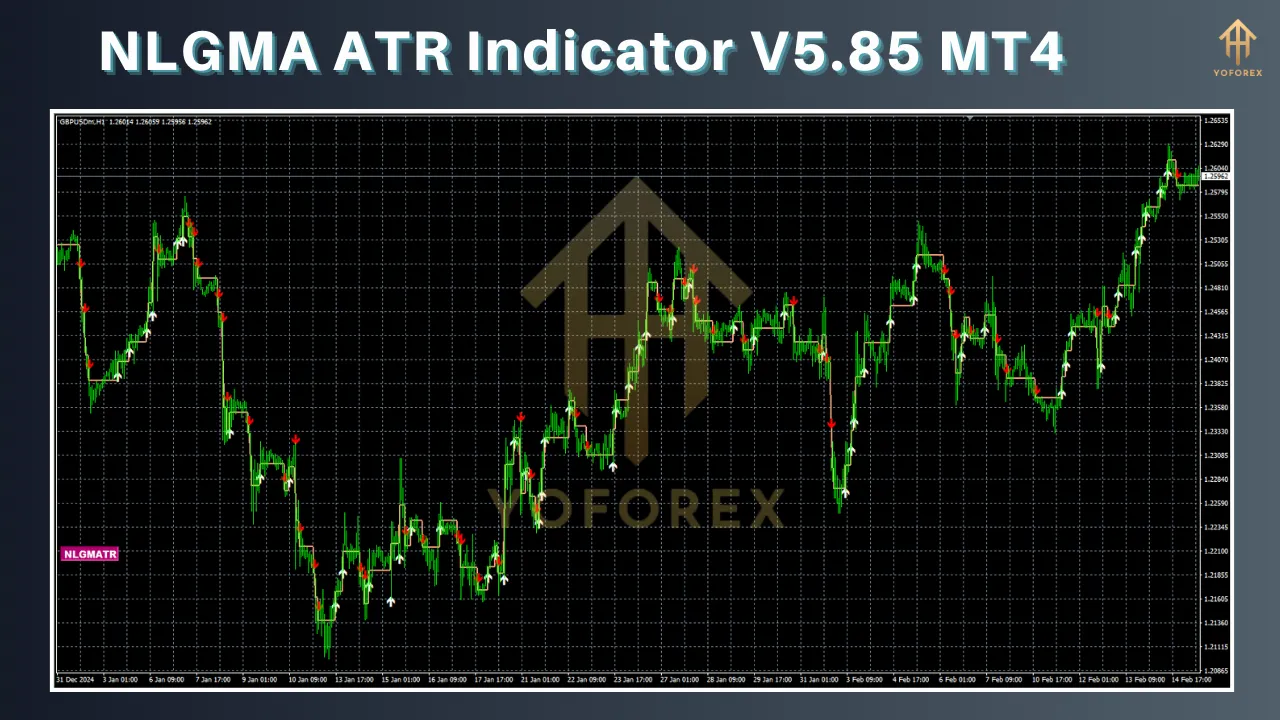
User-Friendly Interface: The indicator is easy to install and configure, with clear visual outputs like colored lines, arrows, or histograms.
-
Optimized Performance: Version 5.85 is optimized for speed and stability, ensuring it runs smoothly even on resource-intensive charts.
Installing the NLGMA ATR Indicator V5.85 on MT4
To use the NLGMA ATR Indicator V5.85, you’ll need to install it on your MT4 platform. Here’s a step-by-step guide:
-
Download the Indicator: Obtain the indicator file (.ex4 or .mq4) from a reputable source. Ensure it’s version 5.85 to access the latest features.
-
Open MT4 Data Folder: In MT4, go to File > Open Data Folder.
-
Navigate to Indicators Folder: Open the MQL4 > Indicators folder.
-
Install the File: Copy the NLGMA ATR V5.85 file into the Indicators folder.
-
Restart MT4: Close and reopen MT4 to load the indicator.
-
Add to Chart: In the MT4 Navigator (Ctrl+N), find the NLGMA ATR Indicator V5.85, drag it onto your chart, and configure the settings as needed.
When adding the indicator to a chart, you’ll see a settings window where you can adjust parameters like the NLGMA period (default: 14), ATR period (default: 14), and ATR multiplier (default: 1.5). These settings can be fine-tuned based on your trading preferences.
Configuring the Indicator
The NLGMA ATR Indicator V5.85 offers several customizable parameters:
-
NLGMA Period: Determines the lookback period for the non-lag moving average. A shorter period (e.g., 10) is more sensitive, while a longer period (e.g., 20) is smoother.
-
ATR Period: Sets the number of bars used to calculate the ATR. The default 14 is suitable for most markets but can be adjusted for faster or slower responses.
-
ATR Multiplier: Controls the width of the volatility bands. A higher multiplier (e.g., 2.0) creates wider bands, while a lower one (e.g., 1.0) makes them tighter.
-
Display Options: Choose how the indicator appears on the chart (e.g., lines, arrows, or histograms) and customize colors for better visibility.
-
Alerts: Enable or disable alerts for events like price crossing the NLGMA or touching the upper/lower ATR bands.
Experiment with these settings on a demo account to find the optimal configuration for your trading style and the specific currency pair or asset you’re trading.
Trading Strategies with NLGMA ATR Indicator V5.85
The NLGMA ATR Indicator V5.85 can be used in various trading strategies. Below are three popular approaches:
1. Trend-Following Strategy
The NLGMA is excellent for identifying trends due to its low-lag nature. Here’s how to use it:
-
Entry: Enter a long position when the price crosses above the NLGMA and is near or above the upper ATR band, indicating strong bullish momentum. For a short position, wait for the price to cross below the NLGMA and approach the lower ATR band.
-
Stop-Loss: Place the stop-loss below the lower ATR band for long trades or above the upper ATR band for short trades. The ATR-based stop-loss adapts to volatility, reducing the risk of premature exits.
-
Take-Profit: Set a take-profit target based on a risk-reward ratio (e.g., 1:2 or 1:3) or when the price approaches a key support/resistance level.
-
Example: On a GBP/USD H1 chart, if the price breaks above the NLGMA and the upper ATR band, enter a long trade with a stop-loss 10 pips below the lower ATR band and a take-profit 20 pips above the entry.
2. Mean Reversion Strategy
The ATR bands can act as dynamic support and resistance levels, making the indicator suitable for mean reversion trades:
-
Entry: Buy when the price touches or falls below the lower ATR band, indicating potential oversold conditions, and sell when it reaches the upper ATR band, suggesting overbought conditions. Confirm with additional indicators like RSI to avoid false signals.
-
Stop-Loss: Place the stop-loss slightly beyond the ATR band to account for volatility spikes.
-
Take-Profit: Aim for the NLGMA line or the opposite ATR band as the price reverts to the mean.
-
Example: On an EUR/USD M15 chart, if the price drops to the lower ATR band and RSI shows oversold conditions, buy with a stop-loss 5 pips below the band and a take-profit at the NLGMA.
3. Breakout Strategy
The ATR bands can help identify breakout opportunities when volatility increases:
-
Entry: Enter a trade when the price breaks out of the ATR bands with strong momentum, confirmed by a spike in ATR values or a candlestick pattern (e.g., engulfing candle).
-
Stop-Loss: Set the stop-loss inside the ATR bands to protect against false breakouts.
-
Take-Profit: Target a multiple of the ATR range (e.g., 2x the current ATR value) or a nearby resistance/support level.
-
Example: On a USD/JPY H4 chart, if the price breaks above the upper ATR band with a bullish engulfing candle, enter a long trade with a stop-loss inside the bands and a take-profit based on the ATR range.
Benefits of the NLGMA ATR Indicator V5.85
-
Enhanced Trend Detection: The NLGMA’s low-lag nature ensures timely trend signals, reducing missed opportunities.
-
Volatility-Based Risk Management: The ATR bands provide dynamic stop-loss and take-profit levels that adapt to market conditions.
-
Versatility: Suitable for multiple trading styles and timeframes, from scalping to swing trading.
-
Improved Decision-Making: The combination of trend and volatility data helps traders make informed entries and exits.
-
Customizability: Adjustable parameters allow traders to tailor the indicator to their preferences and market conditions.
Limitations and Considerations
While the NLGMA ATR Indicator V5.85 is powerful, it’s not without limitations:
-
Not a Standalone Tool: Like most indicators, it works best when combined with other tools (e.g., RSI, MACD, or support/resistance levels) to confirm signals.
-
False Signals in Choppy Markets: During low-volatility or ranging markets, the indicator may produce false signals. Use it in conjunction with market context analysis.
-
Learning Curve: New traders may need time to understand and optimize the indicator’s settings.
-
Broker Dependency: Signal accuracy can vary slightly depending on your broker’s data feed and MT4 platform settings.
To mitigate these limitations, always test the indicator on a demo account and combine it with a robust trading plan that includes risk management and market analysis.
Practical Tips for Maximizing the Indicator
-
Backtest Thoroughly: Use MT4’s Strategy Tester to backtest the indicator on historical data for your chosen currency pair and timeframe.
-
Combine with Other Indicators: Pair the NLGMA ATR with oscillators (e.g., Stochastic) or momentum indicators (e.g., MACD) for stronger confirmation.
-
Adjust for Market Conditions: Increase the ATR multiplier in volatile markets and decrease it in calmer conditions to avoid whipsaws.
-
Use on Major Pairs: The indicator performs best on liquid pairs like EUR/USD, GBP/USD, and USD/JPY due to their consistent volatility.
-
Monitor Economic Events: Be cautious during high-impact news releases, as volatility spikes can trigger false signals. Use an economic calendar to plan your trades.
Community Feedback and Updates
The NLGMA ATR Indicator V5.85 has garnered attention in trading forums and communities, with users praising its responsiveness and versatility. Some traders have shared custom modifications, such as adding display styles (e.g., arrows or histograms) or integrating it with other indicators like the BAT arrow system. However, feedback also highlights the importance of proper configuration to avoid over-optimization, which can lead to curve-fitting.
The developers of version 5.85 have focused on improving compatibility with MT4’s latest updates and enhancing the alert system. Future updates may include additional display options or integration with MT5, based on community demand.
Conclusion
The NLGMA ATR Indicator V5.85 for MT4 is a robust tool that combines the best of trend-following and volatility analysis. By leveraging the non-lag moving average and ATR-based bands, traders can gain a clearer picture of market dynamics, improve their entry and exit timing, and manage risk effectively. Whether you’re scalping on M5 charts or swing trading on D1, this indicator offers the flexibility and precision needed to succeed in forex trading.
To get the most out of the NLGMA ATR V5.85, take the time to understand its settings, test it on a demo account, and integrate it into a well-rounded trading strategy. By combining the indicator with sound risk management and market analysis, you’ll be better equipped to navigate the complexities of the forex market and achieve consistent results.
Start exploring the NLGMA ATR Indicator V5.85 today, and unlock its potential to elevate your trading performance.