Exploring the NLGMA PctFilter Indicator V6.11 for MT4: A Comprehensive Guide
In the dynamic world of forex trading, technical indicators are indispensable tools for traders seeking to navigate market trends and make informed decisions. Among the myriad of indicators available for the MetaTrader 4 (MT4) platform, the Non-Lag Moving Average (NLGMA) PctFilter Indicator V6.11 stands out for its ability to reduce lag while providing reliable signals. This blog delves into the intricacies of the NLGMA PctFilter Indicator V6.11, exploring its features, functionality, application, and how traders can leverage it to enhance their trading strategies.
Introduction
The NLGMA PctFilter Indicator is a custom technical indicator designed for the MT4 platform, a widely used trading software known for its flexibility and robust analytical tools. The indicator is an advanced version of the Non-Lag Moving Average (NonLagMA), which aims to minimize the inherent lag associated with traditional moving averages while maintaining smoothness and accuracy in trend detection.
The “PctFilter” component refers to a percentage-based filter that enhances the indicator’s sensitivity to price movements, allowing it to adapt to market volatility. Version 6.11 introduces refinements to its algorithm, making it more effective for traders seeking precise entry and exit points. This indicator is particularly popular among forex traders, but it can also be applied to other financial instruments like stocks, commodities, and indices.
Understanding the Non-Lag Moving Average
Before diving into the specifics of the NLGMA PctFilter Indicator V6.11, it’s essential to understand the concept of the Non-Lag Moving Average. Traditional moving averages, such as the Simple Moving Average (SMA) or Exponential Moving Average (EMA), often lag behind current price action, leading to delayed signals that can result in missed opportunities or false entries.
The NonLagMA addresses this issue by incorporating a sophisticated algorithm that reduces lag while preserving the smoothness of the moving average line. It achieves this through a combination of adaptive smoothing techniques and dynamic weighting of recent price data. The result is an indicator that closely follows price movements, making it ideal for fast-paced markets like forex.
The PctFilter, as introduced in the NLGMA, adds an additional layer of refinement by filtering out minor price fluctuations that could generate noise or false signals. This percentage-based filter ensures that only significant price movements influence the indicator’s output, enhancing its reliability in volatile conditions.
Key Features of the NLGMA PctFilter Indicator V6.11
The NLGMA PctFilter Indicator V6.11 comes with several features that make it a valuable tool for traders. Here’s a breakdown of its key attributes:
-
Reduced Lag: The core strength of the NonLagMA lies in its ability to minimize lag, providing near-real-time trend signals. This is particularly useful for scalpers and day traders who rely on quick decision-making.
-
PctFilter Parameter: The percentage filter allows traders to adjust the indicator’s sensitivity to price changes. A higher PctFilter value reduces sensitivity, filtering out minor fluctuations, while a lower value increases responsiveness to smaller price movements.
-
Customizable Parameters: Version 6.11 offers a range of adjustable parameters, including Price, Length, Displace, Color, ColorBarBack, Deviation, AlertMode, and WarningMode. These settings enable traders to tailor the indicator to their specific trading style and market conditions.
-
Multiple Indicator Buffers: The indicator supports up to eight buffers (mode values 0–7), allowing it to generate multiple signal lines or data points. This flexibility is crucial for integrating the indicator into Expert Advisors (EAs) or complex trading strategies.
-
Visual and Alert Options: The indicator provides customizable visual displays and alert mechanisms, such as on-screen notifications, sound alerts, or email alerts, to keep traders informed of significant market events.
-
Compatibility with MT4: Designed specifically for MT4, the indicator is easy to install and integrates seamlessly with the platform’s charting and automation features.
How the NLGMA PctFilter Indicator Works
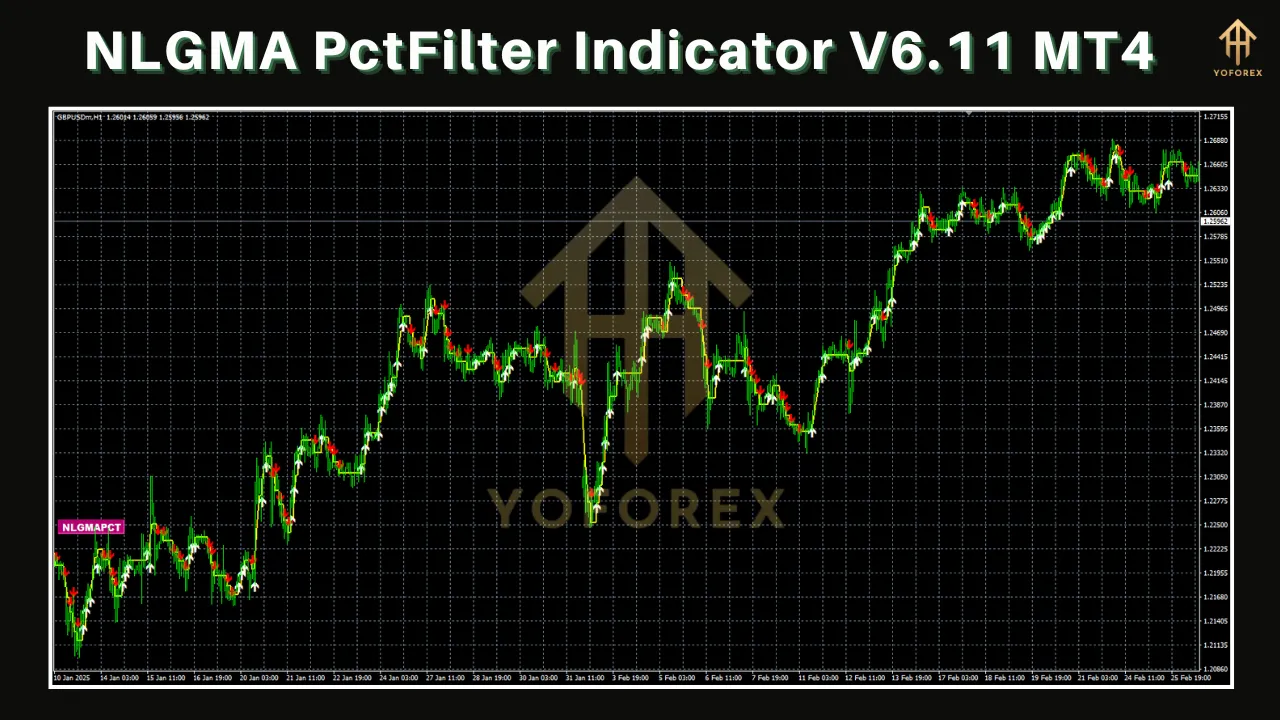
The NLGMA PctFilter Indicator V6.11 operates by calculating a moving average that adapts to price changes with minimal delay. The PctFilter parameter plays a critical role in this process by setting a threshold for price movements that the indicator considers significant. For example, if the PctFilter is set to 0.5%, only price changes exceeding this percentage will influence the moving average calculation, reducing the impact of market noise.
The indicator’s output is displayed as a line on the MT4 chart, which traders can use to identify trends, reversals, or potential entry and exit points. When the price is above the NLGMA line, it indicates a bullish trend, while a price below the line suggests a bearish trend. Crossovers between the price and the indicator line can signal potential trading opportunities.
The customizable parameters allow traders to fine-tune the indicator’s behavior. For instance:
-
Length: Determines the period used for the moving average calculation. A shorter length increases sensitivity, while a longer length smooths out the indicator.
-
Displace: Shifts the indicator line forward or backward on the chart, useful for aligning signals with specific trading strategies.
-
AlertMode and WarningMode: Enable or disable alerts for specific conditions, such as trend changes or crossovers.
Installing the NLGMA PctFilter Indicator on MT4
To use the NLGMA PctFilter Indicator V6.11, traders must first install it on their MT4 platform. Here’s a step-by-step guide:
-
Download the Indicator: Obtain the indicator file (typically in .mq4 or .ex4 format) from a reputable source, such as a forex forum or indicator marketplace. Ensure the file is version 6.11 to access the latest features.
-
Locate the Indicators Folder: Open the MT4 platform, go to File > Open Data Folder, and navigate to MQL4 > Indicators.
-
Install the File: Copy the downloaded .mq4 or .ex4 file into the Indicators folder.
-
Refresh MT4: Close and reopen MT4, or right-click on the “Indicators” section in the Navigator panel and select “Refresh.”
-
Apply to Chart: Drag the NLGMA PctFilter Indicator from the Navigator panel onto a chart, or double-click it and select a chart. Configure the parameters in the settings window as needed.
-
Verify Installation: The indicator line should appear on the chart, and any alerts or visual settings should function as configured.
Using the NLGMA PctFilter Indicator in Trading
The NLGMA PctFilter Indicator V6.11 can be used in various trading strategies, from trend-following to reversal-based approaches. Below are some practical ways to incorporate it into your trading:
1. Trend Identification
The indicator’s ability to closely track price movements makes it an excellent tool for identifying trends. Traders can use the NLGMA line to confirm whether the market is in an uptrend (price above the line) or downtrend (price below the line). To increase confidence, combine the indicator with other trend-confirming tools, such as the Average Directional Index (ADX).
2. Entry and Exit Signals
Price crossovers with the NLGMA line can signal potential entry or exit points. For example:
-
Buy Signal: When the price crosses above the NLGMA line, indicating a potential bullish trend.
-
Sell Signal: When the price crosses below the NLGMA line, suggesting a bearish trend.
To avoid false signals, traders should use the PctFilter parameter to filter out minor crossovers and confirm signals with additional indicators, such as the Relative Strength Index (RSI) or Moving Average Convergence Divergence (MACD).
3. Scalping and Day Trading
The reduced lag of the NLGMA makes it ideal for scalping and day trading, where quick reactions to price changes are critical. Traders can set a shorter Length parameter (e.g., 10–20) and a low PctFilter value (e.g., 0.3%) to increase the indicator’s responsiveness on lower timeframes, such as M5 or M15.
4. Automated Trading with Expert Advisors
The NLGMA PctFilter Indicator’s multiple buffers make it compatible with Expert Advisors (EAs). Traders can use the iCustom() function in MQL4 to integrate the indicator into automated trading systems. For example, the following code snippet retrieves the indicator’s value:
double nlma = iCustom(NULL, 0, "NonLagMA_v6.11", Price, Length, Displace, PctFilter, Color, ColorBarBack, Deviation, AlertMode, WarningMode, 0, 0);By optimizing the Length parameter and defining specific buffer values (mode 0–7), traders can create EAs that execute trades based on NLGMA signals.
Advantages of the NLGMA PctFilter Indicator
-
Low Lag: Provides timely signals, reducing the risk of entering trades too late.
-
Noise Reduction: The PctFilter minimizes false signals caused by market volatility.
-
Versatility: Suitable for various trading styles, timeframes, and financial instruments.
-
Customizability: Offers extensive parameter adjustments to suit individual preferences.
Limitations and Considerations
While the NLGMA PctFilter Indicator is powerful, it’s not without limitations:
-
Complexity: The multitude of parameters can be overwhelming for novice traders.
-
False Signals in Choppy Markets: Like all moving averages, the indicator may produce false signals in ranging or highly volatile markets.
-
Dependence on Optimization: The indicator’s effectiveness depends on proper parameter tuning, which requires testing and experience.
To mitigate these limitations, traders should backtest the indicator on historical data and combine it with other technical tools to confirm signals.
Tips for Optimizing the NLGMA PctFilter Indicator
-
Backtest Extensively: Use MT4’s Strategy Tester to evaluate the indicator’s performance across different currency pairs, timeframes, and market conditions.
-
Adjust PctFilter for Market Conditions: Increase the PctFilter value in volatile markets to reduce noise, and lower it in stable markets for greater sensitivity.
-
Combine with Other Indicators: Pair the NLGMA with oscillators (e.g., Stochastic) or volume-based indicators to validate signals.
-
Test on Demo Accounts: Before using the indicator in live trading, practice on a demo account to understand its behavior and refine your strategy.
Community Feedback and Insights
The NLGMA PctFilter Indicator has garnered attention in forex trading communities, with traders praising its responsiveness and versatility. On platforms like Forex Factory and MQL5, users have shared insights about its integration into EAs and its performance in trending markets. Some traders recommend combining the indicator with low-pass filters or convergence/divergence strategies for enhanced accuracy, as noted in discussions about similar indicators.
However, some users caution that improper parameter settings can lead to overfitting, where the indicator performs well in backtests but fails in live trading. This underscores the importance of robust testing and risk management.
Conclusion
The NLGMA PctFilter Indicator V6.11 for MT4 is a powerful tool that bridges the gap between responsiveness and reliability in technical analysis. Its ability to reduce lag while filtering out market noise makes it a valuable asset for traders of all levels. By understanding its features, customizing its parameters, and integrating it into a well-rounded trading strategy, traders can harness the indicator’s potential to improve their decision-making and profitability.
Whether you’re a scalper, day trader, or long-term investor, the NLGMA PctFilter Indicator offers the flexibility to adapt to your trading style. However, like any tool, it requires practice, testing, and a disciplined approach to unlock its full benefits. As you explore this indicator, remember to combine it with sound risk management and continuous learning to navigate the complexities of the forex market successfully.
For those interested in acquiring the NLGMA PctFilter Indicator V6.11, reputable sources like forex forums or indicator marketplaces are good starting points. Always verify the authenticity of the file and test it thoroughly before incorporating it into your trading arsenal.
Disclaimer: Trading involves significant risk, and past performance is not indicative of future results. Always conduct thorough research and consult with a financial advisor before making trading decisions.