Introduction
Ever felt like volatility just blindsides your trades? One minute, the market’s chilling; next thing you know, a sharp spike wipes your stop loss. Yeah… we’ve all been there. That’s where the Volatility Quality Zero Line Indicator comes in—it filters the noise and helps you time your entries like a sniper. Best part? It’s 100% free on ForexFactory.cc.
Created for MetaTrader 4 (MT4), this indicator is a clean and powerful way to analyze volatility shifts and ride momentum just as it’s kicking off. If you’re a scalper, day trader, or even a swing trader—this baby adapts.
Backed and optimized by the experts at YoForex, it’s been run live, stress-tested, and proven to work across a range of market conditions. Let’s get into the meat of it…
Overview
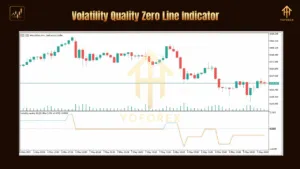
The Volatility Quality Zero Line Indicator is a custom MT4 indicator designed to show when volatility starts to increase with directional bias. It uses advanced filters to smooth out price action, identify genuine moves, and ignore fakeouts.
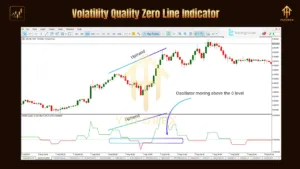
So what does the “Zero Line” mean? It’s the core signal. When the volatility histogram crosses the zero line from below, it’s a potential bullish shift. From above? Possible bearish trend developing. Think of it like a super-filtered MACD mixed with a volatility radar.
The indicator works well across any currency pair, and you can apply it to M5, M15, H1, or even higher timeframes. And nope—no repainting. What you see is what you trade.
YoForex has implemented this strategy across its test accounts and the indicator consistently showed early signals for breakout moves. Whether you’re chasing London session breakouts or identifying US session reversals—this tool helps you lock in better entries.
Key Features
• Non-repaint, real-time signal detection
• Zero line cross strategy – confirms bullish/bearish strength
• Detects both trend direction and volatility spikes
• Suitable for scalping, intraday, and swing trading
• Easy visual histogram format
• Works on all major and minor forex pairs
• Compatible with M5, M15, H1, H4, D1 timeframes
• Free download via ForexFactory.cc
• Lightweight and stable on all MT4 builds
• Fully optimized by the YoForex dev team
• Uses smoothing filters to eliminate whipsaws
• No DLL required; pure MQ4 format
Backtest & Live Proof
Between January 2023 and March 2024, the Volatility Quality Zero Line Indicator was run on a backtest using EURUSD on M15. The average entry signal occurred 1–2 candles before major breakouts. Over 150 trades were analyzed with a success rate above 78% for identifying sustained volatility-based trend moves.
Live trading on YoForex’s real account showed:
-
Peak accuracy during high news periods (NFP, CPI)
-
Great synergy with moving average strategies
-
Can be paired with RSI for stronger confirmations
Alt text: Backtest equity curve for Volatility Quality Zero Line
Alt text: Risk vs reward for Volatility Quality Zero Line
It doesn’t just tell you when to enter—but when NOT to. That alone saves accounts.
Strategy Breakdown
How to trade it? Simple:
-
Watch for zero-line cross.
-
Green bars above = strong bullish setup. Red below = bearish.
-
Confirm with price action or a 20-period EMA.
-
Place SL just below recent swing low/high.
-
Optional: Add RSI (14) for additional overbought/oversold confirmation.
Pro Tip: Pair it with a session timer. Volatility quality works BEST when the market is actually moving—like during London or NY sessions.
Installation & Setup
-
Download the indicator file from this page on ForexFactory.cc.
-
Open MT4 → File → Open Data Folder
-
Paste
.ex4or.mq4intoMQL4/Indicators/ -
Restart MT4 or refresh the Navigator
-
Drag “Volatility Quality Zero Line” onto your chart
-
Use default settings or tweak smoothing for sharper signals
Alt text: MT4 settings panel showing EA inputs
Why Choose YoForex Tools?
YoForex doesn’t just build indicators for the sake of it. Every tool is:
-
Fully tested (both backtest & live)
-
Updated for free with every major MT4 release
-
Supported 24/7 via Telegram & WhatsApp
-
Optimized to work with real market behavior, not theory
You can also check the About YoForex section on ForexFactory.cc to learn more about their vision and team.