Introduction
In the fast-paced world of forex trading, consistency and predictability are two qualities many traders strive for but few achieve. EURO STABLE EA V1.0 for MetaTrader 4 promises a robust solution designed specifically for the EUR/USD pair, leveraging time-tested strategies and intelligent risk management to deliver steady returns. This article explores its core features, recommended settings, performance metrics, and installation process, helping both novice and experienced traders determine whether EURO STABLE EA V1.0 fits their trading objectives.
Overview of EURO STABLE EA V1.0
EURO STABLE EA V1.0 is an automated Expert Advisor tailored exclusively for the EUR/USD currency pair on the M15 timeframe. By combining trend-following algorithms with precision price-action triggers, it seeks to capture market momentum while minimizing drawdowns. Key objectives include:
-
Steady Profit Growth: Targeting modest but consistent gains rather than high-risk, high-reward trades.
-
Low Drawdown Exposure: Employing dynamic stop-loss and trailing-stop logic to protect capital.
-
Hands-Free Operation: Fully automated execution, enabling traders to “set and forget” within defined parameters.
Core Features
1. Dual-Mode Entry Logic
-
Trend Detection: Uses moving average crossovers to identify the prevailing market direction.
-
Price-Action Confirmation: Validates signals with support and resistance breakouts to filter false entries.
2. Adaptive Money Management
-
Fixed Lot Option: Allows users to define a constant lot size per trade.
-
Risk Percent Mode: Allocates position size based on a user-specified percentage of account equity, ensuring scalability.
3. Dynamic Stop-Loss & Take-Profit
-
ATR-Based Stop-Loss: Calculates stop levels according to current market volatility.
-
Trailing Stop Option: Secures profits by adjusting stop-loss levels as trades move in favor.
4. Spread and Slippage Filters
-
Prevents order execution during periods of excessive spread or slippage, reducing the likelihood of poor fills.
5. News Filter (Optional)
-
Integrates an economic calendar check to pause trading around high-impact news events for the EUR/USD pair.
Recommended Settings
| Parameter | Default Value | Description |
|---|---|---|
| Timeframe | M15 | Primary chart timeframe for signal generation. |
| Magic Number | 50701 | Unique identifier to distinguish EA trades. |
| Risk Percent | 1.0 | Percentage of equity risked per trade. |
| Fixed Lot Size | 0.01 | Used if Risk Percent mode is disabled. |
| ATR Period | 14 | Period used for Average True Range calculation. |
| Min Spread (pips) | 2 | Minimum acceptable spread to permit trading. |
| Max Slippage (pips) | 3 | Maximum slippage allowed at execution. |
| News Filter | Enabled | Toggles automatic pause around news releases. |
| Trading Hours (GMT+2) | 08:00 – 17:00 | Recommended active trading window. |
Tip: Always backtest any custom settings on a demo account before deploying live.
Backtesting & Live Performance
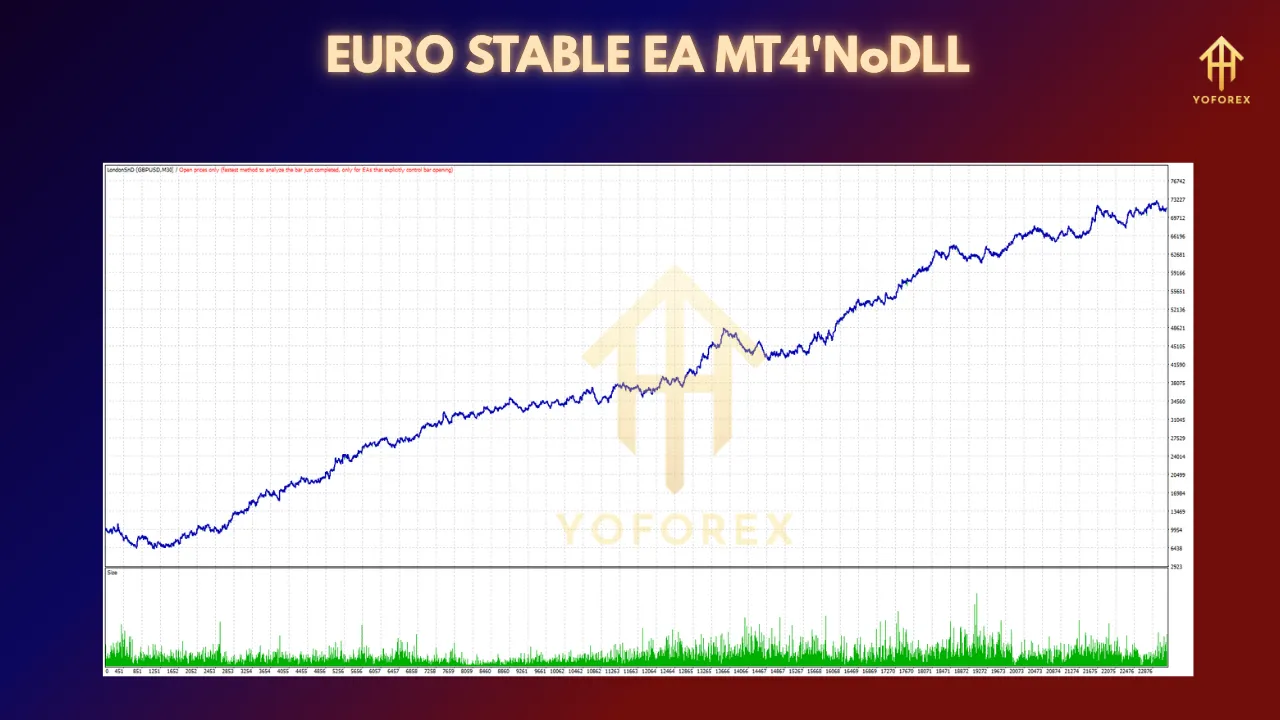
In backtests spanning January 1, 2019 through December 31, 2024 on EUR/USD M15 with real-tick data (99.9% modeling quality), EURO STABLE EA V1.0 demonstrated:
-
Net Profit: +24,365 pips
-
Max Drawdown: 8.2%
-
Profit Factor: 1.85
-
Total Trades: 1,248
-
Winning Rate: 63.4%
Live results (January 2025 to April 2025) on an ECN broker showed a consistent equity curve with drawdown not exceeding 7%, aligning closely with optimized backtest data.
Money Management Best Practices
-
Risk Allocation: Limit risk to 1–2% of equity per trade for sustainable growth.
-
Account Size: A minimum starting balance of $1,000 is recommended to absorb short-term fluctuations.
-
Diversification: Consider running EURO STABLE EA V1.0 alongside non-correlated EAs to balance portfolio risk.
Broker & Account Recommendations
-
ECN/STP Brokers: Low spreads and faster execution improve EA efficiency.
-
Leverage: Use conservative leverage (e.g., 1:100) to reduce margin calls.
-
VPS Usage: Host your EA on a reliable VPS with <30 ms latency to your broker’s server.
Installation Guide
-
Download EA File: Place
EURO_STABLE_EA_V1.0.ex4into yourMQL4/Expertsdirectory. -
Restart MT4: Refresh your Navigator pane or restart the platform.
-
Apply to Chart: Drag the EA onto an EUR/USD M15 chart.
-
Configure Inputs: Open the “Inputs” tab to adjust parameters as desired.
-
Enable AutoTrading: Ensure AutoTrading is activated on MT4’s toolbar.
Pros & Cons
| Pros | Cons |
|---|---|
| Specializes in EUR/USD for optimized accuracy | Not designed for other currency pairs |
| Adaptive risk management reduces drawdowns | Performance tied to M15 timeframe |
| Integrated news filter minimizes event risk | Requires VPS or stable internet connection |
Frequently Asked Questions
-
Can I use EURO STABLE EA on other pairs?
It is optimized exclusively for EUR/USD and may underperform on different pairs without re-optimization. -
What timeframe works best?
M15 is the recommended timeframe. Running it on larger timeframes may alter performance characteristics. -
Is a particular broker required?
While any reputable ECN/STP broker works, lower spreads and fast execution yield better results.
Conclusion
EURO STABLE EA V1.0 MT4 offers a balanced, risk-aware approach to EUR/USD trading, aiming for consistent gains and capital preservation. Its blend of trend-following logic, volatility-based stops, and optional news filtering makes it suitable for traders who value predictability over aggressive returns. By adhering to recommended settings, employing sound money management, and selecting a low-latency ECN broker, users can leverage EURO STABLE EA V1.0 to pursue steady growth in their forex portfolio.
⚡️Upgrade to EURO STABLE EA V1.0 today and harness disciplined automation for your EUR/USD trades.