
Introduction to Automated Forex Trading
The world of forex trading has undergone a significant transformation with the advent of automated trading systems, commonly known as Expert Advisors (EAs). These software programs, designed to run on platforms like MetaTrader 4 (MT4), automate trading decisions, enabling traders to execute strategies with precision and efficiency. Among the myriad of EAs available, EVO TRADE EA V1.0 MT4 stands out as a promising tool for traders seeking to capitalize on the gold market (XAUUSD). This blog post delves into the features, benefits, and practical applications of EVO TRADE EA V1.0, offering a comprehensive guide for both novice and seasoned traders.
What is EVO TRADE EA V1.0 MT4?
EVO TRADE EA V1.0 is an advanced Expert Advisor specifically designed for the MetaTrader 4 platform, tailored to trade the XAUUSD (gold) pair on the H1 timeframe. Developed with cutting-edge technologies, including artificial intelligence (AI) and neural networks, this EA aims to provide a self-learning trading system that adapts to dynamic market conditions. Unlike traditional EAs that rely on static algorithms, EVO TRADE EA V1.0 recalculates its strategies after each trade, ensuring precision and adaptability in the volatile forex market.
Key Features of EVO TRADE EA V1.0
-
AI-Driven Trading: The EA leverages AI and machine learning to analyze real-time market data, identifying high-probability trading opportunities.
-
Dynamic Risk Management: It incorporates adaptive risk management techniques to protect capital while maximizing returns.
-
XAUUSD Optimization: Specifically engineered for gold trading, it capitalizes on the unique volatility and trends of the XAUUSD pair.
-
H1 Timeframe: Operates on the hourly chart, balancing trade frequency with robust market analysis.
-
Seamless MT4 Integration: Fully compatible with MT4, ensuring easy installation and operation.
-
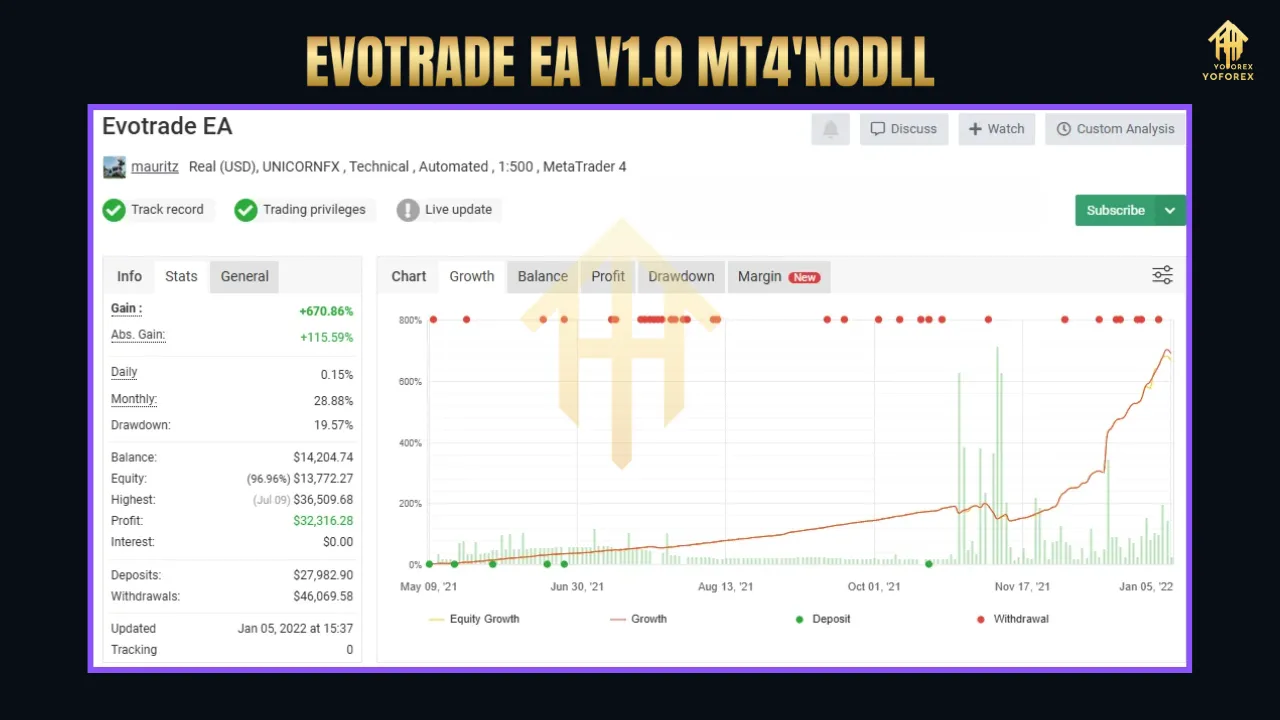
Live Signal Performance: Backed by live performance data, providing transparency and reliability for users.
Why Choose EVO TRADE EA V1.0?
1. Emotion-Free Trading
One of the primary advantages of using an EA like EVO TRADE is the elimination of emotional decision-making. Human traders often fall prey to fear, greed, or hesitation, which can lead to impulsive or irrational trades. EVO TRADE EA V1.0 operates based on predefined algorithms and real-time data analysis, ensuring disciplined and consistent trading.
2. 24/7 Market Monitoring
The forex market operates round-the-clock, making it challenging for traders to monitor every opportunity. EVO TRADE EA V1.0 runs continuously on a Virtual Private Server (VPS), ensuring no trading opportunity is missed, even when the trader is asleep or occupied.
3. Adaptability to Market Changes
Traditional EAs can become obsolete in rapidly changing market conditions. EVO TRADE’s self-learning capability allows it to recalibrate its strategies, ensuring it remains effective in both trending and ranging markets.
4. Cost-Effective Automation
Hiring a professional trader or spending hours analyzing charts can be costly and time-consuming. EVO TRADE EA V1.0 offers a cost-effective solution, automating complex trading strategies at a fraction of the cost.
Installation and Setup
Installing EVO TRADE EA V1.0 on MT4 is straightforward, making it accessible even for traders with limited technical expertise. Here’s a step-by-step guide:
-
Download the EA: Purchase or download EVO TRADE EA V1.0 from a reputable source, such as the MQL5 Market or authorized vendors like CheaperForex. The package typically includes the .ex4 file, an installation guide, and a pairs/timeframes document.
-
Access MT4 Data Folder: Open your MT4 platform, go to File > Open Data Folder, and navigate to the MQL4 > Experts folder.
-
Install the EA: Copy the .ex4 file into the Experts folder. Restart MT4 or refresh the Navigator window to ensure the EA appears under the Expert Advisors section.
-
Configure Settings: Drag the EA onto the XAUUSD H1 chart. A setup pop-up will appear, allowing you to adjust parameters such as risk levels, lot sizes, and trading hours. Ensure Allow Live Trading and Allow DLL Imports are enabled.
-
Verify Activation: Check for a smiling face next to the EA’s name on the chart, indicating it is active for live trading.
-
Use a VPS: For uninterrupted trading, host the EA on a Forex VPS, such as those offered by Cloudzy, to ensure 24/7 operation and low latency.
Recommended Settings
-
Pair: XAUUSD
-
Timeframe: H1
-
Risk Level: Low (0.1) for beginners, adjustable based on experience
-
Lot Size: Auto or fixed, depending on account balance
-
VPS: Recommended for optimal performance
Performance and Backtesting
Before deploying EVO TRADE EA V1.0 on a live account, thorough backtesting is essential to evaluate its performance under various market conditions. MT4’s Strategy Tester allows users to simulate trades using historical data. Key metrics to assess include:
-
Profit Factor: Ratio of gross profits to gross losses.
-
Drawdown: Maximum percentage loss from peak equity.
-
Win Rate: Percentage of winning trades.
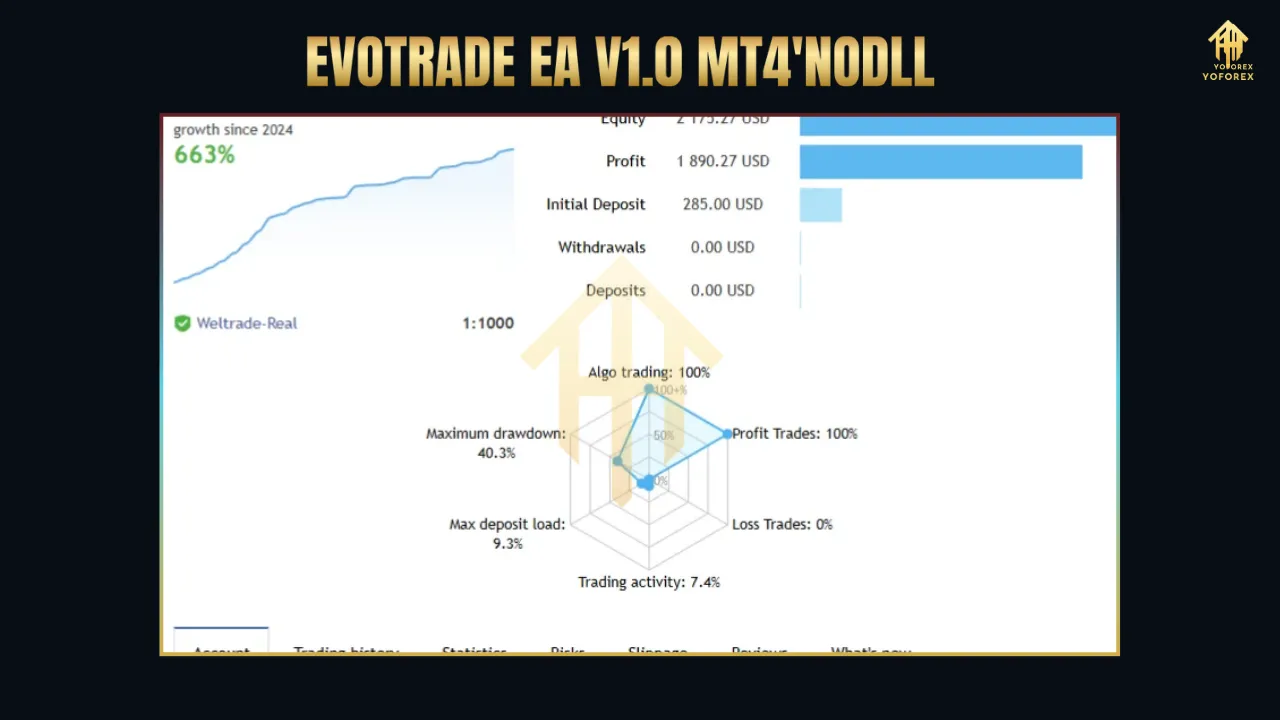
Live signal performance, available on platforms like MQL5, indicates that EVO TRADE EA V1.0 has achieved consistent results with no losing trades in demo testing, though real-world performance may vary due to factors like slippage and broker spreads. Traders should start with a demo account to fine-tune settings and build confidence in the EA’s capabilities.
Benefits of Trading XAUUSD with EVO TRADE EA
Gold (XAUUSD) is a popular asset in forex trading due to its high volatility and sensitivity to global economic events. EVO TRADE EA V1.0 is optimized for this pair, offering several advantages:
-
Volatility Exploitation: Gold’s price swings provide ample trading opportunities, which the EA’s AI-driven analysis capitalizes on.
-
Safe Haven Appeal: Gold often moves inversely to equities, making it a hedge during market uncertainty.
-
Liquidity: XAUUSD is highly liquid, ensuring tight spreads and reliable execution.
Risks and Considerations
-
Market Risks: Unexpected news events or extreme volatility can impact performance.
-
Broker Dependency: Spreads, execution speeds, and broker reliability affect EA performance.
-
Over-Optimization: Excessive tweaking of settings based on backtesting can lead to curve-fitting, reducing real-world effectiveness.
-
Capital Requirements: Ensure sufficient account balance to withstand drawdowns, especially with leveraged trading.
Comparison with Other EAs
EVO TRADE EA V1.0 distinguishes itself from other EAs like Aurum Apex or Titan Gold AI through its self-learning AI and focus on XAUUSD. While Aurum Apex offers multiple risk modes and Titan Gold AI combines traditional strategies with AI, EVO TRADE’s real-time adaptability and neural network integration provide a unique edge. However, traders should compare EAs based on their trading style, risk tolerance, and preferred markets.
Integrating EVO TRADE EA with a Trading Strategy
-
Diversification: Run EVO TRADE alongside other EAs or manual strategies to spread risk.
-
Performance Monitoring: Use tools like Myfxbook to track live performance and identify areas for improvement.
-
Risk Management: Set stop-losses and take-profits within the EA’s parameters to protect capital.
-
Broker Selection: Choose a regulated broker with low spreads and fast execution, such as FOREX.com or AvaTrade.
Community Feedback and Support
User reviews on platforms like MQL5 highlight EVO TRADE EA’s reliability and ease of use. One user noted, “I bought this robot one of the first and since then I have been testing and checking it on a demo account, now I am ready to install it for work on a real account. I want to say that so far it has not had a single losing trade.” Such feedback underscores the EA’s potential, though individual results may vary.
Support is available through vendors like CheaperForex, which offers free lifetime updates and a 7-day refund policy. Traders can also access community forums like Forex Factory to share strategies and troubleshoot issues.
Future Updates and Evolution
The developers of EVO TRADE EA V1.0 are committed to continuous improvement, with version 1.2 already introducing enhanced features. Free updates ensure the EA remains competitive, adapting to new market dynamics and technological advancements.
Conclusion
EVO TRADE EA V1.0 MT4 represents a significant leap forward in automated forex trading, particularly for XAUUSD traders. Its AI-driven approach, dynamic risk management, and seamless MT4 integration make it a powerful tool for achieving consistent results. However, success requires careful setup, rigorous testing, and ongoing monitoring. By combining EVO TRADE EA with sound risk management and a reliable broker, traders can unlock its full potential and navigate the forex market with confidence.