
Crypto Investor EA V1.0 MT4: A Comprehensive Guide to Automated Bitcoin Trading
Introduction
In the fast-paced world of cryptocurrency trading, automation has become a game-changer for traders seeking to capitalize on market opportunities without constant manual intervention. The Crypto Investor EA V1.0 MT4, a sophisticated Expert Advisor (EA) designed for the MetaTrader 4 (MT4) platform, is tailored specifically for trading Bitcoin (BTCUSD). This blog post explores the features, trading strategies, setup process, performance metrics, and key considerations for using this EA, providing a detailed guide for both novice and experienced traders.
Announced by FX Automater on May 19, 2025, the Crypto Investor EA is marketed as a next-generation trading solution designed to dominate the volatile Bitcoin market. With its grid and martingale-based strategy, robust risk management features, and fully automated operation, it aims to simplify trading while maximizing profitability. Let’s dive into what makes this EA a compelling choice for crypto traders.
What is Crypto Investor EA V1.0 MT4?
The Crypto Investor EA V1.0 MT4 is an automated trading robot developed for the MetaTrader 4 platform, one of the most widely used trading platforms in the forex and cryptocurrency markets. This EA is engineered to trade BTCUSD, leveraging a combination of grid and martingale strategies to navigate the volatile price movements of Bitcoin. It is designed to operate autonomously, executing trades based on predefined parameters without requiring constant trader oversight.
The EA is built to handle the complexities of cryptocurrency trading, offering features like proportional money management, customizable trade distances, and recovery mechanisms to optimize performance. It is available for purchase through platforms like MQL5, where it has dedicated product pages for both MT4 and MT5 versions, though this blog focuses on the MT4 iteration.
Key Features
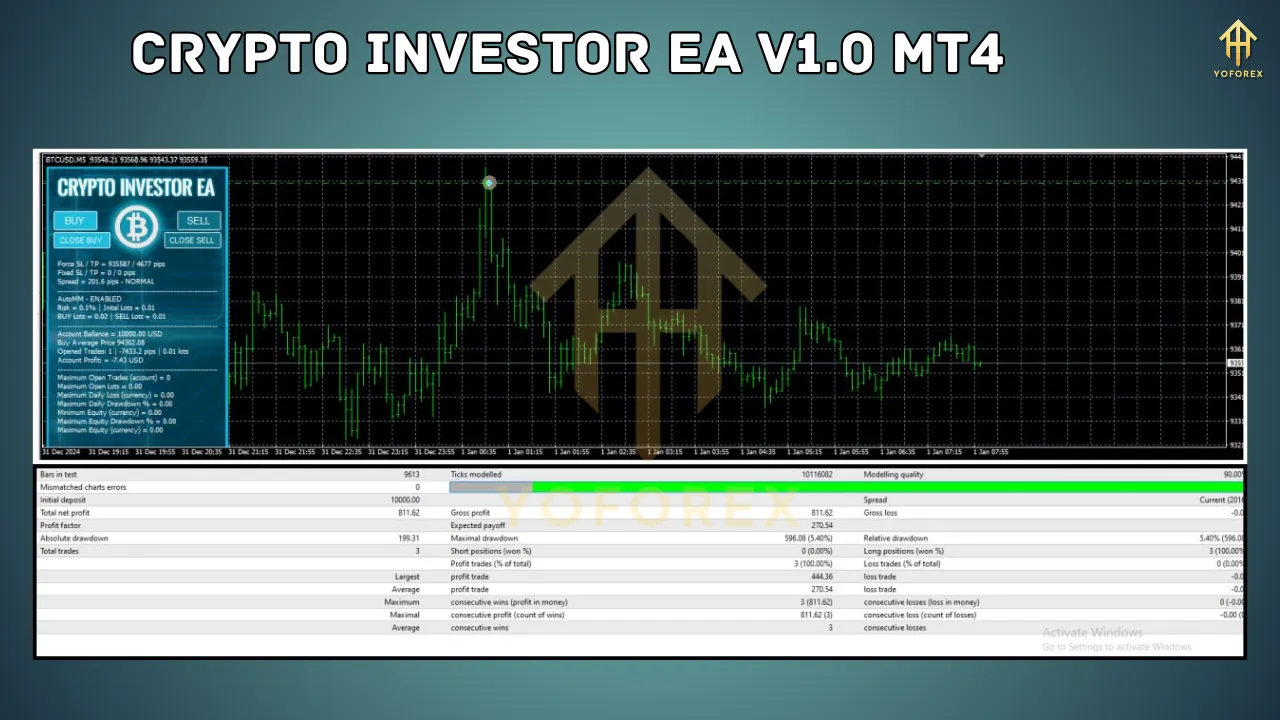
The Crypto Investor EA is packed with features that cater to traders seeking automation and risk control. Below are some of its standout functionalities:
-
Grid and Martingale Strategy:
-
The EA employs a grid trading approach, opening additional trades at specified price intervals when the market moves against the initial position. This is coupled with a martingale strategy, where lot sizes are increased for subsequent trades to recover losses. The lot size multiplier (K_Mart) allows traders to adjust the aggressiveness of this approach.
-
-
Proportional Money Management (AutoMM):
-
The AutoMM feature enables dynamic lot sizing based on account balance and risk percentage. For example, with a $1,000 account and a 0.1% risk setting (recommended for conservative trading), the EA opens trades with a 0.01 lot size, adapting to account size and market conditions.
-
-
Customizable Trade Distances:
-
Traders can set distances between trades (AddDistance_1 to AddDistance_4) as a percentage of the current BTCUSD price. This allows flexibility in managing trade spacing, with a default value (AddDistance_Default) used if specific distances are set to zero.
-
-
Trade Delay Options:
-
The EA supports configurable delays (AddDelay_1 to AddDelay_4) in minutes for opening additional trades, helping to avoid overtrading during volatile market periods.
-
-
Recovery Mechanisms:
-
The RecoveryProfit parameter sets a profit target for recovery trades, while RecoveryAfter defines the minimum distance between recovery trades and previous positions. The EA supports up to a specified number of recovery trades (RecoveryTrades) to manage drawdowns.
-
-
Unique Magic Number:
-
Each instance of the EA uses a unique identifier (Magic) to manage its positions, ensuring compatibility with other EAs running on the same account.
-
-
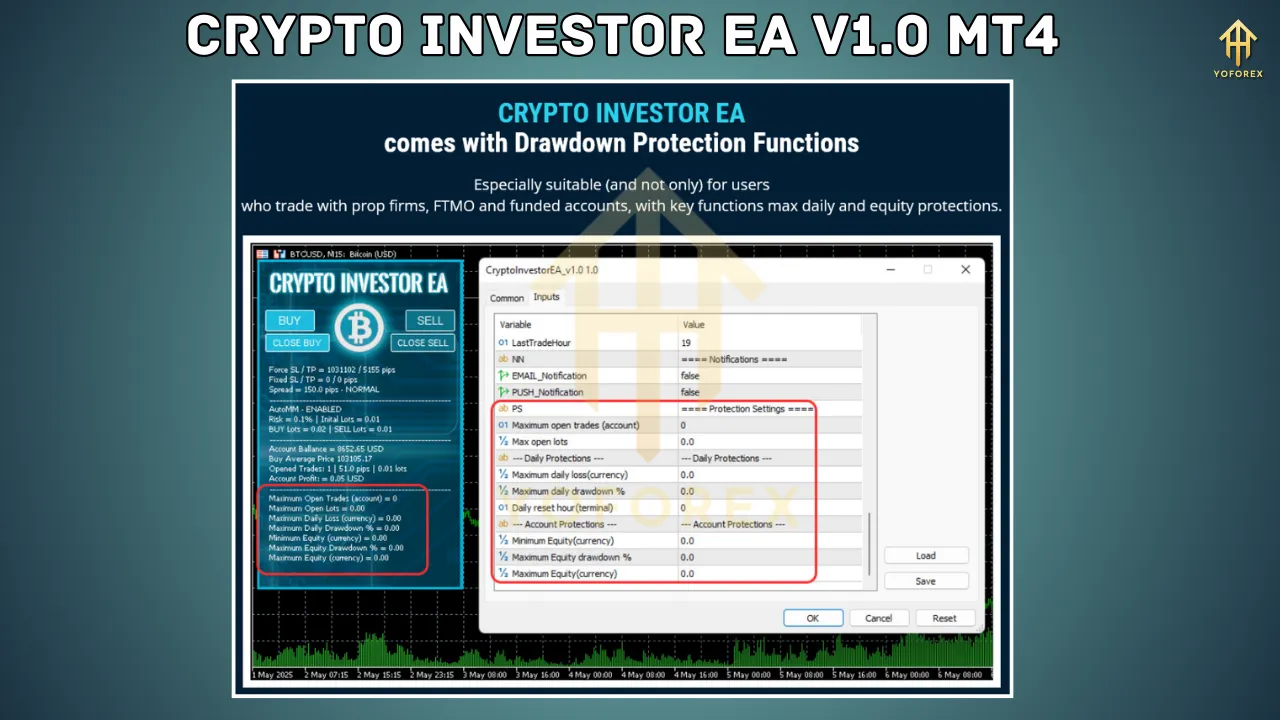
Risk Management:
-
The EA includes features to minimize risk, such as limiting the maximum number of additional trades (MaxAddTrades, default set to 4) and setting conservative risk levels to protect capital.
-
Trading Strategy
The Crypto Investor EA V1.0 MT4 is built around a grid and martingale strategy, which is both its strength and a point of caution. Here’s how it works:
-
Grid Trading: The EA opens an initial trade and, if the market moves against it, places additional trades at predefined price intervals (e.g., a percentage of BTCUSD’s price). This creates a “grid” of trades designed to capture profits when the market reverses.
-
Martingale Approach: To recover losses, the EA increases the lot size of subsequent trades using the K_Mart multiplier. While this can lead to quick recovery in favorable conditions, it also increases risk during prolonged adverse market movements.
-
Risk Management: To mitigate the inherent risks of martingale, the EA uses conservative default settings (e.g., 0.1% risk per trade) and allows traders to customize trade distances and delays. The recovery mechanism targets a specific profit percentage to close losing positions profitably.
This strategy is particularly suited for the volatile BTCUSD market, where price swings can create opportunities for grid-based trading. However, traders must be aware of the potential for significant drawdowns during extended trends, as martingale strategies can amplify losses if not managed carefully.
Setting Up Crypto Investor EA V1.0 MT4
Setting up the Crypto Investor EA is straightforward, but proper configuration is crucial for optimal performance. Here’s a step-by-step guide:
-
Download and Install:
-
Purchase the EA from a trusted source, such as the MQL5 marketplace (product page: https://www.mql5.com/en/market/product/118963).
-
After payment, download the EA file (.ex4) and any accompanying set files or installation guides.
-
-
MT4 Configuration:
-
Open MetaTrader 4 and navigate to “Tools” > “Options” > “Expert Advisors” tab.
-
Enable “Allow automated trading” and “Allow DLL imports” to ensure the EA functions correctly.
-
-
Install the EA:
-
Copy the .ex4 file to the “Experts” folder in your MT4 data directory (File > Open Data Folder > MQL4 > Experts).
-
Restart MT4 or refresh the Navigator panel to load the EA.
-
-
Attach to Chart:
-
Open a BTCUSD chart (recommended timeframe: M15 or as specified in the EA’s documentation).
-
Drag the Crypto Investor EA from the Navigator panel onto the chart.
-
Configure the input parameters (e.g., AutoMM, K_Mart, AddDistance, RecoveryProfit) or load a preset file for optimized settings.
-
-
Test on Demo Account:
-
Before using the EA on a live account, test it on a demo account to evaluate its performance and adjust settings as needed.
-
-
Monitor and Optimize:
-
Regularly monitor the EA’s performance and adjust parameters based on market conditions. Use historical data for backtesting to fine-tune settings.
-
Performance and Live Signals
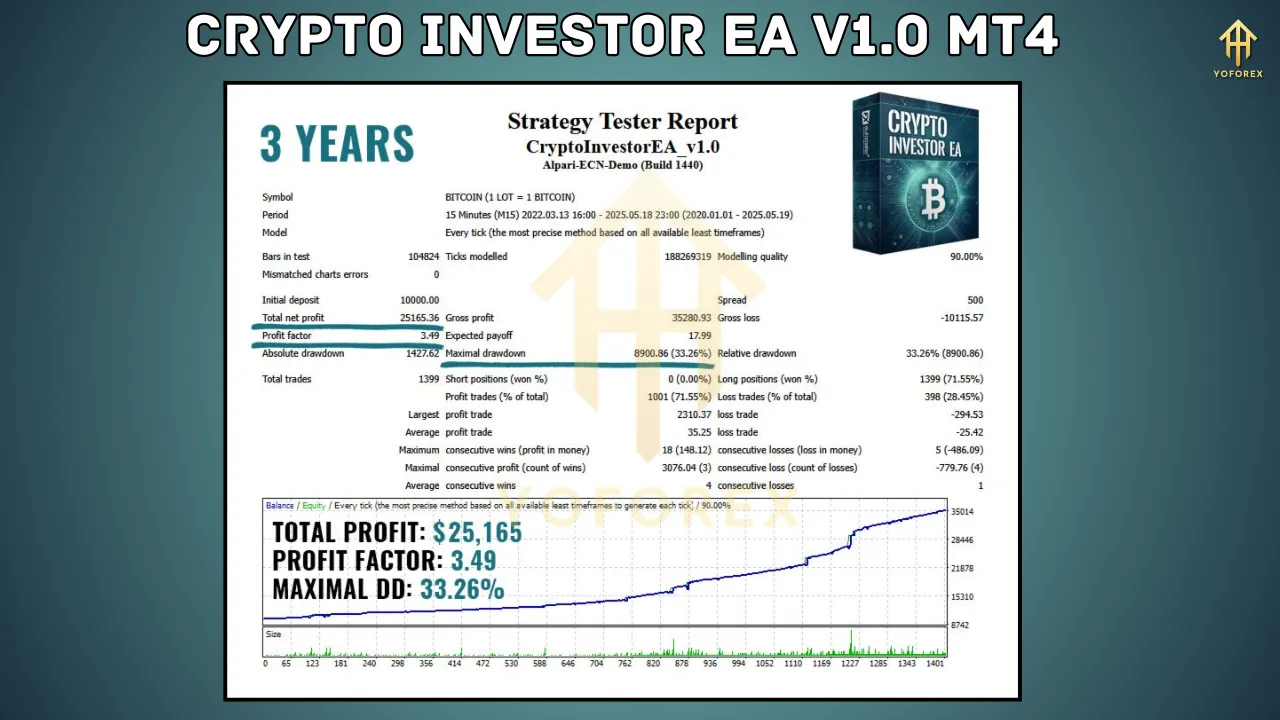
The Crypto Investor EA has been promoted with claims of strong performance, though specific metrics for version 1.0 are limited as of May 21, 2025. According to posts on X by FX Automater, the EA is designed to “dominate” the BTCUSD market, but live performance signals are still forthcoming. Traders can refer to the MQL5 product page for updates on live trading results.
Comparable EAs, such as the Bitcoin Robot EA V8.7, have reported impressive metrics, such as a 2,321.72% growth rate, though these are for different systems. For Crypto Investor EA, backtesting on historical BTCUSD data is recommended to assess its profitability. The EA’s conservative default risk setting of 0.1% suggests a focus on stability, but traders should expect drawdowns due to the martingale strategy, especially in trending markets.
Pros and Cons
Pros
-
Automation: Fully automated trading eliminates the need for constant market monitoring.
-
Customizability: Flexible parameters allow traders to tailor the EA to their risk tolerance and trading style.
-
Risk Management: Features like AutoMM and recovery mechanisms help manage drawdowns.
-
BTCUSD Focus: Optimized specifically for Bitcoin, a highly liquid and volatile asset.
Cons
-
Martingale Risks: The martingale strategy can lead to significant losses during prolonged adverse market conditions.
-
Learning Curve: Configuring the EA effectively requires understanding its parameters and testing.
-
Broker Dependency: Performance may vary across brokers due to differences in spreads and execution.
-
Limited Performance Data: As a new release, live trading results are not yet widely available.
Considerations for Traders
Before using the Crypto Investor EA V1.0 MT4, traders should consider the following:
-
Risk Management: Given the martingale strategy, use conservative risk settings (e.g., 0.1% per trade) and ensure sufficient account capital to withstand drawdowns.
-
Broker Selection: Choose a broker with low spreads and reliable execution for BTCUSD trading to maximize profitability.
-
Backtesting: Test the EA on historical data and a demo account to understand its behavior in different market conditions.
-
Market Volatility: Bitcoin’s high volatility can amplify both profits and losses, so monitor the EA closely during major news events.
-
No Guaranteed Profits: As with any trading tool, profits are not guaranteed, and losses are possible. Maintain realistic expectations and a disciplined approach.
Conclusion
The Crypto Investor EA V1.0 MT4 offers a powerful solution for traders looking to automate their Bitcoin trading on the MetaTrader 4 platform. Its grid and martingale strategy, combined with robust risk management features, makes it a compelling option for navigating the volatile BTCUSD market. However, the inherent risks of martingale trading require careful configuration and monitoring to avoid significant drawdowns.
For traders willing to invest time in testing and optimizing the EA, it can serve as a valuable tool for hands-free trading. As with any automated system, success depends on proper setup, realistic expectations, and adherence to risk management principles. Visit the MQL5 product page for more details and updates on live performance, and always test on a demo account before going live.
May your investments grow with the Crypto Investor EA!