
Exploring Smart Capital m4 EA V1.1 MT4: A Comprehensive Guide to Automated Forex Trading
The forex market, with its 24/5 operation and vast liquidity, is a dynamic environment that attracts traders worldwide. However, the complexity and emotional demands of trading often lead to the adoption of automated solutions like Expert Advisors (EAs). One such tool gaining attention is the Smart Capital m4 EA V1.1 MT4, an innovative trading robot designed for the MetaTrader 4 (MT4) platform. This blog post dives deep into what Smart Capital m4 EA V1.1 offers, its features, performance, installation process, and key considerations for traders looking to integrate it into their strategies.
What is Smart Capital m4 EA V1.1 MT4?
Smart Capital m4 EA V1.1 is an advanced Expert Advisor crafted to automate forex trading on the MT4 platform. EAs like Smart Capital are algorithmic trading systems that analyze market conditions, execute trades, and manage positions based on predefined rules, eliminating the need for constant manual intervention. According to its description on the MQL5 marketplace, Smart Capital is positioned as a “reliable partner in the Forex market,” leveraging deep market analysis to identify trading opportunities.
This EA is designed to work across multiple currency pairs and timeframes, offering traders flexibility in tailoring it to their preferred trading style. Whether you’re a scalper looking for quick profits or a swing trader aiming for longer-term gains, Smart Capital aims to provide a robust framework for automation. Its focus on advanced algorithms and risk management makes it appealing to both novice and experienced traders.
Key Features
1. Multi-Currency Support
Smart Capital m4 EA V1.1 supports trading across multiple currency pairs, allowing traders to diversify their portfolios. This feature is particularly valuable in forex, where different pairs exhibit varying volatility and trends. The ability to add new currency pairs easily enhances its adaptability to changing market conditions.
2. Advanced Time-Series Data Analysis
The EA employs sophisticated time-series data analysis to process market data. This approach involves analyzing historical price movements to predict future trends, helping the EA identify high-probability trade setups. By focusing on data-driven decisions, Smart Capital minimizes emotional biases that often plague manual trading.
3. Customizable Risk Management
Risk management is a cornerstone of successful trading, and Smart Capital m4 EA V1.1 includes built-in tools to protect trading capital. Traders can adjust parameters such as lot size, stop-loss, and take-profit levels to align with their risk tolerance. This customization ensures that the EA can be tailored to conservative or aggressive trading strategies.
4. Compatibility with MT4
Designed specifically for MetaTrader 4, one of the most widely used trading platforms, Smart Capital integrates seamlessly with MT4’s interface. This compatibility ensures that traders can leverage MT4’s robust charting tools, indicators, and execution capabilities alongside the EA’s automation.
5. Automated Trade Execution
The EA handles all aspects of trade execution, from signal generation to order placement and management. This automation allows traders to capitalize on market opportunities around the clock, even when they’re not actively monitoring the markets.
How Does Smart Capital m4 EA V1.1 Work?
Smart Capital m4 EA V1.1 operates by analyzing market data using its proprietary algorithms. It scans price charts for signals based on technical indicators, price action, and market trends. Once a signal is identified, the EA places trades according to its programmed strategy, setting stop-loss and take-profit levels to manage risk and secure profits.
The EA’s time-series analysis likely incorporates indicators such as moving averages, Relative Strength Index (RSI), or other trend-following tools to determine market direction and entry points. While specific details about its algorithm are not fully disclosed (as is common with closed-code EAs), its focus on deep analysis suggests a blend of trend-following and momentum-based strategies.
Unlike some EAs that rely on high-risk strategies like martingale or grid trading, Smart Capital appears to prioritize structured trade management. However, traders should verify the absence of such strategies by reviewing the EA’s documentation or testing it on a demo account, as these approaches can lead to significant drawdowns if not managed properly.
Installation and Setup
Installing Smart Capital m4 EA V1.1 on MT4 is straightforward and follows standard procedures for Expert Advisors. Here’s a step-by-step guide:
-
Download the EA: Purchase or download the Smart Capital m4 EA V1.1 file (typically in .ex4 or .mq4 format) from a trusted source, such as the MQL5 marketplace.
-
Access MT4 Data Folder: Open your MT4 platform, navigate to File > Open Data Folder, and locate the MQL4 > Experts subfolder.
-
Copy the EA File: Paste the downloaded .ex4 or .mq4 file into the Experts folder.
-
Restart MT4: Close and reopen the MT4 platform, or refresh the Navigator panel by right-clicking on Expert Advisors and selecting Refresh.
-
Attach the EA to a Chart: Drag the Smart Capital m4 EA V1.1 from the Navigator panel onto a chart of your chosen currency pair and timeframe. A settings window will appear, allowing you to configure parameters like lot size, risk settings, and trading hours.
-
Enable Auto-Trading: Ensure the AutoTrading button on MT4’s toolbar is active (indicated by a smiling face in the top-right corner of the chart). Adjust settings as needed and click OK to activate the EA.
Traders should consult the EA’s documentation for recommended settings, such as optimal timeframes (e.g., M15, H1) and currency pairs. Testing on a demo account for 2–3 weeks is highly recommended to ensure compatibility with your broker and trading style.
Performance and Backtesting
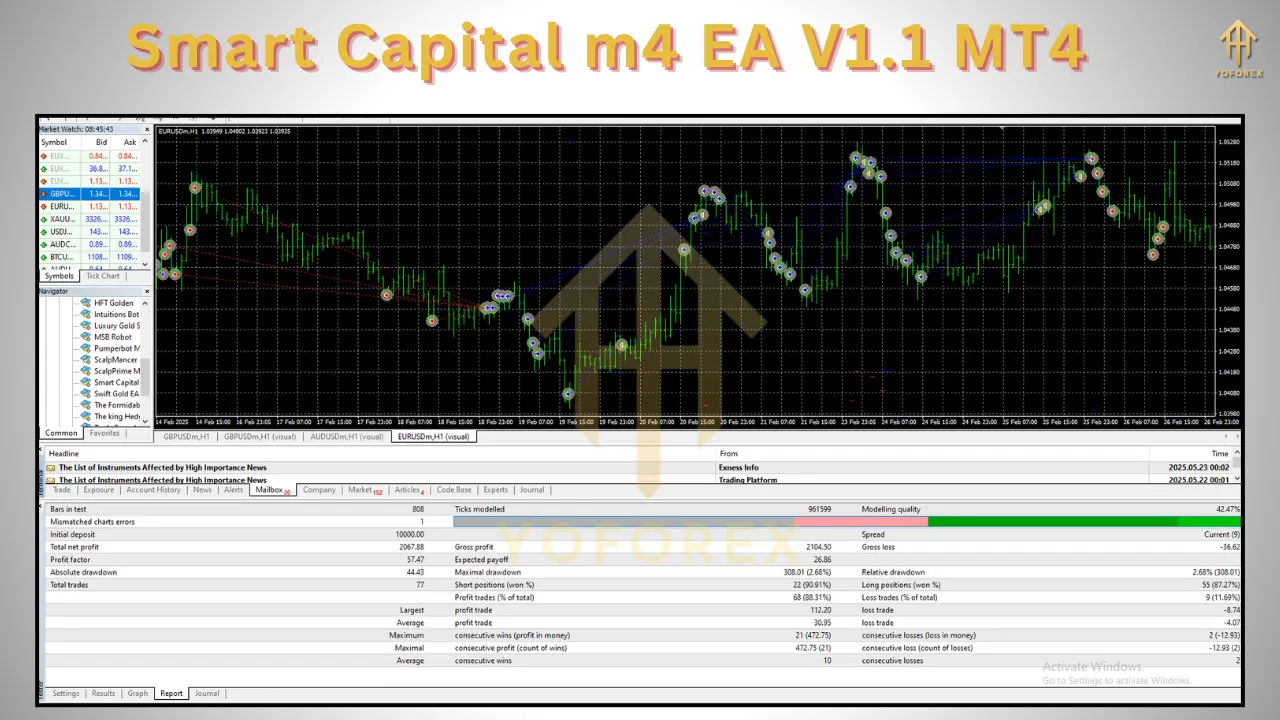
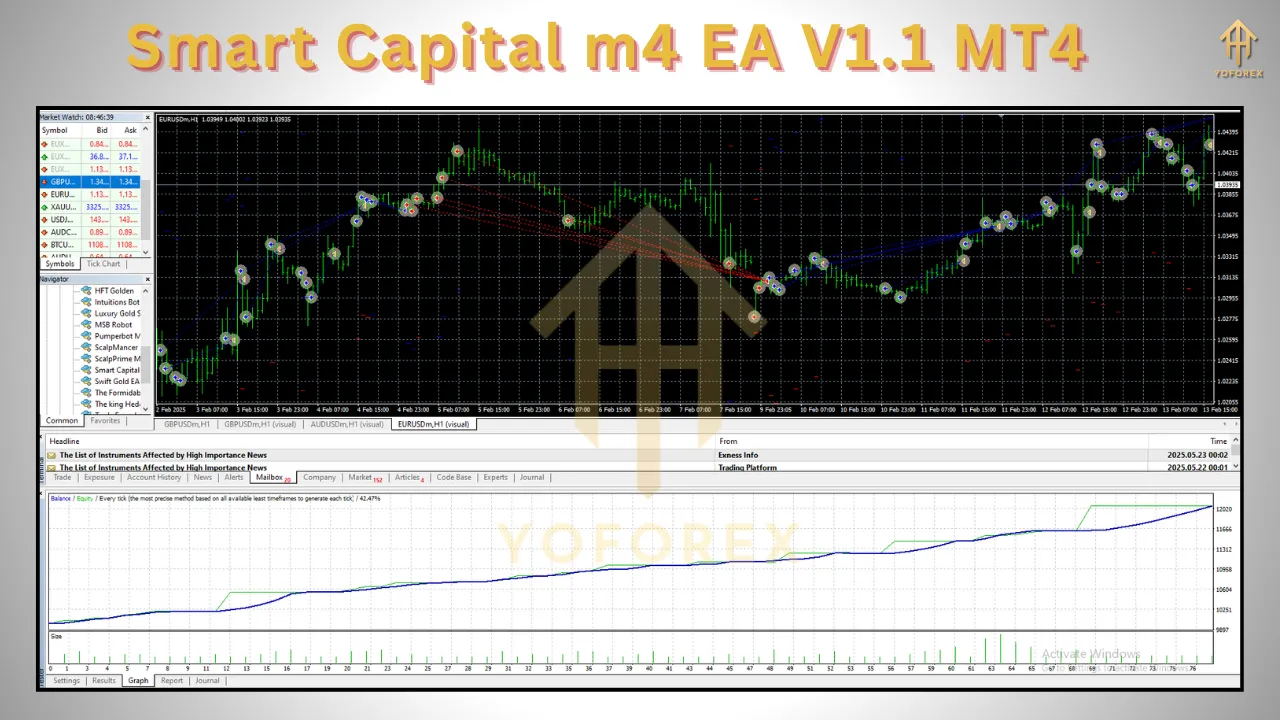
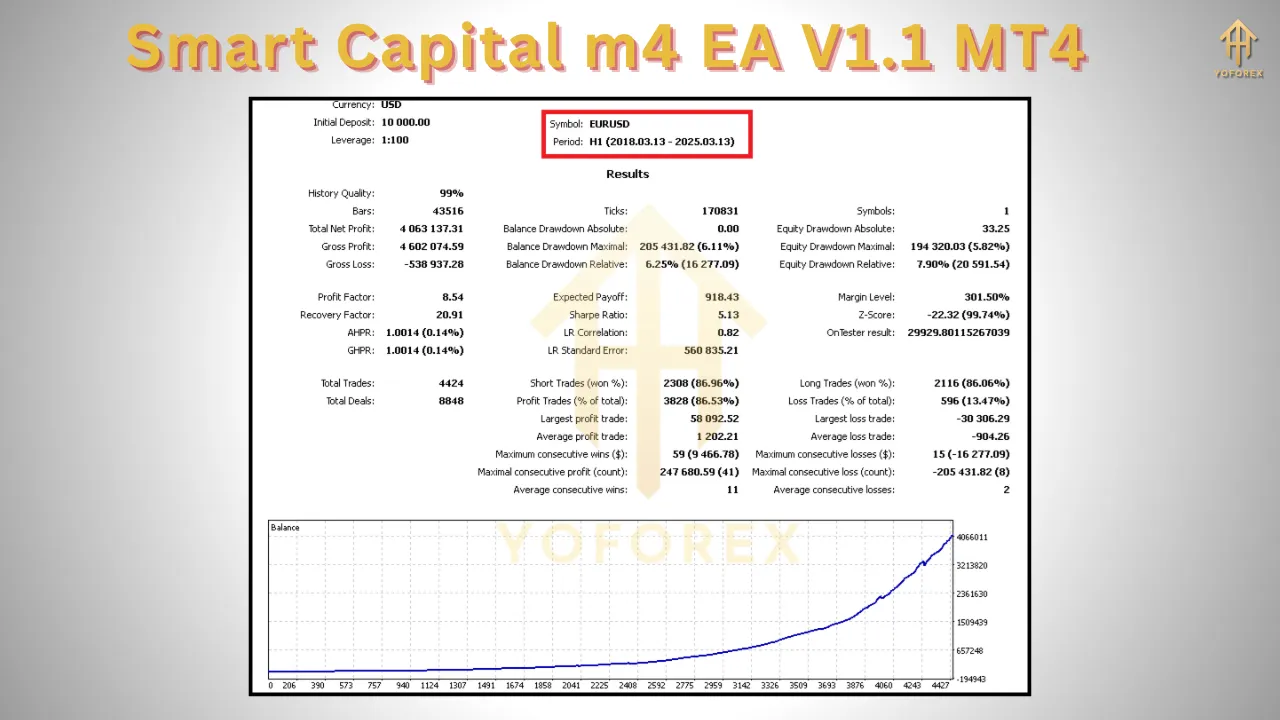
While specific performance metrics for Smart Capital m4 EA V1.1 are not widely available in the provided sources, its listing on MQL5 emphasizes its reliability and profitability. Traders should look for verified results on platforms like Myfxbook or FX Blue, as these provide transparent insights into an EA’s performance, including win rate, drawdown, and return on investment (ROI).
Backtesting is a critical feature of any reputable EA. Smart Capital likely supports backtesting within MT4’s Strategy Tester, allowing traders to simulate its performance using historical data. When backtesting, ensure the following for accurate results:
-
High-Quality Data: Use 99% modeling quality tick data for precise simulations.
-
Realistic Conditions: Incorporate variable spreads, slippage, and commissions to mimic live trading conditions.
-
Risk Settings: Test the EA with the same risk parameters you plan to use in live trading.
Without verified data, it’s challenging to assess Smart Capital’s performance definitively. Traders should exercise caution and avoid EAs with unverified claims of “super-profitable” results, as these may be misleading.
Advantages
-
Emotion-Free Trading: By automating decisions, the EA eliminates emotional biases like fear or greed, fostering disciplined trading.
-
24/5 Market Coverage: The forex market’s round-the-clock nature makes automation ideal for capturing opportunities at any time.
-
Customizability: Adjustable settings allow traders to align the EA with their risk tolerance and trading goals.
-
Ease of Use: The EA’s integration with MT4 and straightforward setup make it accessible to traders of all experience levels.
Risks and Considerations
While Smart Capital m4 EA V1.1 offers promising features, traders should be aware of potential risks:
-
Market Volatility: No EA can guarantee profits in all market conditions. Sudden volatility spikes (e.g., during news events) can lead to losses if the EA lacks robust filters.
-
Broker Compatibility: Ensure your broker supports the EA’s trading style (e.g., scalping or high-frequency trading) and offers low spreads and fast execution.
-
Over-Optimization: Overly optimized settings based on past data may not perform well in live markets. Regularly update and test settings to adapt to changing conditions.
-
Capital Requirements: While the EA may work with low deposits, insufficient capital can limit its effectiveness or increase risk. Always trade with funds you can afford to lose.
Traders should also be cautious of unrealistic claims. EAs promising consistent high returns without drawdowns are often scams or rely on risky strategies like martingale. Always verify performance through third-party platforms and test the EA thoroughly before committing real capital.
Comparing Smart Capital to Other EAs
To put Smart Capital m4 EA V1.1 in context, let’s compare it to other popular EAs mentioned in recent sources:
-
Forex Robotron: Known for its high win rate and verified Myfxbook results, Forex Robotron is a well-established EA with over 20 years of development. It focuses on multiple currency pairs and operates during specific hours (21:00–23:00 GMT).
-
Forex Fury: Praised for its 93% success rate and low drawdown, Forex Fury is ideal for low-risk trading but may be less beginner-friendly.
-
CyNera EA v4.31: Tailored for gold trading (XAUUSD), this EA uses scalping strategies and dynamic risk management, with a low minimum deposit of $100.
Smart Capital stands out for its multi-currency support and time-series analysis, but without verified performance data, it’s harder to gauge its edge over competitors. Traders should compare backtest results and live performance metrics before choosing an EA.
Tips for Using Smart Capital m4 EA V1.1
-
Start with a Demo Account: Test the EA on a demo account to understand its behavior and optimize settings without risking real money.
-
Monitor Performance: Regularly check the EA’s performance and adjust settings to align with current market conditions.
-
Use a Forex VPS: A Virtual Private Server ensures the EA runs 24/7 without interruptions, maximizing trading opportunities.
-
Engage with Trading Communities: Join forums or social media groups to share experiences and gain insights from other Smart Capital users.
-
Understand the Logic: Familiarize yourself with the EA’s strategy to ensure it aligns with your trading philosophy. Avoid black-box systems with unclear algorithms.
Conclusion
The Smart Capital m4 EA V1.1 MT4 is a promising tool for traders seeking to automate their forex trading. Its multi-currency support, advanced analysis, and customizable risk management make it a versatile option for various trading styles. However, like all EAs, it’s not a guaranteed path to profits. Thorough testing, realistic expectations, and continuous monitoring are essential to maximize its potential.
Before investing, verify the EA’s performance through trusted platforms like Myfxbook, test it on a demo account, and ensure compatibility with your broker. By combining Smart Capital’s automation with a disciplined approach, traders can enhance their efficiency and potentially achieve consistent results in the fast-paced forex market.