Introduction to the Forex Viking Indicator
The Forex Viking Indicator, particularly its 1.25 version for MetaTrader 4 (MT4), is a popular trading tool designed to identify high-value trade opportunities by analyzing market volatility. Marketed as a non-repainting indicator, it provides clear buy and sell signals to help traders make informed decisions across various currency pairs and timeframes. Whether you’re a scalper, intraday trader, or swing trader, this indicator claims to adapt to different trading styles with a high success rate, often cited as up to 92% by its developers.
This blog dives into the features, setup, and practical use of the Forex Viking Indicator 1.25, along with tips to maximize its potential and avoid common pitfalls.
What is the Forex Viking Indicator 1.25?
The Forex Viking Indicator is a technical analysis tool designed for the MT4 platform. It’s built to detect market trends and volatility, issuing precise buy and sell recommendations to maximize profits. Unlike some indicators that repaint (revising past signals), the Forex Viking Indicator is non-repainting, meaning its signals remain consistent once generated, providing traders with reliable data for decision-making.
The indicator is versatile and can be used on:
- Any Forex currency pair (e.g., EUR/USD, GBP/USD, AUD/CAD).
- Other assets like stocks, commodities, cryptocurrencies, precious metals, oil, and gas.
- Any timeframe, from 1-minute (M1) to 1-month charts, making it suitable for scalping, day trading, or long-term strategies.
The system is entirely manual, meaning it generates signals, but traders must decide when to enter or exit trades based on their risk management and market analysis. This makes it accessible to traders of all experience levels, though practicing on a demo account is recommended before going live.
Key Features of the Forex Viking Indicator 1.25
The Forex Viking Indicator 1.25 comes with several features that enhance its usability and appeal:
- Non-Repainting Signals: The indicator provides stable buy and sell signals that do not change after they appear, ensuring reliability.
- Real-Time Alerts: Traders receive notifications via:
- MT4 platform pop-up with sound.
- Email notifications.
- Push notifications to mobile devices, allowing you to monitor trades on the go.
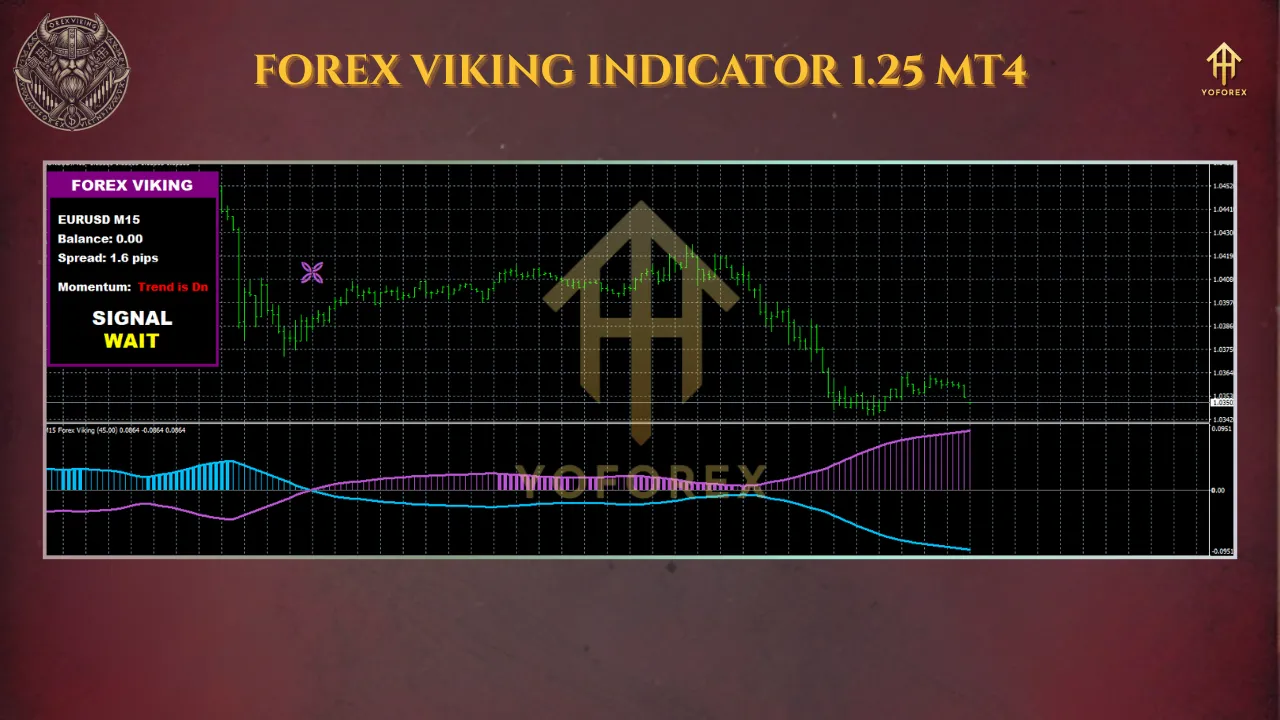
- On-Screen Signal Panel: A user-friendly panel displays real-time buy/sell signals, trend direction, and other critical information, reducing the need to constantly monitor charts.
- Customizable Settings: The indicator offers flexible input parameters, including:
- Colors: Modify background, arrow, and text colors.
- Signal Period: Adjust the default signal period to suit your trading style.
- Timeframe Switching: Toggle between the current timeframe and others.
- Alert Settings: Enable or disable pop-ups, sounds, emails, or push notifications.
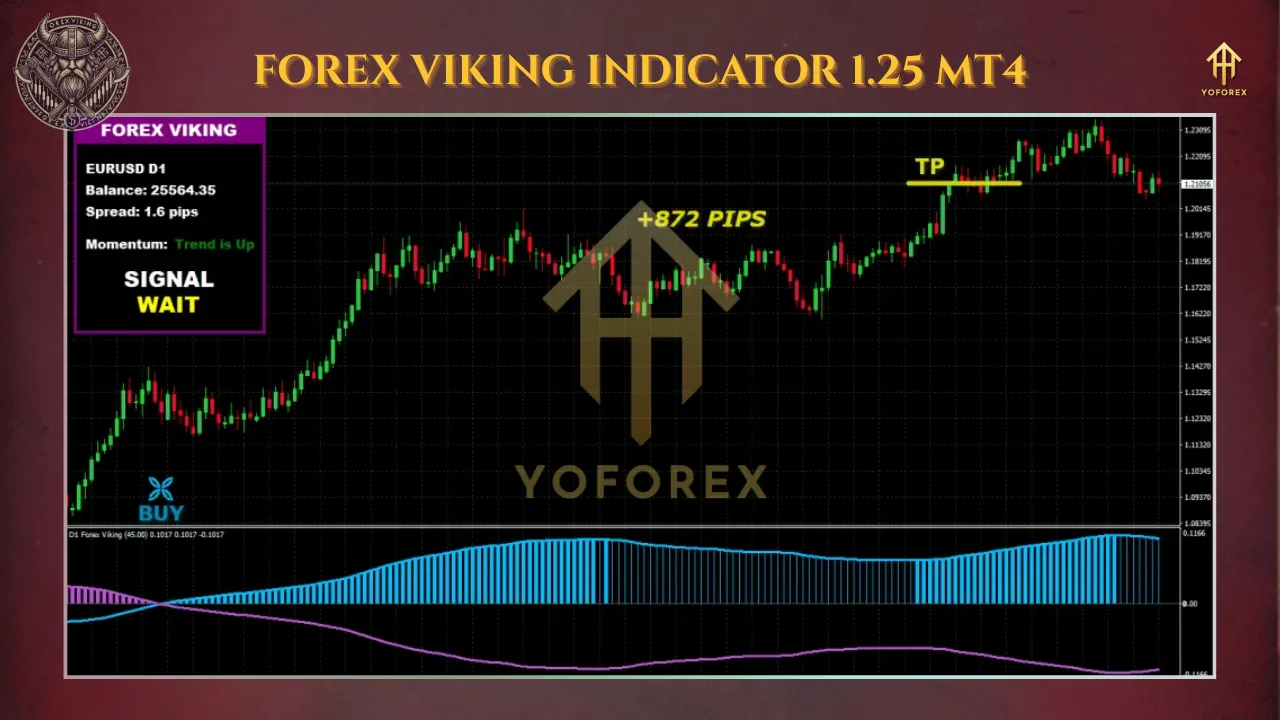
- Dynamic Take-Profit Levels: The indicator suggests adaptive take-profit levels to maximize profits, though stop-loss levels may need manual adjustment.
- Compatibility: Works with any MT4 broker and supports trading on multiple asset classes and timeframes.
- Money-Back Guarantee: Some vendors offer a 14-day money-back guarantee, allowing traders to test the indicator risk-free.
How Does the Forex Viking Indicator Work?
The Forex Viking Indicator 1.25 operates by analyzing market volatility and price action to generate buy and sell signals. Here’s how it works in practice:
- Buy Signal: When the signal in the upper left panel turns to “BUY,” a blue arrow appears on the chart. Traders are advised to:
- Place a stop-loss below the previous swing low.
- Close the trade when the reward-to-risk ratio reaches 1.5 or higher, or when the signal changes to “SELL.”
- Sell Signal: When the signal in the upper left panel turns to “SELL,” a purple arrow appears. Traders should:
- Place a stop-loss above the previous swing high.
- Close the trade when the reward-to-risk ratio reaches 1.5 or higher, or when the signal changes to “BUY.”
- Signal Wait: If the panel shows “WAIT,” no action is recommended until a new signal appears.
The indicator’s signals can be used as standalone triggers or combined with additional chart analysis (e.g., support and resistance levels) for higher accuracy. Traders are encouraged to practice proper money management and avoid trading during high-impact news releases or low-volume market conditions to minimize risks.
Setting Up the Forex Viking Indicator 1.25 on MT4
To install and use the Forex Viking Indicator 1.25 on MT4, follow these steps:
- Purchase and Download: Obtain the indicator files from a reputable source (e.g., altraforex.com or other trusted vendors). The package typically includes:
- Indicator file (Forex Viking.ex4).
- Template file (ForexViking.tpl).
- User manual (Forex Viking Manual.pdf).
- Install on MT4:
- Open your MT4 platform.
- Navigate to
File > Open Data Folder > MQL4 > Indicators. - Copy the
.ex4file into the Indicators folder. - Copy the
.tplfile into the Templates folder. - Restart MT4.
- Apply the Indicator:
- Open a chart for your desired currency pair or asset.
- Right-click on the chart, select
Template, and chooseForexViking. - The indicator and its on-screen panel should appear.
- Customize Settings:
- Adjust colors, signal periods, and alert preferences via the indicator’s input settings.
- Enable or disable notifications based on your trading needs.
- Test on a Demo Account: Before trading live, practice using the indicator on a demo account to familiarize yourself with its signals and performance.
Tips for Using the Forex Viking Indicator Effectively
To get the most out of the Forex Viking Indicator 1.25, consider the following tips:
- Combine with Additional Analysis: While the indicator is powerful, combining its signals with other tools like Fibonacci retracements, moving averages, or support/resistance levels can improve accuracy.
- Adjust Stop-Loss Levels: Some users note that the default stop-loss levels (e.g., 130-200 pips for Gold) may be too tight, especially for volatile assets. Consider increasing stop-loss sizes based on market conditions.
- Avoid High-Impact News: Tighten stop-losses or avoid trading 15 minutes before and after major economic news releases to reduce the risk of sudden market swings.
- Use Proper Risk Management: Maintain a risk-to-reward ratio of at least 1.5:1, and never risk more than 1-2% of your account per trade. Discipline is key to long-term profitability.
- Test on Specific Pairs and Timeframes: Users report strong performance on pairs like EUR/USD, GBP/USD, and AUD/CAD on M5 charts. Experiment to find what works best for your trading style.
- Consider the Forex Viking Manager: Some versions include a manager tool for automated trade management, such as trailing stops or dynamic take-profit adjustments. If available, explore this feature for hands-off trading.
Pros and Cons of the Forex Viking Indicator 1.25
Pros
- High Accuracy: Claims of up to 92% win rate, though real-world results depend on trader skill and market conditions.
- Non-Repainting: Reliable signals that don’t change after appearing.
- Versatile: Works across multiple assets and timeframes.
- User-Friendly: Clear signals and customizable alerts make it easy to use.
- Money-Back Guarantee: Offers a 14-day refund period for risk-free testing.
Cons
- Manual Trading Required: The indicator provides signals but relies on the trader’s judgment for entries and exits.
- No Dynamic Stop-Loss: Unlike take-profit levels, stop-losses may need manual adjustment, which could be a drawback for some traders.
- Learning Curve: Beginners may need time to master the indicator and integrate it with other strategies.
- Cost: Priced at around $37-$95 depending on the vendor, which may be a barrier for some traders.
Real-World Performance and User Feedback
User feedback on the Forex Viking Indicator is generally positive, with many praising its accuracy and ease of use. For example:
- One user reported consistent profits on EUR/USD and GBP/USD (M5 timeframe), often reaching the first or second take-profit level.
- Another trader noted success with Gold on M1 and M5 charts but recommended increasing stop-loss levels for better risk management.
- Some users combine the indicator with others, like the MIX ARROW, for enhanced signal confirmation on M15 charts.
However, some traders caution that the indicator’s performance depends heavily on the user’s ability to manage trades and avoid unfavorable market conditions. There’s also limited information on the specific updates in version 1.25, so traders should verify the version they’re purchasing.
Is the Forex Viking Indicator 1.25 Worth It?
The Forex Viking Indicator 1.25 for MT4 is a powerful tool for traders seeking clear, non-repainting signals to guide their trading decisions. Its flexibility across assets and timeframes, combined with customizable alerts and a high reported win rate, makes it appealing for both novice and experienced traders. However, success requires proper risk management, additional analysis, and avoiding volatile market conditions like news events.
If you’re looking for a reliable indicator to complement your trading strategy, the Forex Viking 1.25 could be a valuable addition, especially with its 14-day money-back guarantee. Start by testing it on a demo account to ensure it aligns with your trading style and goals.
Where to Get the Forex Viking Indicator 1.25
The indicator is available from various online sources, including:
- AltraForex.com: The developer’s official site, offering the indicator for $95+ with a 14-day money-back guarantee.
- ForexObroker.com: Offers the indicator for $37 via Skrill, Neteller, or Perfect Money.
- Other platforms: Check reputable sites like ForexCracked.com or Best-MetaTrader-Indicators.com, but ensure you’re downloading from a trusted source to avoid scams.
Always verify the authenticity of the indicator and avoid unofficial downloads that may include malicious files like msimg32.dll, as noted by some users.
Conclusion
The Forex Viking Indicator 1.25 for MT4 is a robust and versatile tool designed to help traders navigate the complexities of the Forex market. With its non-repainting signals, customizable settings, and multiple alert options, it offers a user-friendly experience for traders of all levels. However, like any trading tool, it’s not a guaranteed path to profits—success depends on your discipline, risk management, and ability to adapt to market conditions.