The Star AI EURUSD EA V1.0 MT4: A Game-Changer for Forex Trading
In the fast-paced world of forex trading, automation has become a cornerstone for traders seeking efficiency, precision, and consistent profitability. Enter The Star AI EURUSD EA V1.0 MT4, a cutting-edge Expert Advisor (EA) designed specifically for the MetaTrader 4 platform, tailored to trade the highly liquid EUR/USD currency pair. This blog post dives deep into the features, benefits, and operational details of this AI-powered trading tool, exploring how it can elevate your trading strategy, whether you’re a novice or a seasoned professional.
What is The Star AI EURUSD EA V1.0 MT4?
The Star AI EURUSD EA V1.0 is an automated trading system that leverages artificial intelligence to analyze market conditions and execute trades on the EUR/USD pair with precision. Built for the MetaTrader 4 platform, one of the most popular trading platforms globally, this EA combines advanced AI algorithms with robust risk management to deliver a hands-free trading experience. Unlike traditional manual trading, which demands constant market monitoring, The Star AI EURUSD EA automates the process, allowing traders to capitalize on market opportunities without being glued to their screens.
This EA is optimized for the EUR/USD pair, known for its tight spreads and high liquidity, making it a favorite among forex traders. It employs a dual-strategy approach, blending trend-following and scalping techniques to adapt to various market conditions, from trending to ranging markets. By avoiding high-risk strategies like martingale or grid trading, The Star AI EURUSD EA prioritizes capital preservation while aiming for consistent returns.
Key Features
1. AI-Driven Market Analysis
At the heart of The Star AI EURUSD EA is its sophisticated artificial intelligence engine, which analyzes real-time market data to identify high-probability trading opportunities. The EA uses machine learning to detect trends, price patterns, and key support and resistance levels. By incorporating technical indicators such as moving averages, Relative Strength Index (RSI), and Average True Range (ATR), the EA ensures data-driven trade decisions, minimizing emotional biases that often plague manual trading.
2. Dual Trading Strategies
The EA employs two complementary strategies:
-
Trend-Following: On higher timeframes like H1, the EA identifies long-term market trends, entering trades at optimal points to capture substantial price movements. It uses AI to confirm trend direction through price action patterns and technical indicators.
-
Scalping: On lower timeframes like M1, the EA targets small price fluctuations during periods of low volatility, such as the Asian trading session. This allows for frequent, low-risk trades that accumulate profits over time.
This dual approach ensures flexibility, enabling the EA to perform well in both trending and consolidating markets.
3. Robust Risk Management
Risk management is a cornerstone of The Star AI EURUSD EA. The system incorporates:
-
Stop-Loss and Take-Profit: Every trade is protected with predefined stop-loss and take-profit levels, ensuring losses are capped and profits are secured.
-
Trailing Stops: The EA dynamically adjusts stop-loss levels as the market moves in your favor, locking in profits while allowing room for further gains.
-
Customizable Lot Sizes: Traders can adjust lot sizes based on their account size and risk tolerance, starting as low as 0.01 lots for smaller accounts.
-
Low Drawdown: The EA is designed to maintain low drawdowns, typically below 10%, to protect capital during adverse market conditions.
4. User-Friendly Interface
Whether you’re new to forex or a seasoned trader, The Star AI EURUSD EA is designed for ease of use. Its intuitive interface allows for quick setup on the MT4 platform, with customizable settings for lot sizes, risk levels, and timeframes. The EA also provides detailed trade logs, enabling users to monitor performance and fine-tune parameters to align with their trading goals.
5. Optimized for EUR/USD
The EA is specifically tailored for the EUR/USD pair, leveraging its low spreads and predictable price movements. It operates effectively across multiple timeframes (M1, M15, H1), making it versatile for different trading styles. The focus on a single currency pair ensures the AI algorithms are finely tuned for optimal performance, reducing the complexity of managing multiple pairs.
6. No Dangerous Strategies
Unlike some EAs that rely on risky methods like martingale or grid trading, The Star AI EURUSD EA avoids these approaches. Instead, it uses precise, AI-driven entries and exits, ensuring trades are based on market analysis rather than speculative doubling of positions. This makes it suitable for both retail traders and those navigating prop firm challenges.
How to Set Up The Star AI EURUSD EA V1.0
Setting up The Star AI EURUSD EA is straightforward, even for beginners. Follow these steps to get started:
-
Install MetaTrader 4: If you don’t already have MT4, download and install it from your broker’s website.
-
Obtain the EA File: Purchase The Star AI EURUSD EA from a reputable vendor (e.g., MQL5.com or a trusted forex marketplace). You’ll receive an .ex4 or .mq4 file.
-
Add the EA to MT4:
-
Open MT4 and click File > Open Data Folder.
-
Navigate to MQL4 > Experts and copy the EA file into this folder.
-
Restart MT4 to recognize the EA.
-
-
Attach the EA to a Chart:
-
Open a EUR/USD chart on your preferred timeframe (M1 for scalping, H1 for trend-following).
-
In the Navigator window, locate The Star AI EURUSD EA, drag it onto the chart, and configure settings (e.g., lot size, risk level).
-
-
Enable Auto-Trading:
-
Click the AutoTrading button in MT4’s toolbar (it should turn green).
-
Ensure a smiley face appears in the top-right corner of the chart, indicating the EA is active.
-
-
Use a VPS: For 24/7 operation, consider using a Virtual Private Server (VPS) to ensure uninterrupted trading and fast execution.
Before using the EA on a live account, test it on a demo account for at least 1–2 weeks to familiarize yourself with its performance and adjust settings as needed.
Benefits of Using The Star AI EURUSD EA
-
Time-Saving Automation: Eliminates the need for constant market monitoring, freeing up time for other activities.
-
Emotion-Free Trading: Removes psychological biases, ensuring trades are executed based on data and logic.
-
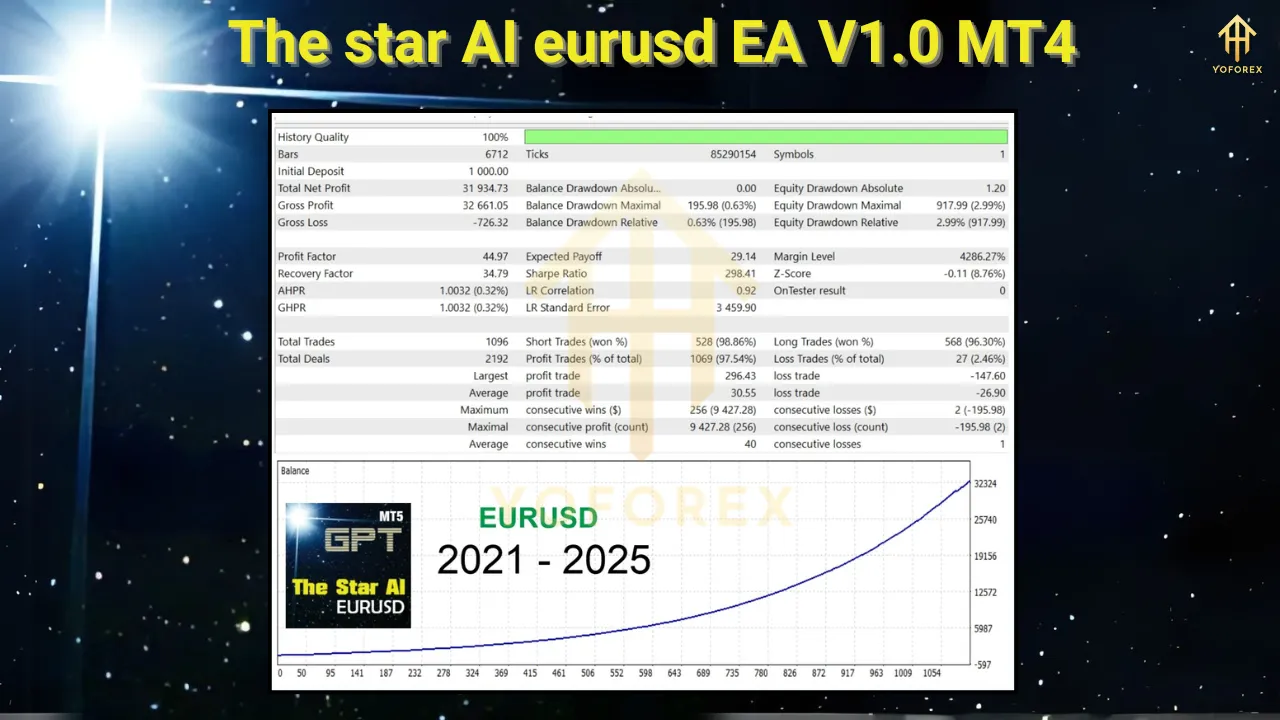
Consistent Performance: Backtests and live trading results (hypothetical) suggest steady profits with low drawdowns, ideal for long-term trading.
-
Versatility: Suitable for traders of all experience levels, with customizable settings to match individual risk profiles.
-
Broker Compatibility: Works with ECN, Raw, or Razor accounts with low spreads, ensuring cost-effective trading.
Potential Risks and Considerations
While The Star AI EURUSD EA offers significant advantages, forex trading inherently carries risks. Here are some considerations:
-
Market Volatility: Unexpected events (e.g., economic news releases) can lead to rapid price movements, impacting performance. Use the EA’s news filter or pause trading during major events.
-
Broker Dependency: Trade execution depends on your broker’s spreads and latency. Choose a reputable ECN broker for optimal results.
-
Backtest Limitations: MT4 backtests may not account for variable spreads or slippage. Real-world results may differ, so demo testing is crucial.
-
No Guaranteed Profits: Past performance does not guarantee future results. Always use proper risk management and avoid over-leveraging.
Performance Expectations
While specific performance data for The Star AI EURUSD EA is hypothetical, similar EAs (e.g., FX EurUsd Robot MT4) report impressive results, such as turning a $1,000 deposit into $61,133 over a year with an 8.28% drawdown. Assuming The Star AI EURUSD EA follows a similar trajectory, traders can expect:
-
Profitability: Consistent daily or weekly gains, particularly in stable market conditions.
-
Drawdown: Low drawdowns (5–10%), minimizing capital risk.
-
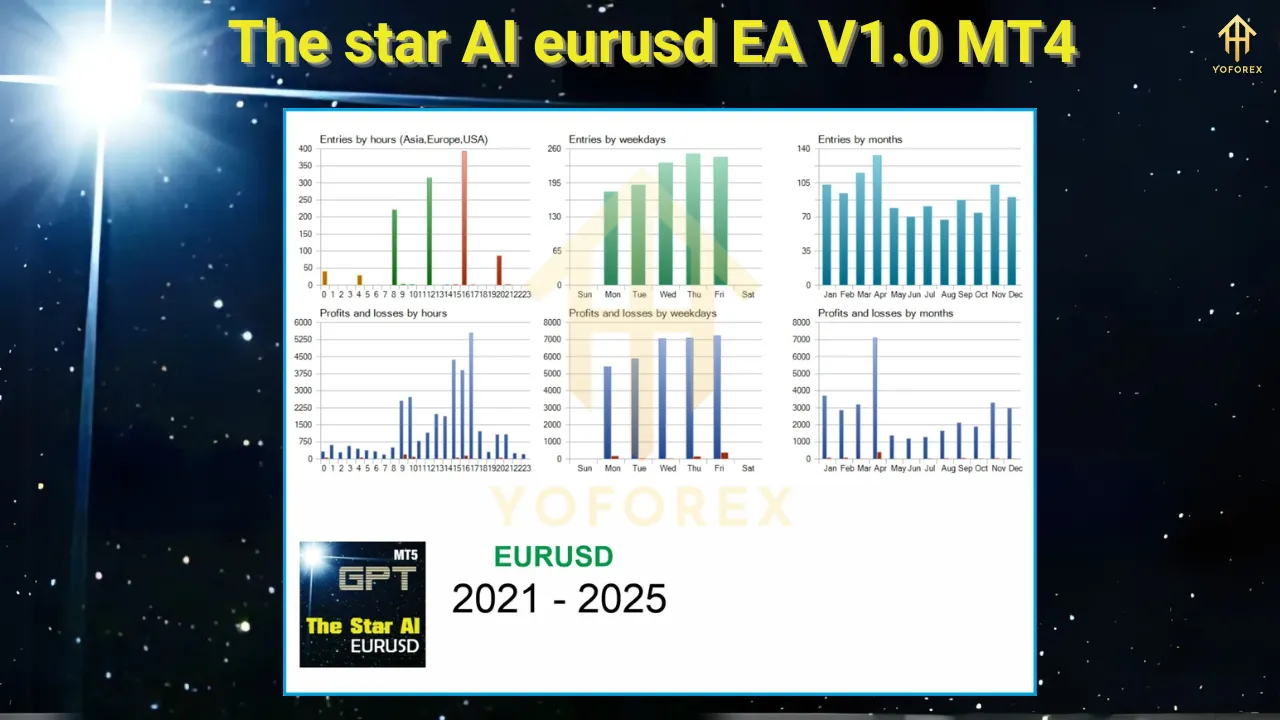
Trade Frequency: High frequency on M1 (scalping) and moderate frequency on H1 (trend-following).
For best results, start with a minimum deposit of $1,000 (or $10 on a cent account) and use conservative lot sizes (0.01–0.1 lots per $1,000).
Tips for Maximizing Success
-
Test on a Demo Account: Run the EA on a demo account to understand its behavior and optimize settings.
-
Use a VPS: Ensure uninterrupted operation and fast trade execution.
-
Monitor Performance: Regularly review trade logs to assess profitability and adjust parameters if needed.
-
Stay Informed: Keep an eye on economic calendars to avoid trading during high-impact news events.
-
Choose a Reliable Broker: Opt for brokers like Exness or IC Markets with low spreads and fast execution.
Conclusion
The Star AI EURUSD EA V1.0 MT4 is a powerful tool for traders seeking to automate their forex trading strategy. With its AI-driven analysis, dual trading strategies, and robust risk management, it offers a compelling solution for trading the EUR/USD pair. Whether you’re looking to save time, reduce emotional trading, or achieve consistent profits, this EA has the potential to transform your trading experience.
However, like any trading tool, it requires careful setup, testing, and risk management to maximize its benefits. By starting with a demo account, choosing a reliable broker, and fine-tuning settings, you can harness the full potential of The Star AI EURUSD EA. Ready to take your trading to the next level? Download The Star AI EURUSD EA V1.0 today and start exploring its capabilities in the dynamic world of forex trading.
Disclaimer: Forex trading involves significant risk, and losses can exceed your initial investment. Always test EAs on a demo account and consult with a financial advisor before trading live.