
Introduction to Automated Forex Trading
The forex market, with its staggering daily trading volume exceeding $5 trillion, is a dynamic and fast-paced environment that attracts traders worldwide. For many, the allure of forex trading lies in its potential for profit, but the complexity and time commitment can be daunting. This is where Expert Advisors (EAs) like the Alligator EA V1.1 MT4 come into play, offering an automated solution to navigate the markets efficiently. In this blog, we’ll dive deep into the Alligator EA V1.1, exploring its features, strategy, performance, and how it can fit into your trading arsenal.
What is the Alligator EA V1.1 MT4?
The Alligator EA V1.1 is an automated trading robot designed for the MetaTrader 4 (MT4) platform, one of the most popular platforms for forex trading. Built around the renowned Alligator indicator developed by Bill Williams, this EA aims to simplify trading by automating decisions based on technical analysis. The Alligator indicator is a staple in many traders’ toolkits, known for its ability to identify trends and potential entry points. The Alligator EA V1.1 takes this a step further by executing trades automatically, reducing the need for constant manual intervention.
The Alligator Indicator: The Core of the Strategy
At the heart of the Alligator EA V1.1 lies Bill Williams’ Alligator indicator, which consists of three smoothed moving averages (MAs) referred to as the Jaw, Teeth, and Lips. These are typically set as follows:
- Jaw (Blue Line): 13-period smoothed MA, shifted 8 bars into the future.
- Teeth (Red Line): 8-period smoothed MA, shifted 5 bars into the future.
- Lips (Green Line): 5-period smoothed MA, shifted 3 bars into the future.
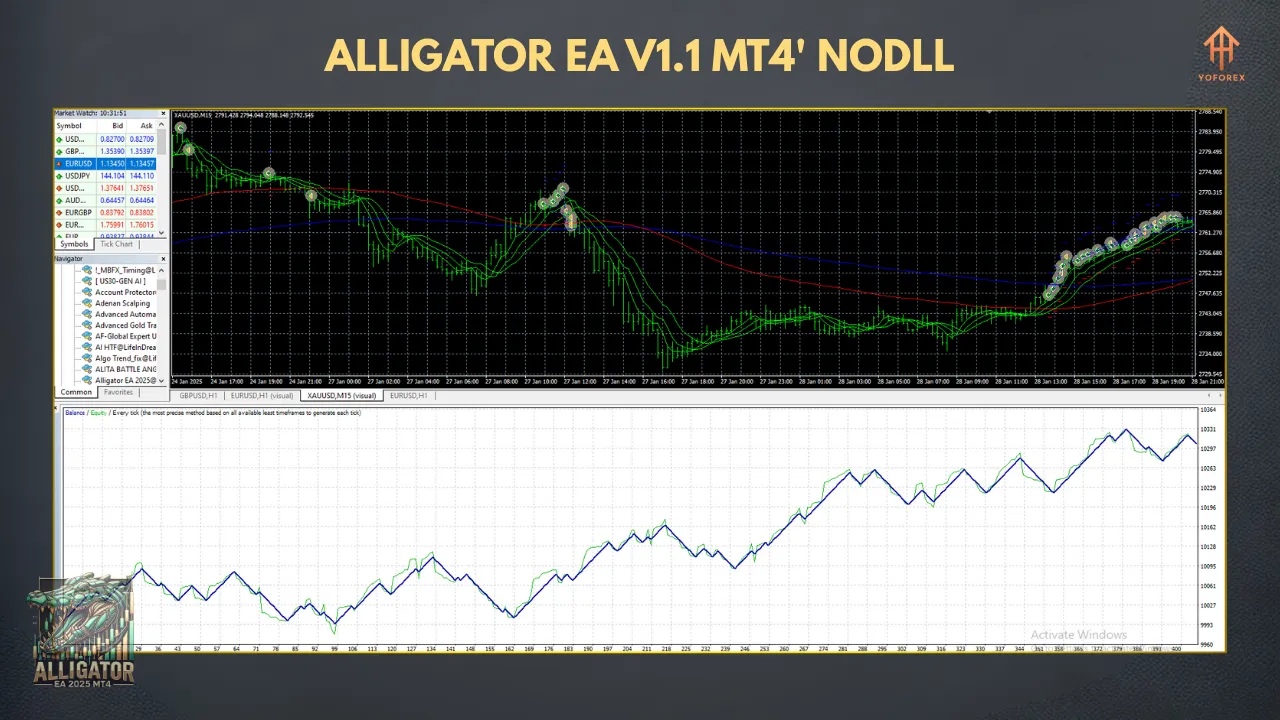
The indicator mimics the behavior of an alligator, with the lines representing its mouth. When the lines are intertwined, the “alligator is sleeping,” indicating a ranging or consolidating market. When they diverge and align in a specific order (Lips above Teeth, Teeth above Jaw for an uptrend, or vice versa for a downtrend), the “alligator is awake,” signaling a trending market. The EA uses this logic to identify trends and place trades accordingly, aiming to ride the trend for profit.
How Does the Alligator EA V1.1 Work?
The Alligator EA V1.1 is programmed to analyze price movements using the Alligator indicator’s signals. When the moving averages align to indicate a trend (e.g., Lips > Teeth > Jaw for a buy signal), the EA initiates a trade in the direction of the trend. Conversely, when the lines signal a downtrend, it places a sell order. The EA is designed to wait for a new candlestick to confirm the signal, reducing the likelihood of false entries.
Key Features of the Alligator EA V1.1
- Automation: The EA eliminates the need for manual trading, allowing traders to set it up and let it run 24/5, capitalizing on opportunities even when they’re not at their screens.
- Customizable Parameters: Traders can adjust settings such as lot size, stop-loss, take-profit, and the periods/shifts of the Alligator’s moving averages to suit their risk tolerance and trading style.
- Risk Management: The EA includes options for setting stop-loss and take-profit levels in pips, as well as dynamic position sizing based on account balance.
- Compatibility: Designed specifically for MT4, it works with any MT4 broker, making it accessible to a wide range of traders.
- Open-Source Availability: Some versions of Alligator-based EAs, like the one offered by EarnForex, provide access to the .mq4 source code, allowing advanced users to customize the EA further.
Setting Up the Alligator EA V1.1 on MT4
Installing the Alligator EA V1.1 is straightforward. Here’s a step-by-step guide:
- Download the EA: Obtain the Alligator EA V1.1 .ex4 file from a reputable source.
- Locate the MT4 Directory: Open MT4, go to File > Open Data Folder, then navigate to the MQL4 > Experts folder.
- Install the EA: Copy the .ex4 file into the Experts folder.
- Restart MT4: Close and reopen MT4, or refresh the Navigator panel to load the EA.
- Attach to a Chart: Drag the EA onto your desired chart (e.g., EUR/USD H1), configure the settings (lot size, stop-loss, etc.), and enable live trading.
- Enable Auto-Trading: Ensure the “AutoTrading” button in MT4 is active.
Always test the EA on a demo account first to understand its behavior and optimize settings for your trading goals.
Performance and Backtesting
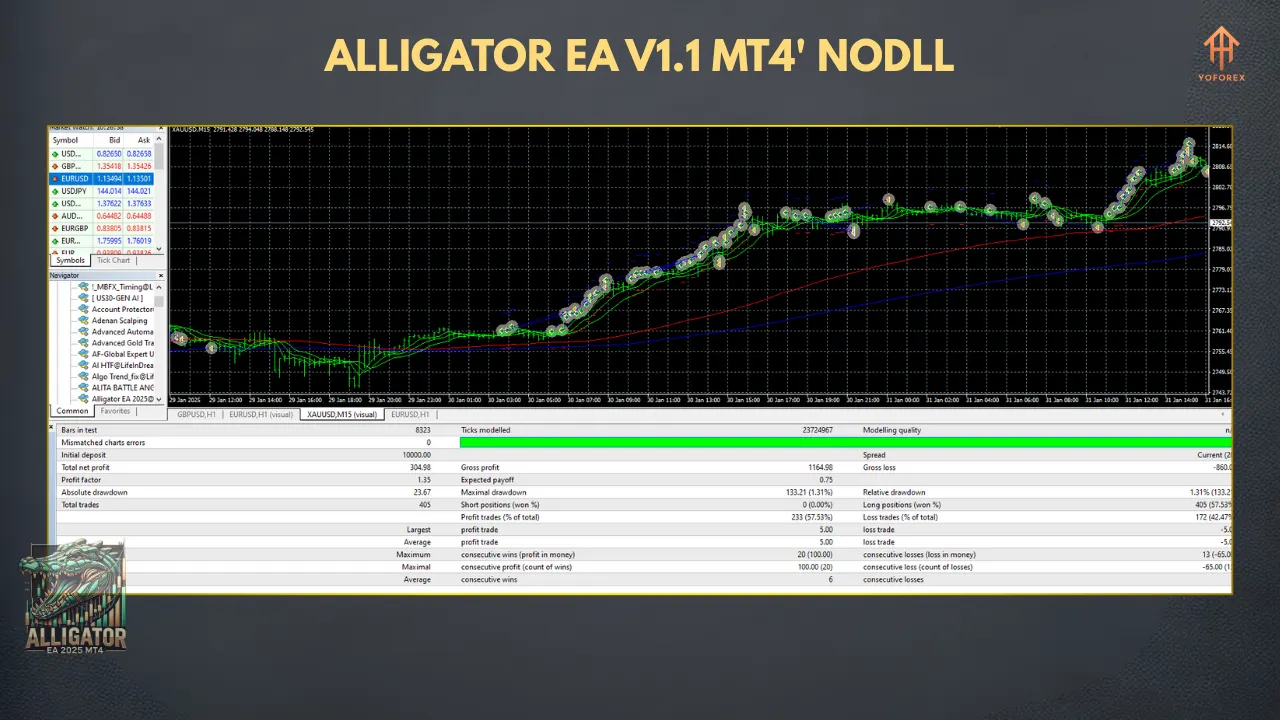
Backtesting is critical when evaluating any EA, and the Alligator EA V1.1 is no exception. According to sources, backtests on the EUR/USD pair over a two-year period (2017–2019) on an hourly chart showed some profitability, though results were not consistently robust across all market conditions. The EA’s performance depends heavily on trending markets, as the Alligator indicator struggles in choppy or sideways markets.
Key considerations for backtesting include:
- Real Tick Data: Use high-quality tick data for accurate results.
- Variable Spreads: Account for real-world spreads and slippage.
- Broker Fees: Include commissions to reflect true costs.
Traders should note that backtest results may be optimized and may not fully reflect live trading performance due to market volatility and execution differences.
Pros and Cons of the Alligator EA V1.1
Pros
- Ease of Use: Simple setup and automation make it accessible for beginners and busy traders.
- Trend-Following Strategy: Effective in trending markets, leveraging the Alligator indicator’s strengths.
- Customizability: Adjustable parameters allow tailoring to individual preferences.
- Time-Saving: Automates analysis and trade execution, freeing up time for other activities.
Cons
- Market Dependency: Performs poorly in ranging markets, as the Alligator indicator is trend-based.
- Optimization Risks: Over-optimized backtests may not translate to live trading success.
- Learning Curve: While user-friendly, understanding the Alligator indicator and EA settings requires some knowledge.
- Risk of Loss: Like all forex trading, there’s a risk of significant losses, especially with improper risk management.
Who Should Use the Alligator EA V1.1?
The Alligator EA V1.1 is ideal for traders who:
- Prefer trend-following strategies.
- Want to automate their trading to save time.
- Have a basic understanding of MT4 and technical indicators.
- Are willing to test and optimize settings on a demo account first.
It may not suit traders who:
- Trade in highly volatile or ranging markets frequently.
- Lack the patience to fine-tune settings.
- Prefer manual trading or discretionary strategies.
Tips for Maximizing Success with the Alligator EA V1.1
- Test Extensively: Run the EA on a demo account for at least 1–2 months to assess its performance in current market conditions.
- Optimize Settings: Experiment with different MA periods, stop-loss, and take-profit levels to find the best configuration for your chosen currency pair and timeframe.
- Use Proper Risk Management: Set lot sizes and stop-loss levels that align with your risk tolerance. Never risk more than 1–2% of your account per trade.
- Monitor Market Conditions: Avoid running the EA during high-impact news events, as volatility can lead to false signals.
- Stay Updated: If using an open-source version, check for updates or community-driven improvements to the EA’s code.
Conclusion
The Alligator EA V1.1 MT4 offers a compelling option for traders looking to automate their forex trading using a proven trend-following strategy. Built on the robust Alligator indicator, it simplifies the process of identifying and capitalizing on market trends. However, like all EAs, it’s not a “set it and forget it” solution. Success requires careful setup, ongoing monitoring, and a solid understanding of market dynamics.
Before deploying the Alligator EA V1.1 on a live account, thoroughly backtest and demo trade to ensure it aligns with your goals. With proper risk management and optimization, this EA can be a valuable tool in your trading toolkit. Whether you’re a novice looking to dip your toes into automated trading or an experienced trader seeking efficiency, the Alligator EA V1.1 MT4 is worth exploring.