Introduction
The foreign exchange (Forex) market is a dynamic and fast-paced environment where traders seek tools to maximize profits while minimizing risks. Among the myriad of trading tools available, Expert Advisors (EAs) for MetaTrader 4 (MT4) have gained significant popularity due to their ability to automate trading strategies. One such tool is the Trend Grid EA V1.0 MT4, a sophisticated trading robot designed to capitalize on market trends using a grid-based strategy. In this blog post, we’ll explore the features, benefits, and setup process of the Trend Grid EA V1.0, and how it can enhance your trading experience.
What is Trend Grid EA V1.0 MT4?
The Trend Grid EA V1.0 MT4 is an automated trading robot tailored for the MetaTrader 4 platform, one of the most widely used trading platforms in the Forex market. This EA combines a trend-following strategy with a grid trading approach, allowing it to place buy and sell orders at predefined intervals to profit from market fluctuations. It’s designed to identify strong market trends and execute trades with precision, making it suitable for both novice and experienced traders.
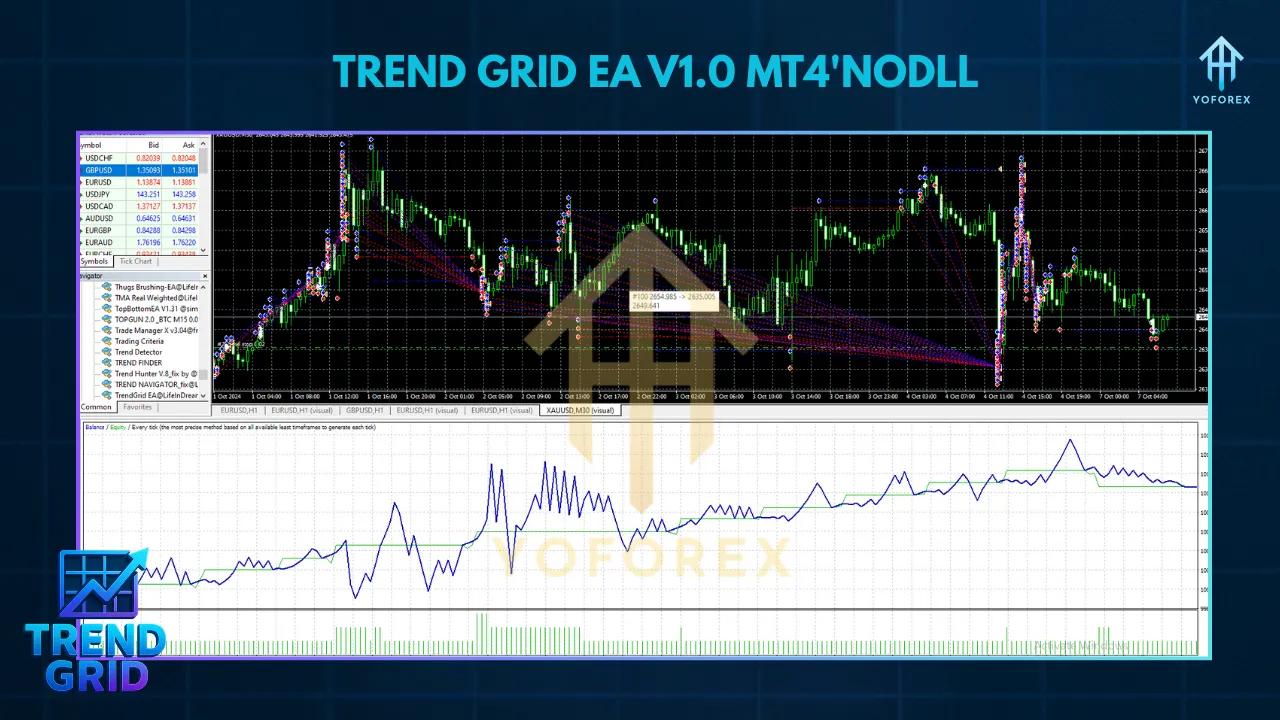
Unlike traditional manual trading, which requires constant monitoring and decision-making, the Trend Grid EA automates the process, reducing emotional bias and ensuring data-driven trade execution. It’s optimized for specific timeframes, such as M1, M5, and M15, and works best with major currency pairs like EURUSD and GBPUSD, though it can be customized for other pairs, including gold (XAUUSD).
Key Features of Trend Grid EA V1.0 MT4
The Trend Grid EA V1.0 is packed with features that make it a powerful tool for Forex traders. Here’s a breakdown of its core functionalities:
1. Trend-Following Strategy
The EA identifies strong market trends using technical indicators such as moving averages, Relative Strength Index (RSI), or Average Directional Index (ADX). By confirming the direction of the trend, it ensures trades are placed in alignment with the market’s momentum, increasing the likelihood of profitable outcomes.
2. Grid Trading Mechanism
The grid strategy involves placing buy and sell orders at set intervals (grid levels) above and below the current market price. This allows the EA to profit from price oscillations, capturing gains as the market moves between these levels. The grid system is particularly effective in ranging markets but can also adapt to trending conditions with proper risk management.
3. Risk Management Tools
Risk management is a cornerstone of the Trend Grid EA V1.0. It includes customizable stop-loss and take-profit levels, trailing stops, and dynamic lot sizing to protect your account from excessive drawdowns. Traders can set risk percentages (e.g., 1-3% per trade) to align with their risk tolerance.
4. Customizable Settings
The EA offers flexibility, allowing traders to adjust parameters such as grid spacing, lot sizes, and timeframes to suit their trading style. This customization makes it versatile for different market conditions and account sizes, from small retail accounts to larger prop firm accounts.
5. Real-Time Market Analysis
The Trend Grid EA continuously scans the market for trading opportunities, ensuring timely execution of trades. Its ability to analyze real-time data helps it adapt to changing market conditions, making it suitable for volatile Forex sessions like the London and New York overlaps.
6. User-Friendly Interface
Designed with simplicity in mind, the EA is easy to set up and use, even for traders with limited technical expertise. It comes with a detailed user manual and preset files for popular currency pairs, streamlining the installation process.
Benefits of Using Trend Grid EA V1.0 MT4
The Trend Grid EA V1.0 offers several advantages that make it a valuable addition to any trader’s toolkit:
- Automation: Eliminates the need for manual trading, saving time and reducing emotional decision-making.
- Consistency: Executes trades based on predefined rules, ensuring consistent application of the trading strategy.
- Versatility: Works across multiple currency pairs and timeframes, adaptable to various market conditions.
- Risk Control: Built-in risk management features protect your capital, making it suitable for both conservative and aggressive traders.
- Accessibility: Compatible with any MT4 broker, with no minimum deposit requirement, though a $1,000 balance is recommended for optimal performance.
Setting Up Trend Grid EA V1.0 MT4
To get started with the Trend Grid EA V1.0, follow these steps:
1. Download and Install MetaTrader 4
If you don’t already have MT4, download it from your broker’s website or the official MetaQuotes site. Install the platform on your computer or use a Virtual Private Server (VPS) for 24/7 operation.
2. Acquire the EA
Purchase or download the Trend Grid EA V1.0 from a reputable source, such as the MetaTrader Market (MQL5) or a trusted vendor. Ensure you receive the .ex4 file, user manual, and any preset files for currency pairs like GBPUSD or XAUUSD.
3. Install the EA
- Open MT4 and navigate to File > Open Data Folder.
- Copy the .ex4 file into the MQL4 > Experts folder.
- If provided, copy preset files into the MQL4 > Presets folder.
- Restart MT4 to load the EA.
4. Attach the EA to a Chart
- Open a chart for your desired currency pair (e.g., EURUSD or GBPUSD) and timeframe (e.g., M5 or M15).
- Drag the Trend Grid EA from the Navigator panel onto the chart.
- Adjust settings like lot size, grid spacing, and risk parameters, or load a preset file for optimal configuration.
5. Test on a Demo Account
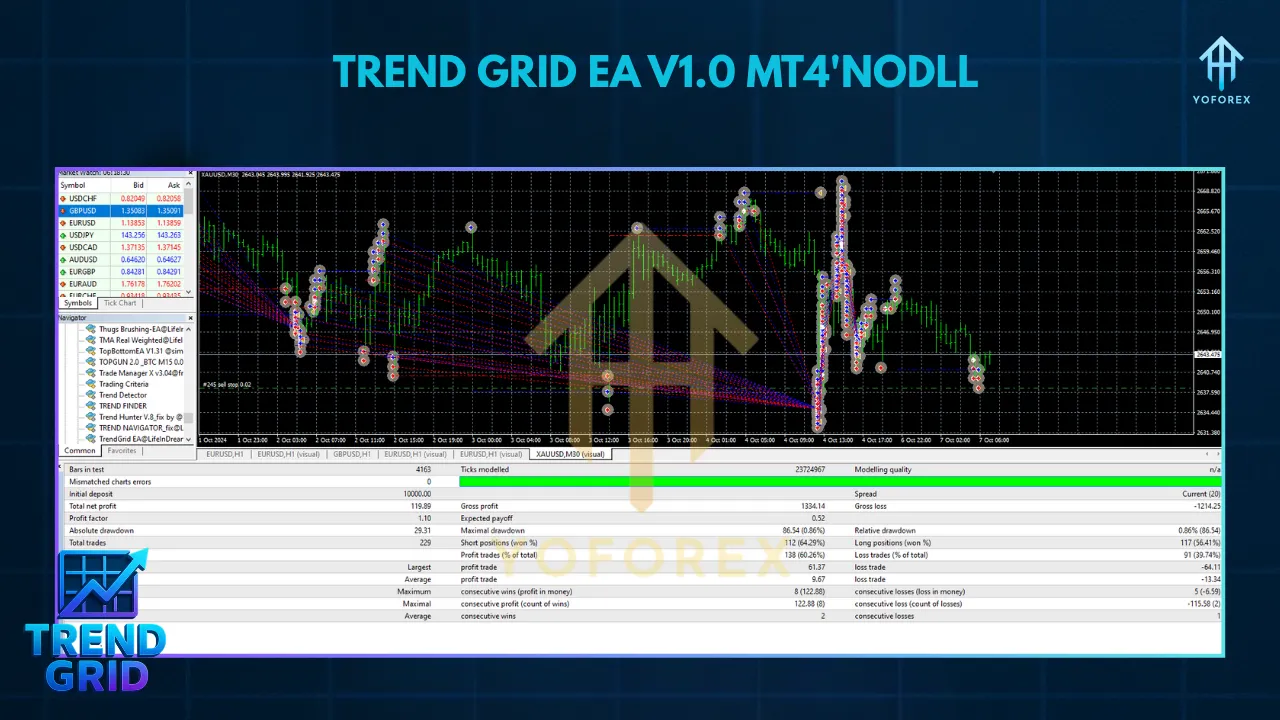
Before trading live, test the EA on a demo account for 2-4 weeks to evaluate its performance. Use MT4’s Strategy Tester to backtest the EA with historical data, ensuring it aligns with your trading goals.
6. Optimize and Go Live
Once satisfied with the demo results, optimize the EA settings for your broker’s conditions (e.g., spreads and slippage). Then, attach it to a live account, ensuring a stable internet connection or VPS for uninterrupted operation.
Best Practices for Using Trend Grid EA V1.0
To maximize the effectiveness of the Trend Grid EA V1.0, consider these tips:
- Start Small: Begin with a low lot size (e.g., 0.01 per $1,000) to minimize risk while you familiarize yourself with the EA’s behavior.
- Choose Liquid Pairs: Focus on major currency pairs with tight spreads, such as EURUSD or GBPUSD, to reduce trading costs.
- Monitor Performance: Regularly review the EA’s performance and adjust settings as market conditions change.
- Use a VPS: A Virtual Private Server ensures the EA runs 24/7, especially during active Forex market hours (Monday to Friday).
- Backtest Thoroughly: Use MT4’s Strategy Tester to evaluate the EA’s performance across different market conditions and timeframes.
- Stay Informed: Be aware of high-impact news events, as they can cause volatility. While the EA may include a news filter, manual intervention during major events can further protect your account.
Potential Risks and Considerations
While the Trend Grid EA V1.0 is a powerful tool, it’s not without risks. Grid trading can lead to significant drawdowns if the market moves strongly against your positions, especially in trending markets. To mitigate this:
- Set strict stop-loss levels to limit losses.
- Avoid over-leveraging, as grid strategies can accumulate multiple open positions.
- Test the EA extensively on a demo account to understand its behavior in various market conditions.
- Be cautious with brokers that have high spreads or slippage, as these can impact profitability.
Additionally, past performance is not a guarantee of future results. The Forex market is inherently volatile, and no EA can eliminate all risks. Always trade with capital you can afford to lose.
Who Should Use Trend Grid EA V1.0?
The Trend Grid EA V1.0 is ideal for:
- Beginner Traders: Its user-friendly setup and automation make it accessible for those new to Forex trading.
- Experienced Traders: Customizable settings allow seasoned traders to fine-tune the EA for advanced strategies.
- Prop Firm Traders: The EA’s risk management and trend-following capabilities align with the requirements of proprietary trading firms.
- Busy Individuals: Automation frees up time for traders who can’t monitor the markets constantly.
Conclusion
The Trend Grid EA V1.0 MT4 is a robust and versatile trading robot that combines trend-following and grid strategies to deliver consistent results in the Forex market. With its customizable settings, built-in risk management, and real-time market analysis, it offers a hands-free trading solution for traders of all levels. However, like any trading tool, it requires careful setup, testing, and monitoring to ensure optimal performance.
By following best practices and understanding the risks involved, traders can leverage the Trend Grid EA V1.0 to enhance their trading efficiency and potentially achieve profitable outcomes. Whether you’re a novice looking to automate your trades or an experienced trader seeking to optimize your strategy, this EA is worth exploring. Download it today, test it on a demo account, and see how it can transform your Forex trading journey.