
EA Trinity Gold V1.0 for MetaTrader 4: A Comprehensive Guide to Automated Gold Trading
In the fast-paced world of forex and commodity trading, automation has become a game-changer for traders seeking consistent performance with minimal manual intervention. Enter EA Trinity Gold V1.0, a sophisticated expert advisor (EA) designed specifically for MetaTrader 4 (MT4) to trade XAUUSD (gold) with precision and efficiency. Leveraging advanced trend-following algorithms, dynamic risk management, and intelligent trade execution, EA Trinity Gold offers a plug-and-play solution for both novice and experienced traders. In this comprehensive guide, we’ll explore its key features, benefits, setup process, and why it stands out as a top choice for automated gold trading.
What is EA Trinity Gold V1.0?
EA Trinity Gold V1.0 is an expert advisor tailored for the MetaTrader 4 platform, designed to capitalize on strong market movements in the gold (XAUUSD) market. By combining a triple moving average (MA) strategy, adaptive position sizing, and robust risk management, this EA delivers a seamless trading experience. Its default settings are pre-optimized, eliminating the need for complex configuration, making it an ideal choice for traders who want a low-maintenance, high-performance trading system.
The EA is built to operate on the M15 timeframe and is optimized for gold trading, with recommended leverage ranging from 1:50 to 1:2000 and a minimum deposit suitable for XAUUSD trading. Whether you’re a beginner looking to automate your trading or a seasoned trader seeking a reliable trend-following system, EA Trinity Gold offers a versatile and disciplined approach to the markets.
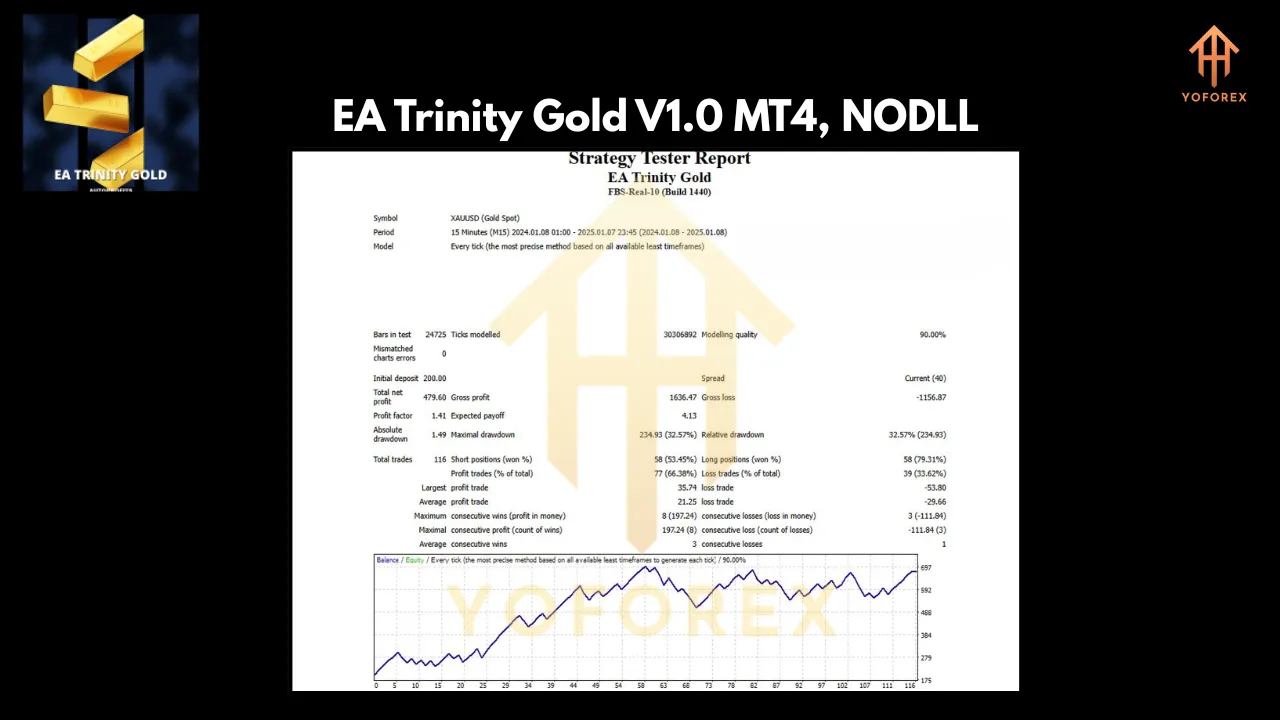
Key Features of EA Trinity Gold V1.0
EA Trinity Gold is packed with features that make it a powerful tool for automated trading. Below, we break down its core functionalities and how they contribute to a robust trading strategy.
1. Triple MA Trend Detection
At the heart of EA Trinity Gold is its triple moving average strategy, which uses three distinct MA periods to identify clear market trends. This approach filters out market noise and focuses on high-probability trade setups aligned with the dominant market direction. By analyzing short-, medium-, and long-term moving averages, the EA ensures that trades are executed only when the trend is well-established, reducing the likelihood of false signals.
This trend-following mechanism is particularly effective for gold, a market known for its volatility and strong directional moves. The triple MA strategy allows the EA to ride trends with confidence while avoiding choppy or range-bound markets.
2. Dynamic Profit and Risk Management
Effective risk management is critical in trading, and EA Trinity Gold excels in this area with its dynamic and flexible approach:
- Flexible Take Profit and Stop Loss: The EA automatically adjusts take profit and stop loss levels based on recent market volatility and historical price action. This ensures that trades are optimized for current market conditions, balancing potential profits with risk exposure.
- Trailing Stops: To lock in profits as the market moves in your favor, EA Trinity Gold employs trailing stops. This feature allows the EA to secure gains while protecting against sudden reversals, making it ideal for capturing extended gold price movements.
- Breakeven Function: Once a trade reaches a predefined profit threshold, the EA moves the stop loss to breakeven, effectively eliminating risk on that trade. This feature ensures that profitable trades are protected, even if the market turns against you.
3. Adaptive Lot Sizing
EA Trinity Gold offers flexible position sizing to suit different risk profiles and account sizes. Traders can choose between fixed lot sizing or auto-lot sizing, where the EA calculates the appropriate lot size based on account equity and user-defined risk parameters. This adaptability ensures that the EA aligns with your risk tolerance, whether you’re trading a small account or a large one.
For example, a trader with a $1,000 account can use auto-lot sizing to keep risk low, while a trader with a larger account can scale up positions for greater profit potential. This feature makes EA Trinity Gold accessible to traders of all levels.
4. Smart Time Filters
Not all trading hours are created equal, and EA Trinity Gold allows you to optimize trading activity with its smart time filters. Traders can define specific time windows to restrict trading to high-volatility periods, such as the London or New York session overlaps, while avoiding low-liquidity periods that may lead to erratic price movements.
For gold trading, which is heavily influenced by economic news and market sessions, this feature ensures that the EA operates when the market is most likely to produce strong, trend-driven moves.
5. Daily and Equity Target Controls
To enforce disciplined money management, EA Trinity Gold includes daily profit targets and equity growth controls. Once a predefined profit target or equity growth percentage is reached, the EA pauses trading to lock in gains and prevent overtrading. This feature is particularly valuable for traders who want to maintain strict control over their account performance and avoid the temptation to chase additional profits after a successful day.
6. Advanced Order Management
EA Trinity Gold incorporates several advanced order management features to optimize trade execution:
- Automatic Order Closing on Opposing Signals: If a new signal indicates a reversal in market direction, the EA can automatically close existing trades to avoid conflicting positions.
- Post-Trade Pausing: After closing a trade, the EA can pause trading temporarily to avoid re-entering the market during volatile or uncertain conditions.
- Dynamic Slippage Monitoring: The EA monitors slippage to ensure trades are executed at optimal prices, reducing the impact of market volatility on trade outcomes.
These features work together to enhance execution quality and minimize unnecessary losses.
7. Customizable Interface
For traders who value real-time insights, EA Trinity Gold provides a customizable on-chart interface. This displays key metrics such as balance, equity, trade performance, and system status, allowing you to monitor the EA’s activity at a glance. The intuitive design ensures that even novice traders can easily understand the EA’s operations without needing to dive into complex logs or reports.
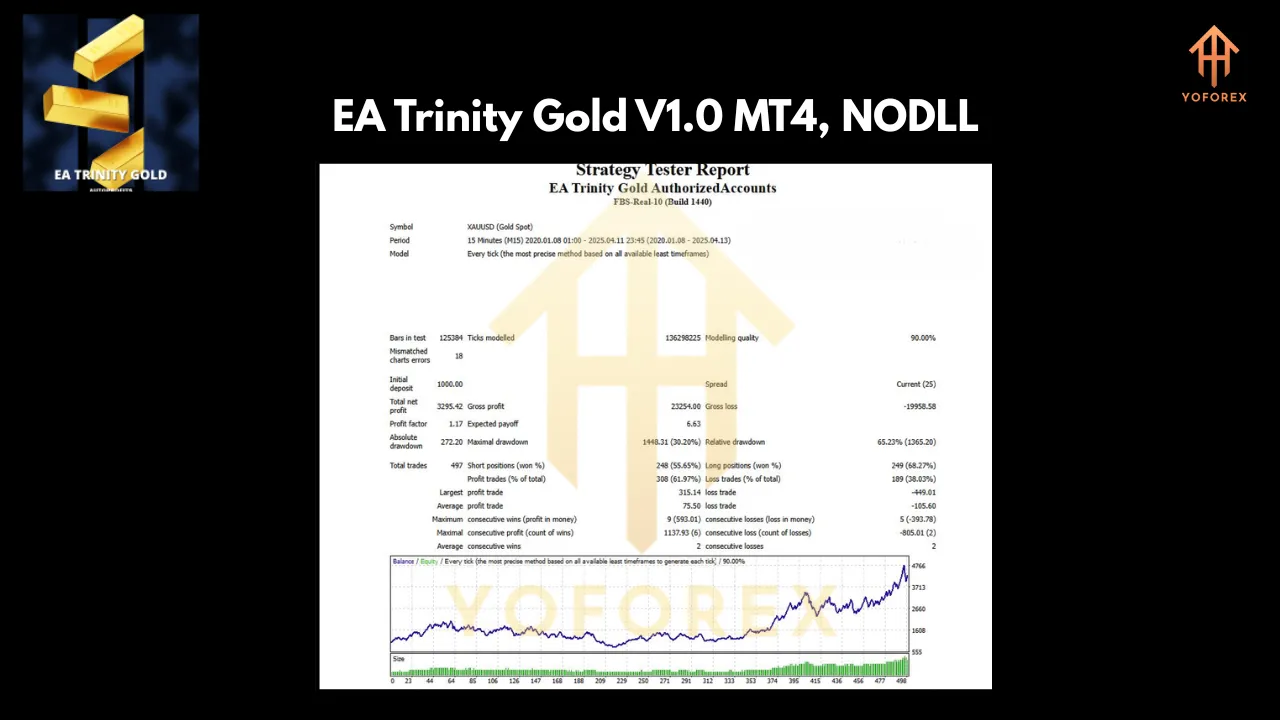
Why Choose EA Trinity Gold?
EA Trinity Gold stands out as a top choice for automated gold trading due to its combination of advanced technology, robust risk management, and user-friendly design. Here are some reasons why it’s an excellent fit for traders:
- Low Maintenance: With pre-optimized default settings, EA Trinity Gold is truly plug-and-play. You can set it up and let it run without needing to tweak complex parameters.
- Trend-Following Precision: The triple MA strategy ensures that trades are aligned with strong market trends, increasing the likelihood of profitable outcomes.
- Risk Control: Dynamic risk management features, such as trailing stops, breakeven functions, and adaptive lot sizing, protect your account from significant drawdowns.
- Time Efficiency: Automated features eliminate the need for constant market monitoring, freeing up time for traders to focus on strategy or other priorities.
- Disciplined Trading: Daily profit targets and equity controls enforce disciplined money management, reducing emotional decision-making.
- Versatility: Whether you’re a beginner with a small account or an experienced trader with a larger portfolio, EA Trinity Gold adapts to your needs.
Setting Up EA Trinity Gold on MetaTrader 4
Getting started with EA Trinity Gold is straightforward, thanks to its user-friendly design. Follow these steps to set up the EA on your MT4 platform:
- Download and Install: Purchase or download EA Trinity Gold from a trusted source, such as the MQL5 marketplace. Ensure you have MetaTrader 4 installed on your computer or VPS.
- Add to MT4: Copy the EA file to the “Experts” folder in your MT4 directory (File > Open Data Folder > MQL4 > Experts).
- Attach to Chart: Open MT4, navigate to the XAUUSD M15 chart, and drag the EA onto the chart. Alternatively, right-click the EA in the Navigator panel and select “Attach to Chart.”
- Configure Settings: The EA’s default settings are pre-optimized, but you can adjust parameters like lot size, time filters, or profit targets to suit your preferences.
- Enable Auto-Trading: Ensure the “AutoTrading” button in MT4 is enabled (green) to allow the EA to execute trades.
- Monitor Performance: Use the on-chart interface to track real-time metrics and ensure the EA is running smoothly.
For optimal performance, consider running EA Trinity Gold on a Virtual Private Server (VPS) to ensure 24/7 operation without interruptions.
Recommended Trading Conditions
To maximize the performance of EA Trinity Gold, adhere to the following recommendations:
- Platform: MetaTrader 4
- Instrument: XAUUSD (gold)
- Timeframe: M15
- Minimum Deposit: Suitable for XAUUSD trading (check broker requirements)
- Leverage: 1:50 to 1:2000
- Broker: Choose a broker with low spreads and fast execution for gold trading.
Always test the EA on a demo account before deploying it on a live account to familiarize yourself with its behavior and ensure compatibility with your broker’s conditions.
Conclusion
EA Trinity Gold V1.0 is a powerful and versatile expert advisor that brings automation, precision, and discipline to gold trading on MetaTrader 4. Its triple MA trend detection, dynamic risk management, and adaptive features make it an excellent choice for traders seeking a reliable trend-following system. With its plug-and-play setup, customizable interface, and focus on risk control, EA Trinity Gold empowers traders to navigate the volatile gold market with confidence.