VAGES Indicator MT4: A Comprehensive Guide to Mastering Forex Trading
The MetaTrader 4 (MT4) platform remains a cornerstone for forex traders worldwide, celebrated for its robust features, flexibility, and extensive library of technical indicators. Among the myriad of tools available, the VAGES Indicator for MT4 has emerged as a powerful asset for traders seeking to enhance their market analysis and decision-making. This blog delves into the intricacies of the VAGES Indicator, exploring its functionality, setup, application in trading strategies, and practical tips for maximizing its potential. Whether you’re a novice or a seasoned trader, this guide will equip you with the knowledge to leverage the VAGES Indicator effectively in your forex trading journey.
What is the VAGES Indicator?
The VAGES Indicator, short for Volume-Adjusted Gaps and Equilibrium Strategy, is a custom technical analysis tool designed for the MT4 platform. It combines elements of volume analysis, price action, and market equilibrium to identify high-probability trading opportunities. Unlike traditional indicators that focus solely on price or momentum, the VAGES Indicator incorporates volume-weighted metrics to highlight significant price gaps and market imbalances, often referred to as “fair value gaps” (FVGs) in modern trading terminology. These gaps represent areas where the market has moved rapidly without sufficient buying or selling activity, creating potential zones for reversals or continuations.
The indicator’s primary strength lies in its ability to detect these imbalances and visually represent them on the chart, enabling traders to pinpoint optimal entry and exit points. By integrating volume data, the VAGES Indicator provides a more holistic view of market dynamics, making it particularly valuable for traders employing strategies based on supply and demand, liquidity, or Inner Circle Trader (ICT) concepts.
Key Features of the VAGES Indicator
The VAGES Indicator stands out due to its unique features, which cater to both intraday and swing traders. Here’s a breakdown of its core functionalities:
-
Automatic Gap Detection: The VAGES Indicator automatically identifies and marks price gaps on the chart, typically displayed as colored boxes (e.g., green for bullish gaps and red for bearish gaps). These gaps indicate areas of market imbalance where price is likely to retrace or continue.
-
Volume-Weighted Analysis: By factoring in trading volume, the indicator ensures that the identified gaps are significant, filtering out minor price movements that lack substantial market participation.
-
Customizable Settings: Traders can adjust parameters such as the number of bars to analyze, gap size thresholds, and display options to suit their trading style and timeframe.
-
Multi-Timeframe Compatibility: The indicator works across various timeframes, from 1-minute charts for scalping to daily charts for long-term trading.
-
Alert System: The VAGES Indicator can be configured to send alerts when price interacts with identified gaps, ensuring traders don’t miss critical setups.
-
Support and Resistance Zones: Gaps often act as dynamic support or resistance levels, providing traders with clear reference points for trade management.
These features make the VAGES Indicator a versatile tool, adaptable to various trading styles, including day trading, swing trading, and even position trading.
Installing the VAGES Indicator on MT4
Before diving into its application, let’s cover how to install the VAGES Indicator on your MT4 platform. Since it’s a custom indicator, you’ll need to download it from a reputable source, such as trading forums, indicator marketplaces like MT4Collection, or developer websites. Follow these steps to install it:
-
Download the Indicator File: Obtain the VAGES Indicator file, typically in .ex4 or .mq4 format. Ensure the source is trustworthy to avoid malware or corrupted files.
-
Open MT4 Data Folder: Launch MT4, go to “File” in the top-left corner, and select “Open Data Folder.” Navigate to the “MQL4” folder, then the “Indicators” subfolder.
-
Copy the Indicator File: Drag and drop the downloaded .ex4 or .mq4 file into the “Indicators” folder.
-
Restart MT4: Close and reopen the MT4 platform to refresh the indicator list.
-
Add to Chart: In MT4, open the “Navigator” panel (Ctrl+N), locate the VAGES Indicator under “Custom Indicators,” and drag it onto your desired chart. Alternatively, double-click the indicator to open its settings window.
-
Configure Settings: Adjust parameters like the number of bars to calculate gaps, threshold percentages for gap size, and display options (e.g., colors, alert settings). If the indicator requires DLLs, ensure DLL imports are enabled in MT4 settings (Tools > Options > Expert Advisors > Allow DLL imports).
Once installed, the VAGES Indicator will overlay gaps on your chart, ready for analysis.
How the VAGES Indicator Works
The VAGES Indicator operates on the principle that significant price movements, driven by institutional activity or liquidity imbalances, leave “gaps” in the price structure. These gaps, often formed by a three-candle pattern where the middle candle’s body exceeds the wicks of adjacent candles, indicate areas where the market has not fully balanced supply and demand. The indicator identifies two types of gaps:
-
Bullish Gaps: Formed after a strong upward price movement, these gaps act as support zones where price may retrace to absorb liquidity before continuing upward.
-
Bearish Gaps: Formed after a sharp downward move, these gaps serve as resistance zones, often revisited by price before resuming the downtrend.
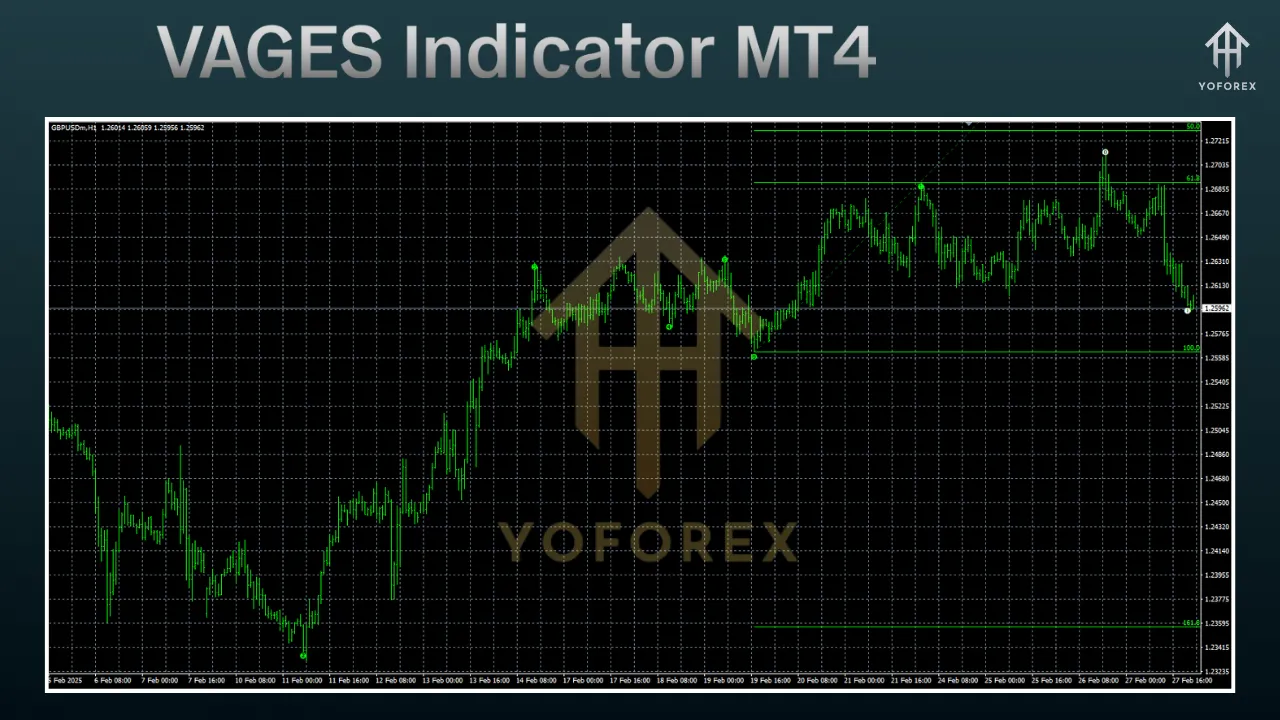
The indicator plots these gaps as boxes on the chart, with customizable settings to control their visibility and sensitivity. For example, traders can set a minimum gap size (e.g., a percentage of the average candle size) to filter out insignificant gaps. Additionally, the indicator tracks whether gaps are “mitigated” (filled by price action) or “unmitigated” (untouched), providing insights into their ongoing relevance.
Trading Strategies with the VAGES Indicator
The VAGES Indicator can be integrated into various trading strategies, particularly those rooted in smart money concepts, ICT principles, or price action. Below are three practical strategies to use the indicator effectively:
1. Trend Continuation Strategy
In a trending market, unmitigated gaps often act as magnets for price, drawing it back to test the gap before continuing in the trend’s direction. Here’s how to trade trend continuations with the VAGES Indicator:
-
Identify the Trend: Use higher-timeframe analysis (e.g., daily or 4-hour charts) to confirm the market’s overall direction. For example, in an uptrend, look for bullish gaps.
-
Wait for Retracement: Monitor the chart for price retracing to an unmitigated bullish gap (green box). This retracement often signals liquidity absorption by institutional traders.
-
Enter the Trade: Place a buy order when price touches the gap and shows signs of rejection (e.g., a bullish candlestick pattern like a pin bar). Set a stop loss below the gap and a take-profit target at the next resistance level or a previous high.
-
Example: On a 1-hour Binance Coin chart, a bullish gap forms after a strong upward move. Price retraces to the gap, confirms support with a bullish engulfing candle, and resumes the uptrend. Enter a long position with a stop loss below the gap and a target at the next resistance.
2. Reversal Strategy
Gaps can also signal potential reversals when price breaks through them in the opposite direction. This strategy is ideal for mean-reversion traders:
-
Spot a Gap Against the Trend: In an uptrend, look for a bearish gap (red box) that forms after a sharp downward move, indicating a potential reversal zone.
-
Confirm the Reversal: Wait for price to retest the gap and show rejection (e.g., a bearish candlestick pattern or divergence on an oscillator like RSI).
-
Enter the Trade: Place a sell order on rejection, with a stop loss above the gap and a take-profit target at the next support level.
-
Example: On a 30-minute USD/CAD chart, a bearish gap forms during a downtrend. Price retraces to the gap, forms a shooting star candle, and continues downward. Enter a short position with a stop loss above the gap.
3. Breakout Strategy
Gaps can serve as breakout levels when price moves decisively through them, signaling strong momentum:
-
Identify a Key Gap: Look for an unmitigated gap near a significant support or resistance level.
-
Wait for Breakout Confirmation: Enter a trade when price breaks through the gap with strong momentum (e.g., a large candle or high volume). Use additional indicators like the Volume Weighted Average Price (VWAP) to confirm the breakout.
-
Manage the Trade: Set a stop loss on the opposite side of the gap and a take-profit target at the next major level.
-
Example: On a 15-minute GBP/JPY chart, price breaks through a bullish gap with a strong candle, supported by high volume. Enter a long position, with a stop loss below the gap and a target at the next resistance.
Tips for Maximizing the VAGES Indicator
To get the most out of the VAGES Indicator, consider the following tips:
-
Combine with Other Tools: Enhance accuracy by pairing the VAGES Indicator with complementary tools like VWAP, Bollinger Bands, or RSI to confirm signals and reduce false positives.
-
Use Multi-Timeframe Analysis: Analyze gaps on higher timeframes (e.g., 4-hour or daily) to identify significant levels, then switch to lower timeframes (e.g., 15-minute or 1-hour) for precise entries.
-
Practice Risk Management: Always use stop losses and appropriate position sizing to protect your capital. Place stop losses beyond the gap to account for potential wicks.
-
Backtest Your Strategy: Test the indicator on historical data to evaluate its performance across different market conditions and timeframes.
-
Stay Disciplined: Avoid chasing trades outside of your strategy. Wait for clear setups where price interacts with gaps and confirms your entry criteria.
Advantages and Limitations
Advantages
-
Clear Visualization: The indicator’s box-based display makes it easy to identify key levels at a glance.
-
Versatility: Suitable for various trading styles and timeframes.
-
Actionable Insights: Provides precise entry and exit points based on market imbalances.
Limitations
-
Lagging Nature: Like most indicators, VAGES relies on historical data, which may lag in fast-moving markets.
-
False Signals: Gaps may not always lead to expected price movements, especially in low-liquidity markets.
-
Learning Curve: Requires understanding of price action and market structure to use effectively.
Conclusion
The VAGES Indicator for MT4 is a powerful tool for forex traders looking to capitalize on market imbalances and price gaps. By combining volume-weighted analysis with clear visual cues, it offers actionable insights for trend continuation, reversal, and breakout strategies. Proper installation, customization, and integration with other tools can significantly enhance its effectiveness. However, like any indicator, it’s not a standalone solution—success depends on disciplined trading, robust risk management, and thorough backtesting. By mastering the VAGES Indicator, traders can gain a deeper understanding of market dynamics and improve their trading outcomes in the competitive world of forex.
For further learning, explore resources like MT4Collection or Forex Factory to download the VAGES Indicator and join communities discussing its application.