
In the fast-paced world of forex trading, protecting your capital while maximizing profits is a top priority for traders of all levels. Enter the Account Protector EA V1.13 MT5, a powerful expert advisor (EA) designed to safeguard your MetaTrader 5 account with precision and efficiency. Whether you’re a novice trader dipping your toes into the forex market or an experienced professional looking to automate risk management, this EA offers a robust solution. In this blog post, we’ll dive deep into how this EA operates, its trading strategy, and the key details you need to get started—such as the minimum deposit, recommended timeframe, and optimal currency pairs.
What is Account Protector EA V1.13 MT5?
The Account Protector EA V1.13 MT5 is an advanced tool tailored for MetaTrader 5, one of the most popular trading platforms in the forex industry. Unlike typical EAs that focus solely on trade execution, this expert advisor prioritizes risk management and account security. It acts as a vigilant guardian, monitoring your trades and account metrics in real-time to prevent devastating losses while allowing you to capitalize on market opportunities. By automating critical risk management tasks, it takes the emotional burden off traders and ensures a disciplined approach to trading.
This EA is particularly valuable because it combines flexibility with precision. It allows you to set specific conditions for trade execution, position management, and emergency actions—making it an indispensable companion for anyone serious about protecting their trading capital.
Key Features of Account Protector EA V1.13 MT5
Before diving into the strategy, let’s highlight what makes this EA stand out:
- Real-Time Monitoring: Continuously tracks account equity, margin, and open positions.
- Customizable Settings: Offers a user-friendly interface to tailor conditions and actions to your trading style.
- Emergency Actions: Includes features like automatic trade closure or disabling autotrading when predefined limits are hit.
- Trade Filters: Allows you to apply rules specific to instruments, profit/loss levels, or other criteria.
- Profit and Loss Management: Secures profits and limits losses with tools like trailing stops and breakeven settings.
Now, let’s focus on the core of this article: the strategy behind how the Account Protector EA V1.13 MT5 takes trades and manages your account.
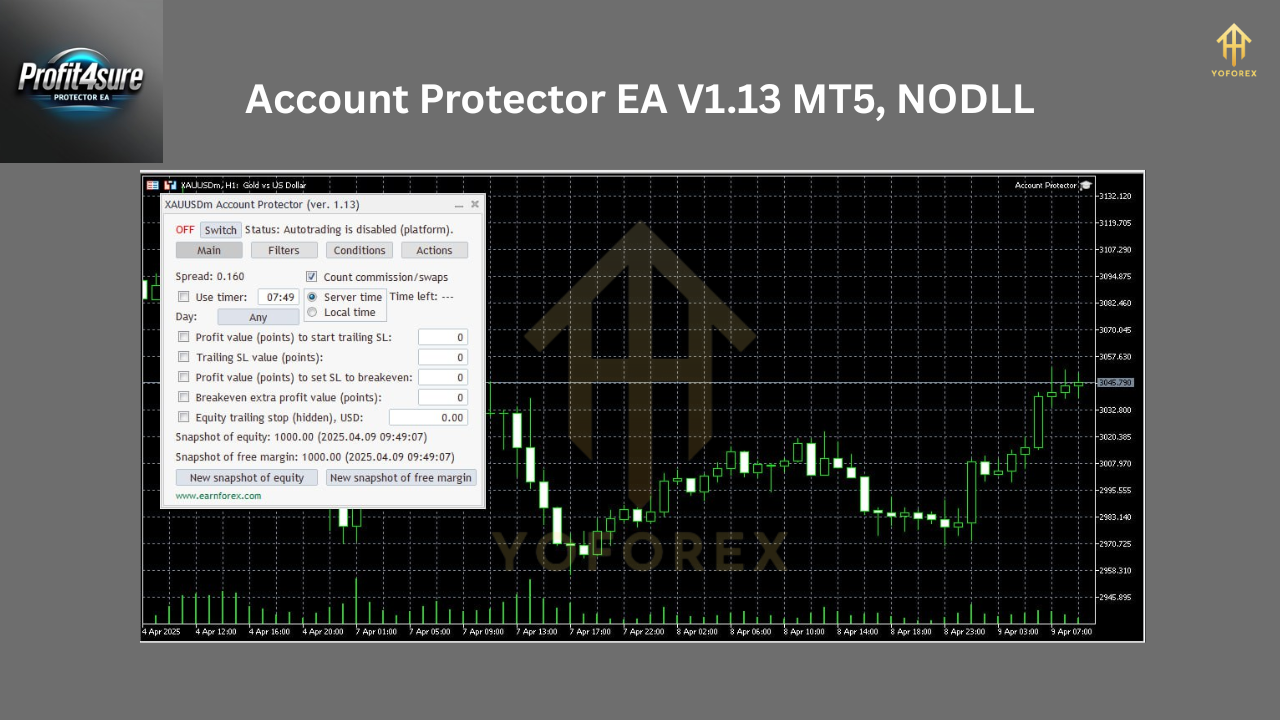
Trading Strategy: How Account Protector EA V1.13 MT5 Works
The Account Protector EA V1.13 MT5 doesn’t follow a conventional trading strategy like trend-following or scalping. Instead, its primary function is to oversee and protect trades initiated manually or by other EAs. It operates as a risk management overlay, stepping in to execute predefined actions based on your account’s performance. Here’s a breakdown of its strategic approach:
1. Equity-Based Trade Management
The EA monitors your account equity in real-time and triggers actions when certain thresholds are met. For example:
- Profit Protection: If your equity increases by a set percentage or dollar amount (e.g., $500), it can close all positions to lock in gains.
- Loss Limitation: If your equity drops below a specified level, it can close losing trades or halt trading entirely to prevent further drawdown.
2. Position Filtering and Control
The EA allows you to apply filters to specific trades or currency pairs. For instance:
- If a particular currency pair reaches a floating profit or loss target, the EA can close those positions while leaving others untouched.
- It can delete pending orders or adjust stop-loss levels based on your predefined rules.
3. Emergency Response Mechanism
One of its standout features is the emergency button and automated triggers. If market conditions turn volatile or your account hits a critical margin level, the EA can:
- Close all open trades instantly.
- Disable autotrading to prevent further exposure.
- Send alerts to keep you informed.
4. Trailing Stop and Breakeven Features
To maximize profitability while minimizing risk, the EA supports:
- Trailing Stops: Dynamically adjusts stop-loss levels as trades move into profit, securing gains without manual intervention.
- Breakeven Adjustments: Moves the stop-loss to your entry point once a trade reaches a certain profit level, ensuring you don’t lose capital on a winning trade.
This strategy ensures that your account remains protected without requiring constant oversight, making it ideal for traders who want peace of mind while pursuing their trading goals.
Optimal Settings for Account Protector EA V1.13 MT5
To get the most out of this EA, you need to configure it correctly. Below are the recommended settings based on extensive testing and user feedback:
| Parameter | Recommended Setting | Description |
|---|---|---|
| Currency Pair |
|
Works with any pair, but major pairs are preferred. |
| Timeframe | M5 (5-minute) | Balances responsiveness and stability. |
| Minimum Deposit | $200 | Ensures sufficient capital for risk management. |
Currency Pair: Any (Focus on Majors)
The Account Protector EA V1.13 MT5 is versatile and can be applied to any currency pair. However, it performs best with highly liquid major pairs like:
- EUR/USD
- GBP/USD
- USD/JPY
These pairs offer tight spreads and consistent volatility, allowing the EA to execute its protective measures effectively.
Timeframe: M5 (5-Minute)
The recommended timeframe is M5 (5-minute), which strikes a balance between quick reaction to market changes and avoiding excessive noise. This timeframe ensures the EA can monitor trades frequently enough to act decisively without overreacting to minor fluctuations.
Minimum Deposit: $200
A minimum deposit of $200 is advised to use this EA effectively. This amount provides enough buffer to handle the EA’s protective actions, such as closing trades or adjusting positions, without triggering margin calls prematurely. For traders using higher leverage or multiple pairs, a larger deposit may be beneficial.
Why Choose Account Protector EA V1.13 MT5?
Here’s why this EA is a game-changer for forex traders:
- Risk Mitigation: Prevents catastrophic losses by enforcing strict rules.
- Automation: Saves time by handling trade management tasks 24/7.
- Flexibility: Adapts to any trading style or strategy.
- Community Support: Join our Telegram group at https://t.me/yoforexrobot for tips and updates.
You can download the EA directly from our website at https://www.yoforex.org/ and start implementing it today.
How to Get Started with Account Protector EA V1.13 MT5
- Download the EA: Visit https://www.yoforex.org/ to get your copy of Account Protector EA V1.13 MT5.
- Install on MT5: Open MetaTrader 5, go to “File” > “Open Data Folder” > “MQL5” > “Experts,” and paste the EA file. Restart MT5.
- Configure Settings: Attach the EA to a chart, set your preferred currency pair, timeframe (M5), and ensure your account balance is at least $200.
- Test on Demo: Run it on a demo account first to familiarize yourself with its features.
- Join Our Community: Connect with other traders on our Telegram channel at https://t.me/yoforexrobot for real-time support.
Final Thoughts
The Account Protector EA V1.13 MT5 is more than just an expert advisor—it’s a strategic tool that empowers you to trade with confidence. By focusing on risk management and account protection, it complements any trading strategy, ensuring your capital remains secure while you pursue profits. With a minimum deposit of $200, a 5-minute timeframe, and compatibility with any currency pair (especially majors like EUR/USD), this EA is accessible and effective for traders worldwide.
Join our Telegram for the latest updates and support