Advance CCI Indicator in MT4: A Comprehensive Guide for Traders
The Commodity Channel Index (CCI) is a versatile and widely used technical indicator in the world of trading, particularly within the MetaTrader 4 (MT4) platform. Developed by Donald Lambert in 1980, the CCI was originally designed to identify cyclical trends in commodities but has since gained popularity across various asset classes, including forex, stocks, and indices. The “Advance CCI Indicator” for MT4 refers to enhanced versions of the standard CCI, often customized with additional features to improve its functionality and adaptability for modern trading strategies. In this 1500-word blog, we’ll explore the Advance CCI Indicator in MT4, its mechanics, customization options, trading strategies, and practical tips for traders.
What is the CCI Indicator?
The CCI is a momentum-based oscillator that measures the deviation of an asset’s price from its statistical average, helping traders identify overbought or oversold conditions. It is calculated using the following formula:
CCI = (Typical Price – Simple Moving Average) / (0.015 × Mean Deviation)
-
Typical Price: (High + Low + Close) / 3
-
Simple Moving Average (SMA): The average of the Typical Price over a specified period.
-
Mean Deviation: The average of the absolute differences between the Typical Price and the SMA.
-
0.015: A constant that scales the CCI to ensure most values fall within a standard range, typically between -100 and +100.
In MT4, the standard CCI indicator is available by default, but the “Advance CCI Indicator” refers to custom versions that include additional features like multi-timeframe analysis, signal alerts, or visual enhancements such as color-coded bars or trend lines.
Understanding the Advance CCI Indicator in MT4
The Advance CCI Indicator is a custom tool developed by coders and traders to address limitations in the standard CCI. While the standard CCI is effective, it can sometimes generate false signals in choppy markets or lack the flexibility needed for complex trading systems. The Advance CCI Indicator often includes:
-
Multi-Timeframe Support: Allows traders to view CCI values from higher or lower timeframes without switching charts.
-
Customizable Alerts: Notifications for specific CCI levels (e.g., crossing +100, -100, or zero).
-
Smoothing Algorithms: Reduces noise by applying additional moving averages or filters.
-
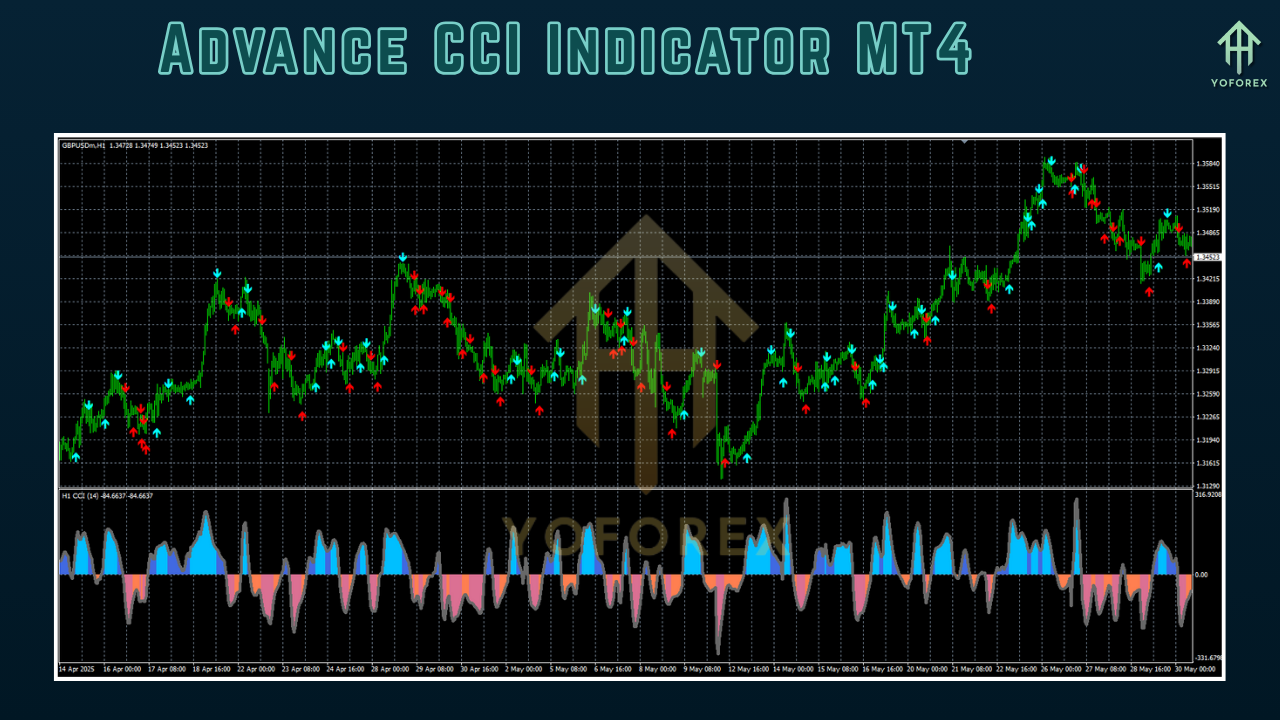
Visual Enhancements: Color-coded signals or histograms for easier trend identification.
-
Divergence Detection: Identifies bullish or bearish divergences between price and CCI for potential reversal signals.
These features make the Advance CCI Indicator a powerful tool for traders seeking more precision and adaptability in their strategies.
Installing the Advance CCI Indicator in MT4
To use the Advance CCI Indicator, you’ll first need to download it from a trusted source, such as a trading forum, marketplace, or developer’s website. Follow these steps to install it in MT4:
-
Download the Indicator: Obtain the .mq4 or .ex4 file for the Advance CCI Indicator.
-
Open MT4 Data Folder: In MT4, go to File > Open Data Folder.
-
Navigate to Indicators: Open the MQL4 > Indicators folder and copy the downloaded file here.
-
Restart MT4: Close and reopen MT4 to refresh the indicator list.
-
Apply the Indicator: Open a chart, go to Insert > Indicators > Custom, and select the Advance CCI Indicator. Configure settings like period, timeframe, or alert preferences as needed.
Always ensure the indicator comes from a reputable source to avoid malware or poorly coded tools that could harm your trading platform.
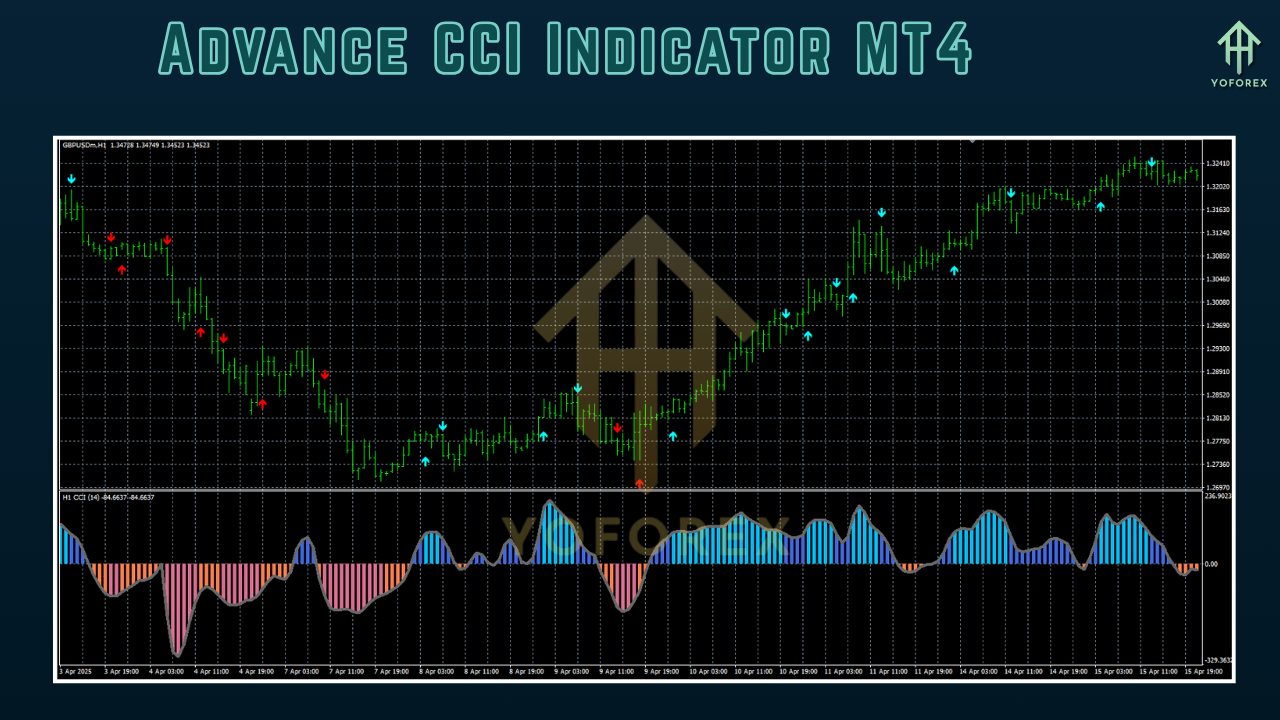
Key Features
The Advance CCI Indicator typically offers several enhancements over the standard version. Here are some common features:
-
Custom Period Settings: While the default CCI period is 14, the Advance CCI allows users to experiment with different periods (e.g., 20, 50) to suit their trading style.
-
Signal Alerts: Pop-up, sound, or email alerts when the CCI crosses key levels or forms specific patterns.
-
Multi-Timeframe Analysis: View CCI signals from a higher timeframe (e.g., H4) on a lower timeframe chart (e.g., M15) for better trend confirmation.
-
Divergence Detection: Automatically highlights divergences, which are powerful signals for potential reversals.
-
Custom Visuals: Options to display the CCI as a line, histogram, or with color changes to indicate trend strength.
These features make the Advance CCI Indicator highly customizable, catering to both novice and experienced traders.
How to Use the Advance CCI Indicator in Trading
The Advance CCI Indicator can be used in various trading strategies, including trend following, mean reversion, and divergence trading. Below are some practical approaches:
1. Overbought and Oversold Levels
The CCI typically ranges between -100 and +100, with values above +100 indicating overbought conditions and below -100 indicating oversold conditions. With the Advance CCI, traders can:
-
Buy Signal: Enter a long position when the CCI crosses above -100 after being oversold, especially if accompanied by a bullish price pattern.
-
Sell Signal: Enter a short position when the CCI crosses below +100 after being overbought, confirmed by bearish price action.
The Advance CCI’s alerts can notify traders when these levels are crossed, reducing the need for constant chart monitoring.
2. Zero Line Cross Strategy
The zero line acts as a centerline for the CCI, indicating the transition between bullish and bearish momentum. A common strategy is:
-
Bullish Signal: Buy when the CCI crosses above the zero line, suggesting upward momentum.
-
Bearish Signal: Sell when the CCI crosses below the zero line, indicating downward momentum.
The Advance CCI’s multi-timeframe feature can enhance this strategy by confirming signals on a higher timeframe, reducing false entries.
3. Divergence Trading
Divergences occur when the price and CCI move in opposite directions, signaling potential reversals. The Advance CCI’s divergence detection feature simplifies this process:
-
Bullish Divergence: When the price makes a lower low, but the CCI forms a higher low, it suggests a potential upward reversal.
-
Bearish Divergence: When the price makes a higher high, but the CCI forms a lower high, it indicates a possible downward reversal.
Traders can combine divergence signals with other indicators, like support/resistance levels, for higher-probability trades.
4. Trend Confirmation
The Advance CCI can confirm trends by analyzing its position relative to the zero line or key levels. For example:
-
A CCI consistently above +100 in an uptrend confirms strong bullish momentum.
-
A CCI below -100 in a downtrend supports bearish momentum.
The indicator’s smoothing algorithms help filter out noise, making trend signals more reliable.
Customizing the Advance CCI Indicator
One of the strengths of the Advance CCI Indicator is its customization options. Traders can adjust:
-
Period: Shorter periods (e.g., 10) make the CCI more sensitive, while longer periods (e.g., 20) smooth out signals.
-
Timeframe: Use a higher timeframe (e.g., D1) for trend analysis or a lower timeframe (e.g., M5) for scalping.
-
Alert Settings: Configure alerts for specific CCI levels or crossings.
-
Visual Settings: Change colors, line styles, or enable histograms for better visualization.
Experimenting with these settings in a demo account is recommended to find the optimal configuration for your trading style.
Advantages of the Advance CCI Indicator
-
Enhanced Functionality: Features like multi-timeframe analysis and divergence detection make it more versatile than the standard CCI.
-
User-Friendly: Alerts and visual enhancements simplify decision-making.
-
Adaptable: Suitable for various markets (forex, stocks, commodities) and trading styles (scalping, swing trading).
-
Customizable: Tailor the indicator to fit specific strategies or preferences.
Limitations of the Advance CCI Indicator
-
Lagging Nature: Like most oscillators, the CCI is based on historical data, which may lag in fast-moving markets.
-
False Signals: In choppy or ranging markets, the CCI can generate misleading signals.
-
Complexity: Advanced features may overwhelm beginners who are unfamiliar with technical analysis.
-
Dependency on Settings: Improper configuration can reduce the indicator’s effectiveness.
To mitigate these limitations, combine the Advance CCI with other indicators (e.g., Moving Averages, RSI) and price action analysis for better accuracy.
Practical Tips for Using the Advance CCI Indicator
-
Combine with Other Tools: Use the Advance CCI alongside trend indicators (e.g., ADX, Bollinger Bands) or price patterns to confirm signals.
-
Test in a Demo Account: Before using the indicator in live trading, backtest and forward-test it to understand its behavior in different market conditions.
-
Avoid Overtrading: Focus on high-probability setups, such as those confirmed by multiple timeframes or confluence with support/resistance.
-
Manage Risk: Always use stop-loss orders and proper position sizing to protect your capital.
-
Stay Updated: Check for updates to the Advance CCI Indicator, as developers may release improved versions with bug fixes or new features.
Example Trading Strategy with Advance CCI
Here’s a simple strategy using the Advance CCI Indicator for forex trading:
-
Setup:
-
Apply the Advance CCI Indicator to an H1 chart with a period of 14.
-
Use a 50-period EMA to identify the trend.
-
Enable alerts for CCI crossings above -100 (buy) and below +100 (sell).
-
-
Entry Rules:
-
Long Entry: Price is above the 50 EMA, and the CCI crosses above -100 from oversold territory.
-
Short Entry: Price is below the 50 EMA, and the CCI crosses below +100 from overbought territory.
-
-
Exit Rules:
-
Exit the trade when the CCI crosses the zero line in the opposite direction or hits an extreme level (+200/-200).
-
Set a stop-loss below the recent swing low (for longs) or above the recent swing high (for shorts).
-
Take profit at a risk-reward ratio of 1:2 or at key support/resistance levels.
-
-
Risk Management:
-
Risk no more than 1-2% of your account per trade.
-
Avoid trading during high-impact news events to reduce volatility.
-
Conclusion
The Advance CCI Indicator for MT4 is a powerful tool that enhances the standard CCI with advanced features like multi-timeframe analysis, divergence detection, and customizable alerts. By understanding its mechanics and applying it within a well-defined trading strategy, traders can improve their ability to identify high-probability setups in various markets. However, like any technical tool, the Advance CCI is not a standalone solution and should be used in conjunction with other indicators, price action, and sound risk management principles. With practice and proper customization, the Advance CCI Indicator can become a valuable addition to your trading arsenal, helping you navigate the complexities of the financial markets with greater confidence.
Support & Disclaimer
Got questions or need help? Reach out anytime:
- WhatsApp: https://wa.me/+443300272265
- Telegram: https://t.me/yoforexrobot
Disclaimer: Past performance is no guarantee of future results. All trading carries risk. Always demo-test the System Haos Indicator MT4 in a risk-free environment before deploying on a live account.