
Advanced Hedge EA V4.0 MT4 – Complete Guide to Smart Hedging & Risk Control
In the fast-paced world of forex trading, automated trading systems have completely changed how traders operate in the market. One such powerful tool is Advanced Hedge EA V4.0 MT4. This expert advisor is designed to help traders automate advanced hedging strategies, reduce exposure to sudden market swings, and target consistent profitability with minimal manual intervention.
Instead of watching charts 24/7 or struggling with emotional decision-making, Advanced Hedge EA V4.0 MT4 allows you to define clear rules and let the algorithm do the heavy lifting. In this comprehensive guide, we’ll explore what this EA does, how its hedging logic works, key features, recommended settings, and practical tips to get the most out of it—whether you’re a beginner or an experienced trader.
What Is Advanced Hedge EA V4.0 MT4?
Advanced Hedge EA V4.0 MT4 is an automated trading robot built for the MetaTrader 4 (MT4) platform that focuses on hedging-based strategies. Instead of relying on a single directional trade, it opens and manages multiple positions in opposite directions when needed, aiming to:
-
Limit large drawdowns
-
Smooth out equity curves over time
-
Take advantage of choppy or ranging market conditions
The EA constantly monitors price movements, volatility, and trend conditions. When the market moves against the initial trade, Advanced Hedge EA V4.0 MT4 can open carefully calculated hedge orders to balance risk. As price corrects or ranges, the EA works to close baskets of trades in overall profit or minimal loss, instead of letting one bad position wipe out your account.
This makes it especially useful for traders who:
-
Trade on volatile pairs like XAUUSD, GBPJPY, or GBPUSD
-
Prefer medium to long-term strategies with controlled risk
-
Want an automated system to handle recovery and risk management
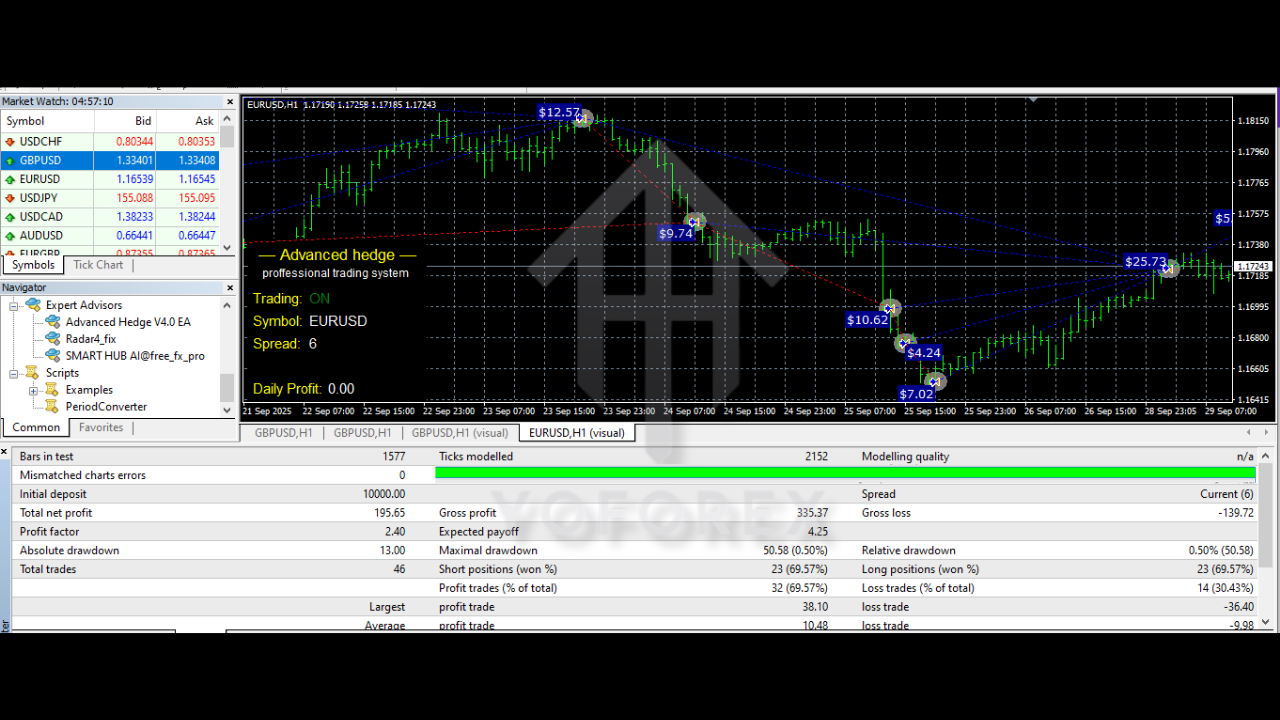
Key Features of Advanced Hedge EA V4.0 MT4
Advanced Hedge EA V4.0 MT4 is packed with tools that help both conservative and aggressive traders tailor the strategy to their style. Some of the most important features include:
1. Smart Hedging Logic
-
Automatically opens hedge positions when the market moves against your main trade beyond a predefined level.
-
Uses distance-based or volatility-based triggers to avoid unnecessary hedging.
-
Targets an overall basket profit instead of focusing on just one entry.
2. Dynamic Lot Sizing
-
Supports both fixed lot and progressive lot modes.
-
Lets you define a safe risk percentage per cycle, protecting your balance.
-
Can be configured to gradually reduce lot sizes in high-drawdown phases.
3. Flexible Entry Filters
-
Trend filters (moving averages, trend direction) to avoid trading against strong market moves.
-
Volatility filters to skip extremely high-impact news periods if desired.
-
Time filters so you can trade only specific sessions like London or New York.
4. Basket Take-Profit & Equity Targets
-
Set a basket take-profit in pips, money, or percentage.
-
Option to use equity-based targets, closing all trades once a certain gain or loss level is reached.
-
Helps lock in profits and prevents extended exposure during uncertain markets.
5. Full Customization & Control
-
Control maximum number of hedge layers.
-
Configure minimum distance between each hedge order.
-
Set maximum spread, slippage, and magic number for easy management.
How the Hedging Strategy Works in Advanced Hedge EA V4.0 MT4
To understand Advanced Hedge EA V4.0 MT4, it’s important to see how the hedging cycle typically works:
-
Initial Trade Entry
-
The EA identifies a potential setup based on its internal filters (trend, volatility, support/resistance, etc.).
-
It opens a buy or sell trade with a predefined lot size.
-
-
Monitoring Price Movement
-
If the market moves in favor of the trade, the EA aims to close at target profit or manage trailing stops.
-
If price starts moving sharply against the initial position, the EA prepares for a hedge.
-
-
Hedge Activation
-
Once the price reaches a certain negative distance (e.g., -30 or -50 pips), the EA may open an opposite trade.
-
This hedge position helps neutralize further floating loss as price continues in the opposite direction.
-
-
Creating a Basket
-
Over time, multiple trades (both original and hedge orders) can form a basket.
-
Advanced Hedge EA V4.0 MT4 calculates an average breakeven point and looks for an exit level that yields total profit or minimal loss.
-
-
Basket Closure
-
When total basket profit reaches the set target (money or %), the EA closes all open trades.
-
This resets the cycle, preparing the EA for the next opportunity.
-
This style of trading does not aim for a single huge winning trade. Instead, it focuses on stability, recovery, and gradual growth—a big reason why hedging EAs are popular among traders who want consistent results and smoother equity curves.
Recommended Settings & Account Conditions
While every trader’s risk tolerance is different, here are some general recommendations to run Advanced Hedge EA V4.0 MT4 more safely:
1. Minimum Deposit & Leverage
-
Recommended starting balance: $200–$500 for conservative risk, higher for aggressive setups.
-
Leverage: 1:100 to 1:500, depending on the broker and instrument.
-
Avoid over-leveraging; hedging strategies can open multiple positions.
2. Pairs & Timeframes
-
Best suited for major currency pairs (EURUSD, GBPUSD, USDJPY) and popular cross pairs.
-
Can also be used on gold (XAUUSD) if configured with wider distances and lower lot sizes due to volatility.
-
Timeframes: M15, M30, or H1 are usually ideal for avoiding excessive noise.
3. Risk Parameters
-
Set a maximum number of hedge levels (for example, 3–5 layers) to avoid infinite position building.
-
Configure a daily or weekly equity stop-loss to protect your account from extreme conditions.
-
Begin with low lot sizes (e.g., 0.01) when testing new settings.
4. Broker Requirements
-
Use an ECN or low-spread broker to make the most of the strategy.
-
Ensure fast order execution and low slippage, especially on volatile pairs.
-
Confirm that your broker allows hedging, as some brokers or regulations restrict it.
Trading Tips & Best Practices for Advanced Hedge EA V4.0 MT4
To get the best results from Advanced Hedge EA V4.0 MT4, treat it like a professional trading system, not a “get rich quick” button:
-
Start on a Demo Account
-
Always test the EA on a demo or cent account before going live.
-
Experiment with different pairs, lot sizes, and hedge distances.
-
-
Use Realistic Profit Targets
-
Don’t aim for extreme daily returns.
-
Smaller, realistic profit targets (e.g., 2–5% per month) are usually more sustainable for hedging systems.
-
-
Monitor News & High-Impact Events
-
Major economic news can cause large spikes that affect hedging baskets.
-
Either pause trading around high-impact news or use the EA’s filters if available.
-
-
Avoid Running on Too Many Pairs at Once
-
Each pair opens its own baskets, so overloading can cause margin issues.
-
Start with 1–2 pairs and scale up carefully.
-
-
Regularly Review Performance
-
Check equity curve, maximum drawdown, and closed profit weekly or monthly.
-
Optimize or adjust parameters based on real data, not just assumptions.
-

Pros & Cons of Advanced Hedge EA V4.0 MT4
Like any trading tool, Advanced Hedge EA V4.0 MT4 has strengths and limitations.
Pros
-
Helps reduce the emotional stress of manual trading
-
Designed to handle both trends and ranging markets through hedging
-
Fully automated strategy with customizable risk settings
-
Can smooth out equity curves and manage recovery intelligently
Cons
-
Hedging requires sufficient margin; small accounts may struggle in long cycles
-
Improper settings (too many hedge levels, high lot sizes) can lead to high drawdown
-
Performance depends heavily on broker quality and execution
-
Not suitable for traders who expect guaranteed profits or zero risk
Who Should Consider Using Advanced Hedge EA V4.0 MT4?
Advanced Hedge EA V4.0 MT4 is best suited for:
-
Traders who want systematic, rule-based risk management
-
Users comfortable with medium-term growth instead of ultra-fast gains
-
Traders who seek a semi-passive approach, where the EA handles entries, hedges, and exits
-
Traders who understand that hedging is about balance and control, not chasing every pip
If you are willing to test, optimize, and let the system run with discipline, Advanced Hedge EA V4.0 MT4 can become a powerful part of your automated trading toolbox.
Final Thoughts
Advanced Hedge EA V4.0 MT4 is designed for traders who want more than just simple buy/sell signals. By combining hedging logic, basket management, and customizable risk controls, it offers a structured way to tackle volatile markets while minimizing emotional errors.
As with every EA, long-term success depends on proper configuration, realistic expectations, solid money management, and continuous monitoring. If you approach it as a professional tool—testing carefully and managing risk wisely—Advanced Hedge EA V4.0 MT4 can help you move closer to consistent, algorithm-driven forex trading.