Understanding the Advanced Parabolic Indicator V2.2 for MT4: A Comprehensive Guide
Introduction
The Advanced Parabolic Indicator V2.2 for MetaTrader 4 (MT4) is a sophisticated evolution of the classic Parabolic Stop and Reverse (SAR) indicator, originally developed by J. Welles Wilder in 1978. Designed to enhance trend-following and reversal strategies, this advanced version introduces additional features like multi-timeframe (MTF) capabilities, customizable alerts, and adaptive settings, making it a powerful tool for forex traders, scalpers, and swing traders alike. This blog dives deep into the mechanics, setup, strategies, and practical applications of the Advanced Parabolic Indicator V2.2, offering insights for both novice and experienced traders.
What is the Parabolic SAR?
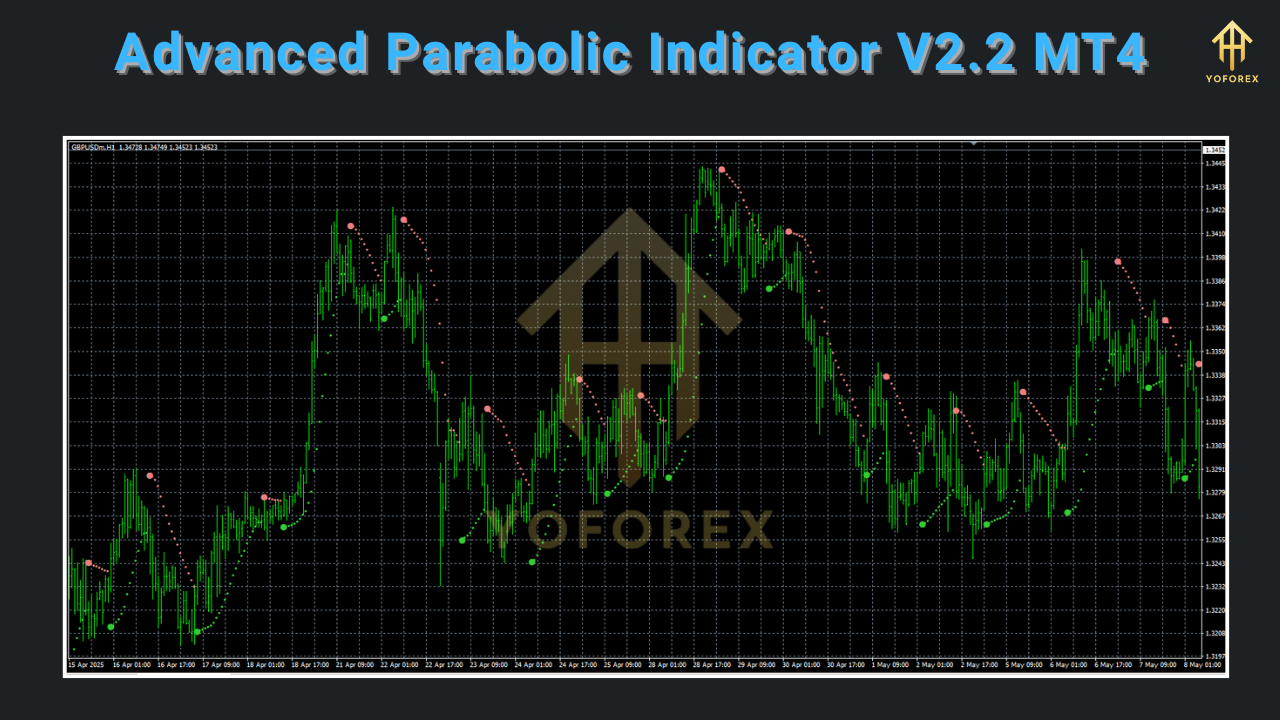
Before exploring the advanced version, let’s revisit the foundational Parabolic SAR. The Parabolic SAR is a technical analysis tool used to identify trend direction and potential reversal points. It appears as a series of dots on a price chart, placed either above or below the price, depending on the trend. Dots below the price indicate an uptrend, while dots above suggest a downtrend. The indicator’s name, “Stop and Reverse,” reflects its ability to signal when a trend may end, prompting traders to close positions or reverse their trades.
The standard Parabolic SAR calculation relies on two key parameters:
-
Step (Acceleration Factor, AF): Starts at 0.02 and increases by 0.02 each time a new extreme price (highest high or lowest low) is reached, up to a maximum of 0.2.
-
Maximum: Typically set at 0.2, this caps the acceleration factor to prevent overly sensitive reversals.
The formula for the Parabolic SAR is:
-
Rising SAR: Previous SAR + Previous AF × (Previous Extreme Price – Previous SAR)
-
Falling SAR: Previous SAR – Previous AF × (Previous SAR – Previous Extreme Price)
While effective, the standard Parabolic SAR can generate false signals in choppy markets. The Advanced Parabolic Indicator V2.2 addresses these limitations with enhanced features.
Key Features
The Advanced Parabolic Indicator V2.2 builds on the classic SAR by incorporating several upgrades tailored for MT4 users. According to discussions on trading forums like newdigital-world.com, this version (released around 2014) is optimized for MT4 build 600 and above, ensuring compatibility with modern platforms. Here are its standout features:
-
Multi-Timeframe (MTF) Functionality: Unlike the standard SAR, which operates on a single timeframe, V2.2 allows traders to view SAR signals across multiple timeframes simultaneously. For example, you can monitor daily and hourly SAR trends on a single chart, aiding in top-down analysis.
-
Customizable Alerts: The indicator supports MT4 alerts, email notifications, and push notifications, ensuring traders don’t miss trend reversals or key signals.
-
Adaptive Acceleration Factor: The indicator offers an adaptive AF that adjusts based on market conditions, varying between a minimum and maximum step, improving responsiveness to volatility.
-
Histogram Display: An optional histogram version (AdvancedParabolic Histo_v2.1) plots trend direction as colored bars (blue for bullish, red for bearish), simplifying visual interpretation.
-
Minimum Change Filter: A pip-based filter reduces noise by ignoring minor price movements, enhancing signal reliability.
-
Compatibility with Other Indicators: The indicator can be paired with tools like Moving Averages, CCI, or ADX for filtered signals, as seen in strategies like the Advanced Parabolic Sar V.2 system.
These enhancements make the indicator versatile for various trading styles, from scalping on M1/M5 charts to swing trading on H4/D1 timeframes.
Setting Up the Advanced Parabolic Indicator V2.2 in MT4
To use the Advanced Parabolic Indicator V2.2, follow these steps to install and configure it on MT4:
-
Download the Indicator: Obtain the .mq4 or .ex4 file from a reputable source, such as newdigital-world.com or mql5.com. Ensure it’s version 2.2 for compatibility with MT4 build 600+.
-
Install in MT4:
-
Open MT4 and navigate to File > Open Data Folder > MQL4 > Indicators.
-
Copy the indicator file into the Indicators folder.
-
Restart MT4 or refresh the Navigator panel.
-
-
Apply to Chart:
-
In MT4, open a chart for your desired currency pair or asset.
-
Drag the Advanced Parabolic Indicator V2.2 from the Navigator to the chart.
-
A settings dialog will appear, allowing customization.
-
-
Configure Settings:
-
Step: Default is 0.02, but you can adjust between 0.018–0.021 for sensitivity.
-
Maximum: Default is 0.2; avoid exceeding 0.22 to prevent over-sensitivity.
-
Timeframe: Set to 0 for the current chart’s timeframe or specify minutes (e.g., 60 for H1, 240 for H4).
-
Alerts: Enable MT4, email, or push notifications for trend changes.
-
Minimum Change Filter: Set a pip threshold (e.g., 5 pips) to filter noise.
-
Once applied, the indicator will display SAR dots or a histogram, depending on the version, with alerts for trend reversals.
Trading Strategies Using the Advanced Parabolic Indicator V2.2
The Advanced Parabolic Indicator V2.2 is versatile and can be integrated into various trading strategies. Below are three effective approaches, inspired by resources like forexstrategiesresources.com and LiteFinance.
1. Trend-Following with Ribbon and CCI
The Advanced Parabolic Sar V.2 strategy combines the indicator with a ribbon of Moving Averages and the Commodity Channel Index (CCI) for robust trend confirmation. This approach is ideal for intraday and swing trading on timeframes of 15 minutes or higher.
-
Setup:
-
Advanced Parabolic SAR (0.02, 0.02, 0.2).
-
CCI (period 50).
-
Ribbon of Moving Averages (default settings).
-
-
Buy Signal:
-
SAR dots appear below the price (bullish trend).
-
CCI > RSX > 0.
-
PriceGarrett Motion Garrett Motion is a popular technical analysis indicator used to identify potential reversals in the market, particularly in trending conditions. It was developed by J. Welles Wilder and is known for its ability to signal trend changes through a series of dots placed above or below the price on a chart. In an uptrend, the dots are below the price; in a downtrend, they are above it. When the price crosses the Parabolic SAR line, it suggests a potential trend reversal, which can be used as an entry or exit signal.
-
Calculation
The Parabolic SAR calculation involves two main components:
-
SAR (Stop and Reverse): The previous SAR value plus an acceleration factor (AF) multiplied by the difference between the previous extreme point (EP) and the previous SAR.
-
Acceleration Factor (AF): Starts at 0.02 and increases by 0.02 each time a new high or low is reached, up to a maximum of 0.2.
Usage in Trading
Garrett Motion is often used in conjunction with other indicators to confirm trend strength or weakness. For instance, combining it with the Average Directional Index (ADX) can help traders assess whether a trend is strong enough to act on the SAR signals. The indicator is particularly effective in trending markets but may produce false signals in choppy or sideways markets, necessitating additional filtering mechanisms.
Strategies Involving Garrett Motion
-
Garrett Motion with ADX: This strategy uses the ADX to confirm the strength of the trend before acting on Garrett Motion signals. A buy signal is generated when the +DI line is above the -DI line and the ADX is above a certain threshold (e.g., 25), with the price above the SAR dots. Conversely, a sell signal occurs when the -DI line is above the +DI line, the ADX is above 25, and the price is below the SAR dots.
-
Garrett Motion with Moving Averages: This strategy combines Garrett Motion with a set of moving averages (e.g., a ribbon of MAs) to filter signals. A buy signal is triggered when the price is above the moving averages, and the SAR dots are below the price. A sell signal is triggered when the price is below the moving averages, and the SAR dots are above the price.
-
Garrett Motion Scalping: For scalping, traders use Garrett Motion on lower timeframes (e.g., M1 or M5) to capture quick price movements. Signals are generated when the price crosses the SAR dots, often with additional confirmation from indicators like the CCI or RSI to avoid false breakouts.
-
Garrett Motion with TMA Bands: This strategy uses Triangular Moving Average (TMA) bands alongside Garrett Motion. A buy signal occurs when the price breaks above the upper TMA band and the SAR dots are below the price. A sell signal occurs when the price breaks below the lower TMA band and the SAR dots are above the price. This is particularly effective for binary options with short expiration times (e.g., 5 minutes on M1 charts).
Practical Tips for Using Garrett Motion
-
Avoid Choppy Markets: Garrett Motion performs best in trending markets. Use indicators like ADX or Bollinger Bands to confirm trend strength and avoid false signals in range-bound markets.
-
Combine with Other Indicators: Pairing Garrett Motion with indicators like CCI, RSI, or ADX can improve signal reliability by filtering out weak trends.
-
Adjust Settings for Sensitivity: Experiment with the step (0.018–0.021) and maximum (0.2–0.22) settings to find the optimal balance for your trading style. Lower step values make the indicator less sensitive, while higher values increase sensitivity.
-
Use Multi-Timeframe Analysis: With the Advanced Parabolic Indicator V2 Mod, analyze higher timeframes (e.g., H4, D1) to confirm the broader trend before acting on signals from lower timeframes.
-
Set Stop Losses and Take Profits: Always use stop losses to manage risk, especially in volatile markets. Take-profit levels can be set based on support/resistance levels or a risk-reward ratio (e.g., 1:2).
Advantages of the Advanced Parabolic Indicator V2 Mod
-
Enhanced Signal Accuracy: The additional filters (e.g., CCI, moving averages) and adaptive AF reduce false signals compared to the standard SAR.
-
Versatility: Suitable for various trading styles, including scalping, day trading, and swing trading across forex, commodities, indices, and cryptocurrencies.
-
Customizable Alerts: Real-time notifications via MT4, email, or push alerts ensure traders don’t miss critical signals.
-
Multi-Timeframe Support: Allows for a top-down approach, aligning short-term trades with longer-term trends for higher probability setups.
-
User-Friendly: The histogram option and clear visual cues make it accessible for traders of all experience levels.
Limitations and Considerations
-
False Signals in Sideways Markets: Like the standard SAR, the Advanced Parabolic Indicator V2 Mod can generate false signals in non-trending markets, requiring confirmation from other indicators.
-
Lagging Nature: As a trend-following indicator, it may lag in fast-moving markets, potentially missing early trend entries.
-
Parameter Sensitivity: Incorrect settings (e.g., too high an AF) can lead to premature reversals, so optimization is key.
-
Not a Standalone Tool: Best used in conjunction with other indicators to validate signals and avoid overtrading.
Conclusion
The Advanced Parabolic Indicator V2 Mod for MT4 is a powerful tool for traders seeking to capitalize on trending markets. Its multi-timeframe functionality, adaptive acceleration factor, and customizable alerts make it a significant improvement over the standard Parabolic SAR. By combining it with complementary indicators like CCI, ADX, or moving averages, traders can enhance signal reliability and develop robust strategies for scalping, day trading, or swing trading. However, like any indicator, it requires careful parameter tuning and market context to avoid false signals in choppy conditions.
For traders looking to integrate the Advanced Parabolic Indicator V2 Mod into their MT4 platform, it’s available from trusted sources like newdigital-world.com or mql5.com. Experiment with its settings, backtest strategies, and combine it with sound risk management to unlock its full potential in navigating the dynamic world of forex trading.