Exploring the Binary Paction Indicator V1.10 for MT4: A Comprehensive Guide for Forex and Binary Options Traders
Introduction to Binary Options and Forex Trading
Binary options and forex trading have become increasingly popular among retail traders due to their potential for high returns and accessibility. Binary options trading focuses on predicting the direction of an asset’s price movement within a specified timeframe, offering a fixed payout or loss. Forex trading, on the other hand, involves speculating on currency pair price movements, often with more flexibility in trade management. Both markets require precise tools to analyze price trends and make informed decisions. One such tool is the Binary Paction Indicator V1.10 for the MetaTrader 4 (MT4) platform, which has garnered attention for its ability to generate reliable trading signals. In this blog, we’ll dive into the features, setup, usage, and performance of the Binary Paction Indicator V1.10, offering insights for both novice and experienced traders.
What is the Binary Paction Indicator V1.10?
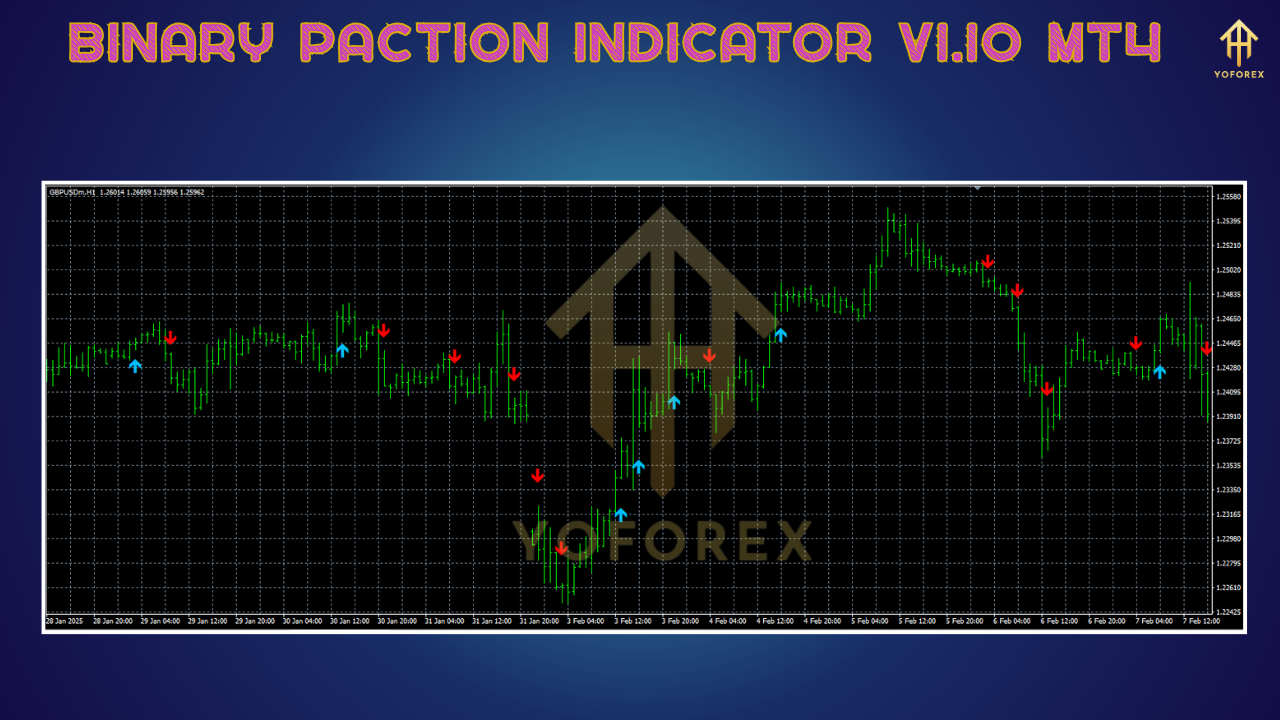
The Binary Paction Indicator V1.10 is a custom technical analysis tool designed for the MT4 platform, primarily tailored for binary options trading but also applicable to forex scalping. It is a non-repainting indicator, meaning its signals remain fixed once they appear, providing traders with confidence in their reliability. The indicator generates clear buy (CALL) and sell (PUT) signals, typically represented by arrows on the chart, to help traders identify potential entry points for binary options or short-term forex trades. Its algorithm combines trend analysis, price action, and key support and resistance levels to produce high-probability signals, making it suitable for fast-paced trading environments.
Unlike many indicators that rely solely on traditional metrics like moving averages or oscillators, the Binary Paction Indicator V1.10 claims to incorporate a unique approach to price action analysis. This focus on price behavior, rather than lagging indicators, aims to provide traders with early trend predictions, which is critical in the time-sensitive world of binary options.
Key Features of the Binary Paction Indicator V1.10
-
Non-Repainting Signals: One of the standout features of the Binary Paction Indicator is its non-repainting nature. Once a signal appears, it does not change, eliminating the confusion caused by indicators that adjust past signals based on new price data. This is particularly valuable for binary options traders who rely on precise entry points.
-
Arrow-Based Signals: The indicator displays clear visual cues in the form of green (buy/CALL) and red (sell/PUT) arrows on the MT4 chart. These arrows simplify decision-making by indicating the predicted direction of the next price movement.
-
Versatile Timeframes: The Binary Paction Indicator is optimized for short timeframes like M1 (1-minute) and M5 (5-minute), making it ideal for scalping and binary options trading with expirations ranging from 5 to 15 minutes. However, it can also be adapted for higher timeframes like M15 or H1 for longer-term trades.
-
Currency Pair Compatibility: While the indicator performs best on major currency pairs like USDJPY, EURUSD, and GBPUSD, it is versatile enough to work across various forex pairs, indices, and even cryptocurrencies, depending on the trader’s broker.
-
Customizable Settings: Traders can adjust the indicator’s parameters to suit their trading style, whether they prefer aggressive scalping or more conservative trend-following strategies. This flexibility makes it appealing to a wide range of users.
-
Integration with Price Action: The indicator’s algorithm emphasizes price action patterns, such as support and resistance zones, candlestick formations, and trend momentum, to generate signals. This reduces reliance on lagging indicators and enhances responsiveness to market conditions.
Setting Up the Binary Paction Indicator V1.10 on MT4
Step-by-Step Installation Guide
To use the Binary Paction Indicator V1.10, you need to install it on the MetaTrader 4 platform. Here’s how to set it up:
-
Download the Indicator: Obtain the Binary Paction Indicator V1.10 file (typically in .ex4 or .mq4 format) from a trusted source. Be cautious of unofficial websites, as some may distribute malicious files. Always verify the source’s credibility.
-
Open MT4 Data Folder: In MetaTrader 4, go to the “File” menu and select “Open Data Folder.” Navigate to the MQL4/Indicators folder.
-
Install the Indicator: Copy the downloaded .ex4 or .mq4 file into the Indicators folder. If the indicator requires DLL files, ensure you enable DLL imports in MT4 (Tools > Options > Expert Advisors > Allow DLL imports).
-
Restart MT4: Close and reopen the MT4 platform to load the indicator.
-
Apply to Chart: Open a chart for your preferred currency pair and timeframe (e.g., USDJPY M5). Right-click on the chart, select “Indicators List,” and choose “Binary Paction Indicator V1.10” from the Custom Indicators section. Adjust settings if needed (e.g., signal sensitivity or timeframe).
-
Verify Settings: Check the indicator’s input parameters, such as expiration time (5 minutes for M1, 15 minutes for M5), and ensure they align with your trading strategy. Save the configuration by clicking “OK.”
Recommended Settings
-
Timeframe: M1 or M5 for binary options; M15 or H1 for forex scalping.
-
Currency Pairs: USDJPY, EURUSD, GBPUSD, or other major pairs with low spreads.
-
Expiration Time: 5 minutes for M1 charts, 15 minutes for M5 charts.
-
Risk Management: Use 1-2% of your account balance per trade and set a daily loss limit (e.g., 5-10% of the account).
How to Trade with the Binary Paction Indicator V1.10
Trading Rules
The Binary Paction Indicator simplifies trading by providing clear entry signals. Here’s a basic strategy for binary options trading:
-
CALL (Buy) Signal:
-
A green upward arrow appears on the chart, indicating a potential price increase.
-
Confirm the signal during an uptrend or near a key support level for higher accuracy.
-
Place a CALL option with a 5-minute expiration (M1) or 15-minute expiration (M5) immediately after the candle closes.
-
-
PUT (Sell) Signal:
-
A red downward arrow appears, suggesting a potential price decline.
-
Confirm the signal during a downtrend or near a resistance level.
-
Place a PUT option with the appropriate expiration time.
-
-
Avoid False Signals:
-
Avoid trading during high-impact news events, as volatility can lead to unreliable signals.
-
Use additional price action analysis (e.g., candlestick patterns or support/resistance zones) to filter signals.
-
Skip signals on abnormally long candlesticks, as they may indicate overextended moves.
-
-
Risk Management:
-
Use a fixed investment size (1-2% of your account) to limit risk.
-
Set a daily loss limit to protect your capital.
-
Monitor trades and exit early if market conditions change unexpectedly.
-
Example Trade Setup
Imagine you’re trading USDJPY on an M5 chart. The Binary Paction Indicator displays a green arrow at a key support level, signaling a CALL option. You confirm the uptrend using a simple moving average (e.g., 50-period SMA) and place a CALL option with a 15-minute expiration. The price rises as predicted, and the trade expires in the money, yielding a fixed payout (e.g., 70-85% depending on the broker).
Performance and User Feedback
While specific reviews for the Binary Paction Indicator V1.10 are limited, similar non-repainting binary options indicators, such as the Binary Striker or Xtreme Binary Bot, have received positive feedback for their simplicity and accuracy. Traders on platforms like ForexCracked and MT4Collection praise arrow-based indicators for their ease of use and effectiveness in short-term trading. For instance, the Xtreme Binary Bot, which shares similarities with the Binary Paction Indicator, is noted for its ability to identify support and resistance zones and generate precise signals, with users reporting win rates of 70-80% when combined with proper risk management.
However, some users caution against over-reliance on any single indicator. The Binary Paction Indicator’s performance depends on market conditions, timeframe, and the trader’s ability to filter signals using price action or other technical tools. Testing the indicator on a demo account is highly recommended to assess its effectiveness with your trading style.
Pros and Cons
Pros
-
User-Friendly: Clear arrow signals make it accessible for beginners.
-
Non-Repainting: Reliable signals that don’t change after appearing.
-
Versatile: Suitable for binary options and forex scalping across multiple assets.
-
Customizable: Adjustable settings cater to different trading styles.
Cons
-
Limited Reviews: Sparse information specifically about V1.10 makes it harder to gauge long-term performance.
-
Broker Dependency: Signal accuracy may vary depending on the broker’s platform and payout structure.
-
Learning Curve: While simple, optimal use requires understanding price action and market conditions.
Tips for Maximizing Success
-
Combine with Price Action: Use candlestick patterns, support/resistance levels, or trendlines to confirm signals.
-
Trade During High Liquidity: Focus on London and New York sessions for better signal accuracy.
-
Backtest Thoroughly: Use MT4’s Strategy Tester to evaluate the indicator’s performance on historical data.
-
Choose a Reliable Broker: Select a broker with competitive payouts and low spreads for optimal results.
-
Stay Disciplined: Adhere to risk management rules and avoid overtrading.
Conclusion
The Binary Paction Indicator V1.10 for MT4 is a promising tool for binary options and forex traders seeking a reliable, non-repainting signal generator. Its focus on price action and clear visual cues make it an excellent choice for short-term trading, particularly on M1 and M5 timeframes. While it offers significant advantages, such as ease of use and versatility, traders must combine it with sound risk management and market analysis to achieve consistent results. By testing the indicator on a demo account and refining your strategy, you can leverage the Binary Paction Indicator to enhance your trading performance in the dynamic world of forex and binary options.
For more information on similar indicators, check trusted sources like ForexCracked or MT4Collection. Always trade responsibly and verify the authenticity of any indicator before use.