Buy and Sell EA V1.0 for MT4: Your Guide to Automated Forex Trading
The forex market, with its daily trading volume exceeding $7.5 trillion, offers immense opportunities for traders worldwide. However, the fast-paced nature of currency trading can be overwhelming, especially for those balancing busy schedules. This is where Expert Advisors (EAs) like Buy and Sell EA V1.0 for MetaTrader 4 (MT4) come into play. Designed to automate trading decisions, this EA promises to simplify the process while aiming for consistent profits. In this blog post, we’ll explore the features of Buy and Sell EA V1.0, recommend optimal currency pairs and timeframes, discuss the minimum deposit of $200, and provide practical tips for getting started.
What is Buy and Sell EA V1.0?
Buy and Sell EA V1.0 is an automated trading robot built for the MetaTrader 4 platform, one of the most popular trading platforms globally due to its reliability and extensive features. This EA is designed to execute buy and sell orders based on predefined technical indicators and market conditions, eliminating the need for manual trading. It’s particularly appealing for beginners and experienced traders alike who want to leverage automation to save time and reduce emotional decision-making.
The EA uses a combination of trend-following and momentum-based strategies to identify high-probability trade setups. While specific details about its algorithm are proprietary, it typically incorporates indicators like Moving Averages (MA), Relative Strength Index (RSI), or Bollinger Bands, similar to other EAs discussed in forex communities. Its flexibility allows it to trade across various currency pairs and timeframes, making it adaptable to different trading styles.
Recommended Currency Pairs
Choosing the right currency pair is critical for the success of any EA, as each pair has unique characteristics like volatility and spread. For Buy and Sell EA V1.0, we recommend the following currency pairs based on their liquidity and suitability for automated trading:
-
EUR/USD: The most traded forex pair, known for low spreads (often 0.1–0.8 pips with competitive brokers like IC Markets) and high liquidity. Its stable price movements make it ideal for EAs relying on technical indicators.
-
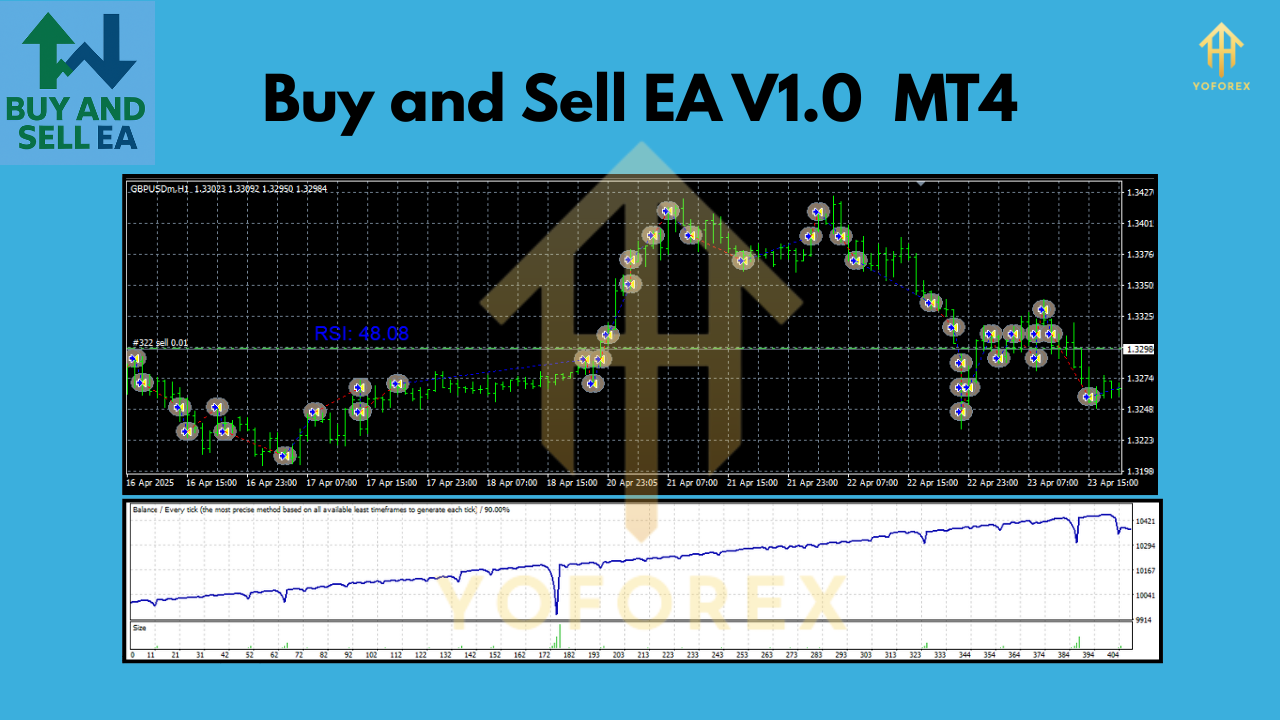
GBP/USD: This pair offers higher volatility, which can lead to larger profit opportunities but also increased risk. It’s suitable for the EA’s momentum-based entries.
-
AUD/USD: A less volatile pair compared to GBP/USD, it’s a good choice for traders prioritizing steady performance over aggressive gains.
-
USD/JPY: Known for its responsiveness to trend-following strategies, this pair works well with EAs using Moving Averages or price action.
These pairs are compatible with the EA’s strategy and perform well across various market conditions. However, traders should backtest the EA on a demo account to confirm performance with their chosen pairs, as results can vary depending on broker spreads and market volatility.
Optimal Timeframe
The timeframe you select for Buy and Sell EA V1.0 significantly impacts its trading frequency and risk profile. Based on common practices for similar EAs, the following timeframes are recommended:
-
M15 (15-Minute Chart): This timeframe strikes a balance between frequent trading opportunities and filtering out market noise. It’s ideal for scalping or short-term trading strategies, as seen in setups like the Zulufx EA.
-
H1 (1-Hour Chart): Suitable for traders seeking fewer but potentially more reliable signals. The H1 timeframe reduces false signals compared to lower timeframes and aligns well with trend-following strategies.
-
M5 (5-Minute Chart): For aggressive traders, the M5 timeframe allows the EA to capitalize on rapid price movements. However, it’s more sensitive to spreads and slippage, so a low-spread broker is essential.
For most users, starting with the H1 timeframe is advisable, as it offers a good mix of stability and trade frequency. Traders can experiment with M15 or M5 after optimizing the EA’s settings through backtesting.
Minimum Deposit: $200
One of the standout features of Buy and Sell EA V1.0 is its accessibility, requiring a minimum deposit of $200. This low entry point makes it appealing for beginners or traders with limited capital. However, there are important considerations to ensure safe and effective trading:
-
Lot Size: With a $200 account, start with a micro lot size (e.g., 0.01 lots) to manage risk. For example, the Signalspro007 EA recommends 0.01 lots per $200 for efficient risk management.
-
Risk Management: Set a stop-loss (SL) and take-profit (TP) for each trade to protect your capital. The EA likely includes customizable SL/TP settings, similar to the Timed Order EA, which supports risk-based position sizing.
-
Broker Choice: Use a broker with low spreads (e.g., IC Markets or FP Markets) to maximize profitability, as high spreads can erode gains on a small account.
-
Leverage: A leverage of 1:100 or 1:200 is sufficient for a $200 account, but higher leverage increases risk. Ensure your broker complies with regulatory standards to avoid issues like order rejections.
While $200 is the minimum, a deposit of $500–$1,000 is recommended for better risk diversification and to withstand market drawdowns, as suggested for EAs like AxisA1.
Setting Up Buy and Sell EA V1.0
To get started with Buy and Sell EA V1.0, follow these steps:
-
Install MT4: Download and install MetaTrader 4 from a reputable broker like IC Markets or FP Markets.
-
Add the EA: Place the EA’s .mq4 or .ex4 file in the MT4 “Experts” folder (typically found in C:\Program Files\MetaTrader 4\MQL4\Experts). Restart MT4 to load the EA.
-
Configure Settings: Open a chart for your chosen currency pair (e.g., EUR/USD), drag the EA onto the chart, and adjust settings like lot size, SL/TP, and timeframe. Enable “AutoTrading” in MT4.
-
Backtest the EA: Use MT4’s Strategy Tester to evaluate the EA’s performance on historical data. Test across different timeframes and pairs to optimize settings.
-
Run on a Demo Account: Before trading live, run the EA on a demo account for at least 1–2 months to assess its performance without risking real money.
-
Monitor Performance: Regularly check the EA’s trades via MT4’s “Trade” tab and adjust settings if needed. Use a Virtual Private Server (VPS) for 24/5 operation to avoid interruptions.
Tips for Success
-
Avoid Over-Optimization: Curve-fitting during backtesting can lead to misleading results. Focus on forward-testing to validate performance.
-
Monitor Market Conditions: Disable the EA during high-impact news events (e.g., Non-Farm Payrolls) to avoid erratic price movements, unless the EA has built-in news filters.
-
Diversify Pairs: Run the EA on multiple currency pairs to spread risk, but ensure each chart has a unique magic number to avoid trade conflicts.
-
Regular Updates: Check for EA updates from the developer to ensure compatibility with the latest MT4 builds (e.g., Build 1430+).
Risks and Considerations
Automated trading with Buy and Sell EA V1.0 carries inherent risks. The forex market is volatile, and no EA guarantees profits. Potential risks include:
-
Drawdowns: Small accounts ($200) are vulnerable to drawdowns, especially with aggressive settings like martingale strategies.
-
Broker Dependency: Performance depends on broker execution speeds and spreads. Poor execution can lead to slippage.
-
Technical Issues: Power outages or internet disruptions can halt trading unless a VPS is used.
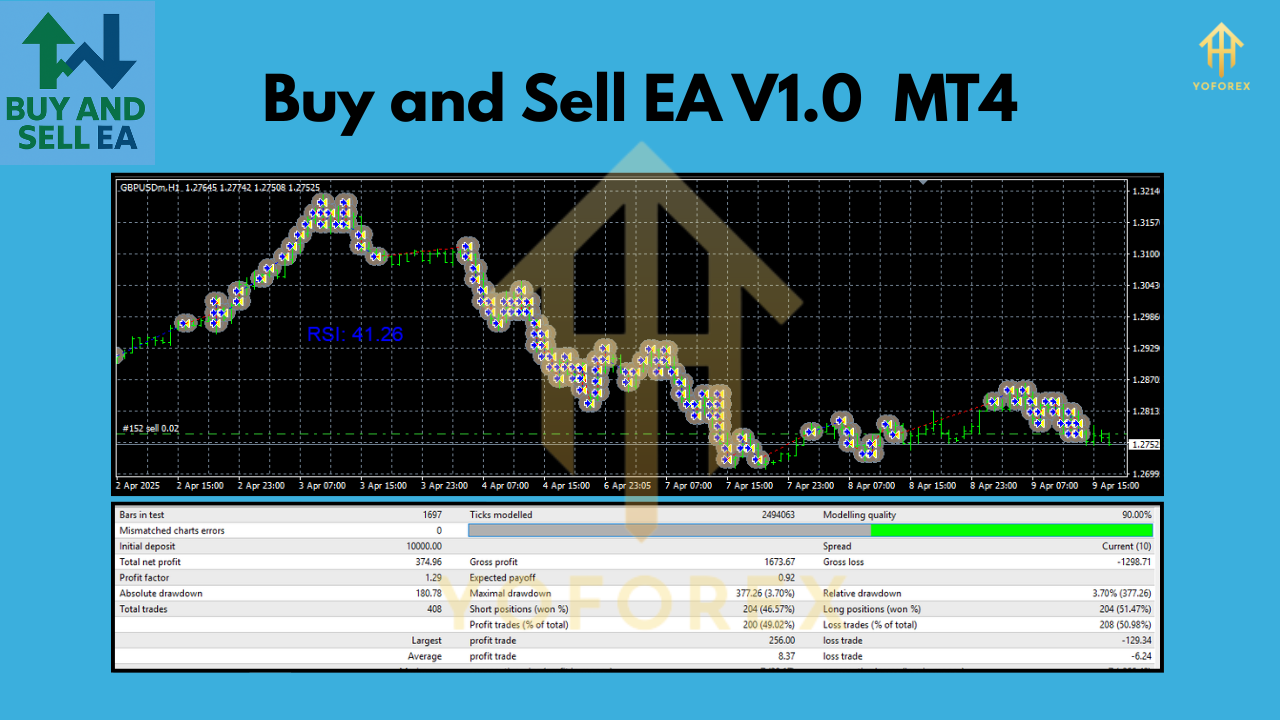
To mitigate these risks, start with conservative settings, use a demo account, and maintain realistic expectations. Past performance, as seen in backtests, does not guarantee future results.
Conclusion
Buy and Sell EA V1.0 for MT4 offers an accessible entry into automated forex trading with a modest $200 minimum deposit. By focusing on liquid currency pairs like EUR/USD and GBP/USD, using timeframes like H1 or M15, and following disciplined risk management, traders can harness the EA’s potential for consistent profits. However, success requires thorough backtesting, careful broker selection, and ongoing monitoring. Whether you’re a novice or a seasoned trader, this EA can streamline your trading process, but always trade responsibly and stay informed about market conditions.
Join our Telegram for the latest updates and support