
Understanding the CCI Speed Oscillator Indicator in MT4: A Comprehensive Guide
Introduction
The Commodity Channel Index (CCI) Speed Oscillator is a powerful technical analysis tool used by traders to identify potential market trends, reversals, and overbought or oversold conditions. Built on the foundation of the traditional CCI, the CCI Speed Oscillator is a modified version tailored for MetaTrader 4 (MT4), one of the most popular trading platforms in the world. This indicator enhances the standard CCI by focusing on the speed of price movements, offering traders a unique perspective on market momentum and potential trading opportunities.
In this blog, we’ll explore the CCI Speed Oscillator Indicator in MT4, covering its definition, calculation, interpretation, and practical applications. Whether you’re a novice trader or an experienced professional, this guide will provide you with the insights needed to effectively incorporate this tool into your trading strategy.
What is the CCI Speed Oscillator?
The CCI Speed Oscillator is a derivative of the Commodity Channel Index, originally developed by Donald Lambert in 1980. The standard CCI measures the deviation of an asset’s price from its statistical average, helping traders identify cyclical trends in commodities, stocks, forex, and other financial instruments. The CCI Speed Oscillator takes this concept further by emphasizing the velocity of price changes, making it particularly useful for short-term traders looking to capitalize on rapid market movements.
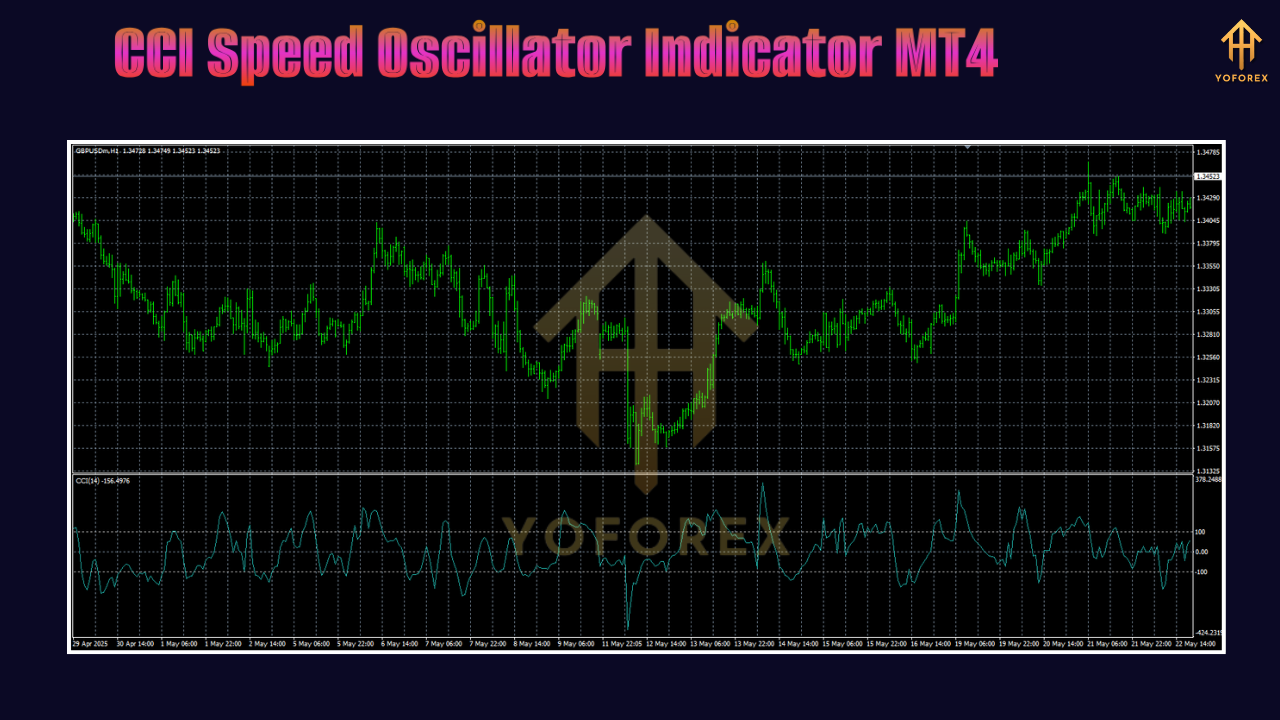
In MT4, the CCI Speed Oscillator is available as a custom indicator, often requiring installation as it is not a default tool in the platform. It plots a histogram or line that oscillates around a zero line, with positive and negative values indicating bullish or bearish momentum, respectively.
How the CCI Speed Oscillator Works
Calculation
The CCI Speed Oscillator is based on the traditional CCI formula but incorporates adjustments to highlight the speed of price changes. The standard CCI is calculated as follows:
-
Typical Price (TP): (High + Low + Close) / 3
-
Simple Moving Average (SMA): Calculate the SMA of the Typical Price over a specified period (e.g., 14 periods).
-
Mean Deviation: Calculate the average deviation of the Typical Price from the SMA.
-
CCI: (Typical Price – SMA) / (0.015 * Mean Deviation)
The CCI Speed Oscillator modifies this by focusing on the rate of change in the CCI values over time. While the exact formula may vary depending on the specific implementation in MT4, it typically involves calculating the difference between consecutive CCI values or applying a smoothing factor to highlight momentum.
Key Parameters in MT4
When using the CCI Speed Oscillator in MT4, traders can customize several parameters:
-
Period: The number of bars used to calculate the CCI (default is often 14).
-
Speed Factor: Determines how sensitive the oscillator is to price changes (higher values emphasize faster movements).
-
Price Type: The price data used (e.g., Close, Typical Price).
-
Overbought/Oversold Levels: Typically set at +100 and -100, though traders can adjust these thresholds.
Installing the CCI Speed Oscillator in MT4
To use the CCI Speed Oscillator in MT4, follow these steps:
-
Download the Indicator: Obtain the CCI Speed Oscillator file (usually a .mq4 or .ex4 file) from a reputable source, such as a trading forum or indicator marketplace.
-
Install in MT4:
-
Open MT4 and navigate to File > Open Data Folder.
-
Go to MQL4 > Indicators and copy the downloaded file into this folder.
-
Restart MT4 to load the indicator.
-
-
Apply to Chart:
-
In MT4, open the Navigator panel (Ctrl+N).
-
Locate the CCI Speed Oscillator under Custom Indicators.
-
Drag it onto your chart and configure the settings (period, speed factor, etc.).
-
-
Customize Appearance: Adjust colors, line styles, and levels to suit your preferences.
Interpreting the CCI Speed Oscillator
The CCI Speed Oscillator provides several signals that traders can use to make informed decisions. Here’s how to interpret its readings:
1. Overbought and Oversold Conditions
-
Above +100: Indicates the market may be overbought, suggesting a potential reversal or pullback.
-
Below -100: Indicates the market may be oversold, signaling a potential buying opportunity.
-
Caution: Overbought/oversold signals are not foolproof. In strong trends, the oscillator may remain in these zones for extended periods.
2. Zero Line Crossovers
-
Crossing Above Zero: Suggests bullish momentum, indicating potential buying opportunities.
-
Crossing Below Zero: Suggests bearish momentum, indicating potential selling opportunities.
-
Tip: Confirm crossovers with other indicators or price action to reduce false signals.
3. Divergences
-
Bullish Divergence: When the price makes a lower low, but the CCI Speed Oscillator forms a higher low, it may indicate a potential reversal to the upside.
-
Bearish Divergence: When the price makes a higher high, but the oscillator forms a lower high, it may signal a potential reversal to the downside.
4. Momentum Analysis
-
The steepness of the oscillator’s movements reflects the speed of price changes. Sharp rises or falls indicate strong momentum, while flat or slow movements suggest consolidation.
Trading Strategies with the CCI Speed Oscillator
1. Trend-Following Strategy
The CCI Speed Oscillator can be used to confirm trends in conjunction with other indicators, such as moving averages.
-
Setup:
-
Apply a 50-period Simple Moving Average (SMA) to identify the trend.
-
Use the CCI Speed Oscillator with a 14-period setting.
-
-
Entry Rules:
-
Buy: When the price is above the 50 SMA and the CCI Speed Oscillator crosses above the zero line.
-
Sell: When the price is below the 50 SMA and the oscillator crosses below the zero line.
-
-
Exit Rules: Exit when the oscillator reverses or when the price crosses the SMA in the opposite direction.
-
Risk Management: Set stop-loss orders below recent swing lows (for buys) or above swing highs (for sells).
2. Reversal Strategy
This strategy focuses on overbought/oversold levels to catch potential reversals.
-
Setup:
-
Set overbought/oversold levels at +100/-100.
-
Use candlestick patterns (e.g., pin bars, engulfing patterns) for confirmation.
-
-
Entry Rules:
-
Buy: When the oscillator falls below -100 and then rises back above it, confirmed by a bullish candlestick pattern.
-
Sell: When the oscillator rises above +100 and then falls below it, confirmed by a bearish candlestick pattern.
-
-
Exit Rules: Exit when the oscillator reaches the opposite extreme or when a predefined profit target is met.
-
Risk Management: Use tight stop-losses to protect against false reversals.
3. Divergence Trading
Divergences can be powerful for spotting reversals, especially in range-bound markets.
-
Setup:
-
Monitor the CCI Speed Oscillator for divergences with price action.
-
Use a higher timeframe (e.g., H4 or D1) to reduce noise.
-
-
Entry Rules:
-
Buy: Enter when a bullish divergence is confirmed by a zero-line crossover or a break above a key resistance level.
-
Sell: Enter when a bearish divergence is confirmed by a zero-line crossover or a break below a key support level.
-
-
Exit Rules: Exit when the oscillator reverses or when the price hits a predefined target.
-
Risk Management: Place stop-losses beyond the recent high/low to account for market volatility.
Advantages of the CCI Speed Oscillator
-
Enhanced Momentum Insight: By focusing on the speed of price changes, it provides a clearer picture of market dynamics.
-
Versatility: Suitable for various markets (forex, stocks, commodities) and timeframes.
-
Customizable: Adjustable parameters allow traders to tailor it to their trading style.
-
Complementary: Works well with other indicators, such as moving averages, RSI, or Bollinger Bands.
Limitations of the CCI Speed Oscillator
-
False Signals: Like all indicators, it can produce false signals, especially in choppy markets.
-
Lagging Nature: As a derivative of price data, it may lag behind real-time price movements.
-
Requires Confirmation: Best used with other tools or price action to validate signals.
-
Complexity: The speed factor and other parameters may require experimentation to optimize.
Tips for Using the CCI Speed Oscillator Effectively
-
Combine with Other Indicators: Use the CCI Speed Oscillator alongside tools like RSI, MACD, or support/resistance levels to confirm signals.
-
Test on a Demo Account: Before using it in live trading, backtest the indicator on historical data to understand its behavior.
-
Adjust for Market Conditions: Use shorter periods for scalping and longer periods for swing trading.
-
Avoid Overtrading: Focus on high-probability setups and avoid trading during low-volume periods.
-
Stay Disciplined: Follow a clear trading plan and risk management strategy to minimize losses.
Common Mistakes to Avoid
-
Over-Reliance: Don’t base trades solely on the CCI Speed Oscillator; always seek confirmation.
-
Ignoring Market Context: Consider the broader market trend and news events that may impact price movements.
-
Improper Settings: Avoid using default settings without testing; optimize parameters for your specific market and timeframe.
-
Chasing Signals: Don’t enter trades late after a signal has already played out.
Conclusion
The CCI Speed Oscillator Indicator for MT4 is a versatile and powerful tool for traders looking to analyze market momentum and identify trading opportunities. By focusing on the speed of price changes, it offers a unique perspective that complements the traditional CCI. Whether you’re trading forex, stocks, or commodities, this indicator can enhance your strategy when used correctly.
To maximize its effectiveness, combine the CCI Speed Oscillator with other technical tools, practice proper risk management, and test your setups thoroughly. With discipline and patience, this indicator can become a valuable addition to your trading arsenal, helping you navigate the complexities of the financial markets with greater confidence.