Understanding the Donchian Zig Zag Indicator for MT4: A Comprehensive Guide
Introduction
The Donchian Zig Zag Indicator is a powerful technical analysis tool used by traders to identify trends, reversals, and key price levels in the financial markets. Built for the MetaTrader 4 (MT4) platform, this indicator combines the principles of the Donchian Channel and the Zig Zag indicator to provide a unique perspective on price action. By integrating these two methodologies, the Donchian Zig Zag Indicator helps traders filter out market noise, spot significant price movements, and make informed trading decisions.
In this blog post, we’ll explore the Donchian Zig Zag Indicator in detail, covering its components, how it works, its applications in trading, and how to set it up on MT4. Whether you’re a novice trader or an experienced market participant, this guide will provide valuable insights into leveraging this indicator to enhance your trading strategy.
What Are the Donchian Channel and Zig Zag Indicators?
Before diving into the Donchian Zig Zag Indicator, let’s briefly examine its core components: the Donchian Channel and the Zig Zag Indicator.
Donchian Channel
The Donchian Channel, developed by Richard Donchian, is a trend-following indicator that identifies the highest high and lowest low over a specified period (commonly 20 periods). It consists of three lines:
-
Upper Band: The highest high over the lookback period.
-
Lower Band: The lowest low over the lookback period.
-
Middle Band: The average of the upper and lower bands.
The Donchian Channel is widely used to identify breakouts and trend direction. A price breaking above the upper band signals a potential bullish trend, while a break below the lower band indicates a bearish trend.
Zig Zag Indicator
The Zig Zag Indicator is a trend-filtering tool that connects significant price highs and lows to highlight major price movements while ignoring minor fluctuations. It uses a percentage or point-based threshold to determine when a price movement is significant enough to be included in the Zig Zag line. This helps traders focus on the overall trend and avoid being distracted by short-term market noise.
The Donchian Zig Zag Fusion
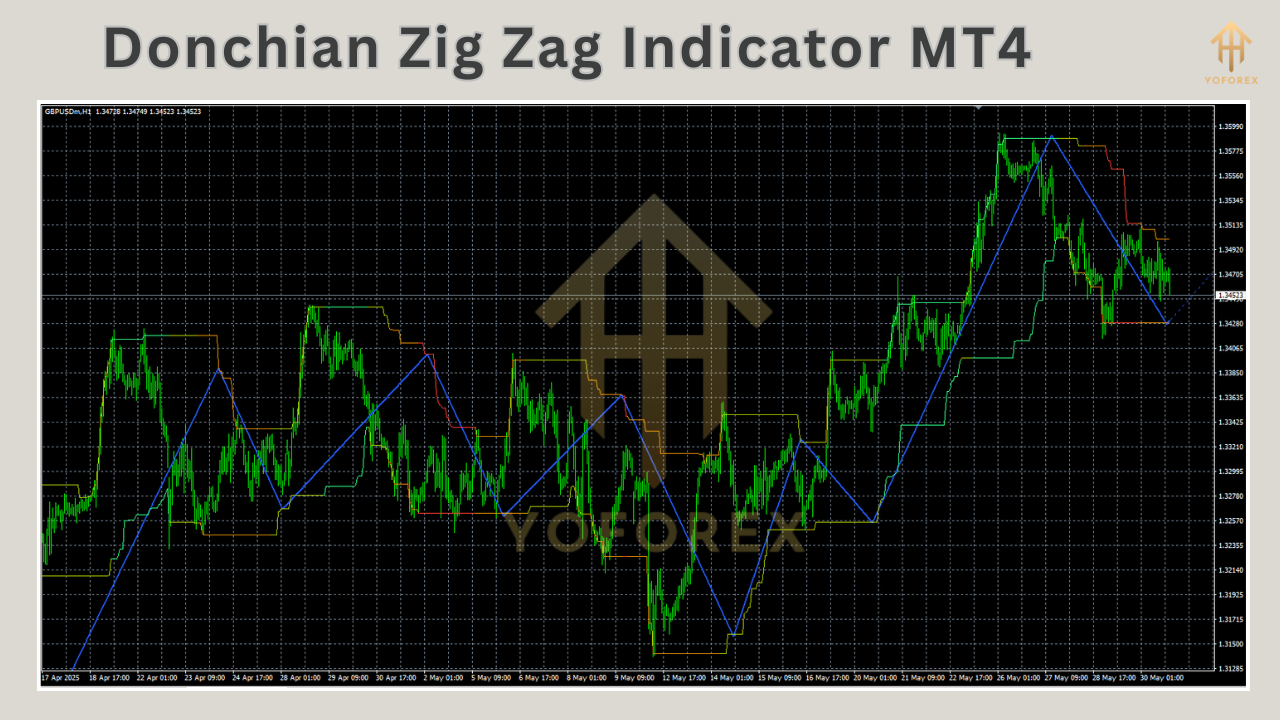
The Donchian Zig Zag Indicator for MT4 combines the breakout detection capabilities of the Donchian Channel with the trend-filtering properties of the Zig Zag Indicator. This hybrid tool plots significant price movements based on Donchian Channel breakouts, making it easier to identify trend reversals and continuation patterns.
How the Donchian Zig Zag Indicator Works
The Donchian Zig Zag Indicator operates by applying the Zig Zag methodology to the price levels defined by the Donchian Channel. Here’s a breakdown of its mechanics:
-
Donchian Channel Calculation: The indicator calculates the upper and lower Donchian bands based on a user-defined lookback period (e.g., 20 periods). These bands represent the highest high and lowest low over that period.
-
Zig Zag Application: The Zig Zag component filters out minor price movements and connects significant highs and lows based on the Donchian Channel’s breakouts. It only plots a new line when the price breaks above the upper band or below the lower band by a specified threshold (e.g., a percentage or pip movement).
-
Trend Identification: The indicator draws lines connecting these significant breakouts, forming a Zig Zag pattern that highlights the direction of the trend. Upward lines indicate bullish trends, while downward lines suggest bearish trends.
-
Reversal Signals: When the price reverses direction after a breakout, the indicator updates the Zig Zag line to reflect the new high or low, helping traders identify potential trend reversals.
By combining these elements, the Donchian Zig Zag Indicator provides a clearer picture of market trends and key price levels, making it a versatile tool for traders.
Setting Up the Donchian Zig Zag Indicator on MT4
To use the Donchian Zig Zag Indicator on MT4, you’ll need to install it and configure its settings. Here’s a step-by-step guide:
Step 1: Download the Indicator
The Donchian Zig Zag Indicator is not a default tool in MT4, so you’ll need to download it from a reputable source, such as a trading forum, marketplace, or developer website. Ensure the file is in the .mq4 or .ex4 format.
Step 2: Install the Indicator
-
Open your MT4 platform.
-
Go to File > Open Data Folder in the MT4 menu.
-
Navigate to the MQL4 > Indicators folder.
-
Copy the downloaded Donchian Zig Zag Indicator file into this folder.
-
Restart MT4 to load the indicator.
Step 3: Apply the Indicator to a Chart
-
Open a chart for the desired currency pair or asset.
-
Right-click on the chart and select Indicators List.
-
Find the Donchian Zig Zag Indicator in the list of custom indicators and double-click to add it.
-
Configure the indicator settings (see below) and click OK.
Step 4: Configure Indicator Settings
The Donchian Zig Zag Indicator typically allows customization of the following parameters:
-
Period: The lookback period for the Donchian Channel (e.g., 20 periods).
-
Deviation: The minimum price movement (in pips or percentage) required to plot a new Zig Zag line.
-
Backstep: The minimum number of bars between two significant highs or lows to avoid over-plotting.
-
Color and Style: Adjust the color and thickness of the Zig Zag lines for better visibility.
Experiment with these settings to suit your trading style and the market you’re analyzing.
Trading Strategies Using the Donchian Zig Zag Indicator
The Donchian Zig Zag Indicator can be used in various trading strategies, including trend following, breakout trading, and reversal trading. Below are some practical applications:
1. Trend-Following Strategy
The indicator’s Zig Zag lines make it easy to identify the overall trend direction. Here’s how to use it:
-
Buy Signal: When the Zig Zag line forms an upward slope after a price breaks above the Donchian upper band, consider entering a long position.
-
Sell Signal: When the Zig Zag line forms a downward slope after a price breaks below the Donchian lower band, consider entering a short position.
-
Confirmation: Use additional indicators like the Moving Average or Relative Strength Index (RSI) to confirm the trend’s strength.
2. Breakout Strategy
The Donchian Zig Zag Indicator excels at identifying breakouts from consolidation zones:
-
Monitor the price as it approaches the upper or lower Donchian band.
-
Enter a trade when the price breaks out and the Zig Zag line confirms the move by plotting a new high or low.
-
Place a stop-loss just below the recent low (for buy trades) or above the recent high (for sell trades) to manage risk.
3. Reversal Trading
The indicator can help spot potential trend reversals:
-
Look for a Zig Zag line that changes direction after a prolonged trend. For example, if the price breaks below the Donchian lower band after a series of higher highs, it may signal a bearish reversal.
-
Combine with candlestick patterns (e.g., engulfing patterns) or support/resistance levels to increase the reliability of reversal signals.
4. Support and Resistance Levels
The highs and lows plotted by the Zig Zag lines often correspond to key support and resistance levels. Traders can use these levels to:
-
Set profit targets for trades.
-
Identify areas where the price is likely to reverse or consolidate.
-
Place stop-losses to protect against adverse price movements.
Advantages of the Donchian Zig Zag Indicator
-
Noise Reduction: By filtering out minor price fluctuations, the indicator helps traders focus on significant market movements.
-
Clear Trend Identification: The Zig Zag lines make it easy to spot trends and reversals, even in volatile markets.
-
Versatility: The indicator can be used across various timeframes and asset classes, including forex, stocks, and commodities.
-
Customizability: Traders can adjust the lookback period, deviation, and other settings to match their trading style.
Limitations of the Donchian Zig Zag Indicator
-
Lagging Nature: Like most trend-following indicators, the Donchian Zig Zag is based on historical data and may lag behind real-time price action.
-
False Signals: In choppy or sideways markets, the indicator may produce false breakout signals, leading to potential losses.
-
Repainting: The Zig Zag component may repaint past lines as new price data emerges, which can be confusing for inexperienced traders.
-
Requires Confirmation: To avoid false signals, the indicator should be used in conjunction with other technical tools or fundamental analysis.
Tips for Using the Donchian Zig Zag Indicator Effectively
-
Combine with Other Indicators: Pair the Donchian Zig Zag with tools like Bollinger Bands, MACD, or RSI to confirm signals and improve accuracy.
-
Test on a Demo Account: Before using the indicator in live trading, practice on a demo account to understand its behavior in different market conditions.
-
Adjust Settings for Timeframes: Use shorter lookback periods for intraday trading and longer periods for swing or position trading.
-
Avoid Overtrading: Focus on high-probability setups and avoid trading in low-volatility or choppy markets.
Conclusion
The Donchian Zig Zag Indicator for MT4 is a versatile and powerful tool for traders looking to navigate the complexities of financial markets. By combining the breakout detection of the Donchian Channel with the trend-filtering capabilities of the Zig Zag Indicator, it provides a clear and actionable view of price action. Whether you’re a trend follower, breakout trader, or reversal hunter, this indicator can enhance your trading strategy when used correctly.
To maximize its potential, take the time to understand its mechanics, experiment with its settings, and combine it with other technical tools. With practice and discipline, the Donchian Zig Zag Indicator can become a valuable addition to your trading arsenal, helping you make more informed and profitable decisions in the markets.