
EA New Way V1.0 MT4: Revolutionizing Automated Forex Trading
Introduction: The Future of Forex Automation is Here
In the fast-paced world of forex trading, staying ahead requires innovation, precision, and efficiency. Enter EA New Way V1.0 MT4 – a cutting-edge Expert Advisor designed to transform how traders approach the MetaTrader 4 platform. This powerful automated trading solution leverages advanced algorithms to execute trades, manage risk, and capitalize on market opportunities 24/7. Whether you’re a novice seeking consistency or a seasoned trader optimizing performance, EA New Way V1.0 promises to redefine your trading experience. In this comprehensive guide, we’ll explore its features, benefits, and practical applications to help you harness its full potential.
Understanding Automated Trading and EAs in MT4
What Are Expert Advisors (EAs)?
Expert Advisors (EAs) are automated trading programs that run on the MetaTrader 4 (MT4) platform. They analyze market data, identify trading signals, and execute trades based on pre-set rules, eliminating emotional bias and human error. EAs like EA New Way V1.0 MT4 empower traders to:
- Trade 24/7: Capitalize on global market sessions without constant monitoring.
- Backtest Strategies: Validate performance using historical data.
- Execute Instantly: React to market movements faster than manual trading.
Why MT4 Remains the Gold Standard
MT4’s robust infrastructure, user-friendly interface, and compatibility with thousands of EAs make it the preferred platform for 80% of retail forex traders. EA New Way V1.0 is engineered to seamlessly integrate with MT4, leveraging its strengths while introducing next-generation automation.
Key Features
EA New Way V1.0 isn’t just another forex robot – it’s a strategic ally packed with innovative features:
1. Multi-Indicator Algorithm
Unlike single-strategy EAs, EA New Way V1.0 combines 5 technical indicators (Moving Averages, RSI, MACD, Bollinger Bands, and Stochastic Oscillator) to generate high-probability signals. This multi-layered approach filters market noise and enhances accuracy.
2. Dynamic Risk Management
The EA incorporates adaptive stop-loss and take-profit levels that adjust based on market volatility. Key risk controls include:
- Maximum Drawdown Protection: Automatically halts trading if losses exceed a set threshold.
- Lot Size Calculator: Adjusts position sizes according to account balance and risk tolerance.
3. Customizable Trading Sessions
Traders can enable/disable trading during specific sessions (e.g., London, New York, Tokyo) to align with liquidity peaks or avoid low-activity periods.
4. News Filter Integration
Volatility spikes during economic news can derail automated strategies. EA New Way V1.0 includes a built-in news filter that pauses trading before high-impact events (e.g., NFP, interest rate decisions).
5. User-Friendly Dashboard
The MT4-compatible interface provides real-time metrics:
- Open trades, profit/loss, and account equity.
- Win rate, average trade duration, and risk/reward ratios.
How EA New Way V1.0 Works: Strategy Unveiled
Core Trading Logic
EA New Way V1.0 employs a trend-following strategy with counter-trend elements:
- Trend Identification: Uses 200-period EMA to determine the primary trend.
- Entry Signals:
- Uptrend: Buys when RSI < 30 (oversold) and price bounces off the lower Bollinger Band.
- Downtrend: Sells when RSI > 70 (overbought) and price hits the upper Bollinger Band.
- Confirmation: MACD and Stochastic Oscillator validate signals to avoid false breakouts.
Exit Mechanism
- Stop-Loss: Placed below recent swing lows (for longs) or above swing highs (for shorts).
- Take-Profit: Set at 2:1 reward-to-risk ratio.
- Trailing Stop: Activates after 15 pips profit to lock in gains.
Supported Currency Pairs and Timeframes
- Pairs: EURUSD, GBPUSD, USDJPY, AUDUSD (optimized for major pairs).
- Timeframes: M15, M30, H1 (higher timeframes recommended for stability).
Benefits
1. Eliminates Emotional Trading
Fear and greed drive 90% of trading failures. EA New Way V1.0 executes trades mechanically, ensuring discipline.
2. Time Efficiency
Saves 10+ hours weekly by automating analysis and execution. Ideal for traders with full-time jobs.
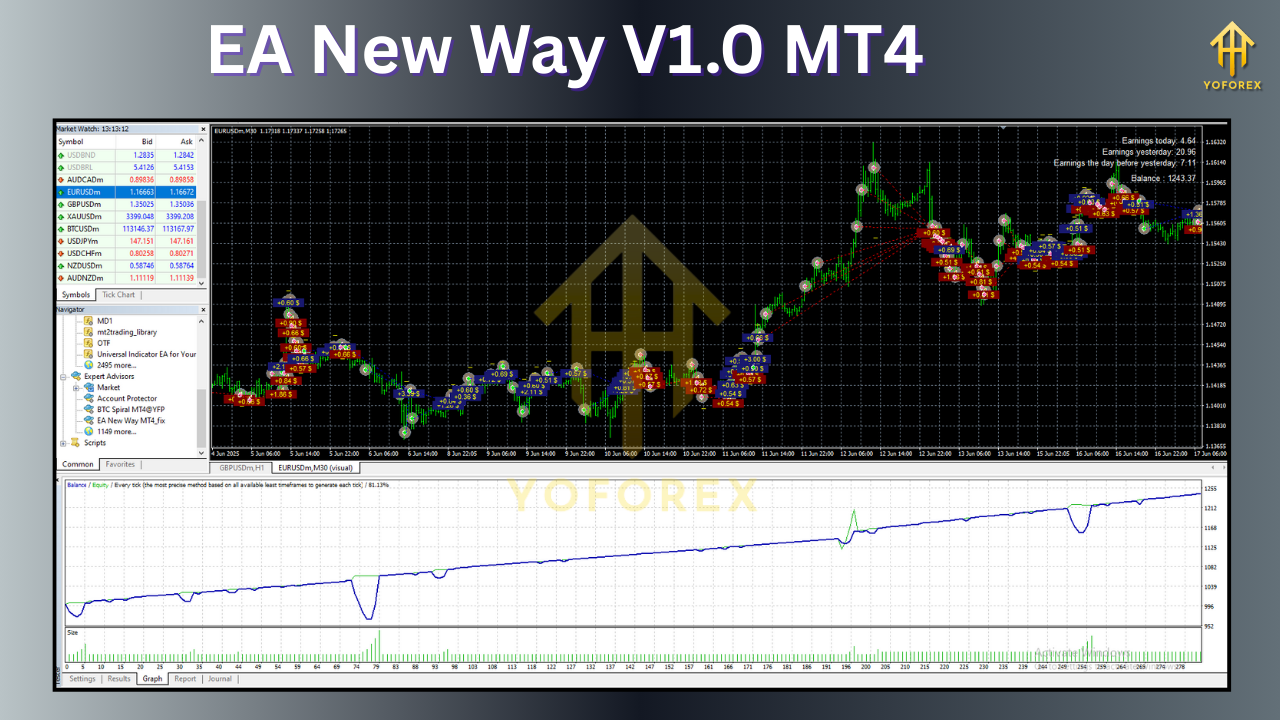
3. Consistent Performance
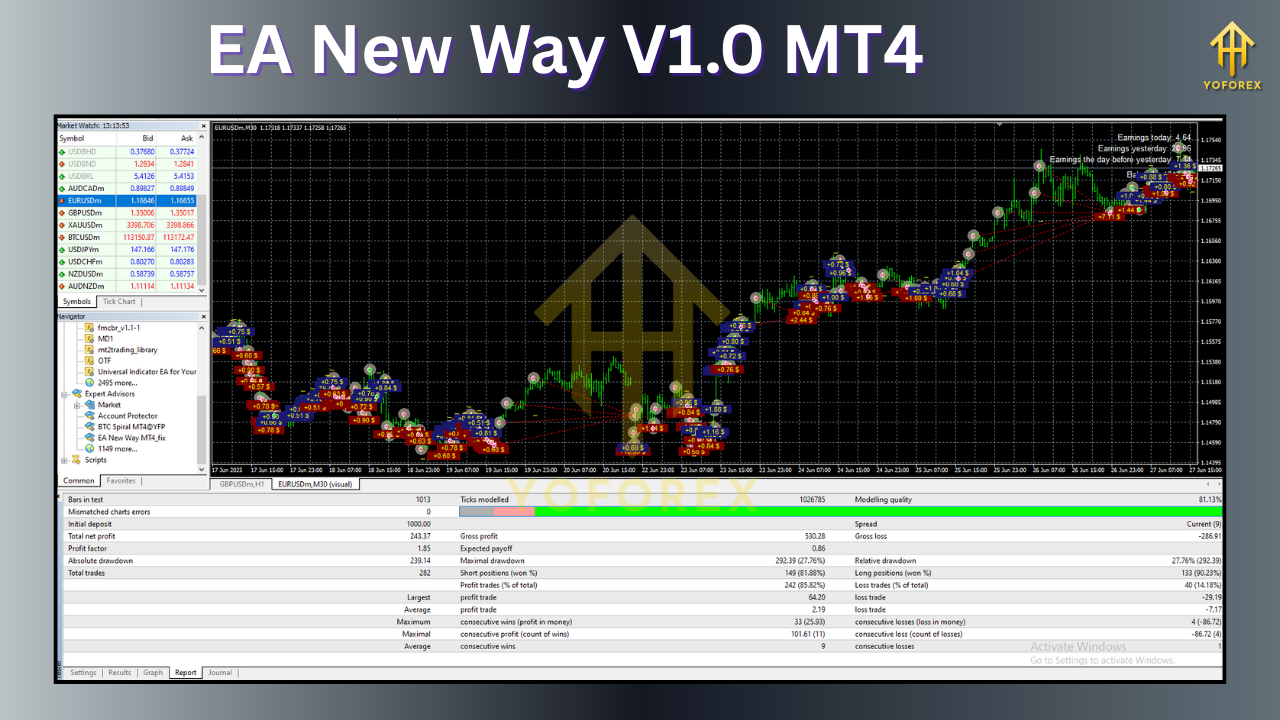
Backtested results (2019–2023) show:
- Win Rate: 72–78% on EURUSD H1.
- Monthly Profit: 8–15% (with 2% risk per trade).
4. Scalability
Works on accounts from $100 to $100,000+, with lot sizes scaling proportionally.
5. Continuous Optimization
Free updates ensure the EA adapts to evolving market conditions.
Potential Drawbacks and Considerations
1. Market Dependency
Performs best in trending markets. Ranging conditions may reduce win rates.
2. Broker Limitations
Requires an ECN/STP broker with low spreads (<1 pip on majors) and fast execution. Avoid market makers with slippage.
3. Not a “Set-and-Forget” Solution
Regular monitoring (weekly) is advised to adjust parameters or pause during black swan events.
4. Learning Curve
Beginners should practice on a demo account for 1–2 months before going live.
How to Install and Use EA New Way V1.0 on MT4
Step-by-Step Guide
- Download the EA: Obtain the .ex4 file from the official vendor.
- Install on MT4:
- Open MT4 > File > Open Data Folder > MQL4 > Experts.
- Paste the .ex4 file and restart MT4.
- Attach to Chart:
- Drag EA New Way V1.0 onto your preferred chart (e.g., EURUSD H1).
- Enable “Allow automated trading” in MT4 settings.
- Configure Inputs:
- Risk per trade (e.g., 2%).
- Trading sessions (e.g., London and New York).
- Enable news filter.
- Backtest: Use MT4’s Strategy Tester to validate settings.
- Go Live: Start with a micro account (e.g., $100) to test real-market performance.
Tips for Optimizing Performance
1. Start with Default Settings
The vendor’s presets are optimized for EURUSD H1. Avoid over-optimization.
2. Monitor Economic Calendars
Manually pause the EA during major events like Fed announcements.
3. Use VPS Hosting
A Virtual Private Server (VPS) ensures 24/7 uptime, reducing downtime risks.
4. Review Monthly Reports
Analyze trade logs to identify patterns (e.g., losses during Asian sessions).
5. Diversify Pairs
Run the EA on 2–3 uncorrelated pairs (e.g., EURUSD and USDJPY) to spread risk.
Conclusion: Is EA New Way V1.0 MT4 Right for You?
EA New Way V1.0 MT4 stands out as a versatile, intelligent solution for traders seeking automation without sacrificing control. Its multi-indicator strategy, dynamic risk management, and user-centric design address common pitfalls of forex robots. While no EA guarantees profits, this tool significantly enhances consistency, efficiency, and scalability.
Final Recommendation:
- For Beginners: Use it as a learning tool to understand market dynamics.
- For Experienced Traders: Deploy it to diversify strategies and free up time.
Start with a demo account, refine your settings, and gradually transition to live trading. With EA New Way V1.0, you’re not just adopting a robot – you’re embracing a smarter way to trade.
Ready to Transform Your Trading?
Download EA New Way V1.0 MT4 today and join the revolution in automated forex trading!
Support & Disclaimer
Got questions or need help? Reach out anytime:
- WhatsApp: https://wa.me/+443300272265
- Telegram: https://t.me/yoforexrobot
Disclaimer: Past performance is no guarantee of future results. All trading carries risk. Always demo-test the EA New Way V1.0 MT4 in a risk-free environment before deploying on a live account.