Intorduction
The RenkoMaker Indicator for MetaTrader 4 (MT4) is a powerful tool that has gained popularity among forex traders for its ability to simplify price action analysis and enhance trend-following strategies. Unlike traditional candlestick charts, which are time-based, the RenkoMaker Indicator leverages Renko charts to focus purely on price movement, filtering out market noise and providing clearer trading signals. This blog dives into the intricacies of the RenkoMaker Indicator, its features, setup process, trading strategies, advantages, limitations, and practical tips for traders using MT4 in 2025.
What is the RenkoMaker Indicator?
The RenkoMaker Indicator is a custom MT4 tool designed to generate Renko charts, which plot price movements as “bricks” or “boxes” of a fixed size, ignoring time intervals. Each brick represents a predefined price movement (e.g., 10 pips), and a new brick forms only when the price moves by that amount in the same direction. This approach eliminates minor price fluctuations, making it easier to identify trends, support and resistance levels, and potential reversals.
The RenkoMaker Pro system, a popular version of this indicator, typically includes several components:
-
RenkoLiveChart EA: Generates offline Renko charts on MT4.
-
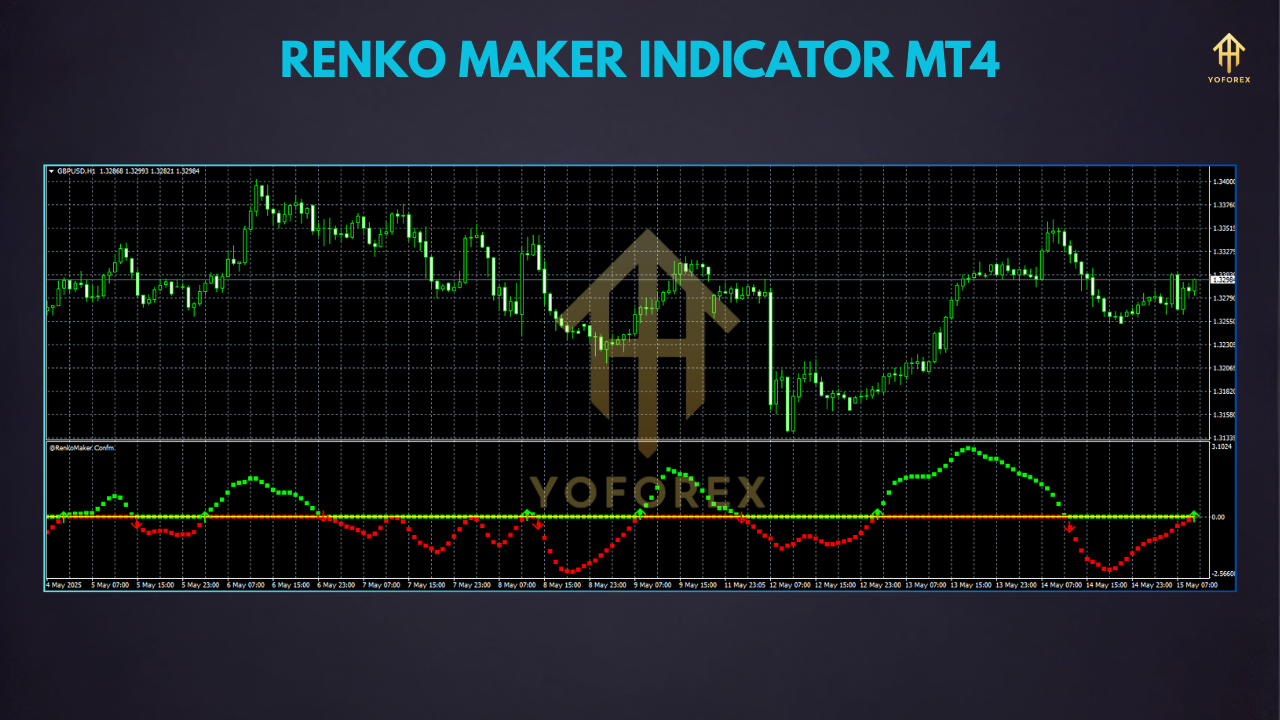
RenkoMaker_Confirm Indicator: Displays trend direction through color-coded signals (e.g., lime for buy, red for sell).
-
MTF TrendBar Indicator: Shows multi-timeframe trend directions.
-
Signal Indicator: Provides buy/sell signals based on price action.
These components work together to create a trend-following system that claims to deliver up to 1500+ pips per trade, though such claims should be approached with caution.
Why Use Renko Charts?
Renko charts offer several advantages over traditional charts:
-
Noise Reduction: By focusing on significant price movements, Renko charts filter out minor fluctuations, making trends more apparent.
-
Trend Clarity: The brick-based structure highlights sustained price movements, aiding trend-following strategies.
-
Simplified Analysis: Support, resistance, and breakout patterns are easier to spot due to the uniform brick size.
-
Versatility: Renko charts can be applied to forex, stocks, commodities, and cryptocurrencies.
However, Renko charts disregard time, which can be a drawback for traders who rely on time-based analysis or need to account for market sessions.
Setting Up the RenkoMaker Indicator on MT4
Installing and configuring the RenkoMaker Indicator on MT4 is straightforward but requires attention to detail. Follow these steps:
-
Download the Indicator:
-
Obtain the RenkoMaker Pro system files from a reputable source (e.g., forex forums or trusted websites). Ensure the package includes the RenkoLiveChart_v3.2 EA, RenkoMaker_Confirm.ex4, MTFTrendBar.ex4, Signal.ex4, and the RenkoMaker Pro template (.tpl file).
-
Be cautious of broken download links or unverified sources, as some users have reported issues.
-
-
Install the Files:
-
Open MT4 and navigate to File > Open Data Folder > MQL4.
-
Copy the RenkoLiveChart_v3.2.ex4 file to the Experts folder.
-
Copy the indicator files (RenkoMaker_Confirm.ex4, MTFTrendBar.ex4, Signal.ex4) to the Indicators folder.
-
Copy the RenkoMaker Pro.tpl file to the Templates folder.
-
Restart MT4 to load the files.
-
-
Configure the Chart:
-
Open a currency pair chart (e.g., EUR/USD) on the M1 timeframe.
-
Zoom out the chart and press the Home key to load historical data (at least 1-2 months).
-
Go to Charts > Properties and set Max bars in history and Max bars in chart to a high value (e.g., 9999999999999).
-
Attach the RenkoLiveChart_v3.2 EA to the M1 chart. Adjust the box size (e.g., 10 pips) in the EA settings based on the asset’s volatility.
-
Open the offline chart (e.g., M2 timeframe) via File > Open Offline. Apply the RenkoMaker Pro.tpl template to the offline chart.
-
-
Customize Settings:
-
Adjust the Box Size to suit the asset (smaller for volatile pairs like GBP/USD, larger for stocks).
-
Modify colors for up and down bricks (e.g., green for up, red for down) for better visibility.
-
Experiment with the Renko Timeframe and Chart Offset to optimize the chart’s appearance.
-
Trading with the RenkoMaker Indicator
The RenkoMaker Pro system is designed for trend-following strategies. Here’s a basic trading strategy based on its signals:
Buy Signal
-
Wait for both the RenkoMaker_Confirm and Signal indicators to turn lime (indicating an uptrend) after a candle closes.
-
Confirm the trend direction using the MTF TrendBar indicator (ensure higher timeframes like H1 show an uptrend).
-
Enter a buy position at the close of the signal candle.
-
Set a stop loss below the recent swing low or based on your risk management (e.g., 2% of account).
-
Exit when the Signal indicator turns red or set a take profit based on your target.

Sell Signal
-
Wait for both indicators to turn red (indicating a downtrend) after a candle closes.
-
Verify the downtrend on higher timeframes via the MTF TrendBar.
-
Enter a sell position at the candle close.
-
Place a stop loss above the recent swing high.
-
Exit when the Signal indicator turns lime or at your take profit level.
Key Rules
-
Avoid Flat Markets: Do not trade when the MTF TrendBar shows gray squares, indicating a sideways market.
-
Practice on Demo: Test the system on a demo account for at least one month to understand its behavior.
-
Money Management: Risk no more than 2% of your account per trade to protect against losses.
Advantages of the RenkoMaker Indicator
-
High Profit Potential: When used correctly, the system can capture significant trends, potentially yielding substantial pips.
-
User-Friendly: The color-coded signals and clear rules make it accessible to beginners and experienced traders alike.
-
Customizable: Adjustable box sizes and settings allow tailoring to different markets and trading styles.
-
Multi-Asset Compatibility: Works across forex pairs, stocks, and commodities.
Limitations and Challenges
-
Repainting Issue: The Signal indicator may repaint, meaning past signals can change as new data arrives. This can lead to misleading backtest results and requires careful trade management.
-
Learning Curve: While the system is simple, mastering Renko charts and avoiding false signals takes practice.
-
Offline Chart Dependency: The need for offline charts can be cumbersome, especially when managing multiple pairs.
-
Market Conditions: The system performs best in trending markets and may struggle during choppy or ranging conditions.
Practical Tips for Success
-
Combine with Price Action: Use candlestick patterns or support/resistance levels to confirm signals andilibre:1⁊
-
Start Small: Begin with a small box size (e.g., 5-10 pips) for forex pairs to capture more signals, then adjust based on performance.
-
Backtest Thoroughly: Use MT4’s strategy tester to evaluate the system’s performance, but be wary of repainting issues affecting historical data.
-
Monitor Higher Timeframes: The MTF TrendBar helps, but manually checking H1 or H4 charts can improve trend confirmation.
-
Stay Disciplined: Follow the system’s rules strictly and avoid overtrading in flat markets.
Community Feedback and Updates
User feedback on the RenkoMaker Indicator is mixed. Some traders praise its profitability and simplicity, with one user reporting a rise from $30 to $150 in two weeks. Others criticize the repainting issue and the lack of native MT4 support for Renko charts. Recent discussions (as of 2024) highlight requests for MT5 conversions and source code access, indicating ongoing interest but also challenges with compatibility.
Conclusion
The RenkoMaker Indicator for MT4 is a valuable tool for traders seeking to simplify price action and capitalize on trends. Its Renko-based approach offers a unique perspective, but success requires discipline, proper risk management, and an understanding of its limitations, particularly the repainting issue. By practicing on a demo account, combining with other analysis methods, and adapting to market conditions, traders can harness the RenkoMaker Indicator to enhance their forex trading strategy in 2025. For more details, explore trusted forex resources or visit the official xAI Grok documentation for advanced trading insights.