Forex Recovery Bot Lite EA V2.50 MT4: Your Automated Solution for Drawdown Recovery
In the fast-paced, often unforgiving world of Forex trading, encountering drawdowns is not a possibility – it’s an inevitability. Even the most seasoned traders experience periods where losses accumulate, testing both capital and confidence. Managing these drawdowns effectively is the difference between staying in the game and blowing up your account. This is where specialized tools like the Forex Recovery Bot Lite EA V2.50 MT4 step in, offering a structured, automated approach to clawing back losses. But what exactly is this EA, how does it work, and is it the right tool for your MT4 trading arsenal? Let’s dive deep into this powerful recovery solution.
What Exactly is Forex Recovery Bot Lite EA V2.50 MT4?
At its core, the Forex Recovery Bot Lite EA V2.50 MT4 is a specialized Expert Advisor (EA) designed exclusively for the MetaTrader 4 (MT4) trading platform. Unlike conventional trading robots that focus primarily on identifying new entry points based on signals or trends, the Recovery Bot Lite has a singular, critical mission: to recover existing drawdowns on your trading account.
Think of it as a dedicated damage control specialist. It doesn’t replace your primary trading strategy; instead, it activates when your account hits a predefined level of loss (a drawdown threshold) and implements a calculated strategy to generate profits specifically aimed at offsetting those accumulated losses. Version 2.50 represents a refinement of previous iterations, incorporating user feedback and market experience to enhance its recovery logic and risk management parameters.
Key Differentiators:
- Purpose-Built: Solely focused on drawdown recovery, not general trading.
- MT4 Native: Seamlessly integrates with the world’s most popular retail trading platform.
- Automated Execution: Removes emotional decision-making during high-stress recovery periods.
- Configurable Strategy: Offers flexibility in how it approaches the recovery task.
Unpacking the Core Features of Forex Recovery Bot Lite EA V2.50
The effectiveness of any automated trading tool lies in its features. The Recovery Bot Lite EA V2.50 packs several key functionalities designed to make the recovery process systematic and controlled:
- Drawdown Threshold Activation: This is the trigger. You define the specific percentage or monetary drawdown level (e.g., 10% of account equity, $500 loss) at which the EA should spring into action. Until this threshold is breached, the EA remains dormant, allowing your primary trading strategy to operate unhindered.
- Flexible Recovery Strategy Selection: V2.50 typically offers multiple core recovery strategies. Common options include:
- Martingale-Inspired Grid Trading: Opens a grid of orders (buy and/or sell) at predetermined intervals above and below the current price. As the market moves, profits from winning trades within the grid are designed to accumulate and offset the initial drawdown. Crucially, this is usually implemented with strict lot sizing rules and grid step controls to mitigate excessive risk.
- Hedging-Based Recovery: Opens opposing positions (a hedge) to lock in the current drawdown and prevent it from worsening. The EA then manages the hedge, aiming to close it profitably when market conditions favor the recovery, effectively canceling out the initial loss.
- Averaging Down (Pyramiding): Adds to losing positions at better prices, lowering the average entry price. The goal is to recover the loss with a smaller subsequent price move in the original direction. Requires careful lot size management.
- Advanced Risk Management Controls: This is paramount for a recovery EA. V2.50 emphasizes features like:
- Max Lot Size: Prevents the EA from opening excessively large positions that could amplify losses.
- Max Drawdown Limit: A hard stop beyond which the EA will cease all recovery attempts to protect remaining capital.
- Stop Loss & Take Profit: Ability to set fixed or dynamic SL/TP levels for recovery trades.
- Equity Stop: An additional safety net based on total account equity.
- Magic Number & Symbol Filtering: Allows the EA to operate only on specific trades or symbols, or to manage only trades placed by a particular strategy (identified by a unique Magic Number). This prevents interference with other manual or automated trades.
- User-Friendly Interface & Customization: Designed for accessibility. Parameters are clearly labeled within the MT4 EA input settings, allowing traders to tailor the recovery approach (threshold, strategy, risk levels) to their specific account size, risk tolerance, and trading style without needing advanced programming skills.
- Trade Management & Reporting: Provides clear on-screen information about its status (Active/Inactive), current drawdown level, recovery progress, and open recovery trades. Some versions may offer basic reporting features.
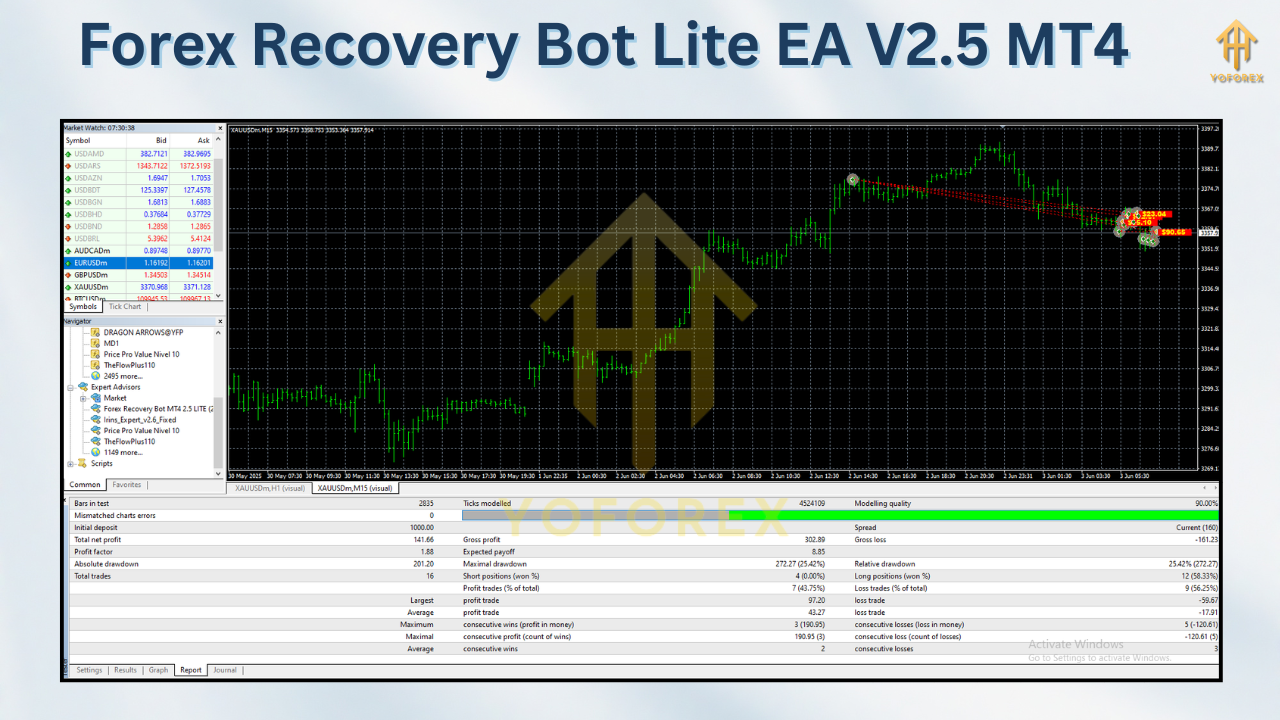
How Does the Recovery Mechanism Work? A Step-by-Step Breakdown
Understanding the operational flow is key to using the Forex Recovery Bot Lite EA V2.50 MT4 effectively:
- Installation & Configuration: You download the EA file (.ex4) and place it in your MT4 platform’s
Expertsfolder. You then attach it to a chart (any chart, as it usually operates account-wide) and configure the input parameters: Set your desired Drawdown Threshold, select the Recovery Strategy, define Risk Management limits (Max Lot, Max DD, SL/TP), and set any symbol/Magic Number filters. - Monitoring Mode: The EA continuously monitors your account’s overall equity in relation to its balance. It remains passive.
- Threshold Triggered: When your account’s drawdown (calculated as
(Balance - Equity) / Balance * 100%or a fixed monetary loss) reaches or exceeds the level you set, the EA activates. - Strategy Execution: Based on your chosen strategy (e.g., Grid, Hedge, Averaging), the EA begins placing recovery trades. For example:
- Grid Strategy: It might place a series of small buy and sell stop orders around the current price. As price fluctuates, it triggers these orders, aiming for small, frequent profits that accumulate.
- Hedge Strategy: It might immediately place a trade opposite to your largest losing position (or a basket of positions) to freeze the loss. It then waits for an opportunity to close the hedge profitably.
- Dynamic Management: The EA actively manages these recovery trades – adjusting stops, trailing profits, potentially adding to positions (if configured and safe), and closing trades when their individual profit targets are hit or if risk limits are approached.
- Recovery Achieved or Stop Loss Hit: The EA continues its recovery operations until:
- The accumulated profits from the recovery trades offset the initial drawdown that triggered it (i.e., Account Equity returns to near the pre-drawdown balance). The EA then typically deactivates and returns to monitoring mode.
- A predefined safety stop (Max Drawdown Limit, Equity Stop) is hit, forcing the EA to halt all recovery activity to protect remaining capital.
- Reporting: The EA updates its status on the chart, showing “Recovery Complete” or “Recovery Stopped.”
The Compelling Benefits: Why Traders Choose This Recovery EA
Integrating the Forex Recovery Bot Lite EA V2.50 MT4 into your trading toolkit offers several significant advantages:
- Emotional Detachment During Crisis: Drawdowns evoke fear, panic, and revenge trading – the deadliest emotions for a trader. The EA automates the recovery process, executing a pre-defined plan without emotional interference. This leads to more rational, disciplined decisions when they matter most.
- Systematic & Disciplined Approach: Recovery isn’t left to chance or impulsive manual decisions. The EA follows a strict, rule-based methodology every time, ensuring consistency in your risk management protocol.
- Time Efficiency: Manually managing a complex recovery strategy (like a grid or a hedge) requires constant monitoring. The EA works 24/5, freeing you to focus on analysis, strategy refinement, or simply stepping away from the screen during stressful periods.
- Potential for Faster Recovery: Well-designed recovery strategies, especially grids in ranging markets, can generate profits more quickly than waiting for your original losing trades to turn around (if they ever do). This minimizes the time your capital is tied up in drawdown.
- Enhanced Capital Preservation: By activating at a specific threshold and employing strict risk controls (Max Lot, Max DD), the EA acts as a crucial safety net. It prevents small drawdowns from spiraling into catastrophic account losses by intervening systematically before it’s too late.
- Flexibility & Customization: The ability to choose the recovery strategy and fine-tune risk parameters means the EA can be adapted to different trading styles (scalper, swing trader, position trader) and account sizes. It’s not a one-size-fits-all solution.
- Focus on Core Strategy: Knowing you have an automated recovery plan in place allows you to focus more energy and mental bandwidth on executing your primary trading strategy effectively, rather than constantly worrying about potential losses.
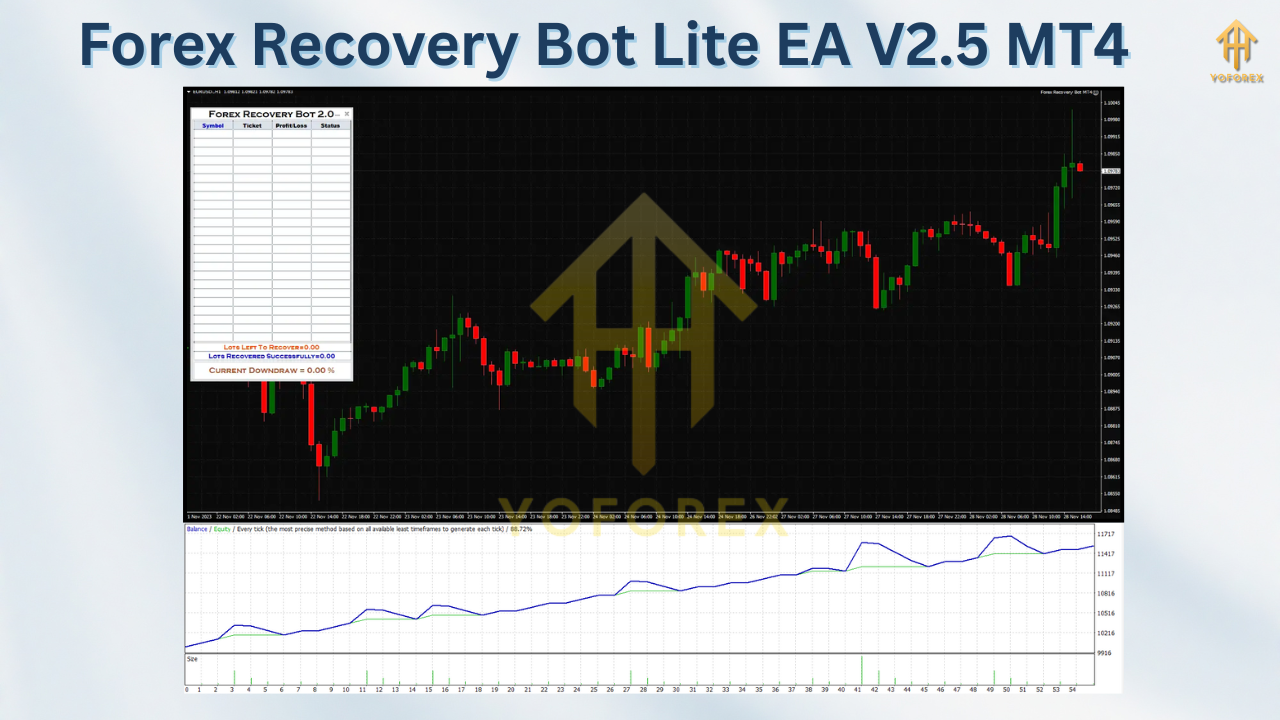
Getting Started: Installation & Setup Guide
Setting up the Forex Recovery Bot Lite EA V2.50 MT4 is straightforward:
- Download & Locate: Obtain the EA file (usually a
.ex4file) from the vendor. Save it to your computer. - Install in MT4:
- Open your MT4 platform.
- Click
File->Open Data Folder. - Double-click the
MQL4folder. - Double-click the
Expertsfolder. - Copy/paste the downloaded
.ex4file into thisExpertsfolder. - Close the Data Folder window. Restart MT4.
- Activate EA:
- In the MT4
Navigatorwindow (Ctrl+N), find theExpert Advisorssection. - Locate “Forex Recovery Bot Lite EA V2.50” in the list.
- Drag and drop it onto any open chart (it usually manages the whole account).
- In the MT4
- Configure Inputs:
- A settings window will pop up. Carefully review and adjust each parameter:
- Drawdown Threshold: Set your trigger (e.g., 10 for 10%).
- Recovery Strategy: Select Grid, Hedge, or Averaging.
- Lot Management: Set initial lot size, max lot size, lot increment rules (if applicable).
- Risk Controls: Set Max Drawdown Limit (e.g., 20%), Equity Stop, SL/TP values.
- Symbol/Magic Number Filters: Define if needed.
- Other Strategy Params: Adjust grid step, hedge distance, etc., based on your chosen strategy.
- Crucially: Use the vendor’s manual and demo testing to understand each parameter.
- A settings window will pop up. Carefully review and adjust each parameter:
- Enable Trading:
- Ensure the
AutoTradingbutton on the MT4 toolbar is GREEN (enabled). - On the chart where you attached the EA, right-click ->
Experts Properties->Commontab. Check “Allow live trading”. - Click
OK.
- Ensure the
- Monitor: The EA will now display its status on the chart. Monitor it initially, especially in demo mode, to ensure it behaves as expected.
Pro Tips for Optimal Performance & Risk Mitigation
While the EA automates recovery, your role in setting it up correctly and managing overall risk is critical:
- DEMO FIRST, ALWAYS: Never deploy a new EA or strategy on a live account without extensive testing on a demo account. Test different drawdown thresholds, strategies, and risk settings. See how it reacts to various market conditions (trending, ranging, volatile).
- Understand Your Chosen Strategy: Don’t just pick a strategy randomly. Understand the mechanics and risks:
- Grids: Excel in ranging markets but suffer large, rapid losses in strong trends. Ensure grid steps and lot sizes are conservative.
- Hedges: Lock in loss but require a subsequent move to profit. Swap costs can eat into profits if held too long.
- Averaging: Lowers break-even but significantly increases exposure. Only use with very small initial positions and strict stops.
- Conservative Risk Settings are Paramount: This is the most important tip. Set your Max Drawdown Limit significantly higher than your activation threshold (e.g., Activate at 10% DD, Max Limit at 20%). Set Max Lot Size to a fraction of what you might use for regular trades. Use Stop Losses religiously on recovery trades.
- Define Realistic Drawdown Thresholds: Setting the trigger too low (e.g., 2%) will activate the EA constantly for minor fluctuations, potentially hindering your primary strategy. Setting it too high (e.g., 25%) might be too late for effective recovery. Find a balance based on your strategy’s typical drawdown profile (use backtesting data).
- Consider Market Context: While the EA is automated, be aware of major news events (NFP, Central Bank decisions) or periods of extreme volatility. You might choose to temporarily disable the EA or tighten risk controls ahead of such events.
- Regularly Review Performance: Don’t set it and forget it forever. Periodically review the EA’s recovery attempts. Was it successful? How long did it take? Did it adhere to risk limits? Use this data to refine your settings.
- It’s a Recovery Tool, Not a Money Printer: Remember, its purpose is to recover losses, not generate primary profits. Its success is measured in preserving capital and mitigating damage, not in doubling your account overnight.
Potential Drawbacks and Critical Considerations
No tool is perfect, and transparency is key. Here are important limitations and risks to consider:
- Not a Substitute for a Profitable Strategy: The EA recovers drawdowns; it doesn’t fix a fundamentally flawed trading strategy. If your primary approach consistently loses money, the EA will eventually fail as drawdowns become too frequent or too large to recover. Focus on strategy profitability first.
- Inherent Strategy Risks:
- Grid Risk: A strong, sustained trend can cause a grid to open multiple losing positions in one direction, leading to significant drawdowns within the recovery itself.
- Hedge Risk: The market might not provide a clear opportunity to close the hedge profitably quickly, leading to prolonged exposure and swap costs.
- Averaging Risk: Dramatically increases position size and market exposure. A small adverse move after averaging can result in a much larger loss than the original.
- Parameter Sensitivity: Performance is highly dependent on the input settings. Poorly chosen parameters (too aggressive lots, too tight grid steps, unrealistic thresholds) can lead to disaster. Requires careful optimization and understanding.
- Market Condition Dependency: Recovery strategies often work best in specific market environments (e.g., grids in ranges). Performance can suffer significantly during strong trends or low volatility/liquidity.
- Not “Set and Forget”: While automated, it requires initial setup, periodic review, and adjustment based on performance and changing market conditions. Ignoring it is risky.
- Potential for Increased Costs: Frequent trading (especially grids) can lead to higher overall transaction costs (spreads and commissions) compared to a passive hold strategy.
- Vulnerability to Extreme Events: Black Swan events or extreme volatility can overwhelm even the best risk controls, potentially leading to larger losses than anticipated.
Conclusion: Is Forex Recovery Bot Lite EA V2.50 MT4 Right for You?
The Forex Recovery Bot Lite EA V2.50 MT4 is a powerful and specialized tool designed to address one of the most challenging aspects of Forex trading: managing drawdowns. Its core strength lies in automating a disciplined, systematic recovery process, removing destructive emotions and providing a structured path back to profitability after losses occur.
For traders who:
- Understand the inherent risks of their chosen forex trading strategies.
- Practice sound risk management in their primary trading.
- Have experienced significant drawdowns and want a pre-defined recovery plan.
- Are comfortable with the mechanics and risks of strategies like grids or hedging.
- Are willing to invest time in proper setup, demo testing, and ongoing monitoring.
…the Recovery Bot Lite EA V2.50 can be an invaluable component of their MT4 trading arsenal. It acts as a safety net, potentially accelerating recovery and safeguarding capital when things go wrong.
However, it is not a magic bullet. It cannot turn a losing strategy into a winning one. It carries its own set of risks, particularly if configured aggressively or used in unsuitable market conditions. Success hinges entirely on the trader’s understanding, conservative parameter setting, and realistic expectations.
Ready to Take Control of Your Drawdowns?
If you’re tired of emotional decision-making during losing streaks and want a robust, automated solution specifically designed for drawdown recovery on MT4, the Forex Recovery Bot Lite EA V2.50 MT4 deserves serious consideration. Remember, the path to consistent trading success involves both winning and managing losses effectively. This EA provides the structure for the latter.
Important Next Steps:
- Research Thoroughly: Look for verified user reviews, performance statements (if available), and detailed vendor documentation.
- Demo Test Extensively: Put it through its paces on a demo account across various market scenarios. Test different strategies and risk settings.
- Understand the Risks: Be brutally honest about your strategy’s weaknesses and whether this EA is a suitable band-aid or a potential amplifier of problems.
- Start Conservatively: If moving to live, use the smallest possible position sizes and the widest risk parameters initially.
By approaching the Forex Recovery Bot Lite EA V2.50 MT4 with knowledge, caution, and a commitment to disciplined risk management, you can equip yourself with a formidable tool to navigate the inevitable drawdowns of the Forex market and protect your trading capital for the long haul.
Support & Disclaimer
Got questions or need help? Reach out anytime:
- WhatsApp: https://wa.me/+443300272265
- Telegram: https://t.me/yoforexrobot
Disclaimer: Past performance is no guarantee of future results. All trading carries risk. Always demo-test the Forex Recovery Bot Lite EA V2.50 MT4 in a risk-free environment before deploying on a live account.