
Goldenclaw EA V1.0 MT4: The Ultimate Automated Trading Solution for Forex Traders
Introduction: Revolutionizing Forex Trading with Automation
The Forex market’s 24/5 nature demands constant vigilance, making manual trading exhausting and prone to emotional errors. Enter Goldenclaw EA V1.0 MT4 – a cutting-edge Expert Advisor (EA) designed to automate trading strategies on MetaTrader 4. This powerful tool leverages advanced algorithms to execute trades, manage risk, and capitalize on market opportunities without human intervention. In this comprehensive guide, we’ll explore how Goldenclaw EA V1.0 MT4 works, its standout features, installation process, optimization tips, and why it’s a game-changer for traders seeking consistency and efficiency.
What is Goldenclaw EA V1.0 MT4?
Goldenclaw EA V1.0 is a sophisticated automated trading system built exclusively for the MetaTrader 4 (MT4) platform. It scans the Forex market in real-time, identifies high-probability setups using technical indicators, and executes trades based on pre-configured parameters. Unlike manual trading, this EA eliminates emotional biases, ensures 24/5 market coverage, and optimizes entry/exit points for enhanced profitability.
Why Choose Goldenclaw EA V1.0?
- Fully Automated: No manual intervention needed.
- Customizable Settings: Tailor strategies to your risk tolerance.
- Multi-Currency Support: Trades major pairs like EUR/USD, GBP/USD, and more.
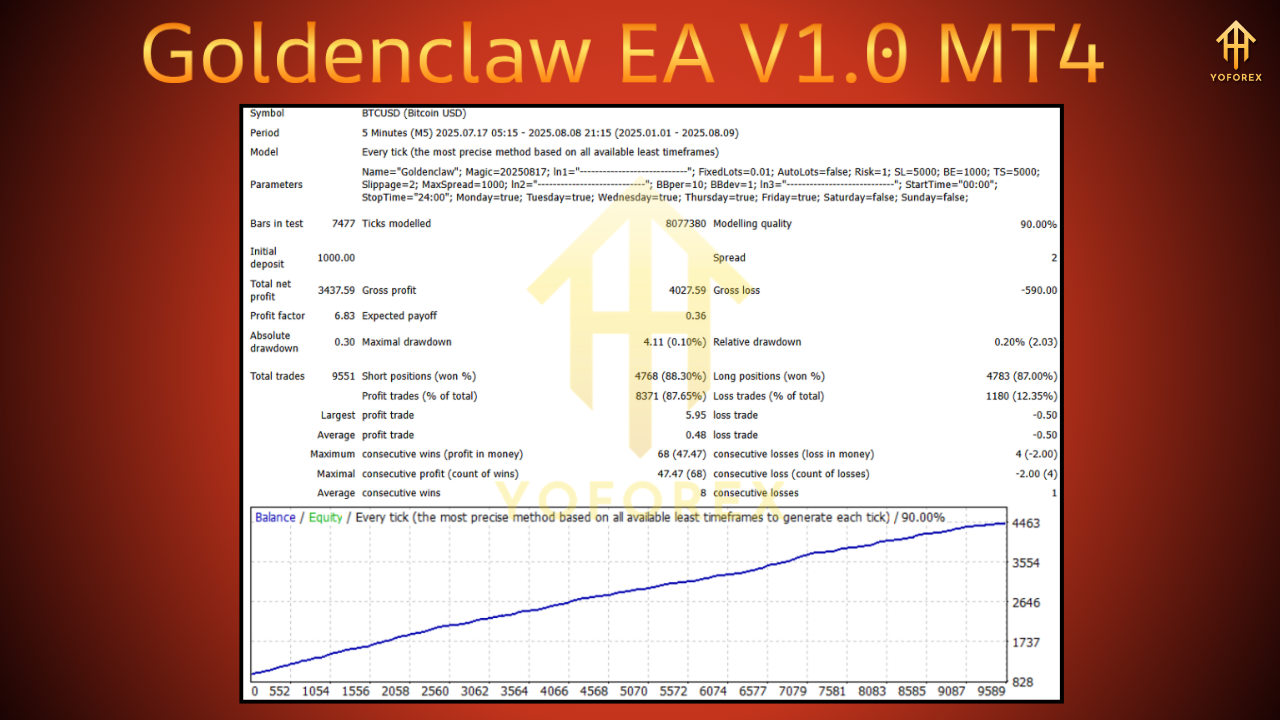
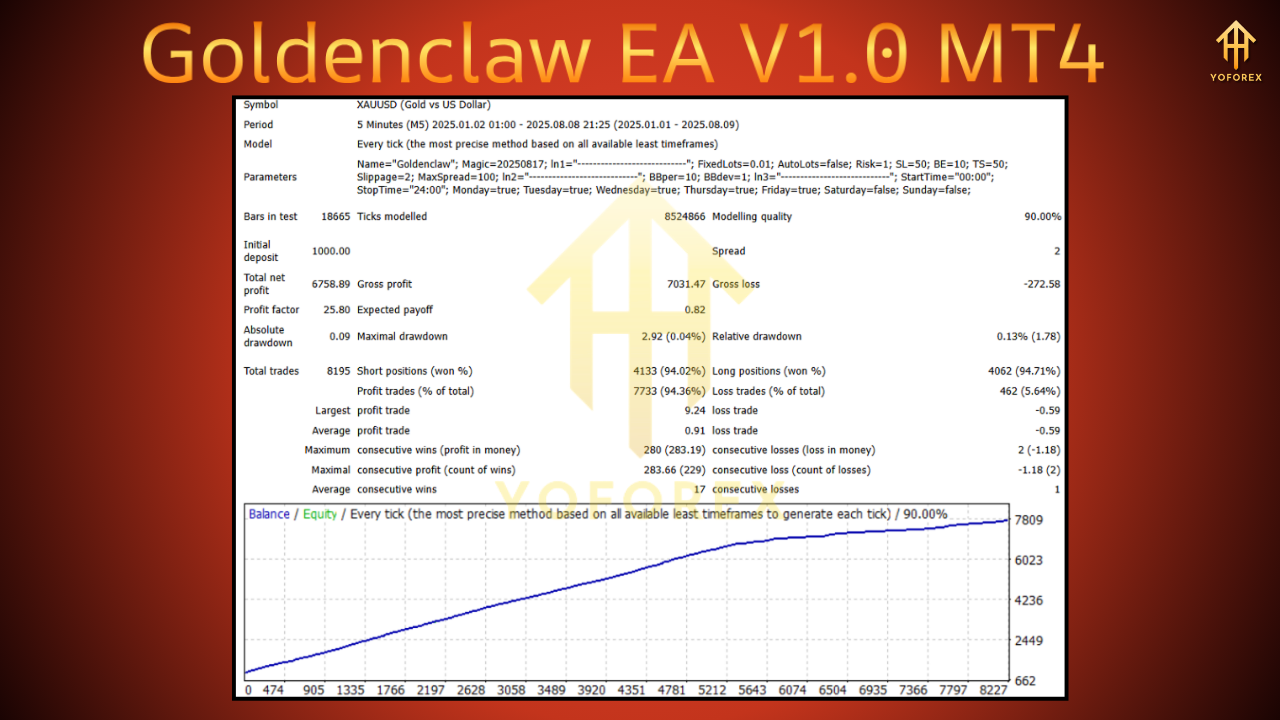
- Backtested & Optimized: Proven performance across diverse market conditions.
Key Features
Goldenclaw EA V1.0 isn’t just another EA – it’s a strategic ally packed with features designed to maximize trading efficiency.
1. Advanced Algorithmic Strategy
The EA combines multiple technical indicators – including Moving Averages, RSI, and MACD – to identify trends, momentum shifts, and reversal points. Its algorithm filters market noise, ensuring trades align with the dominant trend.
2. Dynamic Risk Management
Risk control is non-negotiable in Forex. Goldenclaw EA V1.0 includes:
- Stop-Loss/Take-Profit: Automatically sets SL/TP levels to protect capital.
- Trailing Stop: Locks in profits as trades move favorably.
- Lot Size Calculator: Adjusts position sizes based on account balance and risk percentage.
3. Customizable Trading Parameters
Traders can fine-tune settings like:
- Timeframes: Compatible with M1 to D1 charts.
- Risk Per Trade: Set from 0.1% to 5% of account equity.
- Trading Sessions: Restrict trading to specific hours (e.g., London/New York overlap).
4. User-Friendly Interface
Even beginners can deploy Goldenclaw EA V1.0 effortlessly. Its intuitive dashboard allows easy parameter adjustments without coding knowledge.
5. Compatibility & Performance
- MT4 Optimized: Seamlessly integrates with MetaTrader 4.
- Low Latency: Executes trades in milliseconds.
- VPS Support: Runs 24/5 on a Virtual Private Server for uninterrupted trading.
How Goldenclaw EA V1.0 Works: Strategy Breakdown
Understanding the EA’s core strategy is crucial for leveraging its full potential.
Step 1: Market Analysis
The EA scans multiple currency pairs simultaneously, using:
- Trend Indicators: Identifies uptrends/downtrends via EMA crossovers.
- Momentum Oscillators: Confirms entry signals with RSI/Stochastic.
- Volatility Filters: Avoids trading during low-liquidity periods.
Step 2: Signal Generation
When indicators align (e.g., EMA crossover + RSI oversold), the EA generates a buy/sell signal. For example:
- Buy Signal: Price above 200 EMA + RSI < 30.
- Sell Signal: Price below 200 EMA + RSI > 70.
Step 3: Trade Execution
Goldenclaw EA V1.0 instantly executes trades with:
- Precision Entries: Minimizes slippage.
- Built-in SL/TP: Secures profits and limits losses.
- Hedging Capability: Opens opposite positions during reversals.
Step 4: Continuous Monitoring
The EA tracks open trades, adjusts trailing stops, and closes positions when profit targets or market reversals occur.
Benefits
1. Emotion-Free Trading
Eliminates fear, greed, and hesitation – common pitfalls in manual trading.
2. Time Efficiency
Frees up time for strategy development or other pursuits while the EA handles trading.
3. Consistency
Applies rules uniformly, avoiding erratic decisions.
4. Backtesting & Optimization
Test strategies on historical data to refine settings before live deployment.
5. Scalability
Trade multiple accounts or currency pairs simultaneously.
Installation Guide: Setting Up Goldenclaw EA V1.0
Step 1: Download & Install
- Purchase Goldenclaw EA V1.0 from the official vendor.
- Download the
.ex4file. - Open MT4 > File > Open Data Folder > MQL4 > Experts.
- Paste the
.ex4file and restart MT4.
Step 2: Attach to Chart
- In MT4’s Navigator panel, find Goldenclaw EA V1.0.
- Drag it onto your preferred chart (e.g., EUR/USD H1).
- Enable Allow Algo Trading in MT4 settings.
Step 3: Configure Parameters
Adjust key settings:
- Risk Per Trade: 1-2% (recommended).
- Stop Loss: 20-50 pips.
- Take Profit: 30-100 pips.
- Magic Number: Unique ID to distinguish EA trades.
Step 4: Activate & Monitor
Click AutoTrading in MT4 to activate. Monitor performance via the Terminal tab.
Optimization Tips for Maximum Performance
1. Backtest Rigorously
Use MT4’s Strategy Tester to simulate historical performance. Optimize parameters for different market conditions (trending, ranging).
2. Start with a Demo Account
Test Goldenclaw EA V1.0 on a demo account for 2-4 weeks to validate live-market behavior.
3. Use a VPS
Ensure 24/5 uptime with a low-latency VPS (e.g., Amazon EC2, ForexVPS).
4. Adjust for Market Volatility
- High Volatility: Tighten stop-losses.
- Low Volatility: Increase take-profit targets.
5. Regular Updates
Keep the EA updated to benefit from algorithm improvements and bug fixes.
Risks and Mitigation Strategies
No EA is infallible. Address these risks proactively:
1. Market Volatility
- Risk: Sudden news events cause slippage.
- Mitigation: Avoid trading during high-impact news (e.g., NFP releases).
2. Over-Optimization
- Risk: Settings too tailored to past data fail in live markets.
- Mitigation: Use robust parameters validated across multiple years.
3. Technical Failures
- Risk: VPS outages or MT4 crashes disrupt trading.
- Mitigation: Choose a reliable VPS and enable MT4’s auto-restart feature.
4. Drawdowns
- Risk: Prolonged losing streaks erode capital.
- Mitigation: Set a max drawdown limit (e.g., 15% of equity).
Conclusion: Is Goldenclaw EA V1.0 MT4 Right for You?
Goldenclaw EA V1.0 MT4 stands out as a versatile, reliable, and user-friendly solution for traders seeking automation. Its blend of advanced algorithms, dynamic risk management, and customization options makes it suitable for:
- Beginners: Learning automated trading without coding.
- Experienced Traders: Scaling strategies across multiple pairs.
- Busy Professionals: Maintaining market exposure 24/5.
While no EA guarantees profits, Goldenclaw EA V1.0 provides a disciplined framework to navigate Forex markets efficiently. By combining it with prudent risk management and regular optimization, traders can unlock consistent results and elevate their trading journey.
Support & Disclaimer
Got questions or need help? Reach out anytime:
- WhatsApp: https://wa.me/+443300272265
- Telegram: https://t.me/yoforexrobot
Disclaimer: Past performance is no guarantee of future results. All trading carries risk. Always demo-test the Goldenclaw EA V1.0 MT4 in a risk-free environment before deploying on a live account.