Hedging Forex EA4 V2.0 MT4: A Savvy Trader’s Guide to Smarter Automation
In the fast-paced world of Forex trading, every tick in the market presents both an opportunity and a risk. While many traders rely on indicators and discretionary setups, others embrace automation to balance consistency and efficiency. One such automated tool is the Hedging Forex EA4 V2.0 for MT4.
This Expert Advisor (EA) is designed to harness hedging techniques by opening buy and sell trades simultaneously, targeting steady profits while mitigating directional risk. For traders looking for a scalping-friendly, low-spread strategy, this EA provides a structured solution.
In this comprehensive guide, we’ll explore the core strategy, features, setup process, best practices, and risk considerations so you can evaluate whether Hedging Forex EA4 V2.0 MT4 deserves a place in your trading arsenal.
What Is Hedging Forex EA4 V2.0 MT4?
The Hedging Forex EA4 V2.0 MT4 is an automated trading system for the MetaTrader 4 platform. It is widely seen as a close variant of The King Hedging Forex EA V2.0.
Its primary mechanism is straightforward:
-
Open two positions at once — a buy and a sell.
-
Assign preset take-profit (TP) levels, usually around 20 pips per trade.
-
Allow the market to close one side in profit while the other resets, repeating the cycle for small, consistent wins.
By doing this, the EA aims to smooth out equity fluctuations and capture opportunities regardless of whether the market moves up or down.
Core Strategy: How It Works
The philosophy behind this EA revolves around hedging and short-term scalping:
-
Simultaneous Buy & Sell
The EA instantly enters a buy and a sell order on a chosen pair. -
Defined Profit Targets
Both positions have fixed TP levels (commonly 20 points/pips). -
Cooling or Recovery Trades
If price runs strongly in one direction, the EA can open additional hedged trades at new lot sizes to accelerate recovery. -
Risk Filters
Spread filters, auto-lot sizing, and trading session timers ensure trades only occur under optimal conditions.
This structure makes it well-suited for volatile currency pairs with tight spreads, such as EURUSD, GBPUSD, and USDJPY.
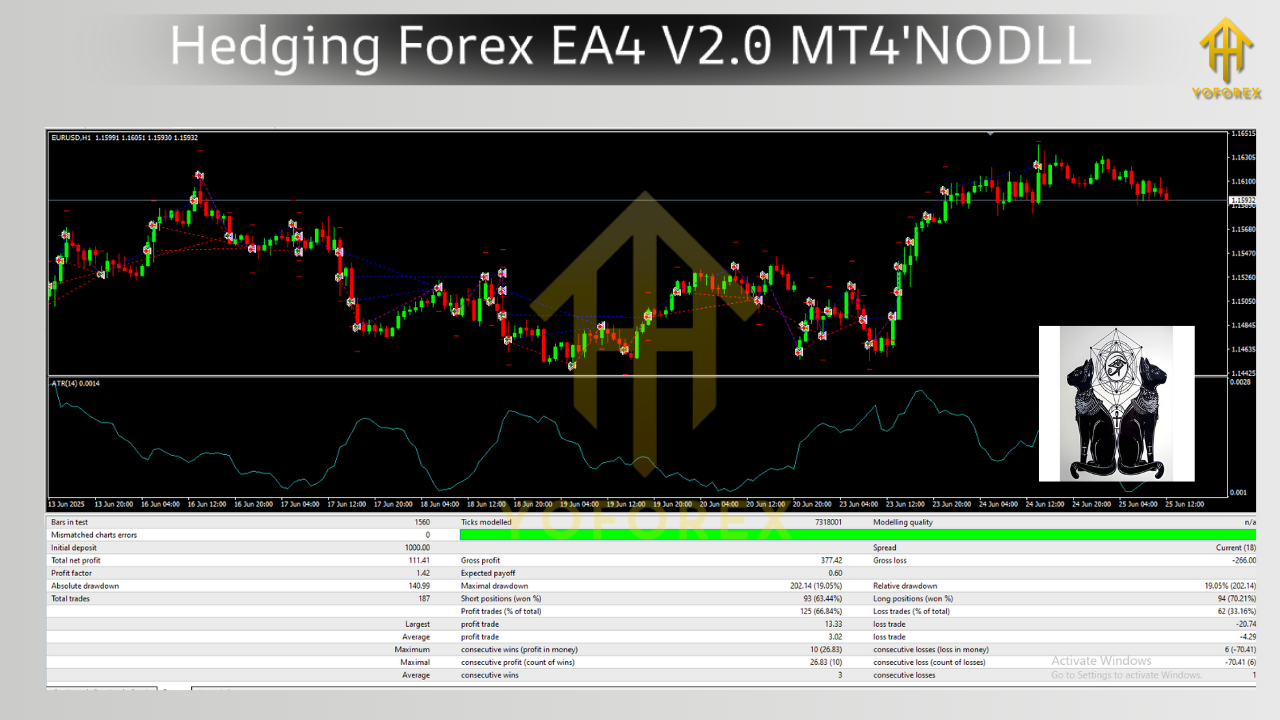
Key Features & Parameters
The EA is equipped with configurable settings, allowing traders to balance aggression and safety.
-
Lot1: Initial lot size (can be fixed).
-
Auto Lot & Max Risk: Automate lot sizing based on equity and desired risk %.
-
Max Spread: Stops trading if spreads exceed your set limit (e.g., 5 pips).
-
Take Profit: Typically set around 20–30 points.
-
Start/End Time: Define active trading sessions.
-
Magic Number: Identifies trades placed by the EA.
Recommended Setup:
-
Chart: M5 (5-minute).
-
Pairs: EURUSD, GBPUSD, USDJPY, USDCHF, AUDUSD.
-
Deposit: $5,000 minimum for stability.
-
Leverage: 1:400 or higher.
-
Broker: ECN account with low spreads.
Why Traders Use Hedging EA4
-
Market Neutrality
Profits can be generated in both bullish and bearish markets. -
Quick Scalping Gains
Targets small profits (20 pips), closing trades quickly to lock in frequent wins. -
Automated Risk Management
Spread and lot filters add a safety net. -
Beginner Friendly
Easy installation and minimal manual intervention required. -
Adaptable
Works across multiple major pairs with stable performance.
Step-by-Step Setup Guide
Here’s how to install and configure the EA on MT4:
1. Installation
-
Download the
.ex4file. -
Place it in MQL4 > Experts folder inside your MT4 directory.
-
Restart MT4.
-
Find it under Navigator > Expert Advisors.
2. Attach to Chart
-
Open a 5-minute chart for EURUSD (recommended).
-
Drag the EA onto the chart.
-
Enable AutoTrading.
3. Configure Settings
Example setup:
-
Lot1 = 0.01
-
Auto Lot = False
-
Max Risk = 1%
-
Max Spread = 5
-
Take Profit = 20 pips
-
Magic Number = 12345
4. Test on Demo
Backtest on historical data, then forward-test on a demo account.
5. Deploy Live with Caution
Use conservative lots until confident in performance. VPS hosting is recommended for 24/5 uptime.
Pros & Cons of Hedging Forex EA4 V2.0 MT4
Pros:
-
Works in any market condition.
-
Frequent, smaller profits.
-
Customizable and beginner-friendly.
-
Leverages MT4’s robust trading environment.
Cons:
-
Requires higher capital ($5,000+) for stability.
-
Hedging not allowed on all broker accounts.
-
Prolonged trends may trigger multiple trades, increasing drawdown.
-
Success depends on tight spreads and proper VPS hosting.
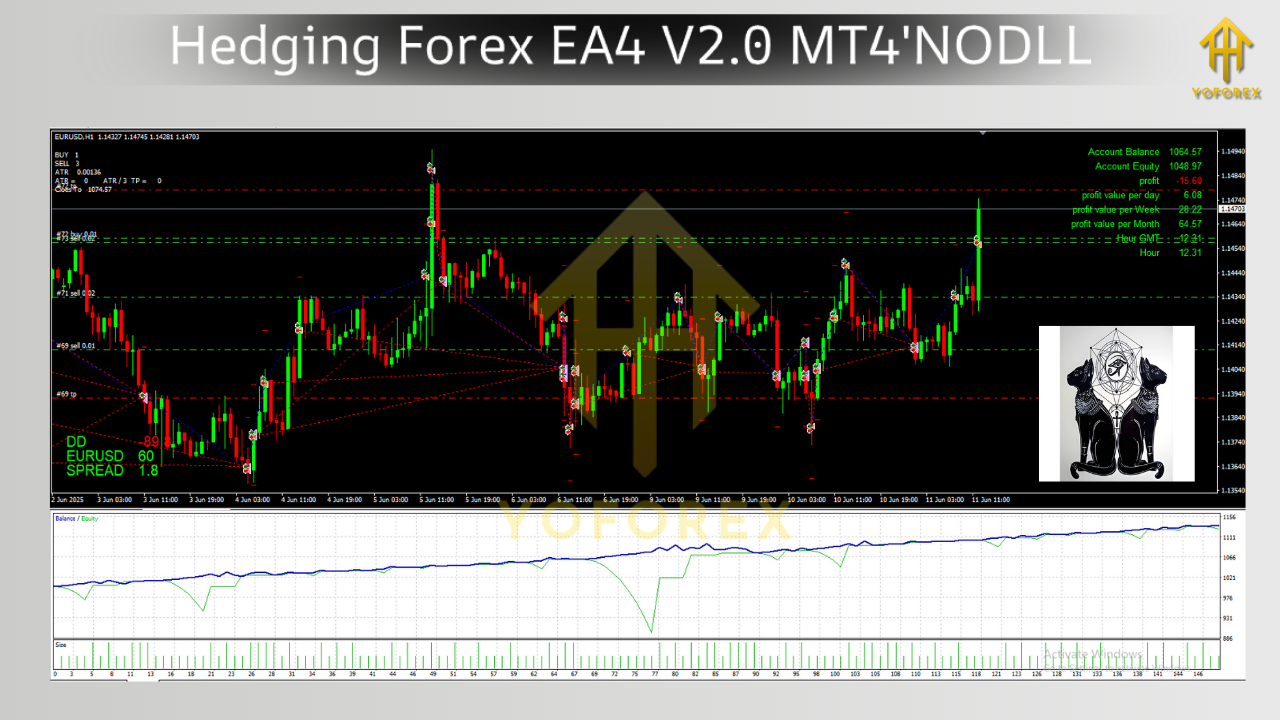
Best Practices for Using This EA
-
Choose the Right Broker: Ensure hedging is allowed and spreads are low.
-
Stick to Major Pairs: Liquidity is key for execution.
-
Use VPS Hosting: Keeps EA running without interruption.
-
Risk Management First: Don’t exceed 1–2% per trade.
-
Monitor Performance: Review logs weekly to adjust settings.
Comparison: Hedging EA4 vs Multi Hedge Profit EA v2.0
-
Hedging EA4 V2.0: Focuses on single-pair dual trades with scalping targets.
-
Multi Hedge Profit EA v2.0: Manages multi-pair hedging strategies with analytics and diversification tools.
If you want simplicity, Hedging EA4 is easier. If you prefer diversified strategies, explore Multi Hedge Profit EA.
Risk Warning
While hedging bots may appear “safe,” no EA eliminates risk. Sudden high volatility events (e.g., NFP, interest rate decisions) can blow past hedging layers and expose accounts to heavy drawdowns. Always use risk capital and test thoroughly before scaling.
Conclusion
The Hedging Forex EA4 V2.0 MT4 provides traders with a practical way to automate hedging and scalp small profits consistently. By pairing dual trades, spread filters, and defined profit targets, it suits traders who want a hands-off yet controlled strategy.
With proper broker choice, VPS hosting, and conservative risk management, this EA can add a reliable stream of automated trades to your portfolio. However, always remember that hedging reduces directional risk but doesn’t eliminate overall exposure—trading discipline remains essential.
For traders at YoForex.org seeking automation with balance and control, Hedging Forex EA4 V2.0 is worth exploring.