In the fast-paced world of forex trading, precision and timing are critical for success. Traders, whether beginners or seasoned professionals, rely on tools to simplify market analysis and enhance decision-making. The Killbinary Signals Indicator for MetaTrader 4 (MT4) is one such tool, designed to provide accurate buy and sell signals for both forex and binary options trading. Known for its non-repainting signals and compatibility with various trading strategies, this indicator has gained attention for its simplicity and effectiveness. In this 800-word guide, we’ll explore the features, setup process, trading strategy, benefits, and considerations of using the Killbinary Signals Indicator MT4, helping you determine if it’s the right fit for your trading arsenal.
What is the Killbinary Signals Indicator MT4?
The Killbinary Signals Indicator is a custom technical indicator developed for the MetaTrader 4 platform, a widely used trading software known for its robust charting and automation capabilities. This indicator generates clear buy and sell signals, typically displayed as arrows on the chart, to help traders identify potential entry and exit points. It is designed to work across various timeframes and currency pairs, making it versatile for day traders, scalpers, and swing traders. The indicator’s non-repainting nature ensures that once a signal appears, it remains fixed, providing reliable insights for live trading. With a focus on simplicity, it’s particularly appealing to traders seeking to minimize market noise and focus on high-probability setups.
Key Features and Specifications
- Non-Repainting Signals: Signals do not change after the candle closes, ensuring reliability in live trading.
- Timeframes: Works effectively on multiple timeframes, including M1, M5, M15, and higher, suitable for both short-term and long-term trading.
- Currency Pairs: Compatible with major pairs like EUR/USD, GBP/USD, USD/JPY, and assets like XAU/USD (Gold).
- Signal Display: Uses clear visual cues, such as blue arrows for buy signals and red arrows for sell signals, to indicate trade opportunities.
- Versatility: Can be used standalone or combined with other indicators like Moving Averages or RSI for enhanced accuracy.
- Platform: Optimized for MT4, supporting builds 1421 and above.
- Trading Sessions: Performs best during high-volatility sessions like London and New York, though it advises caution during major news events.
How the Killbinary Signals Indicator Works
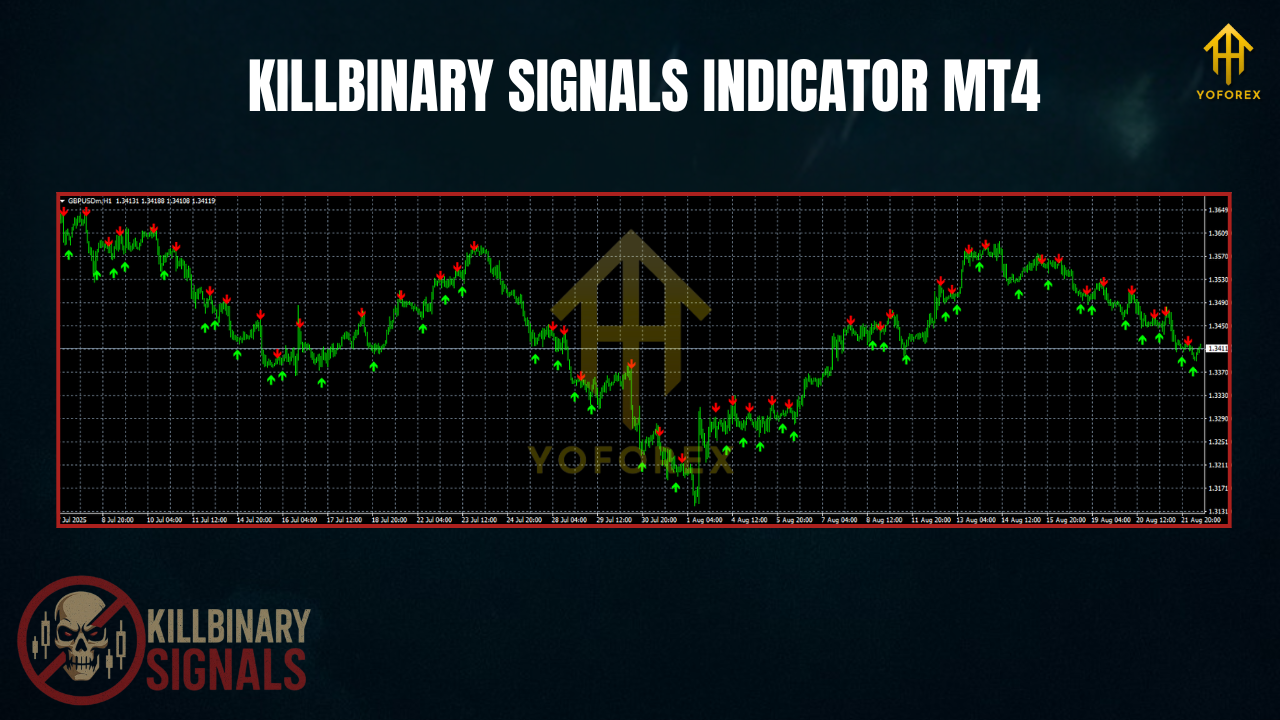
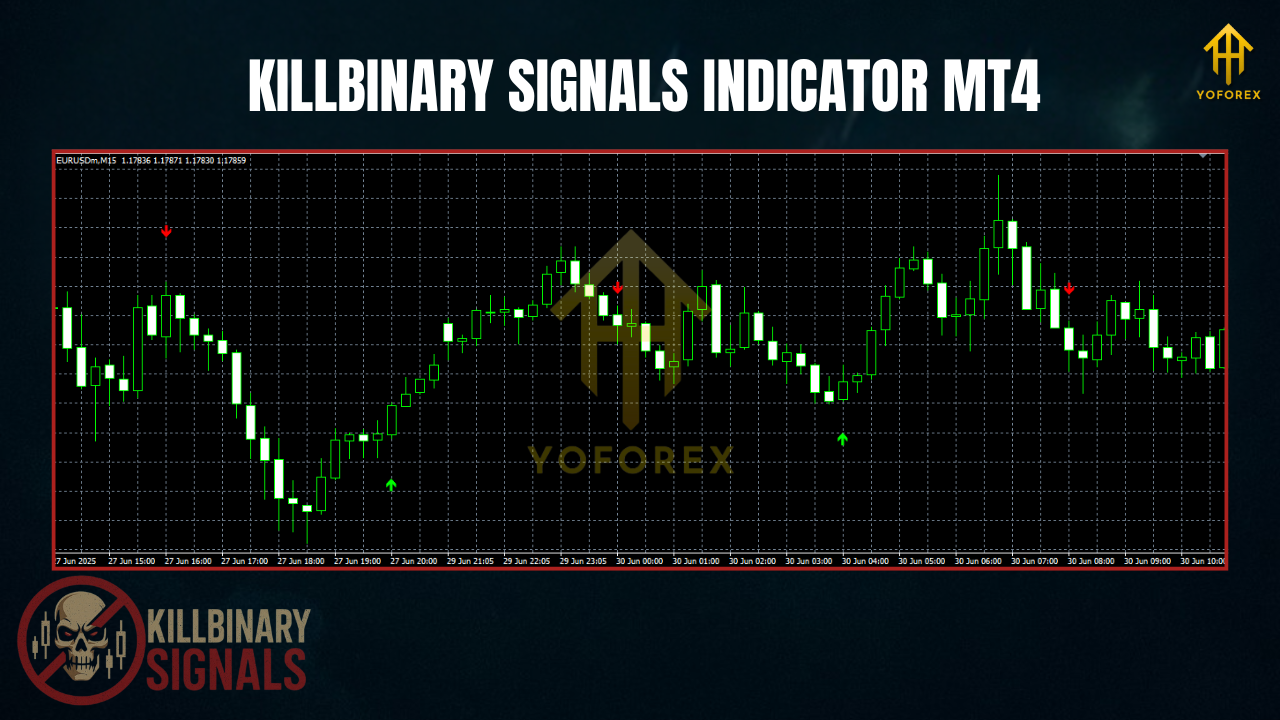
The Killbinary Signals Indicator employs a proprietary algorithm that analyzes price action, volatility, and market momentum to generate trading signals. Unlike repainting indicators that adjust past signals, Killbinary’s signals are fixed once the candle closes, reducing false positives and enhancing trust in its outputs. The indicator plots arrows on the chart: a blue arrow signals a potential buy, while a red arrow indicates a sell opportunity. These signals are often based on trend reversals or momentum shifts, making the indicator suitable for both trend-following and counter-trend strategies.
For optimal results, traders are advised to wait for the current candle to close before acting on a signal, ensuring the trade aligns with the indicator’s logic. The indicator performs best in stable market conditions and may require additional confirmation tools, such as support and resistance levels or other technical indicators, to filter out false signals during high-volatility periods like news releases.
Setting Up the Killbinary Signals Indicator on MT4
- Download the Indicator: Obtain the Killbinary Signals Indicator files (.mq4 or .ex4) from a trusted source, such as 4xone.com or best-metatrader-indicators.com.
- Install MT4: Ensure you have MetaTrader 4 installed from a reputable broker like Blueberry Markets or Exness.
- Add the Indicator: Open MT4, go to File > Open Data Folder > MQL4 > Indicators, and paste the .mq4 or .ex4 file into the Indicators folder. Restart MT4 to load the indicator.
- Apply to Chart: Open a chart (e.g., EUR/USD M5), drag the Killbinary Signals Indicator from the Navigator panel onto the chart, and adjust settings like signal alerts (sound, email, or push notifications) if available.
- Test on Demo: Always test the indicator on a demo account for at least a week to understand its behavior and optimize settings for your trading style.
- Enable Alerts: Configure alerts to stay informed of new signals without constantly monitoring the chart.
Benefits of Using Killbinary Signals Indicator
- Simplicity: Clear buy/sell arrows reduce the complexity of market analysis, making it beginner-friendly.
- Non-Repainting: Fixed signals enhance reliability, allowing traders to trust the indicator in live conditions.
- Versatility: Works across multiple timeframes and assets, accommodating various trading styles.
- Time Efficiency: Automates signal generation, freeing traders from constant chart monitoring.
- Customizable: Can be paired with other indicators or strategies to improve accuracy and reduce false signals..
Considerations and Risks
- Avoid News Events: Signals may be less reliable during high-impact news releases due to increased market volatility.
- Use Confirmation Tools: Combine the indicator with tools like Moving Averages, Bollinger Bands, or support/resistance levels to filter out false signals.
- Risk Management: Always use proper risk management, such as setting stop-loss levels and limiting trade sizes, to protect against unexpected market moves.
- Market Conditions: The indicator performs best in stable, low-volatility environments. Avoid trading during erratic market behavior unless confirmed by other tools.
- Backtesting: Test the indicator thoroughly on historical data to understand its performance and limitations.
Who Should Use the Killbinary Signals Indicator?
This indicator is ideal for traders seeking a straightforward, reliable tool to enhance their trading decisions. Beginners will appreciate its ease of use and clear signals, while experienced traders can integrate it into existing systems for confirmation. However, it’s not a standalone solution. Traders should combine it with sound risk management and market analysis to maximize its effectiveness. Those trading during high-volatility sessions like London or New York may find it particularly useful, provided they avoid major news events.
Conclusion
The Killbinary Signals Indicator MT4 is a valuable tool for forex and binary options traders looking to streamline their trading process. Its non-repainting signals, versatility across timeframes and assets, and ease of use make it a popular choice for both novice and experienced traders. By carefully setting up the indicator, testing it on a demo account, and combining it with other technical tools, traders can leverage its signals to identify high-probability trade setups. However, success requires diligence, proper risk management, and an understanding of market conditions. Whether you’re scalping on M1 or swing trading on H1, the Killbinary Signals Indicator can be a powerful addition to your MT4 toolkit, helping you navigate the complexities of the forex market with greater confidence and precision.