
The world of forex trading is dynamic, fast-paced, and filled with opportunities for those who can navigate its complexities. For traders seeking to automate their strategies and capitalize on market movements, Expert Advisors (EAs) like Lion King EA MT4 V2.0 offer a powerful solution. Designed for the MetaTrader 4 (MT4) platform, this EA promises to deliver robust performance through sophisticated algorithms and risk management features. In this blog post, we’ll dive deep into what makes Lion King EA MT4 V2.0 a standout tool, exploring its features, strategies, installation process, benefits, and tips for optimizing its performance.
What is Lion King EA MT4 V2.0?
Lion King EA MT4 V2.0 is an automated trading system (Expert Advisor) developed for the MetaTrader 4 platform, one of the most popular trading platforms in the forex market. This EA is designed to analyze market conditions, execute trades, and manage positions with minimal manual intervention. It employs a combination of advanced algorithms, including martingale and grid trading strategies, to identify trading opportunities in overbought or oversold market conditions. The EA is particularly suited for traders who want to leverage automation to enhance their trading efficiency while maintaining control over risk parameters.
According to sources, Lion King EA uses complex algorithms to take trades when prices reach extreme levels, aiming to capitalize on reversals or significant market movements. The V2.0 update introduces enhanced features, improved risk management, and better adaptability to various market conditions, making it a compelling choice for both novice and experienced traders.
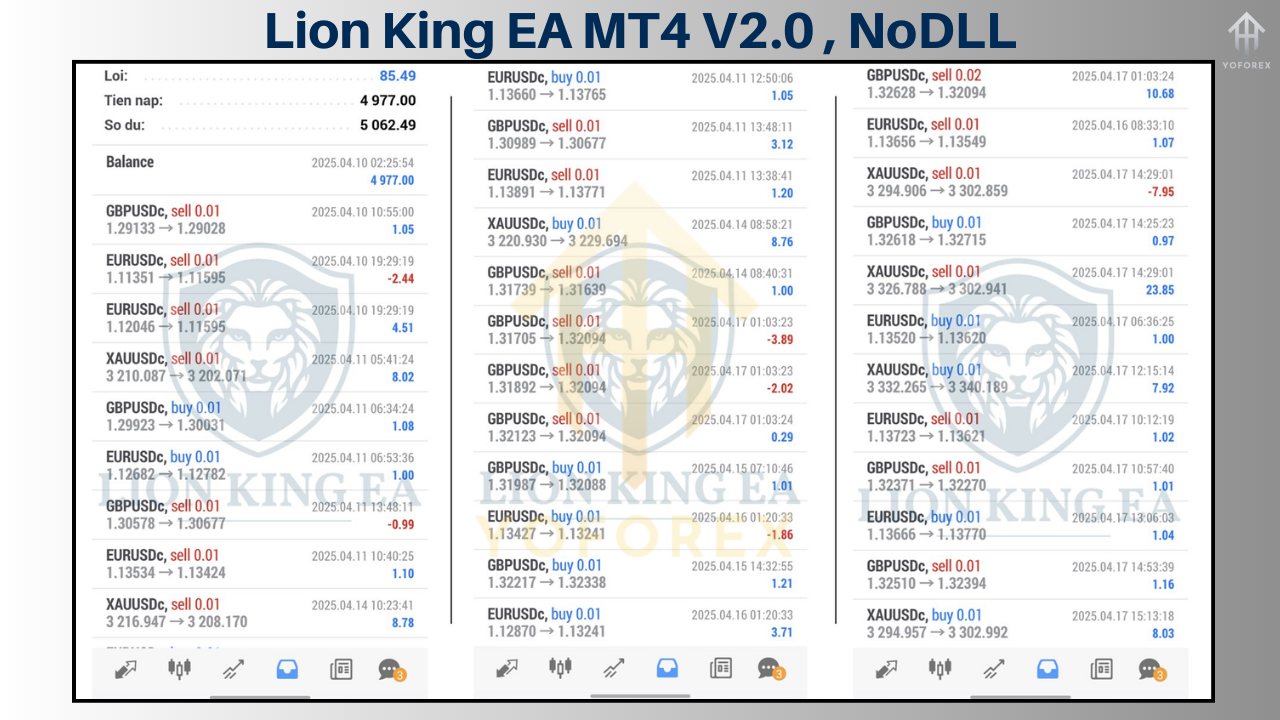
Key Features of Lion King EA MT4 V2.0
Lion King EA MT4 V2.0 is packed with features that cater to the needs of modern forex traders. Here are some of its standout attributes:
-
Martingale and Grid Trading Strategies
The EA employs a martingale approach, where it increases position sizes after losses to recover drawdowns, combined with a grid trading system that places multiple orders at predefined price levels. This strategy aims to capture profits from market reversals while managing risk through controlled lot sizing. -
Overbought/Oversold Detection
Lion King EA identifies trading opportunities by analyzing overbought or oversold market conditions. It uses proprietary algorithms to detect when prices are likely to reverse, enabling precise trade entries. -
Customizable Risk Management
The EA offers flexible risk settings, allowing traders to adjust parameters such as lot size, maximum drawdown, and risk per trade. Features like Max Risk Per Trade and Set Max Daily Drawdown help limit potential losses, ensuring safer trading. -
Multiple Currency Pair Support
While optimized for volatile pairs like XAUUSD (gold), Lion King EA can trade multiple currency pairs, including majors like EURUSD, GBPUSD, and USDJPY. This versatility makes it suitable for diverse trading portfolios. -
Broker Compatibility
The EA is designed to work with ECN brokers and is not sensitive to spread or slippage, though using a reliable broker is recommended for optimal performance. It also supports VPS (Virtual Private Server) for continuous operation. -
User-Friendly Interface
Lion King EA comes with a clear setup process and a user manual, making it accessible even for traders new to automated systems. It includes an information panel that can be customized for different display resolutions. -
Advanced Settings for Optimization
Traders can enable or disable specific strategies, set maximum spread limits, and configure trading hours (e.g., disabling trades on Fridays to avoid weekend gaps). Features like Use Virtual Expiration and SetSL_TP_After_Entry enhance compatibility with various brokers.
How Does Lion King EA MT4 V2.0 Work?
Lion King EA MT4 V2.0 operates by analyzing market data in real-time and executing trades based on its programmed strategies. Here’s a breakdown of its operational mechanism:
-
Market Analysis: The EA uses technical indicators and proprietary algorithms to identify overbought or oversold conditions. It may incorporate trend-following tools (e.g., moving averages) and oscillators (e.g., RSI or Stochastics) to filter signals, though the exact mechanics are proprietary.
-
Trade Execution: When a trading signal is generated, the EA places buy or sell orders, often using a grid system to open multiple positions at different price levels. The martingale strategy increases lot sizes after losses to recover drawdowns, aiming for profitability when the market reverses.
-
Risk Management: The EA includes built-in risk controls, such as stop-loss (SL) and take-profit (TP) levels for each trade, as well as daily drawdown limits to prevent excessive losses. Traders can configure lot sizes based on account equity or balance, ensuring risk aligns with their preferences.
-
Trade Monitoring: Once trades are open, the EA manages them automatically, adjusting positions as needed and closing them when profit targets or stop-loss levels are reached. It also supports trailing stops for locking in profits.
Installation and Setup
Setting up Lion King EA MT4 V2.0 is straightforward, but careful attention to the process ensures optimal performance. Follow these steps to install and configure the EA:
-
Download the EA: Purchase or download the Lion King EA MT4 V2.0 file (typically a .ex4 file) from a trusted source. Ensure you receive any accompanying files, such as user manuals or templates.
-
Open MetaTrader 4: Launch the MT4 platform on your computer. If you don’t have MT4, download it from your broker’s website or the official MetaTrader website.
-
Access the Data Folder: In MT4, go to File > Open Data Folder. This opens the MT4 directory.
-
Install the EA:
-
Navigate to the MQL4 > Experts folder.
-
Copy the Lion King EA V2.0 .ex4 file into the Experts folder.
-
If the EA includes additional indicators or templates, place them in the MQL4 > Indicators or MQL4 > Templates folders, respectively.
-
-
Restart MT4: Close and reopen MetaTrader 4 to load the EA.
-
Attach the EA to a Chart:
-
Open a chart for your desired currency pair (e.g., XAUUSD or EURUSD).
-
Drag the Lion King EA from the Navigator panel (Ctrl+N) onto the chart.
-
A settings window will appear, allowing you to configure parameters like lot size, risk settings, and trading hours.
-
-
Enable Auto-Trading: Ensure the AutoTrading button in MT4 is enabled (green). Also, check that Allow DLL imports and Allow live trading are enabled in the EA settings.
-
Test on a Demo Account: Before using the EA on a live account, test it on a demo account to familiarize yourself with its behavior and fine-tune settings.
For detailed instructions, refer to the user manual provided with the EA or contact the developer for support.
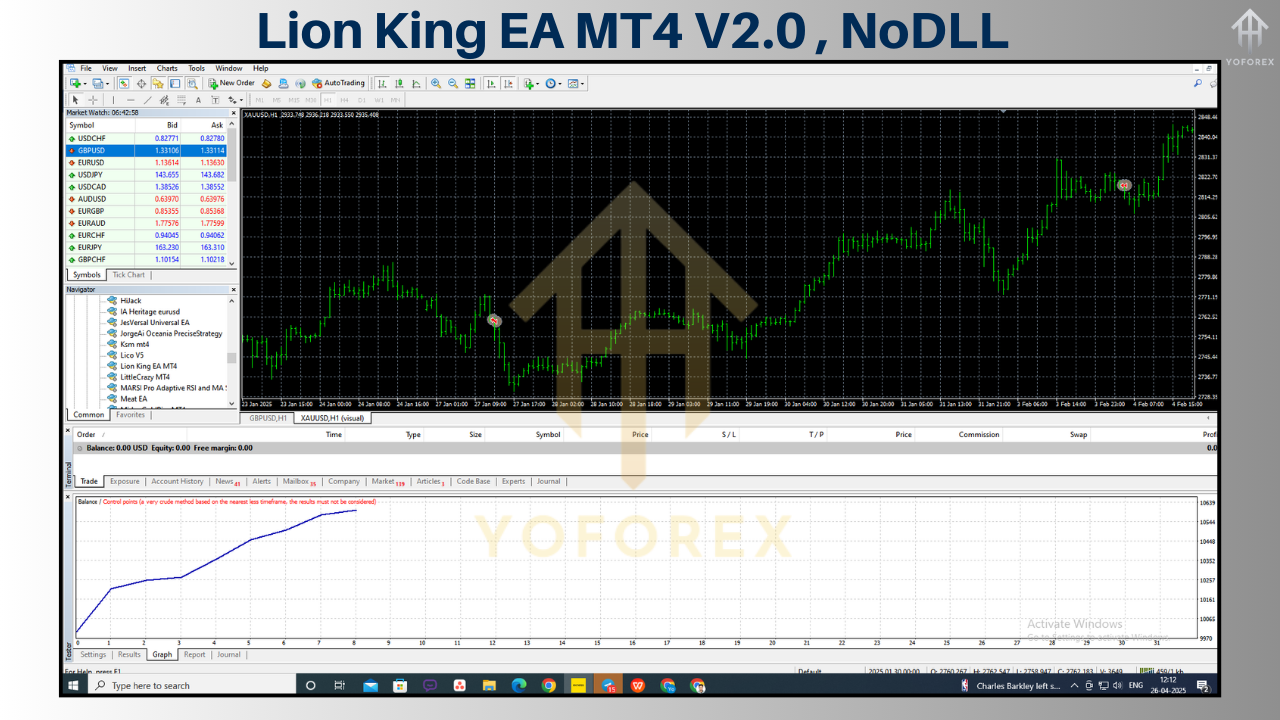
Benefits of Using Lion King EA MT4 V2.0
Lion King EA MT4 V2.0 offers several advantages for forex traders:
-
Automation: The EA eliminates the need for constant market monitoring, executing trades 24/5 based on predefined rules. This is ideal for traders with limited time.
-
Risk Management: With customizable risk settings and drawdown limits, the EA helps protect your capital, making it suitable for conservative and aggressive traders alike.
-
Versatility: Its ability to trade multiple currency pairs and adapt to different market conditions enhances its utility across various trading styles.
-
Profit Potential: The martingale and grid strategies, while risky, can yield significant profits in trending or volatile markets when properly managed.
-
Ease of Use: The EA’s user-friendly setup and comprehensive documentation make it accessible to traders of all experience levels.
Risks and Considerations
While Lion King EA MT4 V2.0 is powerful, it’s not without risks. Here are some factors to consider:
-
Martingale Risks: The martingale strategy can lead to significant drawdowns during prolonged losing streaks, potentially wiping out accounts if not managed carefully. Always use conservative lot sizes and risk settings.
-
Market Volatility: The EA performs best in volatile markets but may struggle during ranging or low-liquidity periods. Backtesting can help identify optimal conditions.
-
Broker Dependence: Performance may vary depending on your broker’s spreads, slippage, and execution speed. Choose a reputable ECN broker for best results.
-
VPS Requirement: For continuous operation, a reliable VPS is recommended to avoid interruptions due to internet or power issues.
-
Backtesting and Optimization: The EA’s default settings may not suit all accounts or market conditions. Thorough backtesting and optimization are essential to align the EA with your trading goals.
Tips for Optimizing Lion King EA MT4 V2.0
To maximize the EA’s performance, consider the following tips:
-
Start with a Demo Account: Test the EA extensively on a demo account to understand its behavior and refine settings without risking real capital.
-
Optimize Risk Settings: Adjust the Max Risk Per Trade and Max Daily Drawdown to align with your risk tolerance. A risk of 1-5% per trade is generally safer than the default 30%.
-
Use a Reliable VPS: Run the EA on a VPS to ensure uninterrupted trading, especially for 24/5 operation.
-
Monitor Spreads: Set a Maximum Allowed Spread to avoid trading during high-spread periods, which can erode profits.
-
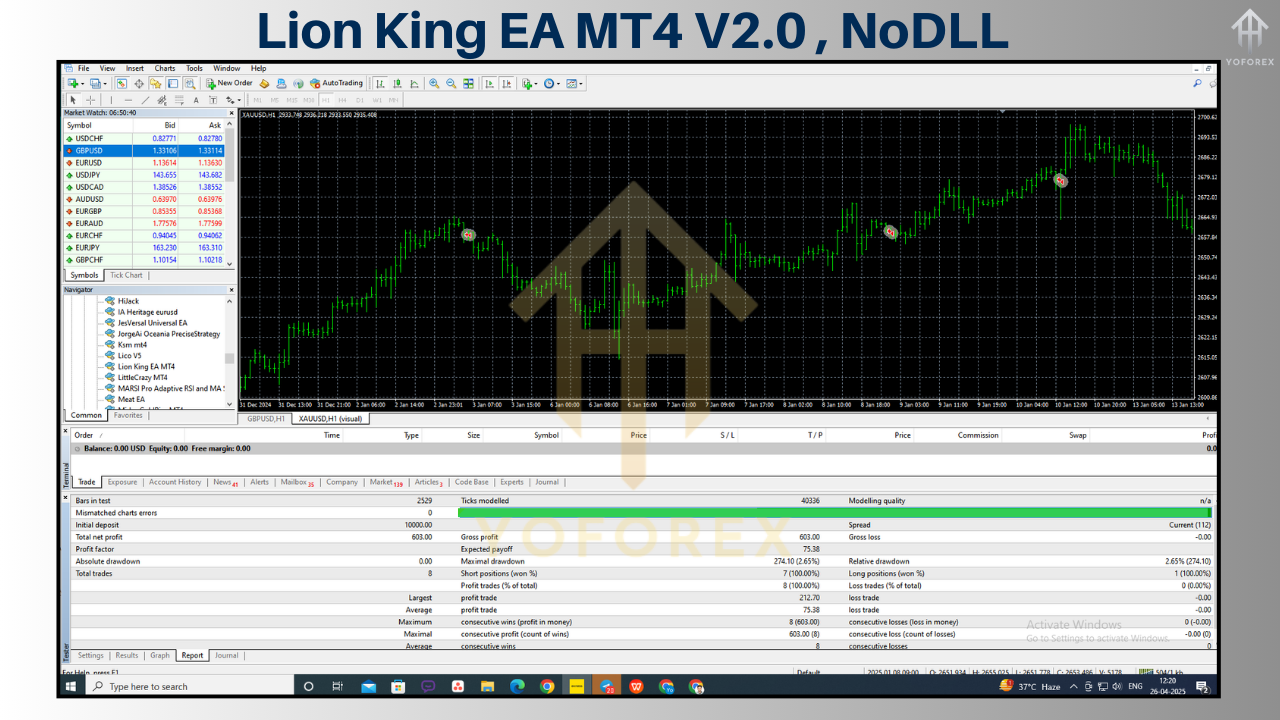
Backtest Thoroughly: Use MT4’s Strategy Tester to backtest the EA on historical data for your chosen currency pairs and timeframes. This helps identify optimal settings and potential weaknesses.
-
Avoid Over-Optimization: While tweaking settings is important, avoid curve-fitting the EA to historical data, as this may reduce its effectiveness in live markets.
-
Combine with Manual Analysis: Use the EA as part of a broader trading strategy, supplementing its signals with your own market analysis or other indicators.
-
Stay Updated: Check for updates or new versions of the EA, as developers may release improvements or bug fixes.
Who Should Use Lion King EA MT4 V2.0?
Lion King EA MT4 V2.0 is ideal for:
-
Busy Traders: Those who lack time to monitor markets but want to automate their trading.
-
Risk-Tolerant Traders: Traders comfortable with martingale and grid strategies, understanding their potential for high rewards and risks.
-
Experienced Traders: Those who can optimize the EA’s settings and integrate it into a broader trading plan.
-
Gold Traders: Traders focusing on XAUUSD, as the EA is optimized for volatile pairs like gold.
However, beginners should approach with caution, as the EA’s martingale strategy requires a solid understanding of risk management to avoid significant losses.
Community Feedback and Performance
While specific reviews for Lion King EA MT4 V2.0 are limited, related products like Lion Gold EA and Lion King Pro Indicator have received positive feedback for their effectiveness in volatile markets. Users on platforms like ForexCracked have praised similar EAs for their profitability, though some have reported issues with VPS compatibility or code access. Common feedback emphasizes the importance of backtesting and using a demo account to validate performance.
To gauge the EA’s performance, traders can monitor its results on platforms like MyFXbook or FxBlue, where developers or users may share live trading data. Always verify claims independently, as past performance does not guarantee future results.
Where to Get Lion King EA MT4 V2.0
Lion King EA MT4 V2.0 is available from various online marketplaces and forex trading communities, such as:
-
MQL5 Market: The official MetaTrader marketplace offers EAs with user reviews and performance data.
-
Forex EA Stores: Websites like ForexStoreEA, ForexMegaStore, or BestMT4EA may offer the EA, often with discounts or bundled indicators.
-
Trading Forums: Communities like ForexCracked or Reddit’s r/Forex_Robots occasionally share free or discounted versions, though authenticity should be verified.
When purchasing, ensure you’re dealing with a reputable seller to avoid scams or pirated software. Look for vendors offering a user manual, support, and a refund policy in case of technical issues.
Conclusion
Lion King EA MT4 V2.0 is a powerful tool for traders seeking to automate their forex trading with a focus on volatile markets and sophisticated strategies. Its combination of martingale, grid trading, and overbought/oversold detection makes it a versatile EA, but its risks—particularly from the martingale approach—require careful management. By optimizing settings, backtesting thoroughly, and using a reliable broker and VPS, traders can unlock the EA’s full potential.
Whether you’re a seasoned trader looking to diversify your portfolio or a busy professional seeking automation, Lion King EA MT4 V2.0 offers a compelling solution. However, success depends on understanding its mechanics, managing risks, and aligning it with your trading goals.