
The Magic Dots 2.02 MTF Alerts Indicator for MetaTrader 4 (MT4) is a powerful technical analysis tool designed to empower traders with clear, actionable signals. By leveraging multi-timeframe (MTF) analysis and customizable alerts, this indicator simplifies decision-making for both novice and experienced traders. In this 800-word guide, we’ll explore the features, benefits, installation process, and trading strategies for the Magic Dots 2.02 MTF Alerts Indicator, helping you understand how it can enhance your forex trading journey.
What is the Magic Dots 2.02 MTF Alerts Indicator?
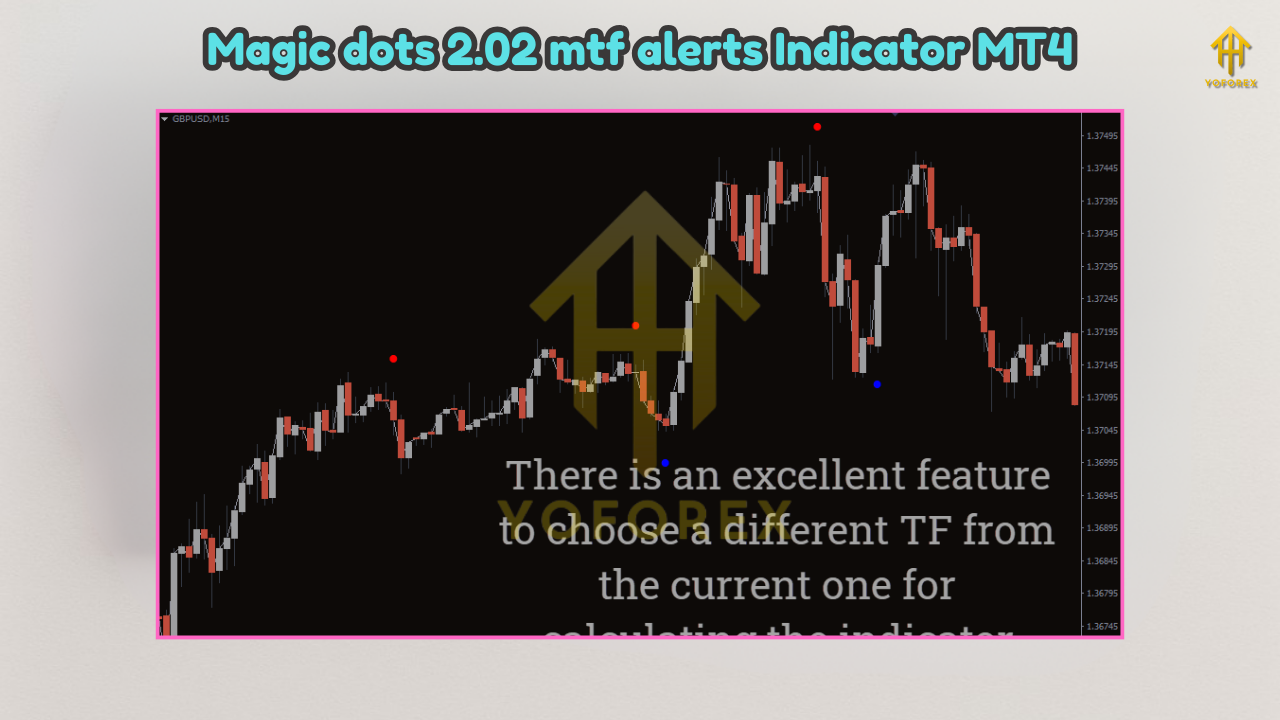
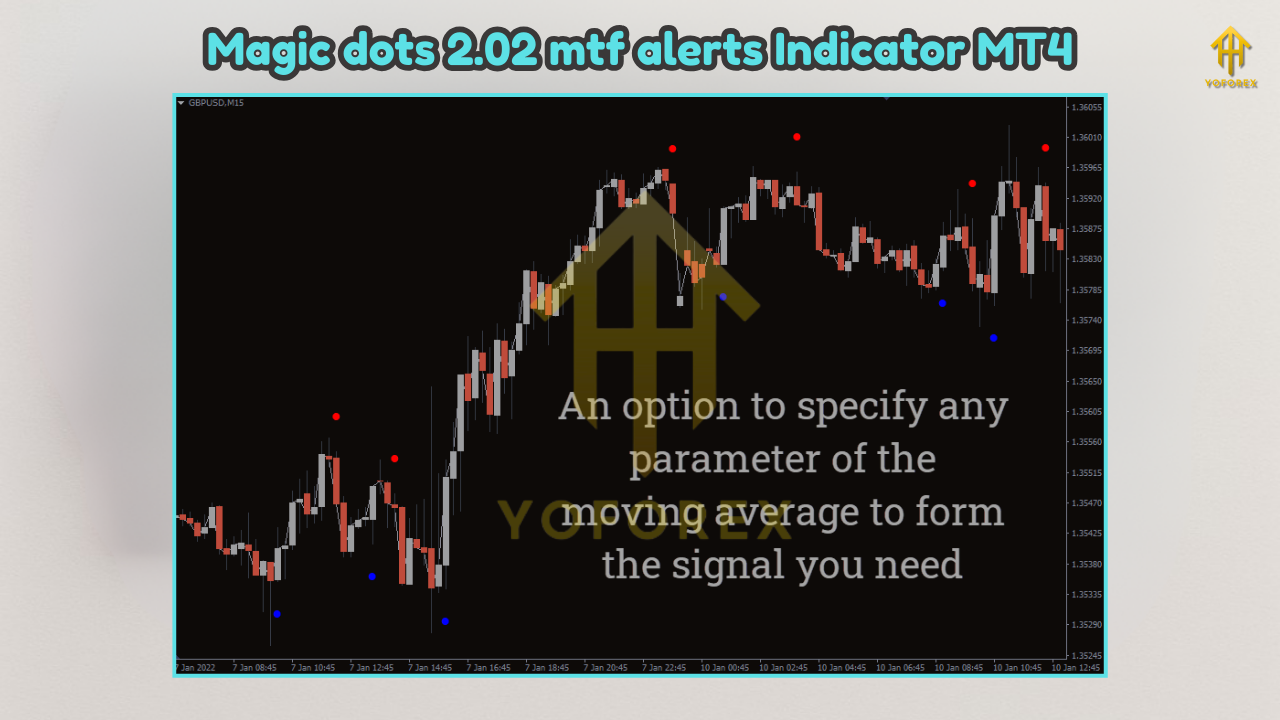
The Magic Dots 2.02 MTF Alerts Indicator is a trend-following tool built for the MetaTrader 4 platform. It uses a moving average-based system to generate buy and sell signals, displayed as colored dots on the price chart. Blue dots indicate bullish trends (potential buy opportunities), while red dots signal bearish trends (potential sell opportunities). The indicator’s standout feature is its multi-timeframe functionality, allowing traders to view signals from higher timeframes (e.g., H1 or H4) on a lower timeframe chart (e.g., M15 or M30). This provides a broader market perspective, helping traders align their trades with larger trends for improved accuracy.
Additionally, the indicator offers real-time alerts, notifying traders when new signals appear, ensuring they never miss a potential trading opportunity. Its user-friendly interface and customizable settings make it suitable for traders of all experience levels, from beginners to seasoned professionals.
Key Features of the Magic Dots 2.02 MTF Alerts Indicator
- Multi-Timeframe Analysis: The MTF feature allows traders to analyze signals across different timeframes simultaneously. For example, a trader can view H1 signals on an M15 chart, aligning short-term trades with longer-term trends. This reduces the risk of trading against the dominant market direction.
- Clear Buy and Sell Signals: The indicator displays blue dots for bullish signals and red dots for bearish signals, making it easy to interpret market trends at a glance. These signals are based on moving averages and price action, providing reliable entry and exit points.
- Customizable Alerts: Traders can enable pop-up, sound, or email alerts to stay informed about new signals in real time. This is especially useful for those who trade multiple charts or cannot monitor the market constantly.
- Versatility Across Timeframes: The indicator performs well on all timeframes, from short-term intraday charts (M15, M30) to longer-term charts (daily, weekly, monthly), catering to various trading styles, including scalping, day trading, and swing trading.
- User-Friendly Design: With straightforward installation and customizable settings, the indicator is accessible to beginners while offering advanced traders the flexibility to tailor it to their strategies.
Benefits of Using the Magic Dots 2.02 MTF Alerts Indicator
- Improved Decision-Making: The MTF functionality provides a holistic view of market trends, helping traders make informed decisions by aligning their trades with higher timeframe signals.
- Time Efficiency: Real-time alerts eliminate the need for constant chart monitoring, allowing traders to focus on strategy development and other tasks.
- Reduced Emotional Trading: Clear visual signals reduce guesswork, helping traders avoid impulsive decisions driven by emotions.
- Adaptability: The indicator’s compatibility with various timeframes and trading styles makes it a versatile tool for different market conditions.
- Free and Accessible: Available for free download from reputable sources, the indicator is an affordable addition to any trader’s toolkit.
How to Install the Magic Dots 2.02 MTF Alerts Indicator
- Download the Indicator: Obtain the indicator file (.mq4 or .ex4) from a trusted source, such as IndicatorsPot, MT4Collection, or ForexMT4Indicators.com. Ensure the file is free of malware.
- Open MT4 Data Folder: Launch your MT4 terminal, go to the “File” menu, and select “Open Data Folder.”
- Navigate to the Indicators Folder: In the data folder, open the “MQL4” folder, then the “Indicators” folder.
- Copy the Indicator File: Drag and drop the downloaded .mq4 or .ex4 file into the “Indicators” folder.
- Restart MT4: Close and reopen the MT4 terminal to refresh the indicator list.
- Apply the Indicator: In the MT4 “Navigator” window, locate the Magic Dots 2.02 MTF Alerts Indicator, double-click it, and apply it to your desired chart.
- Configure Settings: Adjust the indicator’s settings, such as timeframe preferences and alert options, to suit your trading strategy.
Trading Strategies with Magic Dots 2.02 MTF Alerts
- Trend-Following Strategy:
- Setup: Apply the indicator to an M15 chart with H1 signals enabled.
- Entry: Enter a buy trade when a blue dot appears, indicating a bullish trend, and confirm with a higher timeframe trend (e.g., H1). Place a stop loss below the recent swing low.
- Exit: Exit the trade when a red dot appears or when your risk-reward ratio target is met.
- Example: On a EUR/USD M15 chart, a blue dot signals a buy opportunity. Confirm the trend with an H1 chart showing bullish momentum, then enter the trade.
- Scalping Strategy:
- Setup: Use the indicator on a low timeframe (e.g., M5) with M15 signals enabled.
- Entry: Enter a buy trade when a blue dot appears and price action confirms support. Place a tight stop loss below the nearest support level.
- Exit: Take profits quickly when a red dot appears or at a predetermined profit target.
- Tip: Combine with momentum indicators like the RSI to filter out false signals.
Tips for Maximizing the Indicator’s Effectiveness
- Backtest Thoroughly: Before using the indicator in live trading, backtest it on a demo account to evaluate its performance in different market conditions.
- Combine with Other Tools: Use the indicator alongside support and resistance levels, Fibonacci retracements, or other indicators to confirm signals and reduce false positives.
- Practice Risk Management: Always use stop losses and maintain a favorable risk-reward ratio to protect your capital.
- Avoid Overtrading: Focus on high-probability setups by aligning signals with the overall market trend.
- Stay Updated: Check for updates to the indicator, as newer versions may include improved features or bug fixes.
Conclusion
The Magic Dots 2.02 MTF Alerts Indicator for MT4 is a versatile and user-friendly tool that can significantly enhance your forex trading strategy. Its multi-timeframe analysis, clear buy and sell signals, and customizable alerts make it an excellent choice for traders seeking to improve their decision-making and stay ahead of market trends. While it’s not a guaranteed path to profits, combining the indicator with sound risk management and complementary tools can boost your trading performance. Whether you’re a beginner or an experienced trader, the Magic Dots 2.02 MTF Alerts Indicator is worth exploring for its simplicity and effectiveness. Download it today from a trusted source and start refining your trading approach