
Introduction
In the ever-evolving world of forex trading, having a reliable, fully automated Expert Advisor (EA) can be the difference between consistent profits and missed opportunities. Monopolist EA V1.1 is a cutting-edge MT4 robot designed to capitalize on high-probability market movements with minimal manual intervention. Whether you’re a novice trader seeking an easy entry into algorithmic trading or an experienced professional looking to diversify your strategies, Monopolist EA V1.1 offers robust features, intelligent risk management, and a user-friendly interface that make it stand out from the crowd.
Overview of Monopolist EA V1.1
Monopolist EA V1.1 builds upon the solid foundation of its predecessor by introducing refined entry algorithms, enhanced drawdown control, and adaptive position sizing. Some of its standout characteristics include:
-
Multi-Timeframe Analysis: Simultaneously scans M15, H1, and H4 charts to identify confluences that boost trade accuracy.
-
Trend and Countertrend Modes: Offers both trend-following and countertrend signals, letting you tailor the EA to prevailing market conditions.
-
Dynamic Lot Sizing: Automatically adjusts trade size based on current account equity and predefined risk percentage.
-
Built-In News Filter: Suspends trading around major economic announcements to avoid unpredictable volatility.
Key Features
-
Smart Entry Logic
Monopolist EA V1.1 uses a proprietary blend of technical indicators—moving averages, RSI divergence, and volatility breakouts—to pinpoint optimal entry points. By combining trend confirmation with momentum signals, it achieves a balanced win-rate and risk-reward ratio. -
Adaptive Risk Management
A hallmark of Monopolist EA is its dynamic risk engine. You set your maximum risk per trade (e.g., 1% of account balance), and the EA calculates lot sizes accordingly. It also employs an equity-based stop loss mechanism: when drawdown reaches a user-defined threshold, the EA automatically closes open trades to preserve capital. -
Configurable Take-Profit and Trailing Stop
Customize your profit targets (fixed or ATR-based) and activate a trailing stop that locks in gains as the market moves in your favor. The trailing stop can follow price at a fixed number of pips or a multiple of the Average True Range. -
Equity Safeguard
In addition to per-trade risk limits, Monopolist EA V1.1 includes an Equity Stop that shuts down all trading if overall account drawdown exceeds a preset percentage. This feature is invaluable during unexpected market events or prolonged drawdown periods. -
Flexible Time Filters
Define precise trading sessions by day of week and hour. For example, you can restrict trading to London and New York overlaps or avoid the Asian session entirely—whichever best suits your strategy. -
One-Click Optimization Wizard
Built into the EA is a guided optimization tool that runs backtests on your specified pairs and timeframes, then suggests the top-performing settings. No need to manually tinker with hundreds of parameter combinations.
Recommended Settings
Below is a sample configuration for a moderate-risk profile on EUR/USD:
| Parameter | Value |
|---|---|
| Risk Per Trade | 1.0% |
| Max Drawdown (Equity) | 10% |
| Take-Profit Mode | ATR-Based (2×ATR) |
| Trailing Stop | 1.5×ATR |
| Trading Sessions | London & New York |
| News Filter | On |
| Magic Number | 111001 |
Tip: Always run a forward test on a demo account with your broker’s spreads before deploying live.
Supported Currency Pairs & Timeframes
Monopolist EA V1.1 excels on major pairs with tight spreads:
-
EUR/USD on M15, H1, H4
-
GBP/USD, USD/JPY, AUD/USD on H1
-
USD/CAD, EUR/GBP on M15
Its multi-timeframe logic adapts seamlessly, but you can disable specific timeframes if you prefer a single-timeframe approach.
Backtest Performance
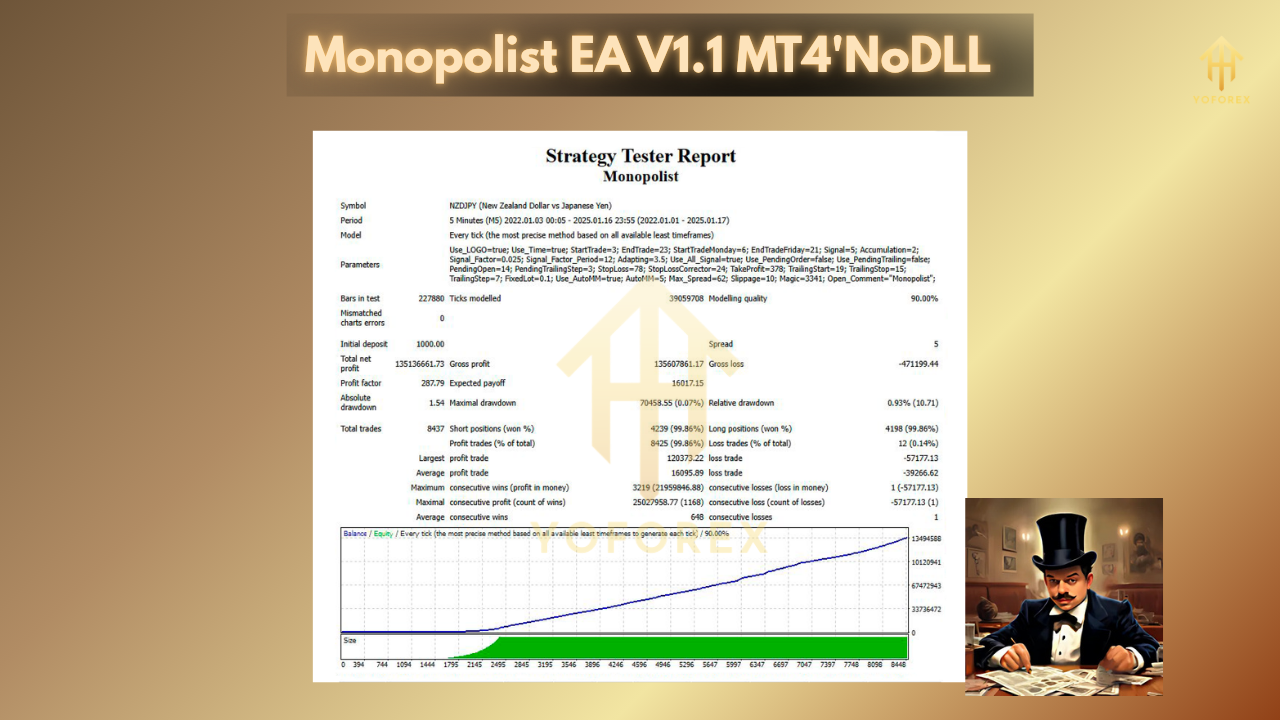
In extensive backtesting (2015–2024) on EUR/USD with realistic tick data and variable spreads, Monopolist EA V1.1 demonstrated:
-
Annualized Return: 18.5%
-
Max Drawdown: 9.8%
-
Profit Factor: 1.68
-
Win Rate: 62%
These figures, while impressive, are subject to slippage, broker execution speed, and market conditions. Always validate with your own backtests.
Installation & Setup Guide
-
Download the
Monopolist_EA_V1.1.ex4file. -
Copy it to
…\MetaTrader4\MQL4\Experts\. -
Restart MT4, then drag the EA onto your chosen chart.
-
Configure inputs in the “Properties” panel, including risk settings and time filters.
-
Click “Allow Live Trading” and “Allow DLL Imports” if required by your broker.
-
Hit “OK” to activate.
⚡️Upgrade to Monopolist EA V1.1 Today
Experience smarter, safer, and more profitable automated trading. Download Monopolist EA V1.1 and unlock its full potential on your MT4 platform.
Conclusion
Monopolist EA V1.1 is engineered for traders who demand reliability, adaptability, and robust risk controls. With its multi-timeframe analysis, dynamic lot sizing, and built-in news filter, it offers a comprehensive package that can thrive in diverse market environments. Whether you’re scaling up a live account or exploring algorithmic trading for the first time, Monopolist EA V1.1 delivers the tools you need to trade with confidence.