The PipFinite Trend Laser Indicator for MetaTrader 4 (MT4) is a powerful tool designed to help traders navigate market complexities with precision. Developed by Karlo Wilson Vendiola, this indicator stands out for its ability to filter out market noise and whipsaws, offering clear trend signals across various currency pairs and timeframes. In this blog, we’ll dive into the features, benefits, and practical applications of the PipFinite Trend Laser Indicator, exploring why it’s a go-to tool for both novice and seasoned traders.
What is the PipFinite Trend Laser Indicator?
The PipFinite Trend Laser Indicator is a technical analysis tool tailored for the MT4 platform, renowned for its advanced trend detection capabilities. Unlike traditional indicators that may generate false signals during choppy market conditions, this tool employs sophisticated algorithms to identify true market trends while avoiding whipsaws—sudden price reversals that can mislead traders. Its versatility allows it to function as a trend filter, entry point identifier, or exit strategy component, making it a flexible addition to any trading system.
The indicator is compatible with all currency pairs and timeframes, offering traders the freedom to adapt it to their preferred trading style, whether scalping on the M1 chart or swing trading on the H4. It also provides statistical insights, such as success rates and average profit metrics, to help traders make informed decisions. With a user-friendly interface and customizable settings, the PipFinite Trend Laser is designed to cater to traders of all experience levels.
Key Features of the PipFinite Trend Laser
1. Advanced Trend Detection
At the heart of the PipFinite Trend Laser is its robust trend detection system. By analyzing price action, moving averages, and volatility, the indicator pinpoints the direction of the prevailing trend—whether it’s an uptrend, downtrend, or ranging market. This clarity helps traders align their strategies with the market’s momentum, reducing the risk of entering trades against the trend.
2. Noise and Whipsaw Filtering
One of the standout features of the PipFinite Trend Laser is its ability to filter out market noise and whipsaws. These false signals can lead to losses, especially in volatile markets. The indicator’s algorithms ensure that only reliable trend signals are generated, enhancing trade accuracy and confidence.
3. Multi-Timeframe Analysis
The indicator supports multi-timeframe analysis, allowing traders to assess trends across different timeframes simultaneously. For example, a trader might confirm a buy signal on the H1 timeframe if the H4 chart shows an uptrend, ensuring consistency in trend direction. This feature is particularly valuable for traders who prefer a holistic approach to market analysis.
4. Statistical Insights
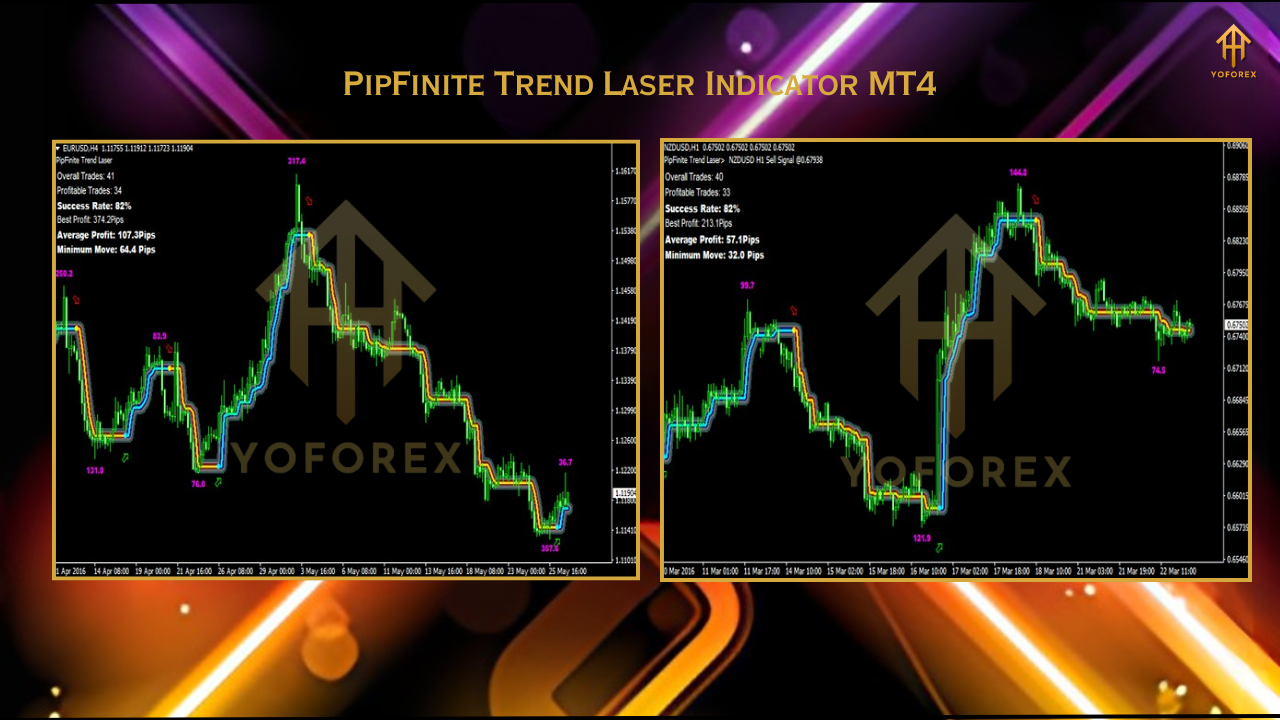
The PipFinite Trend Laser provides valuable statistical data, including success rates, best profit, average profit, and minimum move metrics. These insights allow traders to evaluate past signal performance and set realistic profit targets for upcoming trades. This data-driven approach helps traders optimize their strategies and manage risk effectively.
5. Non-Repainting Signals
Unlike some indicators that recalculate signals after the fact, the PipFinite Trend Laser generates signals based on the close of the bar, ensuring they do not repaint. This reliability is crucial for traders who rely on consistent signals to execute trades.
6. Customizable Settings
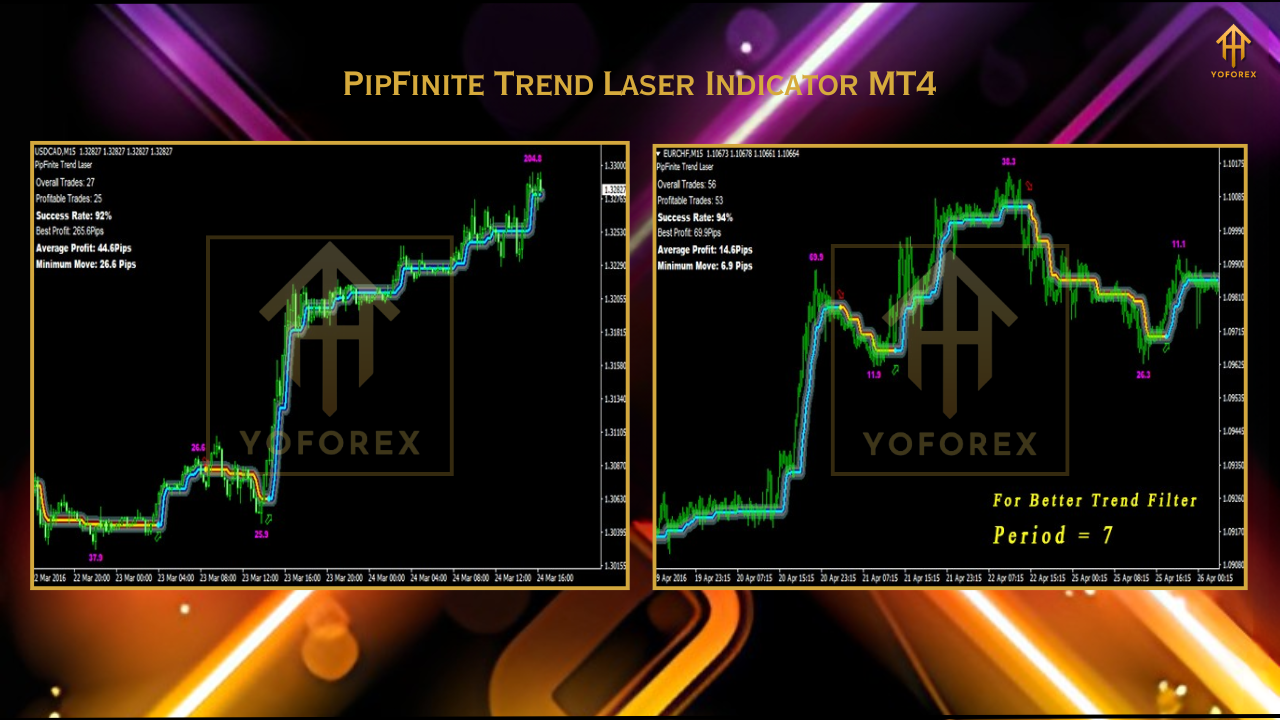
The indicator offers flexible settings, such as adjusting the period between 4 to 10 for trend filtering or 2 to 3 for entry points. Traders can also customize exit strategies based on their preferences, using statistical data or price action patterns to guide decisions.
How to Use the PipFinite Trend Laser Indicator
Installation and Setup
To get started, download the PipFinite Trend Laser Indicator file (.ex4) and install it on your MT4 platform. Ensure that “Allow automated trading” and “Allow DLL imports” are enabled in the MT4 settings (Tools > Options > Expert Advisors). Once installed, apply the indicator to your desired chart and configure the settings to match your trading strategy.
Practical Application
- Trend Filtering: Set the period between 4 and 10 to use the indicator as a trend filter. This helps you trade in the direction of the prevailing trend, reducing the risk of false signals.
- Entry Points: For precise trade entries, adjust the period to 2 or 3. Look for confirmed buy or sell signals, ideally aligned with higher timeframe trends.
- Exit Strategies: Use the indicator’s statistical data, such as average profit, to set take-profit levels. Alternatively, exit trades based on price action patterns or reversal signals.
- Multi-Timeframe Confirmation: Combine signals from multiple timeframes for higher accuracy. For example, only take M15 sell signals if the H1 chart confirms a downtrend.
Combining with Other Strategies
The PipFinite Trend Laser can be integrated with other PipFinite tools, such as the Razor Scalper or Energy Beam, to enhance trading strategies. For instance, combining it with the Razor Scalper allows traders to scalp in the direction of the trend, while the Energy Beam can confirm swing pullback signals. Always test these combinations on a demo account to ensure compatibility with your trading style.
Benefits and Limitations
Benefits
- Versatility: Works with any currency pair and timeframe, suitable for scalping, day trading, or swing trading.
- User-Friendly: Clear signals and a straightforward interface make it accessible to beginners and experts alike.
- Reliable Signals: Non-repainting signals and noise filtering enhance trade accuracy.
- Statistical Insights: Data-driven metrics help traders set realistic profit targets and manage risk.
Limitations
- Not a Standalone Tool: The indicator is most effective when used as part of a broader trading strategy, requiring traders to incorporate other factors like risk management and market analysis.
- Mixed Reviews: Some traders report inconsistent performance, with success rates varying based on market conditions and broker settings. Testing on a demo account is highly recommended.
Tips for Maximizing Success
- Test on a Demo Account: Always test the indicator on a demo account to understand its performance and optimize settings for your trading style.
- Use Proper Risk Management: Set stop-loss and take-profit levels to protect your capital and manage risk effectively.
- Combine with Price Action: Use the indicator alongside price action patterns or support/resistance levels for higher accuracy.
- Avoid News Trading: The indicator may generate false signals during high-impact news events, so consider avoiding trades during these periods.
- Join Community Discussions: Engage with trading communities, such as Telegram groups or Forex Factory, to share settings and learn from other traders’ experiences.
Conclusion
The PipFinite Trend Laser Indicator for MT4 is a versatile and powerful tool that empowers traders to navigate the forex market with confidence. Its advanced trend detection, noise filtering, and statistical insights make it a valuable addition to any trading arsenal. While it’s not a magic bullet, when used correctly within a well-defined trading strategy, it can significantly enhance decision-making and profitability. Whether you’re a scalper chasing quick profits or a swing trader aiming for larger moves, the PipFinite Trend Laser offers the flexibility and reliability to support your goals. Download the demo version from a trusted source like mql5.com, test it thoroughly, and unlock its potential to elevate your trading game.